
Healthcare technology managers face persistent failures when implementing 4K video in operating rooms: signal dropouts during critical procedures, intermittent snow on displays, and mysterious artifacts that technicians struggle to diagnose. How can integrators build 12G-SDI infrastructures that maintain rock-solid stability under surgical conditions?
Building reliable 12G-SDI pipelines for 4K surgical display monitors and other operating room monitors means treating video distribution as mission-critical infrastructure, not conventional AV. As a Reshin engineer supporting OR integration partners, I focus on 12G-SDI signal behavior, measurable stability targets, and disciplined end-to-end management to keep 4K medical monitors stable.
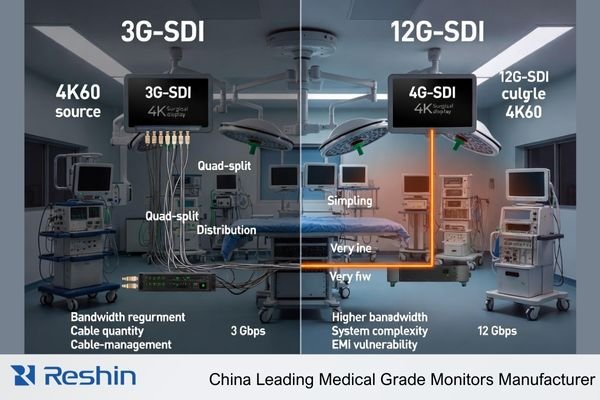
As healthcare facilities upgrade to 4K surgical visualization, many discover that traditional approaches to video integration fail to deliver the reliability required for clinical environments. The 12G-SDI1 standard promises uncompressed 4K60 distribution over a single coaxial cable—an attractive proposition for maintaining image quality and minimizing latency. However, achieving stable performance requires understanding the unique challenges of this high-bandwidth standard and implementing engineering practices that maintain signal integrity under demanding operating room conditions. This article outlines a systematic approach to designing, implementing, and maintaining 12G-SDI pipelines specifically optimized for medical-grade monitors in surgical environments, especially 4K surgical display monitors, surgical display monitors and other operating room monitors and medical display monitors.
Understanding 12G-SDI behavior in real 4K OR environments
Many integrators approach 12G-SDI as merely a faster version of familiar HD-SDI technology, but this underestimates the fundamental electrical differences. Why do some installations perform flawlessly while others exhibit persistent issues despite using identical equipment?
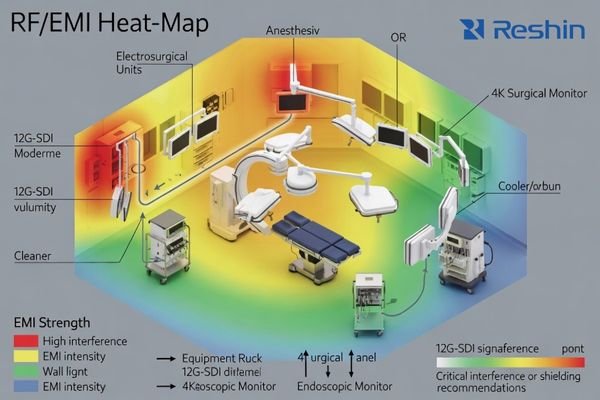
As a Reshin engineer on 4K OR projects, I treat 12G-SDI like an RF system: I map link lengths, safety margins, grounding and EMC noise from ESUs, C-arms and anesthesia machines before we even talk surgical displays, so integrators get predictable behavior instead of endless “monitor brand” blame loops when 4K surgical display monitors flicker or drop out.
Signal Characteristics and Physical Limitations
The 12G-SDI standard operates at approximately 12 gigabits per second—four times the data rate of 3G-SDI. This fundamental increase creates several critical differences in signal behavior:
-
Higher Frequency Components: The signaling frequencies in 12G-SDI extend well into the multi-gigahertz range, making the signal behave more like an RF transmission than a conventional video signal. At these frequencies, cables and connectors must be treated as transmission lines with controlled impedance rather than simple conductors.
-
Increased Attenuation2: Signal loss in coaxial cable increases exponentially with frequency. A cable run that easily supported 3G-SDI may be entirely inadequate for 12G-SDI at the same distance. This often requires either higher-quality cabling or shorter maximum runs between equipment.
-
Enhanced Reflection Sensitivity: Signal reflections caused by impedance discontinuities (connectors, adapters, poorly terminated cables) create more significant issues at 12G frequencies. These reflections can cause visible artifacts, intermittent signal loss, or complete failure depending on severity.
-
Reduced Timing Margins: The higher data rate of 12G-SDI translates to reduced timing margins in the signal. Jitter and phase instability that might have been tolerable in lower-speed standards can cause synchronization failures in 12G-SDI systems.
Environmental Challenges in Medical Settings
Operating rooms present several unique environmental factors that compound these technical challenges:
-
Dense Electromagnetic Environment: Modern ORs contain numerous devices generating electromagnetic interference across multiple frequency bands—from electrosurgical units producing high-energy RF emissions to LED surgical lights with switching power supplies that can create broadband noise.
-
Dynamic Equipment Configurations: Unlike fixed broadcast installations, OR equipment configurations change frequently. Boom arms move, devices are added or removed, and cables are regularly connected and disconnected. These dynamic conditions create variability in signal paths.
-
Complex Grounding Scenarios: Medical equipment safety standards and varied installation practices can create complex grounding topologies with potential for ground loops or differential voltage issues that particularly affect high-frequency signals.
-
Limited Access for Maintenance: Once installed in sterile or semi-sterile environments, cabling infrastructure may be difficult to access for testing or replacement, making initial quality and reliability paramount.
Understanding these fundamental characteristics and environmental challenges provides the foundation for successful 12G-SDI implementations. Rather than treating signal issues as isolated problems to be solved after installation, successful integrators incorporate these considerations into initial system design—treating the operating room as a specialized RF environment that demands appropriate engineering approaches from the outset, particularly when designing systems for 4K surgical monitors, endoscopic monitors and medical imaging displays.
How should we define stability targets for 12G-SDI pipelines?
Healthcare stakeholders often use subjective terms like "reliable" and "high-quality" when specifying video systems, creating ambiguity about what constitutes acceptable performance. How can integrators establish clear, measurable criteria for 12G-SDI stability that align with clinical requirements?
In early design reviews, I push everyone to turn “stable” from a feeling into numbers. Together with IT, clinical staff and biomedical engineers, I define allowable blackouts, recovery times, error rates and redundancy so 12G-SDI pipelines and 4K surgical display monitors can be accepted against written criteria instead of vague expectations.
Quantifiable Performance Metrics
Converting subjective expectations into measurable criteria provides the foundation for successful system design and verification. Based on extensive experience with medical implementations, I recommend defining specific metrics in these key areas, and the table below summarizes typical 12G-SDI stability levels for different medical visualization requirements:
-
Signal Continuity Parameters:
- Maximum acceptable duration for any signal interruption (typically <100ms for surgical applications)
- Maximum number of allowable interruptions per operational hour (often zero for primary surgical views)
- Maximum recovery time after planned source switching (typically <2 seconds)
-
- Bit Error Rate (BER) requirements (typically <10^-12 for medical applications)
- Signal-to-noise ratio minimums at display inputs (typically >30dB)
- Jitter tolerance specifications (aligned with SMPTE standards for 12G-SDI)
-
System Resilience Requirements:
- Maximum allowable time to restore imagery after power interruption
- Single-point-of-failure analysis with recovery paths identified
- Mean Time Between Failures (MTBF) expectations for the overall signal path
| Parameter Category | Basic Compliance | Enhanced Medical Grade | Mission-Critical Surgical |
|---|---|---|---|
| Signal Continuity | No visible interruptions during normal operation | No interruptions >100ms in 24hrs | Zero interruptions during surgical cases |
| Signal Recovery | <5s after source switching | <2s after source switching | <1s after source switching |
| Error Performance | BER <10^-10 | BER <10^-12 | BER <10^-12 with continuous monitoring |
| Resilience | N+1 for critical components | Redundant signal paths | Automatic failover with redundant paths |
| Documentation | As-built drawings | Signal verification reports | Full verification with regular testing protocols |
Stakeholder Alignment Process
Establishing these metrics requires structured collaboration among multiple stakeholders with different perspectives and priorities:
- Clinical Staff: Provide insight into workflow implications of video issues and define what constitutes clinically acceptable performance
- Biomedical Engineering: Determine technical specifications and testing methodologies aligned with hospital equipment standards
- IT Department: Address network integration, security requirements, and compatibility with existing infrastructure
- Facilities Management: Consider physical routing, conduit capacity, and future accessibility needs
- Risk Management: Evaluate potential clinical impact of system failures and define appropriate redundancy requirements
The process of collaboratively developing these metrics provides value beyond the specifications themselves—it creates shared understanding among stakeholders about system capabilities, limitations, and appropriate expectations. This alignment significantly reduces the risk of post-installation disputes about system performance or reliability.
By documenting these metrics in project requirements and acceptance criteria, integrators create clarity about what constitutes successful implementation and establish objective standards for system verification. This approach transforms "stability" from a subjective aspiration into an engineered outcome with measurable attributes that can be systematically verified during commissioning and maintained throughout system life.
Engineering cabling and topology for long 12G-SDI runs in ORs
Physical infrastructure decisions often determine whether 12G-SDI systems will perform reliably or suffer from intermittent issues throughout their lifecycle. What specific cable selections, installation practices, and topology designs maintain signal integrity across the extended distances common in hospital environments?
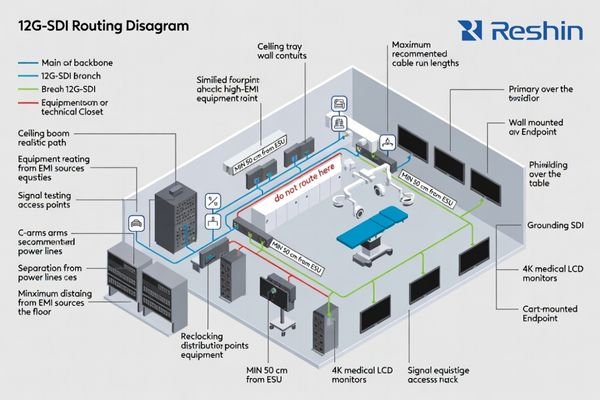
When we move into cabling, my first question is whether 12G-SDI limits really match the building: conduits, booms and racks. I reduce passive joints on arms, place equalizers or reclockers in accessible racks, and keep each path short and simple so faults on 4K medical monitors can be isolated quickly instead of causing long OR downtime.
Cable Selection and Installation Practices
The physical layer forms the foundation of any 12G-SDI system, with cable selection and installation quality directly impacting long-term reliability:
-
Cable Specification: For 12G-SDI applications, specify cables explicitly rated for 12G performance, not merely "high-definition" or 3G-SDI cables. Key parameters include:
- Impedance tolerance: ±1.5Ω or better (tighter than the standard 75Ω ±3.0Ω)
- Attenuation: <1.6dB/100ft at 6GHz for primary signal paths
- Return loss: >15dB across the frequency range (superior to broadcast minimum requirements)
- Shielding effectiveness: >90dB for environments with significant EMI sources
-
Connector Quality: Use precision 75Ω BNC connectors4 specifically designed for 12G-SDI applications:
- Gold-plated center pins for improved conductivity and corrosion resistance
- True 75Ω impedance through the entire connector body
- Proper termination tools specific to the cable and connector type
- Factory termination when possible, especially for critical signal paths
-
Installation Practices:
- Maintain minimum bend radius (typically 10× cable diameter for 12G applications)
- Provide adequate strain relief at all connection points
- Use consistent grounding practices throughout the installation
- Implement physical separation from potential interference sources
- Label all cables with unique identifiers for troubleshooting
Topological Considerations
Beyond individual cable specifications, the overall system topology significantly impacts 12G-SDI performance:
-
Hub-and-Spoke Architecture: Implement a central distribution point with direct connections to each destination rather than daisy-chaining, which compounds signal degradation and creates cascading failure points.
-
Active Signal Regeneration: Strategically place reclocking distribution amplifiers at key junction points:
- After long cable runs (>25 meters for 12G-SDI)
- At transition points between different cable types
- Where multiple destinations require the same source signal
- Before entering areas with high electromagnetic interference
-
Backbone-and-Branch Design: Create a clear hierarchical structure:
- High-quality backbone cabling with minimal connection points between equipment rooms and OR distribution points
- Shorter branch connections from distribution points to individual displays
- Consistent cable types within each signal path to avoid impedance transitions
-
Test Point Integration: Design the system with accessible test points at key junctions:
- After source devices but before distribution
- At central distribution locations
- Before final destination displays
- At transitions between different infrastructure segments
This structured approach to topology design provides several advantages: it localizes potential issues for easier troubleshooting, maintains signal quality by minimizing cumulative degradation, and creates natural segmentation for future upgrades or modifications. By treating the physical infrastructure as an engineered system rather than simple connectivity, integrators can create 12G-SDI implementations that maintain reliability even under the challenging conditions found in medical environments, instead of behaving like generic AV or medical computer monitor cabling.
For integrators who need to benchmark existing OR cabling and topology, Reshin’s engineering team can support structured site surveys and technical reviews as part of standard project collaboration.
Managing conversion, latency and mixed interfaces around 12G-SDI
Healthcare facilities rarely implement pure 12G-SDI environments; instead, they typically combine multiple video standards and conversion points across different visualization workflows. How can integrators manage the complexity of mixed interfaces while maintaining signal integrity and minimizing latency?
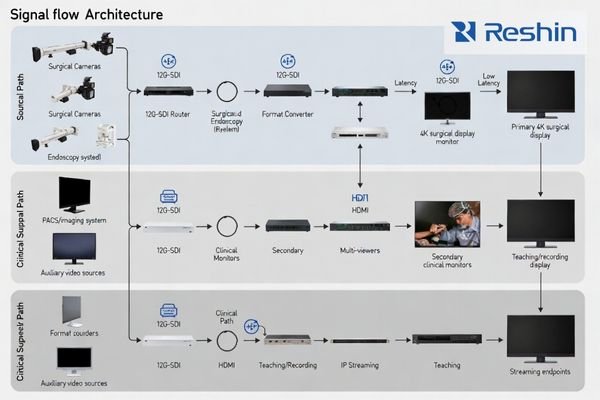
In real ORs I rarely see a pure SDI world; 12G-SDI, HD-SDI, HDMI and IP all coexist. My rule is simple: keep the surgeon’s primary view on a native 4K 12G-SDI path and push conversions, multi-view and streaming into non-critical teaching, documentation and endoscopic monitor paths, so latency risks stay away from the main surgical display monitor.
Critical vs. Secondary Signal Paths
Successful mixed-interface environments begin with clear delineation between different signal paths based on their clinical importance:
-
Critical Signal Paths5 (Surgeon’s primary view, procedural guidance):
- Maintain native 12G-SDI throughout when possible
- Minimize format conversions and scaling operations
- Prioritize direct connections with minimal intermediate devices
- Implement strict latency controls (<100ms end-to-end)
- Use highest quality cables and connectors with additional margin
-
Secondary Signal Paths (Assistant views, documentation, teaching):
- Allow more flexible interface options and conversions as needed
- Accept moderate latency where clinically appropriate
- Implement compression or network distribution where convenient
- Optimize for operational flexibility rather than absolute performance
This tiered approach concentrates engineering effort and quality components where they provide the greatest clinical value, while allowing appropriate trade-offs in less critical applications. It also creates natural isolation between pathways, preventing issues in secondary systems from affecting primary clinical visualization.
Conversion and Latency Management
When format conversions are necessary in mixed-interface environments, several principles help maintain optimal performance:
-
Strategic Conversion Placement: Position format converters (12G-SDI to HDMI, etc.) as close as possible to the destination device rather than near the source. This minimizes the distance that potentially less robust signals (like HDMI) must travel.
-
Consistent Signal Chain Engineering: When conversion is required, ensure that each conversion stage maintains or exceeds the quality parameters of the previous stage:
- Maintain color sampling (4:4:4 or 4:2:2) through conversion points
- Preserve bit depth (typically 10-bit for surgical applications)
- Ensure adequate bandwidth for the required resolution and frame rate
-
Latency Budget Management: Establish a total latency budget for each signal path and allocate portions to each component:
- Source device processing: Typically 1-2 frames (16-33ms)
- Transmission/distribution: Near-zero for direct SDI, variable for IP
- Format conversion: 0.5-1 frame per conversion (8-16ms)
- Display processing: 1-2 frames depending on model (16-33ms)
- Monitor regularly for "latency creep" as devices or firmware are updated
-
Synchronization Considerations: In multi-source environments, maintain consistent reference timing:
- Implement reference signal distribution for SDI sources where possible
- Consider frame synchronizers for sources that cannot accept external reference
- Document expected synchronization behavior during commissioning
Interface Selection Guidelines
When designing systems with mixed interfaces, follow these selection guidelines based on signal path requirements:
-
Primary Surgical View (critical path):
- Native 12G-SDI end-to-end when possible
- If conversion is necessary, use high-quality converters with redundant power
- Avoid network-based distribution for critical paths
- Consider optical transmission for longer distances rather than multiple electrical repeaters
-
Procedural Reference Views (clinical support path):
- 12G-SDI or HDMI 2.0 with appropriate cable quality
- Accept single-stage conversion if necessary
- Implement appropriate EDID management for HDMI paths
- Use signal presence detection and automated alerting
-
Teaching and Documentation (secondary path):
- Multiple interface options acceptable based on convenience
- Network-based distribution appropriate when latency is less critical
- Compression acceptable when clinically appropriate
- Standardize on connector types where possible to reduce adapter requirements
By creating a structured approach to interface selection and conversion strategy, integrators can manage the complexity inherent in mixed-standard environments while maintaining appropriate performance for each clinical application. This systematic approach also simplifies troubleshooting by creating clear expectations for each signal path and limiting format conversions to specific, documented points in the system, rather than treating every 4K medical monitor as a standalone AV endpoint.
How can we design redundancy and monitoring for SDI failures?
Even well-engineered video systems will eventually experience component failures, but many facilities discover these failures only during critical procedures when they have immediate clinical impact. What redundancy architectures and proactive monitoring approaches ensure that problems are detected early and that alternative visualization paths remain available when failures occur?
From a risk and service-cost perspective, I put redundancy and observability on the same level as resolution. High-reliability surgical display monitors alone are not enough; we need independent primary and backup paths, clear rack monitoring points, and simple procedures so OR staff can switch views and isolate faults quickly instead of losing 4K guidance unexpectedly.
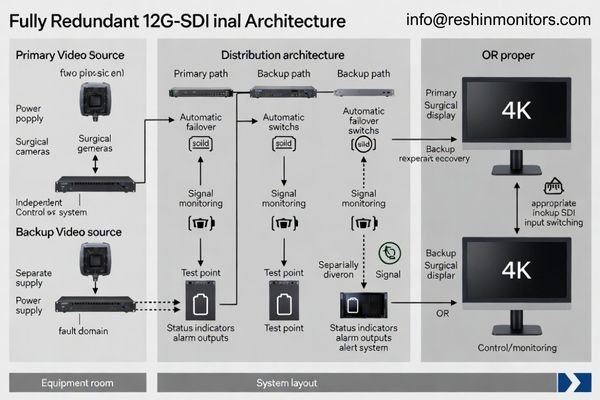
Redundant Signal Path Design
Effective redundancy requires careful architectural planning rather than simply duplicating components:
-
Independent Path Engineering: Create truly independent primary and backup signal paths:
- Separate source devices or outputs when possible
- Physically diverse routing through different conduits and pathways
- Independent power supplies and distribution equipment
- Different conversion chains if format conversion is required
-
Fault Domain Isolation: Analyze and minimize shared failure points:
- Power distribution (use separate circuits or UPS systems)
- Environmental factors (separate equipment locations)
- Control systems (avoid single points of failure in control architecture)
- Ensure redundant paths cannot be affected by the same environmental issue
-
Switching and Failover Strategies:
- Automatic failover for critical applications (using signal sensing or heartbeat monitoring)
- Simple, documented manual override procedures for clinical staff
- Clear labeling of backup interfaces and controls
- Regular testing of failover mechanisms during preventative maintenance
Monitoring and Diagnostics
Proactive monitoring transforms failure management from reactive emergency response to controlled maintenance:
-
Distributed Monitoring Points: Implement signal monitoring at key junction points:
- After critical source devices
- At distribution amplifier outputs
- Before and after format conversion stages
- At room entry points for multi-room installations
-
Monitoring Parameter Selection: Monitor appropriate parameters based on clinical impact:
- Signal presence (basic verification)
- Signal format validation (resolution, frame rate, color space)
- Error detection (CRC validation, bit errors, timing errors)
- Reference timing verification for synchronized systems
-
Alert and Notification Strategy:
- Define appropriate alert thresholds based on clinical significance
- Implement tiered notification based on severity
- Create clear escalation paths from technical monitoring to clinical notification
- Document expected response procedures for each alert type
-
Preventative Diagnostics:
- Scheduled validation during non-clinical hours
- Trend analysis to identify degrading components before failure
- Regular testing of redundant paths and failover mechanisms
- Documentation of baseline performance metrics for comparison
The combination of well-designed redundancy and comprehensive monitoring creates resilient systems that remain available despite inevitable component failures. This approach not only reduces clinical risk but also transforms maintenance from disruptive emergency response to controlled scheduled interventions based on early detection of emerging issues, especially in 12G-SDI pipelines driving 4K surgical monitors and other medical display monitors.
| Monitoring Level | Parameters Measured | Alert Thresholds | Response Protocol | Typical Equipment |
|---|---|---|---|---|
| Basic | Signal presence, format verification | Loss of signal, format mismatch | Technical staff notification, manual investigation | SDI presence detectors, basic scopes |
| Intermediate | Signal quality parameters, CRC validation | CRC errors >0, signal levels outside ±10% | Technical alert with defined response time, documented troubleshooting procedure | Waveform monitors, error detectors |
| Advanced | Bit error rate, eye pattern analysis, jitter measurement | BER >10^-12, eye height <80%, jitter >0.3UI | Immediate technical response, predictive maintenance scheduling | SDI analyzers, specialized test equipment |
| Enterprise | Comprehensive logging with trend analysis | Statistical deviation from baseline, predictive failure indicators | Automated ticketing, scheduled maintenance, inventory verification | Networked monitoring system with central dashboard |
Implementing appropriate monitoring infrastructure requires balancing technical thoroughness with practical constraints. For most medical facilities, focusing on comprehensive basic monitoring with strategic intermediate monitoring at critical junctions provides the optimal balance of early detection capability and sustainable maintenance requirements.
Reshin 4K medical monitors for 12G-SDI OR projects
After designing stable signal infrastructure, integrators must select appropriate display endpoints that maintain signal quality while meeting specific clinical requirements. Which monitor characteristics are essential for different 12G-SDI applications, and how should monitor selection align with the overall system architecture?
Once the 12G-SDI backbone is stable, I help integrators choose Reshin surgical display monitors instead of forcing a single “standard” model. Our 4K medical LCD monitors combine AR-bonded glass, OR-grade hygiene design and native 12G-SDI or HDMI/DP options, so each screen can take a clear role in the 12G-SDI OR pipeline described above.
Model Selection Based on Clinical Context
Selecting appropriate medical monitors involves matching product capabilities to specific clinical requirements, and the table below maps each Reshin 4K surgical monitor model to typical 12G-SDI application scenarios:
| Model | Size | Resolution | Input Interfaces | Key Features | Recommended Applications |
|---|---|---|---|---|---|
| MS550P | 55" | 3840×2160@60Hz | 12G-SDI/3G-SDI×4, HDMI 2.0, DP | AR-coated fully bonded glass, Multi-view support, engineered for surgical environments | Teaching theaters, Hybrid ORs, Multi-discipline environments |
| MS430PC | 43" | 3840×2160@60Hz | HDMI 2.0, DP | AR-coated glass, Optimized for converted 12G-SDI signals | IP-based OR integration, Multi-format distribution systems |
| MS321PB | 31.5" | 3840×2160@60Hz | 12G-SDI/3G-SDI×4, HDMI 2.0, DP | AR-coated fully bonded glass, Compact design, High pixel density | Primary surgical viewing, Boom-mounted applications, Space-constrained ORs |
| MS322PB | 32" | 3840×2160@60Hz | 12G-SDI/3G-SDI×4, HDMI 2.0, DP | AR-coated fully bonded glass, Advanced reflection control | Primary surgical viewing, High-ambient-light environments |
The selection process should consider several key factors beyond simple size preferences:
- Viewing Distance: Match display size to typical viewing distance in the specific clinical scenario
- Ambient Light Conditions: Select models with appropriate brightness and anti-reflective properties for the installation environment
- Interface Requirements: Ensure native support for the planned signal format to minimize external conversion
- Installation Constraints: Consider mounting options, depth, weight, and cooling requirements
- Clinical Specialization: Align image processing capabilities with specific clinical imaging requirements
Configuration Considerations
Beyond model selection, configuration decisions significantly impact performance in 12G-SDI environments:
-
Input Configuration: When using displays with multiple input options, configure input detection and priority settings appropriately:
- Set primary 12G-SDI input as default where applicable
- Configure automatic failover to secondary inputs when available
- Optimize EDID settings for connected sources
-
Image Processing Settings:
- Configure appropriate color space settings (typically Rec.709 for most surgical applications)
- Set gamma response according to viewing environment (typically 2.2-2.4)
- Adjust brightness and contrast to optimize visibility under actual OR lighting conditions
- Consider specialty-specific presets for different surgical disciplines
-
Signal Handling Optimization:
- Set appropriate signal detection thresholds
- Configure jitter tolerance parameters when available
- Implement cable compensation settings matched to actual cable length
- Document optimal settings for future reference during maintenance
By approaching monitor selection and configuration as integral parts of the overall 12G-SDI system design rather than isolated endpoint decisions, integrators can create visualization solutions that maintain signal integrity throughout the entire pipeline while meeting specific clinical requirements. The monitor becomes not merely a display device but an active component in the signal integrity chain that must be properly matched to both upstream infrastructure and clinical application, especially in 4K surgical display monitor and medical display monitor systems.
FAQ: 12G-SDI pipelines and Reshin 4K medical monitors
Healthcare teams often ask similar practical questions when planning 12G-SDI upgrades for 4K operating room monitors and medical imaging displays. I usually address these early so integrators can design stable systems with realistic expectations.
In my integration work, I find that clear answers to a few recurring questions prevent many mistakes: what 12G-SDI delivers in the operating room, how far we can run coax for 4K surgical displays, when native SDI inputs are needed on surgical monitors, what redundancy level makes sense, and what support Reshin provides across the project lifecycle.
Q1: What advantages does 12G-SDI offer for 4K surgical display monitors in the operating room compared with HDMI or IP?
A1: In my projects, I use 12G-SDI when uncompressed 4K60 and predictable latency are non-negotiable. A single 12G-SDI cable behaves like a deterministic broadcast path: it either works within budget or fails in measurable ways. Compared with HDMI or generic IP, this makes troubleshooting in OR environments much more straightforward for integrators.
Q2: How long can 12G-SDI cable runs be in the operating room for 4K surgical monitors without stability problems?
A2: With true 12G-rated coax and good terminations, I typically budget 30–50 meters per hop for OR projects, depending on cable type and safety margin. Rather than pushing theoretical maximums, I design around conservative link budgets and insert reclocking or equalization in accessible racks, avoiding long daisy chains with many passive joints.
Q3: Do all monitors in the system need native 12G-SDI inputs?
A3: For the surgeon’s primary 4K surgical monitor and any critical guidance views, I strongly prefer native 12G-SDI into the display. For secondary views, teaching, or recording, it is perfectly reasonable to convert 12G-SDI to HDMI/DP in the rack and feed Reshin models like the MS430PC. This keeps the critical path clean while still supporting flexible workflows.
Q4: What redundancy level do you recommend for typical 12G-SDI 4K OR visualization projects?
A4: For a single OR, I usually propose independent primary and backup paths for each critical view, plus basic monitoring at key junctions. In multi-OR centers, I often extend this to redundant distribution equipment and more advanced monitoring in the central rack. The right level depends on clinical risk tolerance, but I rarely design critical views without at least one fully independent backup route.
Q5: What kind of engineering support can integrators expect from Reshin on 12G-SDI OR projects?
A5: On most projects, I support integrators from early topology discussions through on-site validation. That can include reviewing 12G-SDI link budgets, advising on OR cable routing, helping select the right Reshin 4K medical monitors and surgical display monitors, and defining acceptance test procedures. The goal is always the same: turn 12G-SDI and display selection into a predictable engineering process, not trial-and-error in the OR.
Conclusion
Building stable 12G-SDI pipelines for 4K medical-grade monitors requires more than selecting modern displays or high-spec cables; it demands a systematic engineering approach that treats the operating room as a high-interference RF environment, defines stability as measurable continuity and error metrics, and aligns cabling, routing, interfaces and monitor behavior into one engineered chain instead of isolated AV decisions.
Reshin is a China-based manufacturer of medical-grade displays and 4K surgical display monitors, supporting OR integration partners in China and international markets. When your team is planning, upgrading or troubleshooting 12G-SDI pipelines for surgical display monitors, our engineers can review your design, map suitable Reshin 4K medical LCD monitors to each role, and support implementation and maintenance—just reach out using the contact details below.
📧 info@reshinmonitors.com
🌐 https://reshinmonitors.com/
-
Explore this link to understand the benefits and technical details of 12G-SDI, crucial for enhancing surgical visualization. ↩
-
Understanding this concept is crucial for optimizing cable performance and ensuring reliable signal transmission. ↩
-
Understanding Signal Quality Thresholds is crucial for ensuring high-quality medical imaging, making this resource invaluable for professionals. ↩
-
Learn why precision 75Ω BNC connectors are crucial for video applications, enhancing signal integrity and reducing interference. ↩
-
Understanding Critical Signal Paths is essential for ensuring high-quality clinical performance in mixed-interface systems. ↩


