
Many healthcare facilities purchase displays based on specifications alone, only to discover incompatibilities and performance issues after installation. Why do seemingly compatible components often fail to deliver consistent clinical performance in real-world environments?
Medical-grade monitors require system-level engineering validation rather than isolated specification checks. At Russian Healthcare Week 2025, I used live surgical and diagnostic workflows—built around real OR signal chains, PACS/KVM infrastructure, and regional power and compliance conditions—to show how display selection impacts stability, accuracy, and lifecycle cost.
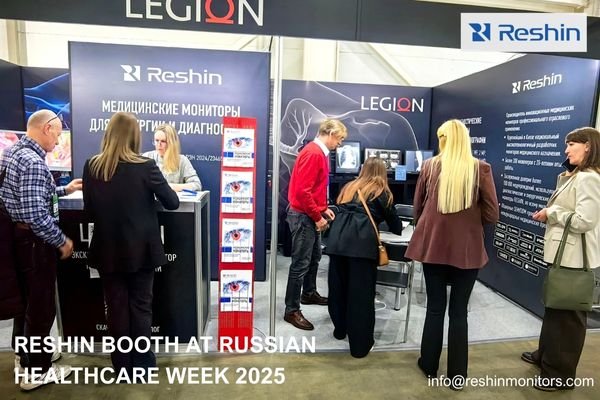
As healthcare facilities modernize their visualization infrastructure, selecting appropriate medical-grade monitors1 becomes increasingly complex. The choice extends beyond basic resolution and brightness specifications to encompass signal topology, KVM and PACS integration, regional certification, and long-term operational risk. In this article, I share key engineering takeaways from Russian Healthcare Week 2025, explaining how our live demonstrations addressed real-world implementation challenges in surgical visualization and diagnostic reading—focusing on risk control, compliance, and total cost of ownership rather than isolated product features.
Russian Healthcare Week 2025 Highlights and Reshin Booth Overview
Trade show booths often feature idealized setups that hide real-world implementation challenges. How did Reshin’s demonstration approach at Russian Healthcare Week 2025 address the practical realities of hospital display integration?
At Russian Healthcare Week 2025, I used a system-level booth layout to show hospitals and integrators how real OR and PACS topologies behave under 220V power, EMI, and multi-vendor conditions, helping them evaluate display choices by implementation risk, compliance, and lifecycle cost—not just image quality.
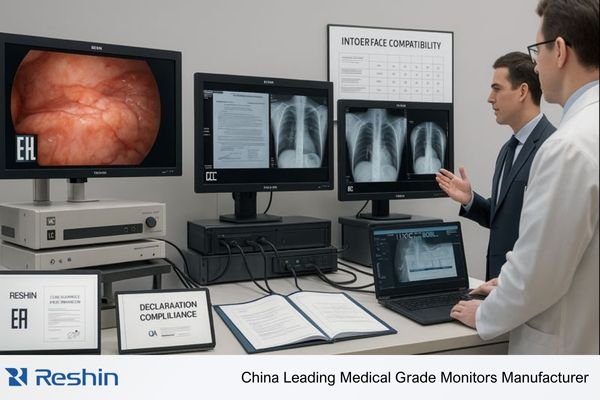
System-Level Demonstration Approach
Traditional display demonstrations isolate monitors from their operational context, creating an artificial impression of performance that rarely matches real hospital conditions. At RHW 2025, I deliberately built our booth as a compressed clinical environment so visitors could see how the entire system behaves, not just the display panel:
- Complete signal chains from surgical/endoscopic sources and PACS workstations through distribution, KVM, and routing equipment to the final display endpoints
- Realistic 220V power conditions with proper grounding and attention to noise, leakage, and surge behavior in a crowded exhibition hall
- Multi-vendor integration points with actual clinical equipment, including different endoscopy systems, imaging modalities, and PACS stations
- Electromagnetic interference conditions2 similar to hospital environments, where poorly shielded cabling or grounding shortcuts quickly reveal themselves as dropouts or artifacts
- Full cable runs with appropriate shielding and management to highlight how incorrect cable type or length can create intermittent failures that never appear in a simple bench test
By exposing the complete OR and PACS topology in front of visitors, I could show where typical failures actually occur—such as noise-sensitive SDI runs without shielding, mismatched connectors introduced by third-party carts, or power distribution that violates hospital grounding practices—long before those problems show up in a live operating room or reading room.
Regulatory and Support Infrastructure
Beyond technical performance, successful medical display implementations depend on regulatory compliance and a realistic support framework. At the booth, I treated these elements as part of the engineering solution rather than as paperwork in the background:
- Prominent display of EAC certification markings directly next to working systems so teams could see which configurations were already import-ready
- Detailed interface compatibility matrices for common hospital equipment, including which inputs and timing modes had been validated with specific vendors
- Local support documentation and escalation procedures mapped onto real failure scenarios such as power-module replacement, cable failures, or backlight degradation
- Spare parts availability timelines and logistics explained in the context of OR downtime risk and PACS reading-room continuity
- Preventative maintenance schedules and procedures connected to real MTBF assumptions and backlight behavior rather than generic “annual service” statements
By placing regulatory documents, compatibility matrices, and service flows beside running systems, I could walk procurement teams, IT, and integrators through the full implementation path: what is already certified, what needs project-specific validation, and how spare parts and support commitments align with the expected lifecycle of medical-grade monitors. This shifted the conversation from “Does the demo look good?” to “Is this configuration importable, supportable, and maintainable over the next five to seven years?”
Surgical and Endoscopic Video Workflows Demonstrated with Reshin Monitors
Surgical visualization systems often underperform in actual clinical environments despite meeting specifications on paper. What hidden factors determine real-world performance, and how did Reshin’s demonstrations address these challenges?
In the surgical and endoscopy zone, I built a complete 4K video chain—from scopes through matrix and KVM to low-latency surgical displays—to expose hidden issues like HDMI bandwidth limits, EDID conflicts, and long SDI runs, and to show how 12G-SDI and validated presets stabilize real OR workflows.

End-to-End Signal Chain Validation
Successful surgical visualization depends on optimized performance across the complete signal path, not just the final monitor. At RHW 2025, I structured the demonstration to highlight which integration points typically fail and how to validate them properly:
| Signal Chain Component | Common Failure Points | Demonstrated Solution | Clinical Impact |
|---|---|---|---|
| Source Equipment | Format inconsistencies, Non-standard timing, Vendor-specific quirks in scope output | Standardized source configurations with documented timing and validated EDID profiles for major endoscopy and imaging vendors | Predictable image acquisition across procedures without “no signal” or incorrect format errors mid-case |
| Signal Distribution | Bandwidth limitations, Signal degradation over long runs, Switching artifacts during source changes | 12G-SDI infrastructure with verified margin at target cable lengths and clean-switching tests under full OR load | Seamless transitions between imaging sources without visible artifacts or frame drops during critical steps |
| KVM Systems | Latency accumulation, EDID conflicts, Inconsistent behavior across ports | Measured end-to-end latency with analyzers, fixed EDID mappings, and validated KVM configurations for 4K/60 workflows | Responsive navigation and tool control for surgeons, avoiding lag-induced hesitation or misalignment |
| Display Endpoints | Color inconsistency, Input incompatibility, Incorrect color space settings | Preset clinical modes for scopes and C-arms, multi-input validation including BT.2020/BT.709 switching, and locked configurations | Accurate and consistent visualization across imaging modalities, without ad-hoc “on the fly” adjustments by OR staff |
By showing each component in context rather than isolation, I helped visitors pinpoint whether their current bottlenecks were caused by source behavior, matrix/KVM design, cable infrastructure, or monitor configuration—and how to build a realistic test plan instead of depending on a single “plug-and-play” assumption.
Clinical Workflow Simulation
Beyond pure signal metrics, I wanted surgical teams3 to recognize how display decisions affect everyday workflow in the OR, so I set up sequences that mirrored common clinical scenarios:
- Source switching between endoscopy, fluoroscopy, and ultrasound with the same user controls surgeons would see in their hybrid OR
- Multi-view layouts showing different modalities simultaneously, stressing both GPU and monitor multi-picture capabilities
- Color consistency verification as images move between different sources and displays, revealing where calibration or color space mismatches occur
- Control system responsiveness under variable signal conditions, combining KVM operations, source switching, and network activity
As surgeons and OR managers interacted with these simulated workflows, I could link what they were feeling—smooth or hesitant navigation, stable or shifting colors—to concrete engineering choices in the signal chain. For integrators, this made the risk picture very clear: if these elements are not validated end-to-end before go-live, the result is OR downtime, expensive troubleshooting across multiple vendors, and warranty disputes when monitor manufacturers are blamed for issues actually caused by upstream configuration. Turning those risks into measurable engineering parameters is exactly what I wanted this surgical demo to achieve.
Diagnostic and PACS Display Solutions for Consistent Clinical Interpretation
Initial display performance often deteriorates rapidly in diagnostic environments, compromising clinical reading consistency. How did Reshin demonstrate sustainable performance that maintains diagnostic accuracy over time?
In the diagnostic and PACS area, I focused on keeping gamma, luminance, and uniformity stable over years, using DICOM Part 14 calibration, front sensors, constant-brightness control, and networked QA so radiologists, IT, and management can rely on consistent diagnostic images across rooms, shifts, and hospital sites.
Sustainable Diagnostic Performance
Consumer displays are optimized to look impressive on day one; diagnostic displays must remain predictable for years. In my RHW 2025 demos, I used side-by-side comparisons and simulated aging to show what actually goes wrong when displays are not engineered or maintained for medical use:
- Front sensor systems for continuous luminance monitoring so the monitor can detect and correct drift instead of relying on user perception
- Automatic DICOM Part 14 calibration verification4 to maintain a known grayscale curve rather than an approximate “good enough” gamma
- Panel uniformity correction routines to remove hotspots and dark corners that appear as backlight components age
- Backlight stabilization mechanisms that compensate for LED decay to keep brightness within defined bounds over the lifecycle
- Networked quality control that allows fleet-wide monitoring, scheduling of calibrations, and consistent target settings across sites
By interactively adjusting and then restoring displays in front of radiologists and PACS administrators, I could show how unmanaged gamma drift, luminance decay, and non-uniformity quickly turn high-resolution panels into inconsistent instruments. At the same time, I could demonstrate that with the right stabilization and QC tools, the monitor behaves as a calibrated medical device rather than as a consumer screen optimized for subjective “wow” factor.
Regulatory Compliance and Accreditation Support
For diagnostic environments, regulatory and accreditation pressures are as important as technical performance. At the booth, I treated compliance as a workflow topic rather than a paperwork checklist:
- Documentation of DICOM Part 14 compliance tied directly to the specific models and modes being demonstrated
- Automated quality assurance reporting showing how daily or weekly checks can be captured without manual data entry
- Calibration verification records structured in a way that can be presented during accreditation audits without additional report-building
- Remote monitoring capabilities that allow IT and PACS teams to track fleet status, including failed checks and overdue calibration tasks
- Historical performance tracking to document luminance, uniformity, and calibration history over time as part of risk management
If you are dealing with inconsistent PACS luminance across reading rooms, accreditation findings related to diagnostic displays, or the complexity of managing calibration for a multi-site monitor fleet, Reshin’s stabilized diagnostic monitors and networked QA tools are designed to address these exact problems. Contact info@reshinmonitors.com to discuss how we can validate and standardize your diagnostic display infrastructure across its full lifecycle.
By linking these mechanisms directly to audit readiness and clinical risk, I helped administrative stakeholders see monitor selection not just as a hardware decision but as a controllable part of their accreditation and quality-management strategy.
Featured Reshin Monitor Models and Their Roles in Clinical Workflows
Display specifications alone rarely indicate suitability for specific clinical environments. How does each Reshin model address the unique requirements of different healthcare workflows?
When I present specific models like MD18G, MD26C, MD32C, MD52G, MS270P, and MS321PB, I position them not just as individual products but as part of Reshin’s broader engineering and manufacturing capability. As one of China’s largest medical-grade display manufacturers with a complete surgical and diagnostic product line, we design these models so they can be combined into coherent OR and PACS architectures across regions. In discussions with integrators and biomedical teams, I use these models to illustrate how our long-term focus on reliability, EMC behavior, multi-interface design, and lifecycle support helps reduce integration risk, simplify spare-part planning, and give partners a stable platform they can build on for years.
Workflow-Oriented Model Selection
Effective display integration begins with matching monitor capabilities to specific clinical requirements and roles in the topology rather than treating displays as interchangeable rectangles:
| Model | Primary Application | Key Specifications | Clinical Value | Integration Considerations |
|---|---|---|---|---|
| MD18G | Basic clinical review, EMR integration | 1MP grayscale, DICOM preset | Reliable reference viewing for wards, clinics, and EMR workstations without over-investing in full diagnostic spec | Fits office-like environments, integrates into standard IT asset management and PACS viewer settings |
| MD26C | Secondary clinical review, Multi-purpose stations | 2MP color, DICOM calibration | Flexible support for color modalities such as ultrasound or endoscopy snapshots alongside reports | Suitable for mixed clinical/administrative spaces with moderate ergonomic and brightness demands |
| MD32C | Primary diagnostic reading, Routine radiology | 3MP monochrome, Front sensor | Solid general radiology performance with calibrated grayscale and front-sensor QA for CT, MR, and CR/DR | Optimized for reading rooms with adjustable lighting and ergonomic mounting arms |
| MD52G | Primary mammography, Advanced diagnostic | 5MP grayscale, High brightness | Fine detail visibility for mammography and other demanding applications that require stable, high-luminance grayscale | Requires more careful cooling, dedicated reading stations, and stricter QA routines |
| MS270P | Procedure room visualization, Mobile carts | 27" FHD surgical, Anti-reflective | Clear visualization in variable lighting conditions on carts, towers, and minor procedure rooms | Designed for cart/boom mounting, multiple video inputs, and frequent repositioning |
| MS321PB | Primary OR visualization, Endoscopic suites | 32" 4K surgical, Low latency | High-detail tissue differentiation and precise endoscopic visualization as the main OR reference monitor | Suited for boom integration, 12G-SDI connectivity, and validated low-latency surgical workflows |
By discussing these models in terms of where they belong in a clinical workflow, I help teams move away from “spec sheet shopping” and towards building coherent visualization architectures that match their actual procedures and room types.
Environmental and Infrastructure Requirements
Once the workflow roles are clear, I focus on the environmental and infrastructure constraints that often decide whether a deployment is robust or fragile:
- Thermal Management: Required clearances and airflow around high-brightness surgical and diagnostic monitors to prevent thermal throttling and premature backlight aging
- Mounting Compatibility: VESA patterns, weight, and center-of-gravity considerations for arms, booms, and wall rails to avoid instability or long-term drift
- Power Requirements: Voltage tolerances, inrush behavior, and consumption in different modes so electrical teams can design circuits with proper margin
- Network Integration: Management interfaces, SNMP or other monitoring hooks for fleets that need remote status and QA integration
- Signal Infrastructure: Supported interfaces (12G-SDI, DP, HDMI), validated cable types and lengths, and recommended distribution approaches for complex OR and PACS installations
By treating these practical factors as engineering requirements, not afterthoughts, I help integration teams assemble deployment plans that protect uptime and simplify maintenance—reducing the probability that a visually impressive solution on paper becomes a reliability liability after installation.
Invitation to WHX 2026 Dubai and Upcoming Reshin Roadmap
Product demonstrations often showcase capabilities that aren’t yet available or certified for specific markets. How is Reshin ensuring that future events like WHX 2026 Dubai will present realistic, market-ready solutions?
For WHX 2026 Dubai, I treat our presence as an engineering and planning exercise, preparing GSO/IEC-compliant, region-ready monitor configurations and clear roadmaps so Middle East hospitals and integrators see only display solutions that match their grid, certification, and tender rules—not prototypes that cannot be deployed.
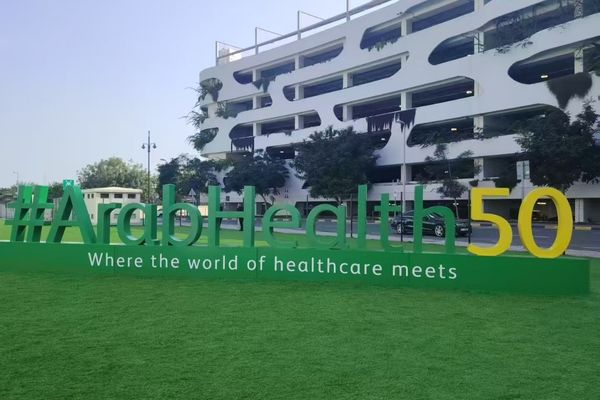
Regional Certification and Compliance Planning
For WHX 2026 Dubai, I am treating regional compliance as a design input, not as a post-hoc constraint. That preparation focuses on several key areas:
- GSO/IEC certification requirements for Gulf and broader Middle Eastern markets, linked to specific product configurations and accessories
- Regional power grid characteristics and protection requirements, including voltage tolerances, protection devices, and behavior during brownouts or generator transitions
- Country-specific regulatory approval timelines so we don’t demonstrate configurations that cannot be shipped and installed within realistic project windows
- Local tender and procurement process documentation, including how display specifications, compliance documents, and support commitments must be written to satisfy public-hospital rules
- Regional service infrastructure and support capabilities for installation, calibration, and repair, aligned to the expected lifecycle of surgical and diagnostic displays
By doing this preparation before WHX, I aim to ensure that what visitors see on the stand is directly implementable in their own markets, without hidden certification or power-related changes afterward.
Transparent Technology Roadmap
At the same time, many partners want visibility into upcoming technologies without being misled by prototypes that will not be available for years. To balance clarity and realism, I present our roadmap in structured layers:
- Near-term enhancements to existing product lines with clear software/firmware and hardware evolution points
- Mid-range development priorities with expected certification and regional approval dates so integrators can plan tenders accordingly
- Long-term technology directions—such as higher-resolution OR displays or deeper PACS/KVM integration—with explicit dependencies and no promises on unavailable features
- Lifecycle planning guidance for current installations, including when to expect last-time-buy windows and successor models
- Migration paths for existing customers who need to expand or modernize while maintaining compatibility with their installed base
During NDA sessions at WHX, I intend to walk key partners through this roadmap with concrete constraints and dependencies, so they can align their OR and PACS projects with realistic availability and certification timelines rather than with speculative feature lists.
Conclusion
At Russian Healthcare Week 2025, I used complete OR and PACS signal chains, realistic power and EMI conditions, and workflow-focused demos to move the discussion beyond isolated monitor specifications. By letting visitors see where signal, calibration, and integration issues actually surface, I could connect display selection directly to clinical reliability, maintenance effort, and long-term cost of ownership.
From an engineering perspective, Reshin’s value lies in combining large-scale medical-grade display manufacturing with disciplined system validation and lifecycle support. Whether we are deploying 4K surgical walls, stabilizing PACS reading fleets, or preparing region-specific configurations for events like WHX 2026 Dubai, my goal is to give integrators and hospital IT teams a predictable foundation: monitors, interfaces, and support models that are ready for regulatory scrutiny and everyday clinical use—not just trade-show demonstrations. If you are planning OR visualization upgrades, PACS display standardization, or cross-site KVM and monitor integration, I encourage you to involve our engineering team early so we can translate your clinical requirements into a tested, maintainable visualization architecture.
📧 info@reshinmonitors.com
🌐 https://reshinmonitors.com
-
Explore this link to discover top-rated medical-grade monitors that enhance surgical visualization and diagnostic accuracy. ↩
-
Learn about the impact of electromagnetic interference on medical devices and how to mitigate its effects for better reliability. ↩
-
Explore this link to discover essential strategies that enhance surgical team performance and improve patient outcomes. ↩
-
Understanding DICOM Part 14 calibration is crucial for maintaining accurate medical imaging standards. ↩


