Digital pathology workflows increasingly depend on subtle color differentiation for accurate diagnosis, yet many implementations rely on standard-gamut displays that can compromise the visual fidelity needed for confident stain interpretation and consistent cross-site collaboration.
Wide-gamut medical grade monitors enhance digital pathology by preserving stain color separation, reducing interpretation variability across pathologists, and enabling consistent visual baselines for primary diagnosis, peer review, and remote consultation workflows.
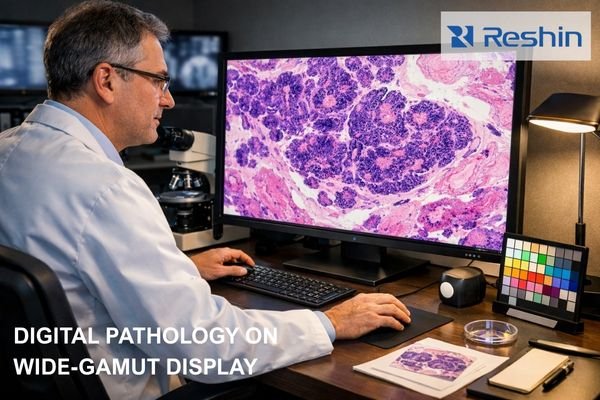
In my work supporting digital pathology implementations at Reshin, I’ve observed how display technology choices can affect diagnostic workflows in ways that extend beyond basic image quality metrics. The transition from glass slides to whole slide imaging creates new dependencies on monitor color reproduction that were less visible in traditional microscopy environments. Where pathologists once adjusted stain appearance through microscope optics and lighting conditions, digital pathology systems rely on the display’s ability to consistently reproduce the scanner’s color capture across different rooms, devices, and user preferences.
The clinical implications become apparent when comparing confidence and consistency between standard- and wide-gamut deployments. Standard-gamut monitors can compress the color space in regions where critical stain differentiation occurs, particularly in subtle hue transitions that help distinguish normal tissue architecture from early pathological changes. This compression can manifest as increased uncertainty during primary reads, more frequent second opinions, and higher disagreement rates when the same cases are reviewed on different workstations. In multiple projects, I’ve seen that when wide-gamut displays1 are deployed with a defined baseline (viewer settings, calibration targets, and consistent profiles), teams report smoother sign-out workflows and fewer “display-driven” disagreements—especially in areas like dysplasia grading and inflammatory infiltrate assessment. The impact is often most visible in telepathology, where consistency across geographically distributed endpoints is essential for reliable remote consultation and multi-institutional collaboration.
Why do standard-gamut displays limit digital pathology diagnostic confidence?
Standard-gamut displays create color reproduction bottlenecks that compress the subtle stain variations essential for confident pathological interpretation, particularly affecting the delicate hue transitions that distinguish critical diagnostic features.
Standard-gamut displays limit diagnostic confidence by compressing stain colors into narrower ranges, making subtle hue differences harder to differentiate. This manifests as increased zooming requirements, longer review times, and greater inter-observer variability across different workstations and viewing environments.
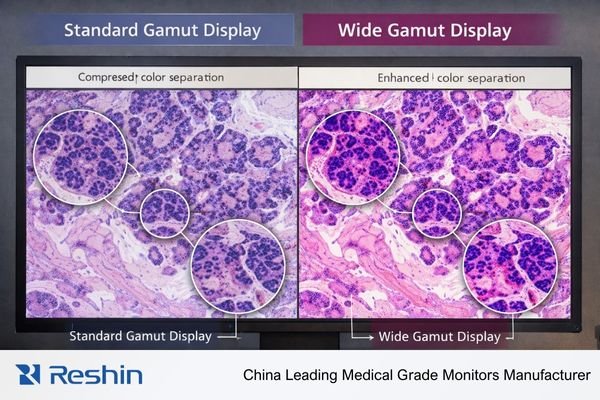
When I analyze diagnostic workflow inefficiencies in digital pathology implementations, color gamut limitations consistently emerge as a factor affecting pathologist confidence and review consistency. The core issue is how standard-gamut displays handle complex color relationships inherent in histological staining, where diagnostic conclusions depend on recognizing subtle variations in stain intensity, hue mixing, and boundary gradients that can sit near the edges of standard color reproduction.
Stain Differentiation Challenges2
Digital pathology depends heavily on recognizing subtle color cues that indicate cellular and tissue changes—nuclear chromatin texture variations, cytoplasmic hue shifts indicating metabolic states, delicate extracellular matrix tones, and faint boundary gradients that separate morphologically similar structures. Standard-gamut displays compress these critical color ranges, particularly affecting light hematoxylin variations that indicate nuclear detail and pale eosin transitions that reveal cytoplasmic architecture. When these colors are compressed into a narrower reproduction range, pathologists often compensate through increased magnification and more extensive region sampling, extending case review times and reducing diagnostic confidence. In practice, the problem is not only “less color,” but reduced separation where the workflow needs it most: faint stain transitions become harder to interpret at normal magnification, and subtle boundaries can appear less stable across different viewing stations.
Cross-Platform Consistency Issues
Standard-gamut limitations become particularly problematic in multi-workstation environments where the same scanned slide appears differently across sign-out stations, conference room displays, and remote consultation setups. These variations complicate multidisciplinary team discussions and create training challenges where subtle diagnostic features appear inconsistently depending on the viewing platform. I’ve observed cases where disagreement diminished after the department standardized viewing modes and calibration targets, suggesting that apparent inter-observer variability was partially driven by display-related inconsistency. Without a consistent baseline, even careful teams can spend time reconciling “what the slide looks like” instead of focusing on the clinical question.
Color science essentials: gamut, bit depth, calibration, and stain appearance
Understanding the relationship between color science fundamentals and stain visualization enables systematic optimization of digital pathology viewing environments for consistent diagnostic interpretation across diverse clinical workflows.
Effective digital pathology color reproduction requires coordinated attention to gamut coverage for stain separation, adequate bit depth for smooth tonal transitions, precise calibration for consistent baselines, and comprehensive color management throughout the imaging pipeline.
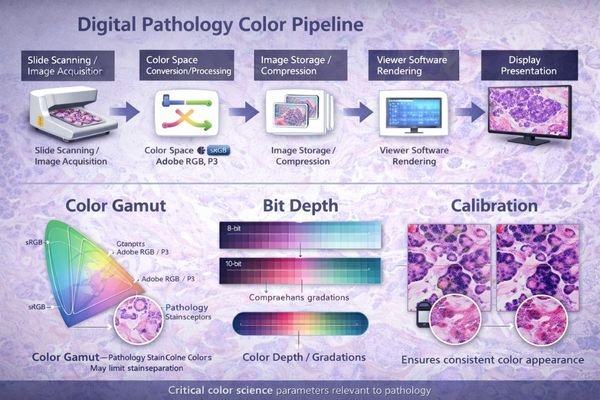
From my experience implementing color-managed pathology workflows, the interaction between these technical parameters creates compound effects that impact diagnostic visualization. Wide-gamut benefits become meaningful only when the entire color pipeline is understood and controlled end-to-end, from scanner capture through viewer rendering and final display presentation.
Color gamut defines the range of colors the monitor can accurately reproduce, and digital pathology images frequently contain stain mixtures and subtle hue variations that sit near the boundaries of standard color spaces. When these edge colors are compressed or mapped to fit within standard-gamut limitations, the resulting shifts can change the perceived balance between hematoxylin and eosin components, affecting how nuclear-to-cytoplasmic contrast and architectural relationships are perceived. Bit depth is equally important: insufficient color resolution can create banding in gradual stain transitions, which may be mistaken for tissue texture, fixation artifacts, or uneven staining—especially in pale regions where the diagnostic signal is already subtle.
Calibration ties gamut and bit depth3 capabilities into a reproducible baseline. Even wide-gamut panels with high bit depth can drift or vary between installations without controlled targets, stable lookup table behavior, and consistent viewing mode management. In multi-vendor digital pathology environments, color management extends beyond the display to include scanner profile handling, viewer software settings, and graphics pipeline decisions such as RGB versus YCbCr output formats, bit depth preservation through the chain, and ICC behavior across different platforms. Small “silent” conversions—like unintended color space changes or bit-depth fallback—can materially change stain appearance, especially when multiple endpoints are expected to match for sign-out, review, and telepathology.
What workflow advantages do wide-gamut medical monitors deliver in digital pathology?
Wide-gamut medical monitors provide operational improvements that enhance diagnostic efficiency, reduce interpretation variability, and strengthen quality assurance capabilities across comprehensive digital pathology workflows.
Wide-gamut monitors deliver measurable workflow advantages including improved stain separation at normal magnification levels, enhanced consistency across different viewing roles and locations, more reliable quality assurance capabilities, and better support for remote collaboration and AI-assisted diagnostic workflows.
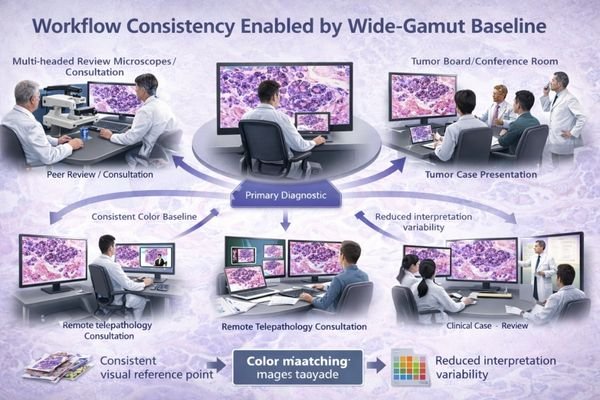
Based on my analysis of digital pathology implementations, the most significant advantages are operational rather than purely visual, and they show up as improvements in throughput, consistency, and maintainability under real clinical conditions.
Enhanced Diagnostic Efficiency and Confidence
Improved stain separation enables pathologists to recognize subtle hue differences at normal zoom levels, reducing repeated zoom and pan cycles during case review. This becomes especially valuable in high-volume screening workflows where small time savings per case accumulate into meaningful capacity gains. Better separation can also reduce “uncertainty loops” during primary reads—fewer back-and-forth checks and fewer cases pushed to consult purely because the stain nuance is hard to judge on the current workstation.
Cross-Platform Consistency and Collaboration
Wide-gamut monitors4 help teams hold a closer visual baseline across different roles and environments—primary sign-out workstations, peer review setups, tumor board presentations, and teaching sessions can align more closely in stain appearance. That reduces interpretation variance and minimizes the translation overhead that occurs when discussing findings viewed on different systems. In telepathology, a consistent baseline across distributed endpoints reduces cross-site disagreements and helps remote reviewers focus on diagnostic features rather than debating whether the stain “looks different” because of the display.
Wide-gamut baselines also strengthen QA workflows. When the display is less likely to be the limiting factor, it becomes easier to notice scanner drift, staining batch shifts, or pre-analytic variation because changes are more visible and more repeatable across stations. In AI-assisted workflows, controlled wide-gamut viewing can improve readability of overlays, heatmaps, and subtle confidence gradients without washing out underlying stain detail, provided overlay mapping and viewer policies are standardized.
How should wide-gamut monitors be implemented to keep color consistent over time?
Successful wide-gamut implementation requires systematic color management that treats display characteristics as controlled specifications rather than variable parameters, ensuring long-term consistency across diverse viewing environments and operational changes.
Maintaining color consistency requires establishing standardized viewing profiles per workflow type, implementing regular calibration verification procedures, controlling environmental factors, and managing the complete color pipeline from scanner through display presentation.
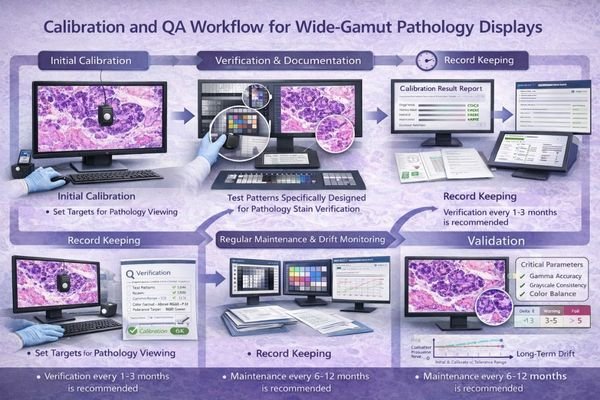
Implementation success depends on treating color reproduction as an engineered specification rather than an aesthetic preference. The systematic approach must account for both technical and operational factors that influence color consistency over time.
| Implementation Component | Specification Requirements | Validation Methods | Maintenance Schedule |
|---|---|---|---|
| Viewing Profiles | Standardized per workflow type | Representative WSI test sets | Initial setup, post-update |
| Calibration Targets | Defined color temperature, gamma | Colorimeter verification | Monthly verification checks |
| Environmental Control | Ambient light, reflection management | Light meter validation | Quarterly environment audit |
| Software Pipeline | Consistent viewer settings, GPU policies | Color management validation | After system changes |
| Hardware Validation | Color gamut, uniformity verification | Acceptance test procedures | Annual recertification |
The implementation strategy should establish a small set of approved viewing profiles5 tailored to specific workflow requirements—primary sign-out profiles optimized for diagnostic accuracy, conference profiles adjusted for group viewing conditions, and secondary review profiles that balance color fidelity with productivity requirements. These profiles must be locked as organizational baselines and protected from ad-hoc user changes that could introduce inconsistency across the pathology service.
Calibration and verification procedures work best when documented in a way that supports trend analysis rather than one-time pass/fail assessments. That includes maintaining target specifications, scheduling periodic verification checks with recorded results, and defining response procedures when drift exceeds acceptable thresholds. Environmental control extends beyond the display itself to ambient lighting, reflection management, and workstation positioning, all of which can affect perceived stain balance as much as calibration drift. For enhanced implementation guidance tailored to your specific pathology workflow requirements, feel free to contact info@reshinmonitors.com for detailed color management planning support.
Reshin wide-gamut medical monitors for digital pathology reading and review
Selecting appropriate wide-gamut displays for digital pathology requires matching color reproduction capabilities with specific workflow demands and standardization requirements across diverse clinical viewing environments.
When evaluating display requirements for digital pathology implementations, I focus on models that support stable calibration workflows and maintain consistent color reproduction characteristics across fleet deployments. Reshin’s wide-gamut medical monitor portfolio is designed to support stain visualization needs and long-term baseline stability across primary review, consultation, and collaborative viewing scenarios, where repeatability matters as much as peak performance.
| Clinical Role / Application | Usage Pattern | Color Requirements | Recommended Model | Key Implementation Benefits |
|---|---|---|---|---|
| Primary Diagnostic Review | Extended viewing sessions, critical decisions | Maximum stain separation, stable calibration | MD33G | Consistent diagnostic baseline |
| Peer Review and Consultation | Collaborative viewing, case discussion | Reliable color reproduction, flexible viewing | MD32C | Cross-pathologist consistency |
| Secondary Review and Reporting | Moderate usage, standardized workflows | Balanced performance, cost-effective deployment | MD26GA | Scalable color management |
| Space-Constrained Workstations | Limited installation space, flexible mounting | Compact form factor, maintained color fidelity | MD26C | Space-efficient color accuracy |
| Conference and Teaching Applications | Group viewing, presentation scenarios | Enhanced visibility, shared color reference | MD45C | Collaborative viewing consistency |
FAQ
Do wide-gamut monitors change diagnostic accuracy, or mainly improve visualization?
Wide-gamut monitors primarily improve diagnostic confidence and workflow efficiency by preserving color relationships that might be compressed in standard displays. While they don’t change underlying tissue pathology, they can reveal subtle stain variations that may be harder to judge on standard-gamut displays, particularly in challenging cases involving early dysplastic changes or inflammatory infiltrates.
How do we standardize stain appearance across multiple pathologists and multiple sites?
Implement standardized viewing profiles across all workstations, establish consistent calibration procedures with documented targets, and use representative test slide sets to validate color reproduction consistency. Regular cross-site verification and centralized policies help keep the baseline stable across distributed pathology services.
What should we calibrate to: a target standard, a scanner profile, or a viewer baseline?
Use a defined departmental baseline that can be validated and repeated across sites. If your program uses established medical imaging practices for tone response, keep them consistent, but ensure pathology-specific color targets and viewer settings are validated with representative WSI cases and agreed upon by the clinical team. The most important outcome is repeatability: the same case should look consistent across approved workstations and after routine updates.
Can wide-gamut cause oversaturation or misinterpretation if unmanaged?
Yes, improperly managed wide-gamut displays can create oversaturated stain appearance that doesn’t reflect actual tissue characteristics. This risk is mitigated through calibration, standardized viewing profiles, and routine validation using known reference samples and representative WSI regions.
What validation proves color consistency after software updates or hardware replacement?
Use standardized test slide sets with representative stain combinations and documented reference expectations. Re-run the same verification workflow after changes, combining objective checks (instrument verification) with structured clinical review by qualified pathologists to confirm that baseline appearance remains clinically acceptable.
Conclusion
Wide-gamut medical monitors create measurable value in digital pathology workflows by preserving essential stain color relationships, reducing interpretation variability across viewing platforms, and enabling reliable quality assurance procedures across multiple sites and user groups. The most successful programs treat wide-gamut capability as part of a comprehensive color management strategy rather than simply upgrading display hardware.
As a specialist in medical display technology for pathology applications, Reshin understands that effective wide-gamut implementation extends beyond monitor specifications to encompass systematic color pipeline management and long-term consistency maintenance. Our engineering team can help develop comprehensive color management strategies that optimize diagnostic workflows while maintaining the standardization essential for multi-site pathology operations. For detailed discussion of your digital pathology color management requirements and access to our pathology-specific calibration resources, please contact the Reshin team using the email below to explore solutions that enhance diagnostic confidence and workflow consistency.
✉️ info@reshinmonitors.com
🌐 https://reshinmonitors.com/
-
Explore how wide-gamut displays enhance diagnostic accuracy and workflow efficiency in digital pathology. ↩
-
Exploring stain differentiation challenges can provide insights into improving diagnostic workflows and accuracy. ↩
-
Exploring bit depth’s impact on image quality can help improve diagnostic accuracy by preventing issues like banding and enhancing subtle details. ↩
-
Explore this link to understand how wide-gamut monitors enhance visual consistency and reduce interpretation variance in various professional settings. ↩
-
Understanding approved viewing profiles can enhance diagnostic accuracy and improve workflow efficiency in pathology services. ↩