
AI-assisted imaging systems create new requirements for display consistency, where the accuracy of artificial intelligence outputs depends not only on model validation but also on standardized human interpretation through properly calibrated viewing environments.
AI-assisted medical imaging systems require DICOM Part 14 compliant monitors to ensure consistent grayscale perception and standardized visual interpretation of AI outputs including overlays, heatmaps, and probability indicators. Non-compliant displays introduce perception variability that can affect clinical decision-making and undermine AI system governance.

In my experience implementing AI-assisted imaging workflows1 at Reshin, moving AI into routine clinical use has shifted the weakest link from model accuracy to interpretation consistency. European- and enterprise-style governance expects repeatability: the same case, the same AI output, and the same clinical takeaway—regardless of room, site, or workstation. That only happens when the display endpoint is treated as a controlled component of the AI system, not a “best-effort” accessory.
The integration of AI into clinical workflows also introduces new dependencies between algorithmic outputs and human perception that did not exist in traditional imaging environments. AI systems generate probability heatmaps, lesion boundary overlays, attention maps, quantitative measurements, and confidence indicators that must be perceived consistently. If brightness, contrast response, or gamma behavior varies between stations—or drifts over time—identical AI outputs can look more “certain,” more “subtle,” or even visually contradictory, weakening standardization and complicating auditability.
What goes wrong when AI results are viewed on non-DICOM displays?
Non-DICOM displays introduce uncontrolled variability in AI output visualization that can affect clinical interpretation consistency, creating governance challenges and potentially undermining the clinical benefits of AI-assisted diagnostic systems.
AI outputs viewed on non-calibrated displays suffer from inconsistent contrast perception, variable overlay visibility, and unpredictable grayscale response that can cause identical findings to appear more or less significant across different viewing stations, leading to interpretation variability and compromised clinical decision-making.
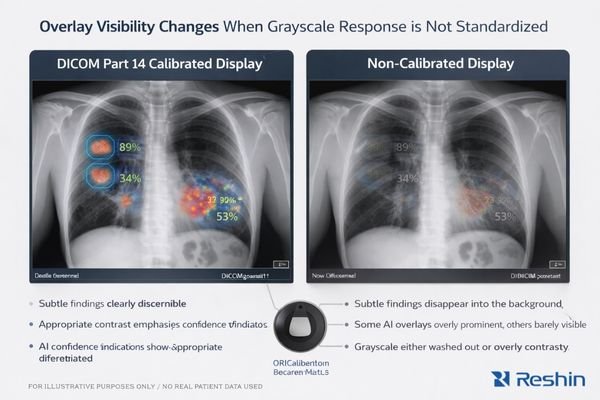
From my analysis of AI deployment challenges, the primary risk is human interpretation inconsistency2 rather than AI model failure. The problem shows up when clinicians view identical AI outputs on different displays and perceive different levels of confidence or clinical significance because the display response is not controlled.
When AI systems generate probability heatmaps, lesion boundary overlays, or attention indicators, these visual elements depend on precise contrast relationships to communicate emphasis. Non-calibrated displays can shift perceived significance through brightness drift, gamma curve variation, inconsistent presets, or automatic image “enhancements.” Borderline findings can become artificially prominent—or too faint to trigger attention—simply because the monitor maps the same pixel values to different perceived contrast.
Multi-Site Interpretation Variability
In healthcare systems spanning multiple sites, inconsistent display behavior turns AI from a standardized decision support tool into a variable signal that depends on viewing location. Two clinicians reviewing the same study may disagree not because of clinical reasoning, but because the workstation emphasizes (or suppresses) AI overlays differently. That erodes governance: performance monitoring becomes noisy, peer review becomes less comparable, and training outcomes vary by station.
Confidence Assessment Challenges
AI probability overlays and confidence indicators rely on subtle grayscale relationships to communicate uncertainty. If the display response curve is not standardized, those cues can be amplified, diminished, or distorted, changing how readers weigh AI recommendations. In practice, this is one of the fastest ways for an “approved” AI workflow to become inconsistent across rooms and time. Contact info@reshinmonitors.com to define a DICOM Part 14 viewing baseline and acceptance cases for consistent AI interpretation.
How does DICOM Part 14 stabilize grayscale perception for AI workflows?
DICOM Part 14’s Grayscale Standard Display Function ensures consistent perceptual uniformity across different luminance ranges, providing the standardized visual foundation necessary for reliable AI output interpretation in clinical workflows.
DICOM Part 14 GSDF creates standardized grayscale perception by defining consistent luminance response curves that ensure identical pixel values produce equivalent visual contrast across different displays. This standardization enables reliable interpretation of AI-generated visual elements including probability maps, detection overlays, and quantitative measurements.
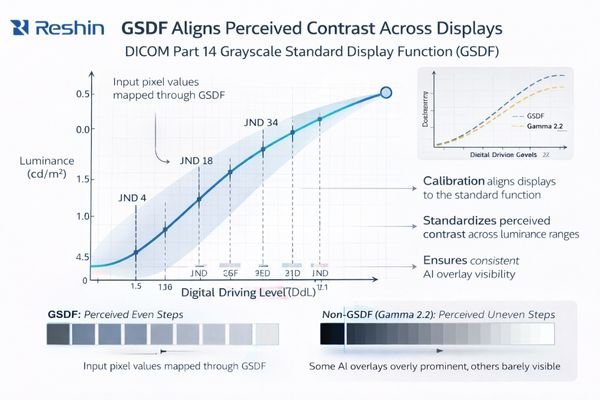
GSDF addresses a practical reality: human vision does not respond linearly to luminance, so a “similar” monitor can still present meaningfully different contrast in different regions of the grayscale range. Without standardization, the same pixel values can yield different perceived separations between near-gray tones—exactly where many AI prompts and imaging findings live.
In AI-assisted imaging, the clinician’s visual system is effectively the last stage of the AI pipeline. If the display response curve varies, the perceived strength of AI prompts varies as well. GSDF alignment makes perceived contrast more predictable, allowing institutions to establish a baseline viewing behavior that stays consistent across devices, rooms, and time periods—supporting reliable interpretation, peer review, and cross-site collaboration.
One common integration pitfall is “the display is DICOM-capable3, but the system breaks the baseline.” GPU output format changes (RGB vs YCbCr), bit-depth fallbacks, OS-level color adjustments, power-saving brightness behavior, or application-driven LUT changes can quietly alter perceived contrast. In stable deployments, those settings are treated as part of the controlled configuration, documented at commissioning, and re-verified after updates.
Which AI-assisted use cases require strict DICOM calibration and why?
Different AI applications have varying sensitivity to display calibration, with lesion detection, quantitative assessment, and subtle finding visualization requiring strict DICOM compliance while basic triage and text-based alerts showing greater tolerance for display variability.
AI applications involving lesion detection overlays, microcalcification highlighting, pneumothorax edge identification, quantitative follow-up comparisons, and subtle density change visualization require strict DICOM Part 14 compliance because these tasks depend on precise grayscale relationships for accurate clinical interpretation and consistent decision-making.
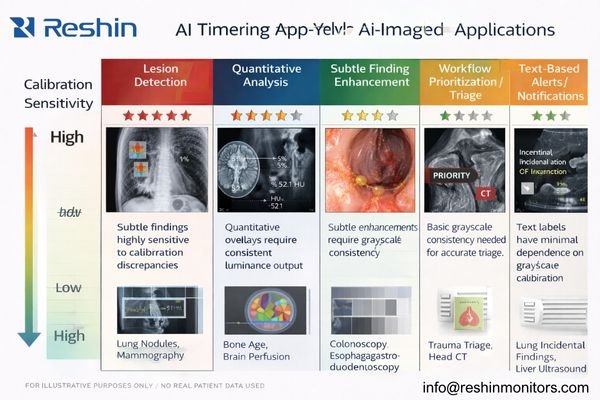
Based on my experience with diverse AI implementations, the need for strict calibration depends on what the clinician must visually discriminate. Some AI tools are “information-forwarding” (alerts, flags), while others are “perception-dependent” (subtle edges, gradients, faint overlays). The more the clinical action depends on subtle grayscale differences, the more important it is to keep the display response standardized and stable over time.
High-sensitivity use cases include detection overlays that rely on small contrast cues, subtle finding enhancement that changes saliency, and quantitative workflows that depend on consistent grayscale mapping4 for comparison across time and sites. Moderate-sensitivity workflows benefit from standardization because they affect prioritization and attention guidance, but they may tolerate small variations if the primary signal is not purely grayscale-dependent.
| AI Application Type | Display Sensitivity | Calibration Requirements | Potential Clinical Impact |
|---|---|---|---|
| Lesion detection overlays | High | Strict GSDF compliance | High (interpretation consistency) |
| Quantitative analysis | High | Tight grayscale control and verification | High (measurement comparability) |
| Subtle finding enhancement | High | Consistent contrast response | High (detection reliability) |
| Workflow prioritization | Medium | Standard calibration and periodic checks | Medium (efficiency, attention guidance) |
| Text-based alerts | Low | Baseline display adequacy | Lower (information delivery) |
How should integrators implement DICOM Part 14 verification and QA at scale?
Large-scale DICOM Part 14 implementation requires systematic verification procedures, ongoing quality assurance protocols, and change control processes that maintain calibration consistency across multiple sites and extended time periods.
Effective DICOM Part 14 implementation involves establishing approved viewing modes, implementing scheduled verification checks, documenting performance drift and corrective actions, and maintaining fleet-wide calibration baselines that ensure consistent AI interpretation across multiple sites and time periods.

From my experience supporting large-scale medical imaging deployments, successful DICOM Part 14 implementation5 requires treating each reading room as a controlled system with documented baseline performance and systematic maintenance procedures. The practical objective is a “fleet baseline” that remains comparable across rooms and remains recoverable after changes.
Operational control starts by defining approved viewing modes and locking targets that match workflow needs (for example, primary reading vs review). Baselines should include display mode, luminance targets, GSDF verification status, ambient lighting assumptions, and workstation output policies (GPU output format, bit depth behavior, and any enforced color management settings). The configuration is only meaningful if it is documented and repeatable.
Verification should combine periodic checks with event-driven re-validation after changes such as GPU driver updates, OS patches, firmware changes, panel replacement, workstation swaps, or room lighting modifications. Practical acceptance testing should include stress conditions that affect perception: warm-up behavior, long-session drift, and repeated switching between viewing modes. When drift exceeds a defined threshold, corrective action should be recorded and tied back to the room baseline so governance remains audit-ready.
Reshin monitor recommendations for DICOM Part 14 AI-assisted deployments
Selecting appropriate displays for AI-assisted imaging requires matching DICOM Part 14 capabilities with workflow-critical grayscale consistency, while keeping calibration verification repeatable across departments and sites.
When evaluating displays for AI-assisted diagnostic environments, I prioritize models that support GSDF alignment, predictable verification routines, and long-term luminance stability that can be maintained as a fleet. The goal is to keep AI overlays, subtle grayscale cues, and confidence gradients visually comparable across reading rooms—so interpretation variance is driven by clinical judgment, not monitor behavior.
| Clinical role | AI integration requirements | Recommended model | DICOM Part 14 alignment focus |
|---|---|---|---|
| Primary diagnostic reading | Strict GSDF compliance, stable baseline | MD33G | Grayscale baseline control and verification readiness |
| High-volume reading stations | Reliable verification cadence, repeatable QA | MD32C | Operational QA support for consistent baselines |
| Cross-site peer review and consultation | Comparable appearance across rooms/sites | MD26GA | Fleet consistency with standardized profiles |
| Secondary review and reporting | Stable viewing, efficient deployment | MD26C | Practical GSDF alignment and routine verification |
| Large-format review / conference reading | Shared reference for group decisions | MD45C | Consistent grayscale in collaborative viewing |
FAQ
Does DICOM Part 14 matter if the AI model is already validated?
Yes. Model validation is typically performed under defined viewing conditions, but real deployments can include varied monitors, drift, and uncontrolled presets. Without standardized grayscale behavior, the same AI output may be perceived differently across stations, reducing consistency even if the model performance is unchanged.
Can software calibration alone replace a DICOM Part 14 monitor?
Software calibration can improve consistency, especially when paired with strong IT controls, but long-term stability and audit-friendly QA are typically easier to achieve with purpose-built medical displays and a defined verification routine. The key requirement is not “software vs hardware,” but whether the baseline is measurable, repeatable, and maintained over time.
How often should we verify GSDF compliance in busy reading rooms?
Verification frequency should reflect usage intensity, drift history, ambient conditions, and audit requirements. Many organizations use scheduled checks (for example, monthly or quarterly) plus event-driven re-verification after changes. The most reliable approach is to set a cadence, measure drift trends, and adjust based on evidence rather than guesswork.
Do AI heatmaps and overlays require different display settings than raw images?
Most workflows keep a single GSDF-aligned baseline for both raw images and overlays so perception remains consistent. Overlay visibility is typically tuned in the software layer (opacity, colormap design) while the display baseline stays controlled, preventing unintended shifts in perceived confidence.
What breaks baseline consistency across sites using the same monitor model?
Differences in ambient lighting, GPU output settings, OS/app color behavior, inconsistent calibration procedures, replacement parts, firmware/driver updates, and uncontrolled presets are common causes. Consistency improves when those variables are documented, locked where possible, and re-verified after changes.
Conclusion
AI-assisted imaging only improves outcomes when clinicians see a consistent, trustworthy representation of both the image and the AI output. DICOM Part 14 (GSDF) turns grayscale behavior into a controlled variable, enabling comparable decisions, reliable QA, and defensible governance across rooms and sites.
As a Reshin engineer, I see the most successful AI rollouts treat GSDF-aligned baselines, verification cadence, and change control as part of the AI system—not optional “display housekeeping.” Contact info@reshinmonitors.com to standardize your AI viewing baseline and verification plan with DICOM Part 14.
✉️ info@reshinmonitors.com
🌐 https://reshinmonitors.com/
-
Explore this link to understand how AI-assisted imaging workflows enhance clinical efficiency and accuracy. ↩
-
Understanding the nuances of human interpretation inconsistency can help improve AI deployment strategies and enhance clinical outcomes. ↩
-
Exploring DICOM-capable systems helps ensure compliance with standards, enhancing interoperability and image quality in medical imaging. ↩
-
Exploring grayscale mapping will provide insights into its critical role in ensuring consistency in AI-driven quantitative workflows. ↩
-
Understanding DICOM Part 14 implementation is crucial for ensuring effective medical imaging systems and compliance. ↩


