
In OR integration deployments, it’s common to see endoscopy towers connect successfully to a medical display during setup, yet create avoidable operational issues during procedures because critical output parameters were never confirmed and the system drifts into unstable modes or slow switching behavior.
Before connecting an endoscopy tower to a medical display, confirm a pre-connection checklist: timing (resolution, refresh rate, scan format), color encoding (RGB vs YCbCr and range behavior), and the exact signal-chain path used in the OR. The goal is a single known-good video mode that remains stable and repeatable across power cycles and input switching during procedures.
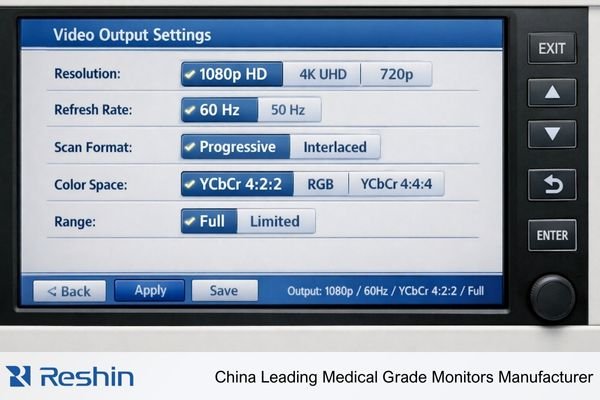
In OR routing environments, a setup that “shows an image” can still be operationally risky if the chosen output mode1 is unstable, renegotiates during switching, or falls back to different parameters after a reboot or reconnection. Confirming key parameters upfront reduces these risks and helps the system behave predictably under the state transitions that occur in real surgical workflows.
Why Do Output Parameters Matter for Endoscopy Video Compatibility?
Output parameter verification is essential for maintaining stable video communication between endoscopy systems and medical displays.
Endoscopy towers output specific video modes that are only truly compatible when the complete signal chain—tower, any routing/switching devices, and the medical display—agrees on timing and encoding. A mode can “work” yet still be suboptimal, leading to switching delays, brief black screens, or silent presentation changes that disrupt surgical workflows.
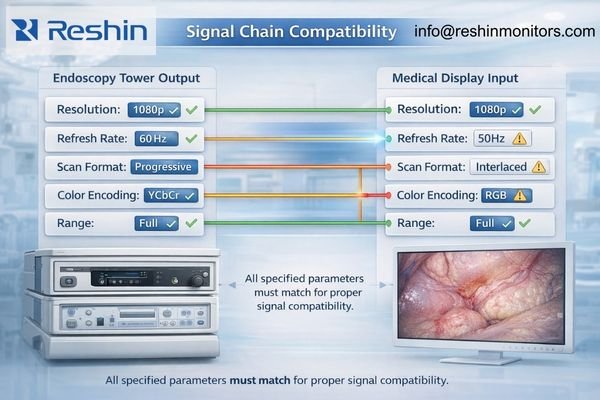
In OR video chain configurations, teams sometimes focus on basic connectivity without verifying that the system is operating in a stable, intended mode. Output mismatches can push the chain into fallback behavior that seems fine when everything is steady, but fails during routine state transitions such as power cycling, switching inputs, or changing a routing path.
Mode Stability Requirements
Endoscopy procedures require consistent video presentation without interruptions or mode changes2 that distract the surgical team or delay time-sensitive decisions. Unconfirmed parameters can trigger renegotiation events that cause brief signal dropouts, switching delays, or unexpected presentation changes during procedures.
Operational Predictability
OR workflows depend on systems that behave the same way across power cycles, input switching, and device state changes. When output parameters are confirmed and aligned end-to-end, the video chain is more likely to maintain predictable performance throughout a procedure.
Which Timing Parameters Should You Confirm: Resolution, Refresh Rate, and Scan Format?
Timing parameter verification prevents the most common compatibility and stability issues in endoscopy video chains.
Start with timing because mismatches are a leading cause of “no signal,” unstable lock behavior, and unexpected scaling. Confirm the tower’s intended output resolution, verify the refresh rate remains consistent across reboots and switching events, and confirm scan format compatibility (progressive vs interlaced) to avoid unnecessary conversion delay or artifacts.
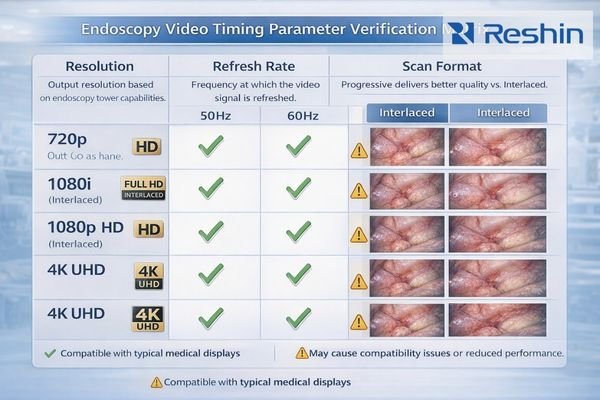
In OR integration and routing projects, timing mismatches are a frequent root cause of connection failures and operational instabilities in endoscopy video systems. The objective is to standardize one repeatable timing profile that the tower outputs reliably and the display locks to consistently, including during the state transitions that occur during surgical procedures.
Resolution Compatibility
Confirm that the endoscopy tower’s output resolution can be accepted by the medical display without forcing internal scaling or mode conversion that could change perceived sharpness or introduce extra processing. When the chain stays in a stable, intended mode, teams reduce the chance of “works in setup, fails in use” behavior during switching or reboot events.
Refresh Rate Consistency
Verify that the tower maintains the same refresh rate3 across system reboots, input changes, and power cycling events. Refresh drift can trigger re-lock behavior, increase switching time, or cause synchronization artifacts that interfere with real-time visualization.
Scan Format Verification
Check whether the tower outputs progressive or interlaced signals and confirm the complete signal chain handles the chosen scan format without unexpected conversion. If conversion is occurring in the chain, it can introduce delay or artifacts that may not be obvious during a quick test but become disruptive during live procedures.
What Color Encoding and Range Settings Should You Check?
Color parameter verification ensures consistent image presentation and prevents subtle shifts that can affect surgical visualization.
After timing, confirm color encoding (RGB vs YCbCr), range behavior (full vs limited), and any encoding behaviors that may change across reconnection events so pixel interpretation stays consistent. In endoscopy, small changes in color handling can alter tissue tone appearance and contrast perception, so the objective is stable, repeatable settings—not maximum settings.
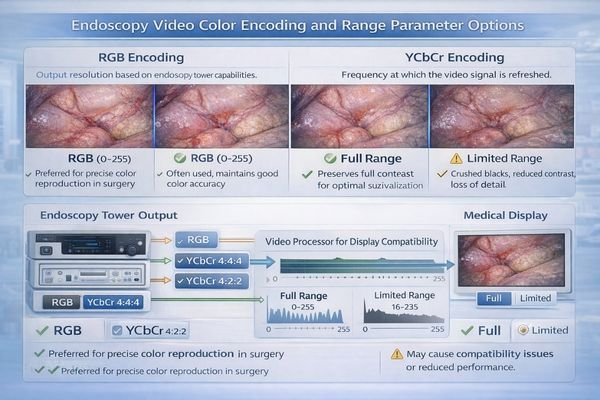
In OR environments, color parameter mismatches often create subtle presentation changes that are hard to diagnose because the image still “looks normal,” just different. The same resolution can appear inconsistent if the tower switches between encoding formats or range behaviors after switching, reconnecting, or re-reading capabilities in the chain.
Encoding Format Control
Verify whether the endoscopy tower outputs RGB or YCbCr4 and ensure the medical display input is set to interpret that encoding consistently. Relying on auto-detection can introduce variability if the chain presents capabilities differently across ports or state transitions.
Range Behavior Alignment
Confirm whether the chain expects full range or limited range handling and ensure devices apply the same interpretation. Range mismatches can shift contrast and brightness behavior, changing perceived detail in ways that distract teams and complicate troubleshooting.
Subsampling Considerations
Check encoding behaviors that affect color detail reproduction and confirm they remain consistent across your actual OR switching and reconnection scenarios. The practical goal is minimizing automatic format changes and keeping the chain in one known-good configuration that the team can reproduce after maintenance or updates.
What Interface and Signal-Chain Details Can Break a "Correct" Output Mode?
Physical interface and signal chain factors can undermine otherwise compatible output parameter settings.
Even with correct timing and encoding parameters, OR signal chains can become unstable due to interface behavior and device state management. Confirm the exact physical path, minimize unnecessary adapters, and validate intermediate devices as part of the baseline because they can change EDID exposure, alter negotiation timing, or trigger renegotiation during switching events.
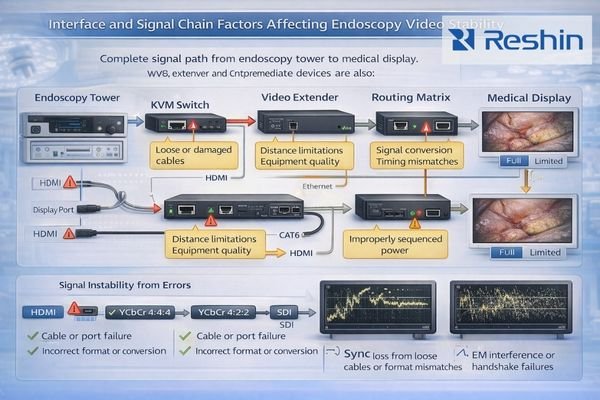
In complex OR chains, parameters that seem “correct” can still fail once switching, power sequencing, or routing behavior enters the picture. Interface devices and device initialization order can trigger renegotiation that changes the supposedly fixed output mode or increases switching delay during real workflows.
Physical Interface Validation
Confirm the specific ports used on both tower and display, and minimize adapters or converters that can modify capability exposure or introduce timing variability. Direct, consistent connections are typically easier to keep stable and repeatable across state transitions.
Intermediate Device Impact
If the signal chain5 includes KVMs, extenders, switchers, or recording devices, validate the complete path as an integrated system rather than testing components individually. These devices can cache capability information or modify signal behavior in ways that affect parameter stability—especially during switching and power events.
Power Sequencing Control
Define consistent power-on and switching sequences to reduce timing-dependent renegotiation problems. Many issues that appear “random” are actually caused by devices initializing in different orders, changing the negotiated mode or delaying link lock.
State Transition Testing
Test parameter stability across power cycling, input switching, and routing changes that occur in normal OR operation. A configuration that works under ideal conditions can still fail under real state transitions, so repeatability across those transitions should be part of acceptance criteria.
What Medical Displays Fit Common Endoscopy Tower Output Scenarios?
Display selection should align with the tower’s output capabilities and OR workflow requirements.
Product selection should follow the endoscopy tower’s dominant output modes and operational workflow patterns rather than maximum capability specifications.
| Clinical Role / Application | Usage Pattern | Display Requirements | Recommended Model | Key Integration Considerations |
|---|---|---|---|---|
| Primary Surgical Display | Single endoscopy tower, stable connection | Native mode compatibility, reliable timing support | MS430PC | Direct interface compatibility, stable parameter negotiation |
| Multi-Source OR Display | Tower plus other sources, input switching | Multi-input stability, consistent parameter handling | MS321PB | Reliable input switching, stable mode retention |
| Compact Surgical Display | Space-constrained applications, reliable operation | Robust interface support, predictable behavior | MS321PC | Compact design, reliable parameter support |
| Large Format Team Display | Wall mount, team viewing | High-resolution support, stable large format operation | MS550P | Large format timing support, stable operation |
| Flexible OR Display | Multiple configurations, adaptable setup | Broad compatibility, stable multi-mode operation | MS322PB | Flexible interface support, consistent parameter handling |
Start by documenting the exact resolutions, refresh rates, scan format, and color encoding your endoscopy tower uses for primary procedures, then confirm the display can accept those parameters on the intended inputs without forced scaling or unnecessary conversion. Consider workflow realities such as single-source use versus frequent switching, integration with recording or routing systems, and recovery expectations after state transitions.
Evaluate practical constraints that affect long-term stability, including mounting systems that prevent cable strain, cleaning procedures compatible with OR protocols, and serviceability approaches that maintain consistent parameter profiles when equipment is replaced or updated.
Focus selection on displays that keep the signal chain in a known-good parameter mode across power cycles and switching events, with minimal configuration drift and clear verification procedures OR teams can reuse for ongoing validation.
FAQ
If the endoscopy tower shows an image, does that mean the output mode is correct?
Not necessarily—an image can appear in a fallback mode with scaling, different color encoding, or unstable switching; you should confirm the exact timing and encoding and retest across power and switching events.
What is the fastest way to prevent "no signal" after switching?
Standardize one known-good resolution/refresh profile, minimize adapters, and validate the exact OR routing path, then keep power-on and switching sequences consistent.
Do I need to worry about progressive vs interlaced outputs?
Yes—some chains handle interlaced signals differently or convert them, which can introduce delay or instability; confirm scan format support end-to-end.
Why does color look different after reconnecting the same cable?
The tower may renegotiate and switch RGB/YCbCr or range behavior based on what it reads from the chain; lock consistent encoding and ensure the display interprets it consistently.
Can intermediate devices change the mode even if the tower settings are fixed?
They can—switchers/extenders may alter EDID exposure or timing behavior, causing renegotiation; validate the full chain as a system.
What should be documented for a reusable OR baseline?
The chosen resolution/refresh/scan format, color encoding/range, exact port/path, any intermediate device profiles, and a quick repeatability check after updates or maintenance.
Conclusion
Confirming output parameters before connecting endoscopy towers to medical displays helps reduce signal compatibility issues, switching instabilities, and silent presentation changes that can disrupt surgical workflows. Timing establishes the foundation for stable lock and predictable switching, while consistent encoding and range handling help keep image presentation repeatable across reconnection events.
At Reshin, we design medical displays with robust parameter support and provide documentation for establishing reliable configuration baselines that work consistently with endoscopy tower outputs across OR workflows. Our engineering approach emphasizes end-to-end validation that includes the complete signal chain and state transitions that occur during surgical procedures. By standardizing output parameters, validating signal chain behavior, and implementing repeatable verification procedures, surgical teams can achieve consistent video presentation throughout the system lifecycle.
✉️ info@reshinmonitors.com
🌐 https://reshinmonitors.com/
-
Understanding output mode is crucial for ensuring stability and predictability in surgical workflows, minimizing operational risks. ↩
-
Understanding mode changes is crucial for ensuring uninterrupted video during critical procedures. ↩
-
Exploring refresh rate impacts can help ensure smooth and accurate visualizations, essential for effective medical procedures. ↩
-
Understanding the differences between RGB and YCbCr can help ensure proper configuration of medical displays for optimal image quality. ↩
-
Understanding the signal chain’s role can help ensure stability and performance in complex setups. ↩


