In OR integration deployments, “no signal” incidents can create urgent interruptions during procedures, but most cases can be resolved quickly when troubleshooting starts with the highest-probability failure points and isolates variables in a repeatable way.
"No signal" on surgical monitors typically indicates the display cannot lock to a valid video mode due to source configuration, signal chain negotiation failures, or device state transitions. Quick troubleshooting isolates whether the issue originates from the source, intermediate devices, or monitor configuration by testing direct connections and forcing standardized, known-good modes.
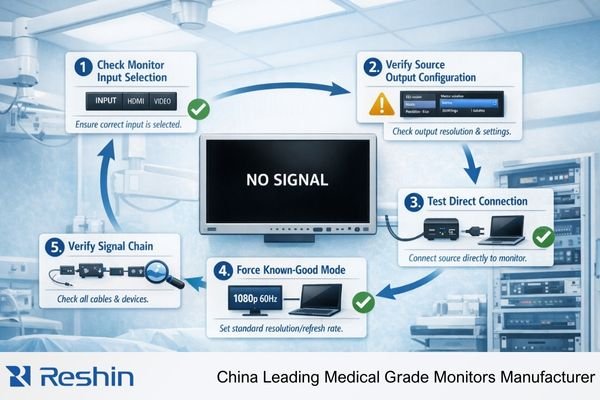
In complex OR signal chains, “no signal” problems are rarely simple monitor failures—they more often reflect an end-to-end communication or state issue that becomes visible during boot, wake, switching, or routing changes. The fastest approach is methodical isolation1 rather than randomly swapping connections or changing settings.
What Does "No Signal" Usually Mean in an OR Setup?
Understanding the root cause helps focus troubleshooting efforts on the most likely failure points.
"No signal" typically means the display cannot receive or lock to a valid video mode—either due to no electrical/link presence or a signal that the monitor cannot interpret as a valid mode because timing/format is incompatible or negotiation failed. In OR setups, this is usually an end-to-end communication issue originating from source settings, routing paths, or device state transitions rather than monitor hardware failure.
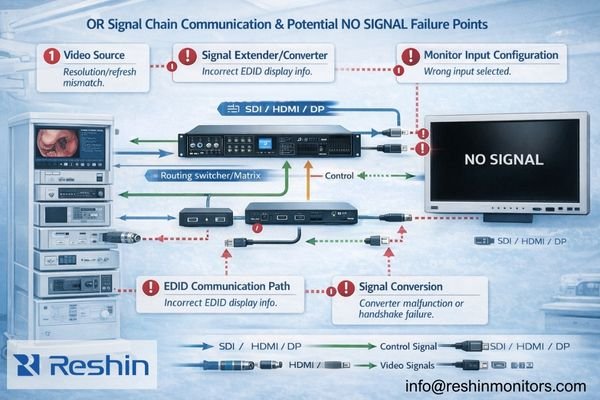
In many failed installations, teams assume “no signal” indicates a broken monitor, when the actual cause is often mode negotiation2, routing configuration, or timing-dependent state transitions that occur during boot, wake, or input switching in complex OR environments.
Signal Presence vs Mode Compatibility
"No signal" can indicate either complete absence of electrical signal or presence of signal that the monitor cannot interpret as a valid video mode. These require different troubleshooting approaches—link issues versus compatibility problems.
State-Dependent Failures
Many OR "no signal" issues are state-dependent, appearing during specific transitions like power cycling, input switching, or routing changes when devices renegotiate communication parameters and may select incompatible modes.
How to Isolate the Problem Fast: Source, Chain, or Monitor?
Systematic isolation prevents wasting time on unlikely causes while quickly identifying the actual failure point.
The quickest isolation method reduces variables systematically: confirm correct monitor input selection, verify source output on the intended port, then bypass intermediate devices to test direct connection. If direct connection works but the complete chain fails, focus on routing devices, EDID exposure, link training timing, or power sequencing in intermediate components.
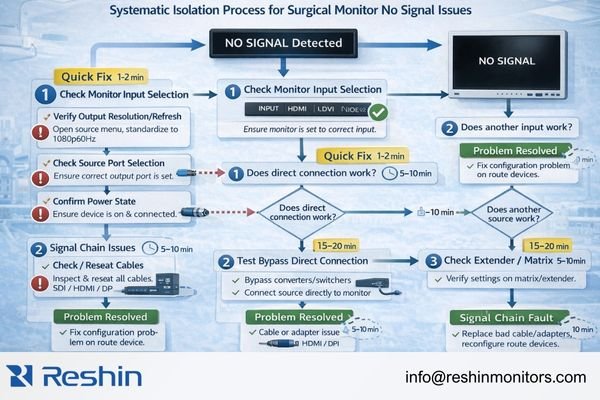
A “direct path first” approach prevents time-consuming guesswork when the root cause is often a simple path, port, or mode selection issue that can be identified in minutes. A practical action chain is: check monitor input → confirm source output → bypass intermediates → force a known-good mode → retest the triggering transition → document the baseline.
Monitor Input Verification
Start by confirming the monitor is set to the correct input and is not attempting to scale or process an incompatible signal format. Many apparent signal failures are actually input selection or mode processing issues.
Source Output Confirmation3
Verify that the source device is actively outputting video on the intended port and in a compatible format. Sources may disable outputs, change modes, or switch ports during state transitions.
Chain Bypass Testing
Test direct connection between source and monitor using a known-good cable to isolate whether the problem involves intermediate devices like switchers, extenders, or routing equipment that may be modifying signal characteristics.
Which "Quick Checks" Solve Most No-Signal Cases?
A focused sequence of high-probability fixes resolves the majority of OR no-signal incidents efficiently.
Most OR no-signal cases resolve by checking monitor input/path selection first, then source output mode, then physical link quality: verify the correct input and output ports, confirm cable/interface compatibility for bandwidth and length, standardize a known-good timing profile, use a controlled power sequence with intermediates first, and remove adapters to test with a shorter known-good cable.
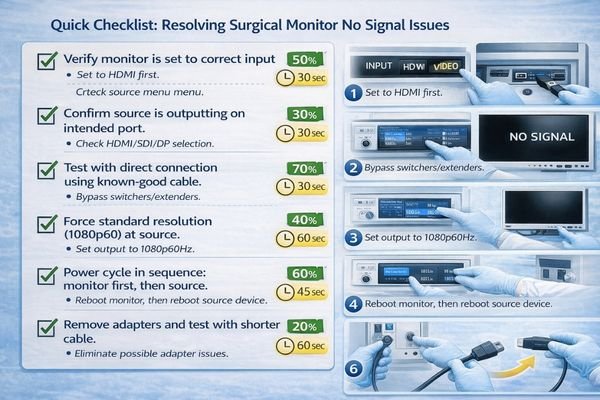
In urgent situations, a standardized sequence of quick checks typically restores function faster than deep analysis, allowing clinical workflows to continue while recurring causes can be addressed afterward with structured validation.
Physical Connection Verification
Check input selection on the monitor, confirm the source output port matches the intended connection, and verify cable type compatibility for the required bandwidth and cable length used in the installation.
Mode Standardization
Force the source to output a known-good resolution and refresh rate combination rather than auto-selected modes that may change after switching events. Avoid frequent mode changes that can trigger negotiation failures.
Power Sequence Control
Power-cycle devices in a controlled sequence—intermediate devices and monitors first, then the source—because state-dependent negotiation issues often resolve when devices initialize in the correct order.
Interface Simplification4
Remove adapters, converters, and unnecessary intermediate devices, then test with a shorter known-good cable to eliminate marginal link conditions that cause intermittent failures during switching or wake events.
What Chain and Negotiation Issues Cause Intermittent "No Signal"?
Understanding negotiation failures helps address recurring issues that appear during normal OR operations.
Intermittent no-signal often results from negotiation instability: EDID changes across ports or through intermediate devices cause sources to select different modes after state transitions, link training fails when timing is tight or devices wake in different states, and multi-device chains negotiate to fallback modes that workflows don’t expect.
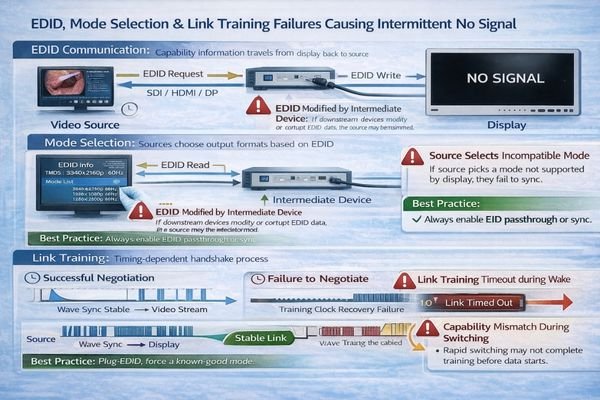
Intermittent failures are often more challenging than permanent ones because they point to timing-dependent behavior that appears during routine state transitions—boot sequences, input switching, and routing changes—rather than a single component that is always broken.
EDID Variability
Sources may read different capability information depending on routing paths, intermediate device states, or port selection, causing them to output modes that worked previously but fail after configuration changes or state transitions.
Link Training Sensitivity
Complex signal chains may fail link training when devices initialize in different orders or when timing margins are tight, creating failures that resolve with cable replugging but indicate underlying instability.
Multi-Device Negotiation5
Chains with multiple intermediate devices may negotiate to conservative fallback modes that don’t match expected workflow requirements, creating functional but suboptimal connections that may fail during switching events.
State Transition Dependencies
Power cycling, wake events, and input switching trigger renegotiation that can expose timing-dependent failures or configuration inconsistencies that weren’t apparent during initial setup testing.
Choosing Surgical Displays That Reduce No-Signal Risk in the OR
Display selection should prioritize reliable communication and state transition stability over maximum specifications.
Selection should focus on predictable locking and switching behavior in real OR signal chains rather than peak capability specifications.
| Clinical Role / Application | Usage Pattern | Display Requirements | Recommended Model | Key Integration Considerations |
|---|---|---|---|---|
| Primary Surgical Display | Stable single source connection | Robust link training, predictable EDID | MS430PC | Reliable negotiation, stable input handling |
| Multi-Input OR Display | Frequent input switching | Stable switching, consistent mode handling | MS321PB | Fast input switching, reliable renegotiation |
| Compact Surgical Monitor | Space-constrained installation | Simple configuration, robust operation | MS321PC | Straightforward setup, predictable behavior |
| Large Format Team Display | Wall mount, complex routing | Stable high-resolution operation | MS550P | Robust chain compatibility, reliable large format operation |
| Flexible OR Display | Variable routing configurations | Broad compatibility, stable operation | MS322PB | Flexible input support, consistent behavior |
Consider the dominant sources in your OR environment—endoscopy towers, camera systems, integration routers—and their typical timing profiles, then select displays that support reliable negotiation with those specific sources. Evaluate workflow requirements for input switching frequency and multi-destination routing that drive EDID stability and link training robustness needs.
Plan for integration realities including clear input configuration procedures, repeatable behavior across power cycles, straightforward verification after maintenance, mounting systems that prevent cable strain, and serviceability approaches that maintain consistent performance when units are replaced.
Focus on displays that support controlled, repeatable operation as part of validated end-to-end systems, so no-signal prevention becomes a predictable system outcome rather than hoping individual components work reliably in isolation.
FAQ
What is the first thing to check when a surgical monitor shows "No Signal"?
Confirm the monitor input selection and confirm the source is outputting on the intended port; most "no signal" cases are path or mode selection issues rather than a broken panel.
Why does replugging the cable sometimes "fix" it?
Replugging forces a clean renegotiation and link training, which can bypass a bad state after boot, wake, or switching, but it indicates an unstable chain rather than a real solution.
How do I tell whether the issue is the chain or the monitor?
Bypass intermediates and test a direct known-good source and cable; if direct works reliably, focus on routing devices, adapters, and power/switching sequences.
Why does "no signal" happen mainly during switching or wake events?
Those transitions trigger capability re-read and mode reselection; EDID exposure or device state timing can change, causing the source to output an incompatible or unstable mode.
What should be standardized to reduce repeat incidents?
Standardize a known-good timing/encoding profile, lock down the routing path and port usage, and re-verify after updates or device replacements using the same transition tests.
Is "No Signal" always a cable problem?
Not always—cables can fail, but many OR cases come from renegotiation, EDID changes through intermediates, or mode mismatch after switching; isolation testing is the fastest way to know.
Conclusion
Quick no-signal troubleshooting requires systematic isolation of failure points through methodical testing that prioritizes the most common causes—input/path selection, source output mode, and intermediate device behavior—before deeper investigation. Most persistent OR issues improve when negotiation is stabilized and configuration drift is reduced through standardized modes, documented routing paths, and validated end-to-end behavior across the same state transitions that trigger the problem.
Our approach at Reshin emphasizes surgical displays designed to support reliable communication and predictable state transition behavior, helping reduce the risk of no-signal events through robust link handling and consistent capability presentation. By implementing repeatable troubleshooting procedures, maintaining configuration baselines, and selecting displays optimized for OR signal chain stability, surgical teams can minimize interruptions and restore predictable display performance quickly when issues occur. Effective no-signal prevention combines systematic troubleshooting knowledge with displays engineered for reliable operation in complex OR environments.
✉️ info@reshinmonitors.com
🌐 https://reshinmonitors.com/
-
Exploring methodical isolation techniques can enhance your troubleshooting skills and lead to quicker resolutions. ↩
-
Understanding mode negotiation is crucial for troubleshooting video signal issues effectively. ↩
-
Learning about Source Output Confirmation ensures your source device is functioning correctly, preventing unnecessary troubleshooting. ↩
-
Exploring interface simplification techniques can enhance your setup’s reliability and reduce failures during operation. ↩
-
Exploring Multi-Device Negotiation will provide insights into improving your device’s workflow and connection stability. ↩