
Black screen incidents in clinical video setups can look like “signal problems,” but in some cases the real cause is HDCP authentication failing somewhere in the digital video chain—creating interruptions that are hard to reproduce if you only focus on cables and timing.
HDCP (High-bandwidth Digital Content Protection) is a content protection mechanism that adds authentication requirements to digital video connections. HDCP can cause medical displays to go black when authentication fails between source and display, even when basic video timing and connections appear correct, particularly during switching, wake events, or routing changes in complex OR signal chains.

HDCP-related black screens1 often appear random because they are tied to authentication state transitions rather than obvious hardware failures, and the link can still look “alive” while content is intentionally withheld. The practical troubleshooting goal is to determine whether you are dealing with content-protection gating versus true link/timing failure, then isolate the exact hop or transition that breaks authentication so the chain can be standardized and validated.
What Is HDCP and What Problem Is It Designed to Solve?
Understanding HDCP’s purpose helps explain why it can interfere with medical display operation.
HDCP (High-bandwidth Digital Content Protection) is a content protection mechanism applied over digital video interfaces that requires source and display authentication before protected content transmission. In medical environments, HDCP adds a security negotiation step on top of normal video handshaking, which can affect signal chain behavior during boot, wake, input switching, or routing changes.
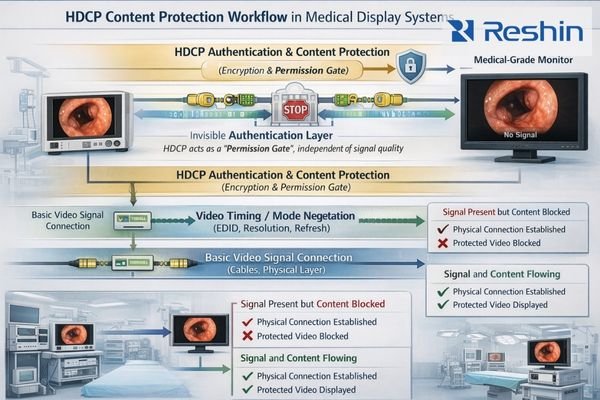
HDCP operates as an invisible authorization layer that can block video transmission even when cables and basic timing appear correct, because it behaves like a permission gate rather than a signal-quality mechanism—meaning a chain can have valid timing while content is still withheld due to failed authentication.
Content Protection Mechanism
HDCP was designed to prevent unauthorized copying of digital content by requiring every device in the video chain to authenticate and prove it can protect content appropriately. This authentication process2 can introduce failure points that are independent of basic video signal transmission.
Authentication Requirements
Each device in the signal chain must support the appropriate HDCP version and complete authentication successfully before video transmission is permitted. Failed authentication results in intentional video blocking rather than degraded signal quality, which is why the symptom is often “black screen” instead of “poor image.”
State Transition Sensitivity
HDCP authentication can be retriggered by device state changes including power cycling, input switching, or mode changes, creating opportunities for failures during normal operational transitions that may not affect unprotected content.
Can HDCP Actually Make a Medical Display Go Black?
HDCP authentication failures can create black screen conditions in medical display systems.
Yes—HDCP can cause black screens when sources detect non-compliant display paths or when authentication fails during transitions. This is most visible during source switching, wake events, mode changes, or routing through intermediate devices, because HDCP operates as a permission gate where timing can be correct while content is intentionally withheld.
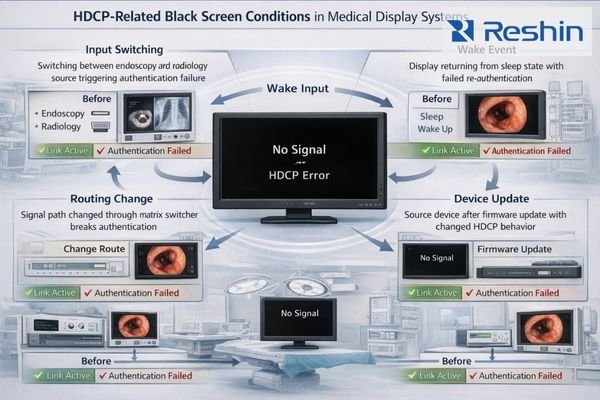
In real OR workflows, HDCP black screens often show up during transitions rather than steady-state viewing: the system may look healthy (link present, correct resolution detected, menus responsive) yet video content disappears at the moment a source switches, a device wakes, or the route changes. The key differentiator versus a pure signal failure is that the connection can still appear “up” while protected content is blocked, so blindly swapping cables or forcing resolution can waste time unless you first confirm whether HDCP gating is the real trigger.
- Link looks normal but picture is missing: resolution/refresh may still appear correct while content is withheld.
- Highly transition-dependent behavior3: blackouts correlate with switching, wake events, or routing changes more than steady viewing.
- Works direct, fails through the chain: adding a switcher/extender/capture hop often changes authentication outcomes.
- Mode changes retrigger the problem: any re-selection of output mode can retrigger authentication and expose timing sensitivity.
Where in the Signal Chain Does HDCP Fail Most Often?
Identifying common failure points helps target diagnostic efforts effectively.
HDCP failures occur most frequently in chains with intermediate devices—switchers, extenders, splitters, capture devices, routing matrices, or KVMs—because every device must support required HDCP versions and pass authentication reliably. Additional failures arise when displays expose different capabilities across inputs or sources change behavior after updates.
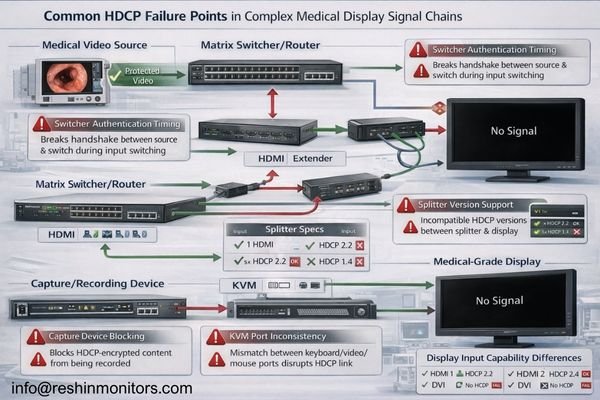
HDCP issues are most often “chain problems,” not “one device problems,” because authentication must succeed end-to-end and can fail only in certain states. The table below summarizes common hops where HDCP breaks and what symptoms typically look like in clinical environments.
| Chain Hop / Component | Why HDCP Fails Here | Typical Symptom | Fast Isolation Check |
|---|---|---|---|
| Switcher / Matrix Router | Authentication timing changes during switching; capability exposure varies by port/path | Black screen right after switching; intermittent recovery | Bypass the switcher with a direct connection; then reintroduce switching on the same path |
| Extender / Long-Run Link | Added link training or conversion step can break HDCP pass-through | Works at startup, fails after wake or re-plug; unstable re-lock | Test the same source/display with a short known-good cable; compare wake/switch behavior |
| Splitter / Distribution Device | Some devices do not fully support the required HDCP version across outputs | One output works, another blacks out; inconsistent endpoints | Test a single-output path; remove the splitter and verify repeatability |
| Capture / Recording Device | Many capture devices alter or block HDCP by design | Display blacks out when capture is inserted | Remove capture device and verify whether the same transition still fails |
| KVM / Multi-Hop Integration | EDID/HDCP handling4 can differ per port, per state, per endpoint | “Random” blackouts after switching ports | Fix port usage, validate one KVM path, then test all transitions consistently |
| Display Input Differences | Different inputs may expose different capability sets | Works on one input but not another | Move only the input (same source/cable) and compare switching/wake behavior |
| Source Updates / Mode Changes | Firmware/driver changes can alter HDCP behavior or retrigger auth more often | New black screens after updates; mode-sensitive failures | Roll back or standardize output mode; verify across boot/wake/switching |
How Can You Diagnose HDCP-Related Black Screens Quickly?
Systematic diagnosis isolates HDCP issues from traditional signal problems efficiently.
Fast diagnosis involves isolating content-protection gating from basic link failure by testing with non-protected sources, bypassing intermediate devices for direct connections, and identifying which device hop or transition causes authentication failure. Focus on whether blackouts correlate with switching, wake events, or specific workflow transitions rather than random cable testing.
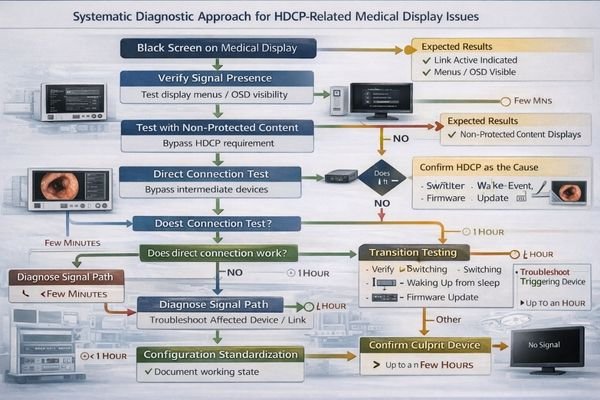
A reliable workflow is to confirm whether HDCP is even being invoked in your scenario, then reduce the chain to a known-good baseline and add complexity back one hop at a time. The objective is repeatability: the same transition should produce the same outcome so you can pinpoint the exact trigger and standardize the configuration.
Content Protection Testing
Compare behavior using known non-protected sources or test content that doesn’t require HDCP authentication. If the display is consistently stable without protection but blacks out with a specific source or workflow transition, HDCP gating becomes a strong suspect.
Chain Simplification5
Bypass intermediate devices and test direct source-to-display connections, then reintroduce devices systematically to identify exactly where authentication fails, particularly during switching, wake, and routing transitions that retrigger the authentication process.
Transition Analysis
Verify that intended output modes remain stable across state transitions, because mode changes can retrigger HDCP authentication and expose timing-dependent failures that do not appear during steady-state operation.
Choosing Medical Displays and OR Chains That Reduce HDCP Black-Screen Risk
System design and component selection can minimize HDCP-related interruptions.
Selection and integration should prioritize predictable authentication behavior across real signal chains and operational transitions.
| Clinical Role / Application | Chain Complexity | Display Requirements | Recommended Model | Key HDCP Considerations |
|---|---|---|---|---|
| Primary Surgical Display | Direct connections, minimal hops | Reliable HDCP support, stable authentication | MS430PC | Direct connection capability, consistent authentication |
| Multi-Source OR Display | Switching infrastructure required | Stable authentication across inputs | MS321PB | Multi-input HDCP consistency, reliable switching |
| Large Format Team Display | Extended cable runs, potential routing | Robust authentication over distance | MS550P | Authentication stability, extended chain support |
| Flexible OR Monitor | Variable routing configurations | Consistent HDCP across configurations | MS321PC | Flexible authentication support, stable operation |
| Compact Surgical Display | Simple chains, reliable operation | Straightforward HDCP compliance | MS322PB | Simple authentication requirements, reliable operation |
Start by clarifying whether sources output HDCP-protected content and whether intermediate devices must pass that protection, then design chains where capability exposure and authentication remain consistent across inputs and transitions.
Reduce unnecessary device hops, minimize adapters that could affect authentication, and standardize routing paths so sources consistently see the same downstream capabilities without switching behavior after reboots or input changes.
Focus on serviceability and repeatability by documenting port and path usage, validated device profiles, and power/switching sequences that maintain stable authentication, then re-verify after updates or hardware changes to prevent configuration drift.
As a medical-grade display manufacturer, Reshin focuses on repeatable input behavior and integration stability across real OR transitions (boot, wake, switching) so deployments can be standardized, validated end-to-end, and maintained consistently over the display lifecycle.
FAQ
Is HDCP always enabled on medical video sources?
Not always—HDCP is typically triggered by protected content or by how a source is configured, so some workflows never invoke it while others do during specific playback or routing scenarios.
Why does the screen go black even when resolution looks correct?
Because HDCP can block video as a permission gate even if timing is valid; the link can be present while the source withholds the image due to failed authentication.
Do switchers, extenders, or capture devices increase HDCP black-screen risk?
Yes—every device in the chain must support the required HDCP version and pass authentication reliably, and state changes during switching can break that process.
How can I confirm whether a black screen is HDCP-related?
Test with a non-protected source/content, bypass intermediates with a direct connection, and see whether the blackout correlates with switching/wake events or a specific device hop.
Can updates change HDCP behavior?
Yes—source firmware/OS/driver updates and intermediate device firmware changes can alter authentication timing or capability exposure, so re-validation is important after changes.
What is the most practical way to prevent recurring HDCP black screens?
Standardize the chain: fixed port/path usage, minimized hops, validated intermediate devices, and repeatability testing across boot/wake/switching so the same transition produces the same result.
Conclusion
HDCP adds a content protection authentication layer that operates independently of basic video signal quality, so a medical display monitor can go black when authentication fails even though timing and connections appear correct. In clinical environments, the highest risk comes from complex OR signal chains with intermediate devices and frequent state transitions that retrigger authentication under different timing conditions.
At Reshin, we approach these issues as system problems, not one-off component problems. By isolating the exact hop or transition that breaks authentication, standardizing port/path usage, and validating repeatability across switching and wake events, teams can reduce HDCP-related black screens and maintain predictable display behavior throughout the lifecycle of medical-grade display deployments.
✉️ info@reshinmonitors.com
🌐 https://reshinmonitors.com/
-
Understanding HDCP-related black screens can help you troubleshoot and fix issues effectively. ↩
-
Exploring the authentication process will provide insights into how devices verify content protection, essential for troubleshooting video issues. ↩
-
Exploring transition-dependent behavior will enhance your knowledge of video signal integrity during source changes. ↩
-
Discover the importance of EDID/HDCP handling in KVM setups to prevent display issues. ↩
-
Learning about chain simplification can help you optimize your setup and identify issues more effectively. ↩


