
In my work supporting OR installations, I’ve identified three recurring compatibility problems that create unreliable endoscopy display performance: timing mismatches, color encoding conflicts, and negotiation instability through intermediate devices.
The three most common compatibility problems when matching surgical monitors with endoscopy systems are timing mismatch (resolution/refresh/scan format), color encoding and range mismatch (RGB vs YCbCr, full vs limited), and negotiation instability through EDID/handshake behavior via intermediate devices. These issues often appear after switching or rebooting rather than during initial setup.

From my experience with surgical teams, these compatibility issues1 are rarely resolved through one-time connectivity testing because real OR workflows stress systems with repeated boot cycles, wake events, input switching, and routing changes that expose hidden fallbacks and inconsistent behavior. The fastest path to stability is treating compatibility as repeatability: identify which of the three patterns you’re seeing, confirm what mode the tower is actually outputting in the clinical path, and then validate that the same behavior returns after the transitions that happen during real cases.
Problem 1—Timing Mismatch: Resolution, Refresh Rate, and Scan Format
Timing compatibility issues are the most common source of endoscopy display problems.
Timing mismatch occurs when endoscopy towers output resolution, refresh rate, or scan formats that surgical monitors cannot lock to consistently. Setups may appear stable initially but fail after reboots or input switching when towers fall back to different timing, refresh changes, or progressive/interlaced handling differs across devices in the signal chain.

When I review failed installations, I often find that timing problems2 show up as intermittent “no signal,” longer blackouts during switching, or a silent fallback to a lower or different mode that still displays an image but changes sharpness and latency. The practical goal is to standardize one known-good timing profile for the clinical path, verify fast lock and re-lock on the exact ports used in the OR, and repeat the test across boot, wake, and switching—because that’s when timing drift and fallback behavior typically appear.
Resolution and Refresh Rate Conflicts
Endoscopy towers often support multiple output modes and may change resolution or refresh rate based on what the chain reports as supported. That creates a classic “works once” scenario: the first lock succeeds, but after a reboot or switch event the tower outputs a different timing that the monitor, extender, or switcher cannot handle consistently. Stabilization usually comes from fixing a validated mode on the tower (when possible), avoiding non-native or marginal timings for the chain, and confirming that the monitor re-acquires the same mode quickly after repeated transitions.
Progressive versus Interlaced Handling
Progressive versus interlaced differences can cause compatibility problems that only appear in certain paths or after certain transitions, especially when devices rely on auto detection. Some intermediate devices handle interlaced content differently, introduce conversion delays, or expose limited support upstream, which can trigger unexpected mode selection. The most reliable approach is to confirm what scan format the tower outputs in the clinical workflow, verify that the complete chain supports it end-to-end, and avoid mode switching between scan formats during procedures, because those transitions are a common trigger for longer blackouts.
Problem 2—Color Encoding and Range: RGB vs YCbCr, Full vs Limited
Color format mismatches create image quality degradation that may not be immediately obvious.
Color handling mismatch involves RGB vs YCbCr encoding conflicts and full vs limited range behavior differences, causing endoscopy systems to auto-select formats based on downstream capability exposure. Even with stable signals, mismatches can shift contrast, crush shadow detail, clip highlights, or change tissue tone in ways surgeons describe as "washed out" or inconsistent.

Color mismatches3 are disruptive because they often degrade the picture without breaking the link, so brief setup testing may “look fine” while longer procedures reveal that tissue tone and contrast are not consistent. The same tower can look different after a switch event if encoding or range renegotiates, and the team experiences it as “it changed during the case” even though nothing was intentionally adjusted.
Compatibility improves when the chain is designed for “same format every time”: verify what the tower outputs (RGB vs YCbCr and full vs limited), confirm the monitor interprets it predictably, and re-check after switching or routing changes that may trigger renegotiation. If you can reproduce the issue only on certain paths or only after transitions, treat it as a chain behavior problem (capability exposure and negotiation), not as a one-off image preference setting.
Problem 3—Negotiation Instability: EDID/Handshake Through Intermediate Devices
EDID and handshake behavior creates the third major compatibility challenge through complex signal chains.
Negotiation instability occurs when EDID and handshake behavior changes as signals pass through intermediate devices, causing endoscopy towers to select different output modes based on device state, power sequence, or routing selection. This leads to intermittent signal loss, longer switching blackouts, or silent fallbacks that reduce quality without obvious errors.
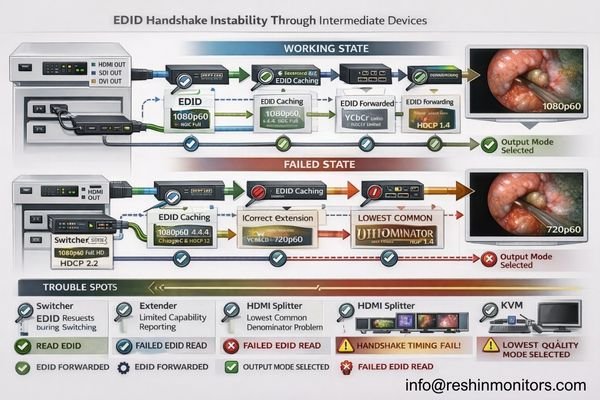
From an engineering standpoint, negotiation instability is most often a “capability exposure” problem: the tower is making a reasonable mode choice based on what it reads, but intermediate devices may cache, simplify, or alter EDID, and their behavior can change depending on state. This is why troubleshooting should focus on repeatability across real transitions and why direct-path comparisons (source-to-monitor bypassing intermediates) are so effective at isolating where behavior changes.
| Device Type | Common Negotiation Issues | Impact on Endoscopy | Prevention Strategy | Validation Method |
|---|---|---|---|---|
| Switchers | EDID caching, delayed handshake4 | Mode changes during switching | Standardized EDID management | Switching repeatability testing |
| Extenders | Capability limitation, timing drift | Fallback to lower modes | Native mode validation | End-to-end timing verification |
| Splitters | Multiple sink negotiation | Lowest common denominator | Output capability matching | Multi-output testing |
| KVMs | State-dependent behavior | Different modes per input | Consistent state management | Input switching validation |
| Capture Devices | Recording format limitations | Silent quality reduction | Bypass during surgery | Direct connection comparison |
A reliable prevention approach is system validation: standardize the clinical port/path, fix power and switching sequences, minimize unnecessary adapters, and confirm the same mode is selected repeatedly across boot, wake, and switching. If a chain can’t reproduce “same mode every time,” it’s not ready for workflow-critical use—because intermittent negotiation behavior is exactly what turns routine switching into unpredictable blackouts.
Why Do "Works in Setup" Endoscopy Chains Fail in Real OR Workflows?
Understanding why initially successful setups fail operationally helps prevent compatibility problems.
Endoscopy chains appear stable during setup because testing is typically static—single source, single path, single successful lock—while real OR workflows stress systems with repeated boot cycles, wake events, input switching, routing changes, and cable reconnection scenarios that trigger renegotiation under different conditions than initial testing.

The key difference is transition frequency5. In real rooms, devices are power-cycled, carts are moved, inputs are switched, routing paths change, and intermediate devices enter different states—each event is a chance for the system to renegotiate timing and encoding. That is why compatibility must be defined as repeatability rather than initial visibility: the same signal path should return to the same validated mode consistently, with predictable lock times and without silent parameter drift.
Dynamic Renegotiation Stress
Real workflows create repeated renegotiation events that reveal what static testing misses. A chain that locks once can still fail later if the tower chooses a different timing after a switch, if an intermediate device exposes a reduced capability set during a specific state, or if the monitor behaves differently on another input. The practical improvement is adding transition testing into acceptance: repeat boot/wake/switch cycles and confirm the same output mode, lock behavior, and visual appearance every time.
State-Dependent Device Behavior
Endoscopy towers may select different modes based on downstream state, intermediate devices can present different EDID depending on power sequence, and monitors can interpret the same source differently across inputs if configurations are not standardized. This is why a stable deployment needs documented port/path usage, consistent power/switch sequences, and a short post-change verification routine. If you can reproduce issues only after specific transitions, treat the transition as part of the test case—because that’s where the chain is actually failing.
Choosing Surgical Monitors That Reduce Endoscopy Compatibility Risk
Monitor selection should minimize compatibility problems across realistic OR workflows and signal chains.
Selection should start from understanding the endoscopy tower’s dominant output modes and the practical realities of OR signal routing requirements.
Choose monitors that accept intended timing natively, re-lock quickly after switching events, and behave predictably across different inputs so systems don’t depend on favorable negotiation outcomes during critical procedures.
| Clinical Role / Application | Compatibility Priority | Display Requirements | Recommended Model | Key Integration Factors |
|---|---|---|---|---|
| Primary Endoscopy Display | Fast re-lock, native timing | Reliable mode acceptance | MS270P | Quick switching, stable negotiation |
| Multi-Input OR Monitor | Consistent cross-input behavior | Predictable input handling | MS275PA | Input consistency, reliable switching |
| Flexible Routing Display | Stable through intermediate devices | Robust EDID handling | MS321PB | EDID stability, routing tolerance |
| Team Collaboration Screen | Large format, reliable operation | Stable large format display | MS321PC | Large format stability, consistent operation |
| High-Performance OR Display | Maximum compatibility margin | Premium compatibility features | MS430PC | Advanced compatibility, robust operation |
Selection is most effective when it is tied to the tower’s real output profile and the hospital’s real signal chain, not just maximum specifications. Prioritize displays that lock reliably to the intended timing, remain consistent across inputs, and recover predictably after switching—then protect that behavior with a clean interface strategy (adequate bandwidth margin, minimal converters/adapters) and installation practices that reduce drift (stable mounting, strain relief, consistent port usage). Plan serviceability as part of compatibility: document baseline settings, validate the exact clinical port/path (especially when routing or recording is involved), and re-verify repeatability across boot, wake, and switching after updates or replacements. As a medical-grade surgical monitor manufacturer, Reshin designs for predictable input behavior and supports integration teams with baseline documentation and validation guidance so endoscopy visualization remains stable throughout the system lifecycle.
FAQ
If the endoscopy tower shows an image, is compatibility confirmed?
Not necessarily—true compatibility means the same timing and color format lock repeatably across boot, wake, and switching, without silent fallbacks.
What timing mismatch most commonly causes "no signal" after switching?
A fallback to an unexpected resolution/refresh or a progressive/interlaced change that the chain cannot handle consistently, especially through intermediate devices.
Why does the image look "washed out" even though the signal is stable?
A full vs limited range mismatch or an RGB/YCbCr interpretation mismatch can shift contrast and tissue tone without breaking the link.
Do switchers, extenders, or recorders increase compatibility risk?
Yes—intermediate devices can change EDID exposure and handshake timing, causing different mode choices or longer blackouts during switching.
What is the best way to prevent silent fallback modes?
Standardize one validated mode profile, fix the port/path used clinically, and verify repeatability across real OR transitions rather than single-point testing.
What should be documented to keep compatibility stable over time?
The validated timing profile, encoding/range settings, exact port/path, power/switching sequence, and a quick post-change verification routine.
Conclusion
The three most common compatibility problems when matching surgical monitors with endoscopy systems—timing mismatch, color encoding conflicts, and negotiation instability—rarely appear during initial setup but emerge under the dynamic conditions of real OR workflows. These issues are best solved by defining compatibility as repeatability and validating behavior across the transitions that actually occur during clinical operations, including rebooting, waking, switching, and routing changes.
At Reshin, our approach to endoscopy compatibility emphasizes end-to-end system validation that treats timing, color format, and negotiation behavior as integrated system requirements rather than isolated device settings. By standardizing validated mode profiles, maintaining consistent encoding and range behavior, and documenting baseline configurations for lifecycle maintenance, surgical teams can achieve predictable endoscopy display performance that supports workflow demands. When acceptance testing includes realistic operational stress on the exact clinical signal path, endoscopy visualization becomes a reliable tool that supports—not complicates—surgical procedures.
✉️ info@reshinmonitors.com
🌐 https://reshinmonitors.com/
-
Understanding compatibility issues can help improve surgical workflows and enhance team efficiency. ↩
-
Understanding timing problems can help you troubleshoot and prevent issues in video installations effectively. ↩
-
Understanding color mismatches can help you improve image quality and consistency in your projects. ↩
-
Understanding EDID caching and delayed handshake can help you troubleshoot and prevent negotiation issues in video systems. ↩
-
Understanding transition frequency is crucial for ensuring device compatibility and reliability in real-world applications. ↩


