
In my work troubleshooting clinical display systems, I frequently encounter intermittent dropout issues that appear random but typically follow predictable patterns when analyzed systematically through controlled testing procedures.
Random dropouts on Medical grade monitors can be diagnosed by testing with direct, short cable connections first to isolate cable issues, then rebuilding the signal chain incrementally to identify device-specific problems. Cable issues typically show physical sensitivity and bandwidth stress patterns, while device issues correlate with specific states, negotiations, and switching events.

From my experience supporting clinical teams, most “random” dropouts become predictable once you control variables like signal mode, port selection, and state transitions. Efficient troubleshooting means isolating one variable at a time—first proving whether a minimal direct path is stable, then reintroducing complexity only as needed—so you can produce a smallest reproducible configuration that engineering teams can validate and fix.
What Counts as a "Random Dropout" in a Clinical Video Chain?
Understanding dropout definitions helps establish systematic troubleshooting approaches for clinical display issues.
In practice, random dropouts are unexpected picture loss events including brief black screens, flicker, re-lock delays, or intermittent sparkles that occur without intentional mode changes, especially clustering around transitions like boot, wake, input switching, or routing changes. The monitor remains powered and responsive while video link momentarily fails or re-trains, indicating signal-link instability rather than panel failure.
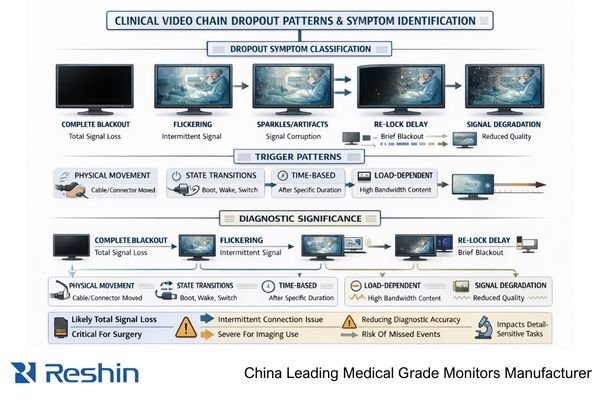
In my OR integration work at Reshin, I’ve learned that precise symptom definition is the fastest way to separate “link instability1” from true hardware failure. Capture what the user actually sees (black screen vs sparkles vs flicker), how long it lasts, whether the on-screen display still works, and whether it happens only on one input or one routing path. Those details quickly point you toward physical-layer integrity, negotiation behavior (EDID/handshake), or input-tolerance differences across ports.
Dropout Pattern Classification
A useful pattern description includes duration, frequency, and what remains active during the event. If the monitor’s OSD stays responsive while the image disappears, that often suggests a link re-lock or renegotiation rather than a power fault. Also note whether dropouts correlate with cable touch, cart movement, or connector strain relief, because “movement-triggered” issues heavily implicate the physical layer. Finally, record whether the issue is input-specific, since one port can behave differently than another even at the same nominal mode.
Clinical Context and Impact
Clinical severity depends on when and where the dropout occurs. A brief re-lock during low-risk review may be tolerable, while even a 1–2 second blackout during procedure-critical moments is operationally unacceptable. Document the workflow context (procedure vs review, switching frequency, routed chain vs direct) so troubleshooting can prioritize the most disruptive triggers first. This also helps teams define acceptance criteria: a chain that “works eventually” is not the same as a chain that returns to the same mode reliably across transitions.
Cable vs Device—Which Failure Patterns Usually Point to Each?
Different failure patterns provide diagnostic clues for distinguishing between cable and device issues.
Cable-related dropouts show sensitivity to physical disturbance, distance-related behavior, and bandwidth stress patterns, while device-side issues correlate with specific states and negotiations including post-wake dropouts, input switching problems, and routing-dependent failures that suggest link training or handshake behavior rather than physical signal degradation.
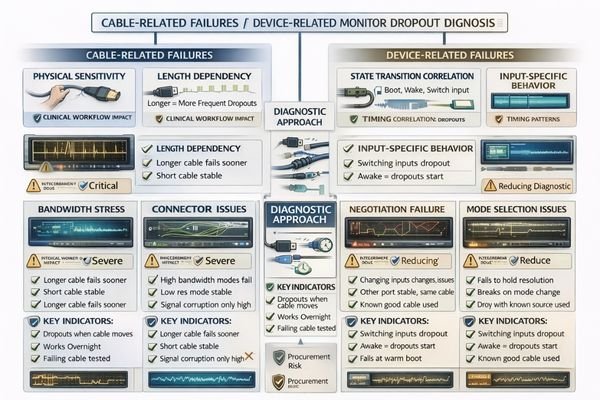
A practical way to separate cable versus device2 is to think in “fingerprints.” Cable and connector issues often reveal themselves through physical sensitivity (touch or bend triggers), length dependence (longer runs fail sooner), and bandwidth dependence (high-resolution/high-refresh modes drop while lower modes stabilize). Device-side issues more often cluster around state transitions—wake, boot, input switching, or specific routing paths—because those transitions retrigger link training and capability negotiation. The most reliable separator is repeatability: if the same cable fails across multiple known-good sources and inputs, suspect the physical layer; if failures follow a specific input, state, or chain behavior, suspect device/negotiation tolerance in that path.
How to Isolate the Root Cause Fast Without Guessing?
Systematic variable reduction provides efficient root cause isolation for dropout troubleshooting.
The fastest workflow involves reducing variables in controlled order: lock one known-good mode, test direct source-to-monitor connection on the failing input, then reintroduce intermediate devices incrementally. If dropouts disappear with short direct cables, the problem lies in the signal chain; if dropouts persist in minimal direct configurations, the issue involves monitor input compatibility or device-specific behavior.
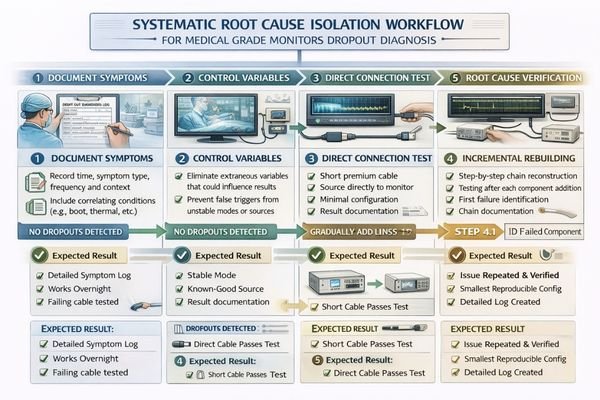
Based on the projects I support with PACS and KVM partners, the goal is to find the smallest configuration that still reproduces the dropout. Start by forcing a stable, clinically used output mode so the source does not “wander” across timing or encoding during testing. Next, test a short known-good cable3 directly into the exact monitor input that fails. If the direct path is stable, rebuild the chain one hop at a time—switcher, extender, recorder—until the first hop that reintroduces the issue appears.
If the dropout persists even in a minimal direct setup, move from “chain suspicion” to “compatibility/tolerance suspicion.” Try a second known-good source, then test an alternate stable mode, and verify whether the failure follows a specific input port or only a specific format. The value is not just fixing today’s incident—it’s producing a reproducible case with the exact port/path, mode, and trigger event so you can validate the resolution and prevent recurrence.
| Test Configuration | Dropout Behavior | Likely Root Cause | Next Diagnostic Step | Resolution Strategy |
|---|---|---|---|---|
| Direct Short Cable | No dropouts | Signal chain issue | Test intermediate devices incrementally | Replace/reconfigure chain components |
| Direct Short Cable | Dropouts persist | Monitor input issue | Test multiple sources/modes | Monitor input evaluation/replacement |
| Long Cable Direct | Dropouts appear | Cable/bandwidth issue | Test shorter cable/lower mode | Cable upgrade/mode optimization |
| Through Switcher | Dropouts on switching | Negotiation issue | Test EDID/handshake behavior | EDID management/timing optimization |
| After Wake/Boot | Dropouts on state change | Mode negotiation issue | Document mode changes | Standardize negotiation behavior |
What Settings and Signal Details Often Create "Random" Dropouts?
Many apparently random dropouts have deterministic causes related to signal parameters and negotiation behavior.
Many random dropouts are deterministic once mode and negotiation details are inspected: output timing changes across boot cycles, sources that auto-switch encoding or range, and chains where capability exposure differs by port or device state can trigger re-lock events that appear unpredictable. Bandwidth margin issues and monitor-side processing differences between inputs create additional variability.
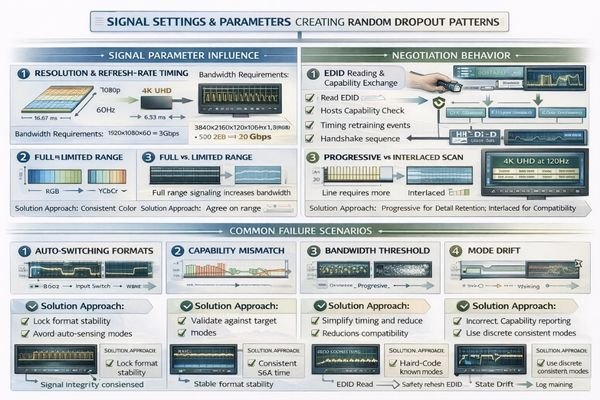
When systems drop out “randomly,” look for mode drift and negotiation churn. If the source changes output timing across boot/wake, or switches between encoding and range automatically, the monitor may re-lock even though the physical link is intact. In routed chains, capability exposure can differ by port or intermediate-device state, changing what the source thinks is supported and causing silent mode shifts. Treat the signal mode as a controlled variable: record resolution, refresh rate, scan format, and encoding/range at the exact moment the dropout occurs.
Mode and Negotiation Variables
Output timing can change across wake events, and some sources will auto-select different modes when they detect different downstream capabilities. Auto switching between RGB and component formats, or between full and limited range, can create brief blackouts during renegotiation that users interpret as “random.” These behaviors become more likely when routing paths change, when devices power up in different sequences, or when different inputs expose different capability sets. The fix is usually standardization: lock one validated mode profile and keep the port/path consistent.
Bandwidth and Processing Factors
High data-rate modes may operate near the margin of a long cable run, then fail under real-world stress—cart movement, connector strain, temperature changes, or EMI—after passing an initial bench test. Separately, monitor-side behaviors can vary by input: scaling/processing settings, auto input detection, and internal firmware paths can make one port stable and another fragile even at the same nominal resolution. Confirm stability at the actual clinical mode, then verify repeatability across boot, wake, and switching. Contact us at info@reshinmonitors.com if you need assistance building repeatable dropout-diagnosis procedures for Medical grade monitors4 in your clinical environment.
Which Medical-Grade Monitors Help Reduce Dropout Risk in Real Deployments?
Monitor selection should prioritize predictable behavior and signal chain compatibility over peak specifications.
Selection should start from actual signal environment requirements rather than theoretical performance maximums.
Start selection based on signal environment realities including routing chains, switching frequency, and dominant output modes used clinically rather than maximum specification capabilities.
| Clinical Role / Application | Dropout Risk Factors | Selection Priorities | Recommended Model | Risk Reduction Features |
|---|---|---|---|---|
| Premium Surgical Display | Complex OR signal chains | Reliable switching, robust negotiation | MS430PC | Advanced signal processing, stable re-lock |
| Surgical Team Display | Frequent input switching | Fast re-lock, consistent modes | MS321PB | Predictable switching behavior, reliable operation |
| Surgical Visualization | Multi-source environments | Stable multi-input operation | MS322PB | Multi-input stability, consistent performance |
| Advanced Diagnostic | High-resolution requirements | Stable high-bandwidth operation | MD33G | Robust high-resolution handling, stable modes |
| Clinical Diagnostic | Demanding clinical workflows | Reliable clinical operation | MD45C | Clinical reliability, predictable behavior |
Prioritize displays that behave predictably across state transitions—cold boot, wake, and input switching—because repeatable re-lock and stable mode retention reduce dropout recurrence after installation. Match size and resolution to viewing distance so you avoid avoidable scaling that complicates timing and increases negotiation churn. Validate the intended interfaces and the complete signal chain as an acceptance item, then lock baseline settings: approved ports, cable rules, picture mode, and any no-scaling configuration required for the workflow. As a manufacturer, we focus on supporting these baseline-and-restore practices so service events can return systems to the same validated behavior rather than forcing re-tuning under pressure.
FAQ
If the screen goes black for 1–2 seconds and then returns, is that more likely cable or negotiation?
Short blackouts that recover by themselves often indicate re-lock or renegotiation; confirm by testing a direct short cable path and checking whether the event correlates with switching, wake, or routing state changes.
Why does touching the cable sometimes trigger dropouts immediately?
That pattern strongly suggests a physical-layer issue such as a marginal connector, poor strain relief, or a cable that’s operating with too little bandwidth margin for the mode in use.
Can the same cable be "fine" at lower resolution but fail at higher modes?
Yes. Higher-bandwidth modes reduce margin and can expose attenuation or interference issues; proving stability at the clinical target mode is more meaningful than "it works at 1080p."
If direct connection is stable but the full chain drops out, what should I check first?
Reintroduce devices one hop at a time and watch for the first hop that reproduces the issue; intermediate devices can change EDID exposure or timing behavior, especially during switching.
Do firmware or OS/GPU updates commonly reintroduce dropouts?
They can—updates may change output timing selection, scaling, or negotiation behavior; treat the stable mode as a baseline and re-verify after updates.
What evidence should I document so the issue can be fixed quickly?
Record the exact port/path, mode (resolution/refresh/scan), trigger event (boot/wake/switch), cable type/length, and whether a short direct test reproduces it—this creates a usable engineering reproduction case.
Conclusion
Random dropouts are rarely truly random when analyzed systematically through controlled variable reduction. Most issues become predictable once signal modes, port selections, and state transitions are controlled and documented, and the fastest path to clarity is proving whether a short direct connection is stable before rebuilding the chain incrementally. That approach identifies the smallest reproducing configuration, which is the foundation for reliable fixes and repeatable validation.
At Reshin, we treat dropout prevention as a system-level requirement for Medical grade monitors, not a one-time installation outcome. By documenting baseline configurations, standardizing known-good modes and port/path usage, and validating behavior across boot, wake, and switching, clinical teams can reduce urgent black-screen incidents and maintain consistent performance across maintenance and service events. When troubleshooting produces reproducible evidence—and deployments include restoreable baselines—dropout risk becomes manageable across the full equipment lifecycle.
✉️ info@reshinmonitors.com
🌐 https://reshinmonitors.com/
-
Understanding link instability can help you identify and resolve hardware issues effectively. ↩
-
Understanding the distinctions can help troubleshoot and optimize your electronic setups effectively.. ↩
-
Exploring the concept of known-good cables can enhance your troubleshooting skills, ensuring reliable connections in your setups. ↩
-
Exploring the features of Medical grade monitors can enhance your knowledge for better clinical applications. ↩


