
Forced downgrade from a 4K30 endoscopy output is usually not a “monitor spec” problem—it’s a signal-chain negotiation problem. In real OR deployments, the displayed mode is determined by what the source believes the entire chain can support, and one weak link (routing hardware, extender, capture box, cable, or EDID behavior) can pull everything down to 1080p.
When endoscopy systems output 4K30, surgical monitors can avoid forced downgrade by stabilizing the negotiated mode across the full chain: lock one known-good 4K30 format (resolution + refresh + chroma + bit depth + timing), manage EDID/handshake behavior across routing devices, and validate switching, recording on/off, and power-cycle responses so the system does not fall back to a lower mode. This article provides a practical downgrade “cause map,” a pre-go-live stress test routine, and a baseline package you can reuse across rooms.

Successful 4K301 implementation treats the source, routing devices, cables, and monitor as a single system. “Lowest common denominator” behavior is common: if any hop cannot reliably sustain the exact 4K30 format being used, the chain often renegotiates to a safer mode. The goal is repeatability—meaning the system holds the same 4K30 mode across real clinical events like source switching, overlay/menu changes, recording enable/disable, cable reconnection, and power cycling.
Why does a 4K30 endoscopy output get downgraded in real OR signal chains?
Forced downgrade typically occurs during signal chain negotiation when devices cannot maintain shared compatibility modes.
Forced downgrade usually happens because endoscopy sources, routing devices, cables, and monitors negotiate shared "lowest common denominator" modes where any weak link can push the chain down to 1080p. In practical OR setups, 4K30 signals may pass through splitters, matrix switchers, KVM extenders, or capture boxes that don’t fully support exact timing, chroma format, bandwidth, or HDCP behaviors, triggering fallback modes even when every device claims "4K capable."

Most downgrades are triggered by predictable weak-link patterns: an upstream device advertises a simplified EDID, a specific input port has reduced bandwidth or limited accepted formats, long cable runs reduce signal margin, or recording/overlay features change what the source outputs. A direct-connect test may show 4K30, but once the real routing path is used—especially with switching and recording enabled—the negotiated mode can shift. Treat downgrade as a chain stability issue: confirm what the source outputs when it sees the effective EDID of the assembled chain, and verify the chain holds that mode during the exact events that occur in clinical use.
Device Compatibility Mismatches
Mismatches in supported EDID2 profiles, limited bandwidth on certain inputs, timing support gaps, or unstable link training over long cables can trigger fallback modes because the chain cannot sustain a stable negotiation. In practice, a single “4K-capable” box that only supports certain 4K30 combinations (or only on certain ports) is enough to pull the chain down.
Signal Processing Interventions
Intermediate devices including splitters, matrix switchers, extenders, and capture/recording systems can introduce resampling, buffering, or mode changes that alter the original 4K30 characteristics. Even when a device passes “4K,” it may not pass the exact chroma/bit-depth/timing combination your source is outputting, causing renegotiation to a lower, more widely supported format.
Which signal specs matter most to keep 4K30 stable: bandwidth, chroma, and timing?
Maintaining 4K30 stability requires precise alignment of resolution, refresh rate, chroma subsampling, and bit depth across all signal chain components.
Keeping 4K30 stable depends on whether every hop in the chain supports the exact combination of resolution, refresh, chroma subsampling, and bit depth without silently switching to lower modes. Many endoscopy sources output 4K30 in specific formats like 4:2:2 or 4:2:0, and some switchers or extenders only accept certain chroma/bit-depth combinations at 4K, while timing details determine whether devices accept 3840×2160 at 30 Hz in different standards.
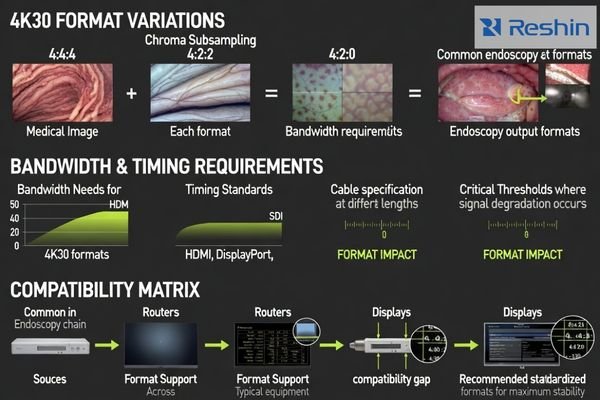
“4K30” is not a single universal setting. What matters is the exact format package: resolution + refresh + chroma subsampling + bit depth + timing standard. A chain can look compatible on paper and still fail if one device only supports 4K30 at a different chroma/bit depth than the source produces, or if it accepts one timing variant but not another. This is why standardizing one known-good mode (the one your chain can actually sustain) is more effective than chasing maximum specs.
Monitor input capabilities and EDID advertisements3 should align with what the source can reliably output and what intermediate devices can pass without conversion. If the chain is sensitive, “less conversion” is usually safer: keep formats consistent, avoid unnecessary processing, and verify that the selected mode stays locked across reconnects, switching, and power events.
How do EDID/handshake and HDCP behaviors trigger "lowest-mode" fallback?
EDID and handshake behaviors determine what sources believe display chains can support, with inconsistencies causing fallback to safer modes.
EDID and handshake behavior determine what sources believe display chains can support, and small inconsistencies can cause sources to choose safer, lower-resolution modes. In multi-device OR chains, effective EDID may come from switchers, splitters, or capture devices rather than monitors, often presenting simplified or generic EDIDs. If chains don’t advertise exact 4K30 modes sources prefer, systems may drop to 1080p to preserve stability.
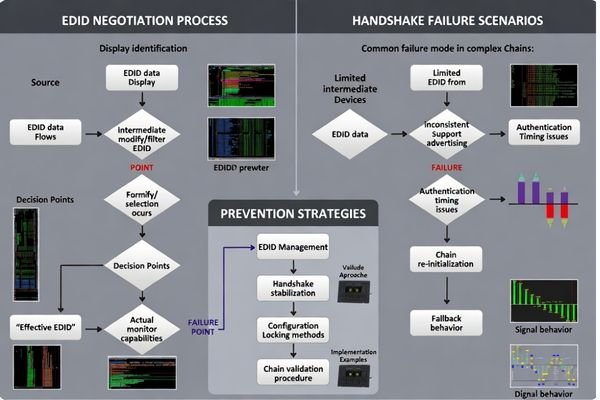
The critical detail in the OR is that the source often does not “see” the monitor directly. It sees the EDID and handshake behavior of the device closest to it—often a switcher, extender, or capture box—so the chain’s effective EDID can be different from the monitor’s true capabilities. If that effective EDID is too generic, incomplete, or inconsistent across rooms, the source may choose 1080p to stay safe. Conversely, if the EDID advertises a mode that downstream devices can’t truly sustain, the chain can become unstable and fall back.
HDCP behavior can also affect stability in some configurations or policies, especially after switching inputs. If a device mishandles authentication or resets protection state during switching, the source may blank, flicker, or renegotiate to a safer mode. The takeaway is not “HDCP is always the cause,” but that handshake state changes (including HDCP where present) must be validated under real switching and power-cycle conditions.
| Fallback Trigger | Technical Cause | Chain Impact | Prevention Strategy | Validation Method |
|---|---|---|---|---|
| EDID Mismatch | Missing/incorrect 4K30 format in effective EDID | Source chooses safe mode | Standardize EDID in chain | Verify advertised EDID in path |
| Handshake Failure | Link training instability / marginal signal | Renegotiation to lower resolution | Improve margin, stabilize ports | Switching + power-cycle stress test |
| HDCP State Issues | Authentication resets after switching (where applicable) | Blank/flicker or fallback | Align device policies, stabilize chain | Switch-input repeatability testing |
| Bandwidth Limits4 | Port/cable/device can’t sustain format | Automatic downgrade | Confirm port capability end-to-end | Worst-path cable validation |
| Timing Incompatibility | Unsupported timing variant | Format rejection | Lock to known-good timing | Source switching verification |
Monitors cannot fix every chain issue independently, but selecting monitors with predictable handshake behavior, using EDID management where appropriate, and validating behavior across switching and power events give you practical control over surprise downgrades. If you can’t keep EDID consistent, you can’t keep 4K30 consistent.
What validation steps catch downgrades before go-live in endoscopy rooms?
Effective validation reproduces real conditions that cause downgrades through systematic stress testing of signal chains.
Effective validation reproduces real conditions causing downgrades by switching sources, enabling recording, changing routing paths, reconnecting cables, and power cycling devices in clinical use order. Document intended locked modes, confirm actual source outputs, stress handshakes through rapid switching and overlay toggling, test long-run stability through typical case durations, and record baseline packages preventing future fallback behavior.

To catch downgrades early, validation must mirror what the OR actually does. A practical minimum sequence is: confirm the delivered mode through the full routing path, stress switching and overlays5, test recording on/off, run long-duration stability, then record the baseline package so it can be reproduced later. This approach prevents a common go-live surprise: everything looks fine in a quiet setup, then resolution drops during active switching or recording.
Handshake Stress Testing
Stress handshake behavior by switching inputs rapidly, toggling overlays and menus, starting and stopping recording or streaming functions, and verifying that monitors return to the same 4K30 mode without flicker or resolution drops. Repeat tests across the “worst path” routing option and the longest intended cable runs, because marginal margin is a frequent trigger for renegotiation.
Long-Run Stability Assessment
Test extended stability by maintaining system activity through warm-up periods and typical case durations, including worst-case cable lengths and the exact routing hardware used in deployment. Include at least one full power-cycle sequence that matches real operations (order matters), and confirm that the chain returns to the same mode after recovery. Document what you tested and what passed, because updates and replacements often reintroduce fallback behavior if baselines are not controlled.
Choosing surgical monitors that help maintain 4K30 endoscopy output without downgrade
Monitor selection should focus on creating deterministic 4K30 pipelines rather than assuming generic 4K support provides adequate stability.
Effective selection strategies treat monitors as components of complete signal chains rather than isolated display devices.
To avoid forced downgrade, select and configure monitors as parts of deterministic 4K30 pipelines rather than assuming generic "4K support" provides sufficient compatibility.
| Clinical Role / Application | Usage Pattern | Display Requirements | Recommended Model | Key Integration Considerations |
|---|---|---|---|---|
| Primary Endoscopy Display | Direct surgeon viewing | Stable 4K30, predictable switching | MS270P | Direct signal path, stable handshakes |
| Assistant Visualization | Team coordination support | Reliable mode retention | MS275PA | Switching repeatability, EDID consistency |
| Multi-Input Flexibility | Complex routing scenarios | Stable behavior across inputs | MS321PB | Chain validation, configuration control |
| Advanced 4K Workflows | Multi-device chain integration | Deterministic signal handling | MS321PC | Validate delivered format, lock modes |
| Team Display Platform | Shared surgical visualization | Consistent 4K stability | MS322PB | Uniformity, repeatable setup |
To avoid forced downgrade, build a deterministic 4K30 pipeline and select the monitor to support that stability rather than chasing headline specs. Start by confirming the exact delivered 4K30 format from your endoscopy system through the intended routing path, then ensure the monitor input can accept that format with margin for cable length and switching. Plan EDID strategy early because in multi-device chains the monitor’s capabilities may be hidden behind switchers or extenders; consistent EDID management across rooms often matters more than panel labels. Finally, treat lifecycle control as part of selection: lock validated input/picture settings, document firmware and acceptance checks, and ensure replacements can replicate the same behavior without triggering revalidation delays.
FAQ
If every device says "4K," why do we still end up at 1080p?
Because “4K” can mean different timings, chroma, and bit depth support, and the chain negotiates a shared mode; one weak link or an effective-EDID mismatch can force fallback to 1080p.
Does cable length really matter for 4K30 stability?
Yes—marginal signal integrity can cause link training issues and intermittent handshakes, which often triggers renegotiation to a lower mode.
Should we force the monitor to 4K30 using EDID management?
It can help, but only if every device in the path truly supports that exact 4K30 format; forcing a mode that the chain can’t sustain may increase instability, so validate first.
Why does the resolution drop after switching inputs?
Switching can reset handshake state (and HDCP where applicable), causing the source to re-read the effective EDID and choose a safer mode if negotiation is inconsistent.
Do capture/recording devices commonly cause downgrades?
They can—some advertise limited EDID modes or resample/buffer the signal; test with recording enabled and disabled because behavior often changes.
What should be documented to prevent the issue from returning later?
Document the locked output mode, routing diagram, EDID configuration, firmware versions, input settings, and acceptance checks across switching and power cycles.
Conclusion
Avoiding forced downgrade from 4K30 endoscopy output is primarily a signal-chain stability problem: mode negotiation, effective EDID/handshake behavior, and true format/bandwidth compatibility across every device in the path. The most reliable approach is to standardize one known-good 4K30 format, minimize unnecessary conversions, validate switching/recording/power-cycle behavior, and select monitors that behave predictably during handshakes within the real routing environment.
Our approach at Reshin emphasizes treating the routing path and monitor as a single validated system, then locking and documenting a baseline package—delivered mode, EDID strategy, versions, input settings, and repeatability checks—so updates and replacements do not reintroduce fallback to 1080p. With deterministic configuration and realistic stress testing, OR teams can protect workflow repeatability for live viewing, teaching, and recording while maintaining stable 4K30 performance.
✉️ info@reshinmonitors.com
🌐 https://reshinmonitors.com/
-
Understanding 4K30 can enhance your knowledge of video quality and its applications in various fields. ↩
-
Understanding EDID is crucial for ensuring device compatibility and avoiding downgrades in video quality. ↩
-
Exploring EDID advertisements will help you grasp how devices communicate their capabilities, ensuring better setup and performance. ↩
-
Understanding bandwidth limits is essential for ensuring your devices can handle the desired video formats without downgrades. ↩
-
Understanding stress switching and overlays can help ensure your system performs reliably under pressure, preventing unexpected downgrades. ↩


