
In many hybrid OR deployments, intraoperative 3D imaging creates uniquely demanding display requirements because decisions happen immediately, under time pressure, with multiple clinicians relying on the same visual evidence across different viewpoints and devices.
Intraoperative 3D imaging (3D fluoro/CT) needs displays that keep low-contrast cues visible for navigation, render fine detail without added artifacts during interaction, and stay consistent across sources and viewing positions. Priorities include stable grayscale/brightness behavior, restrained processing (no halos or over-sharpening), reliable tone mapping, and fast, predictable source switching.
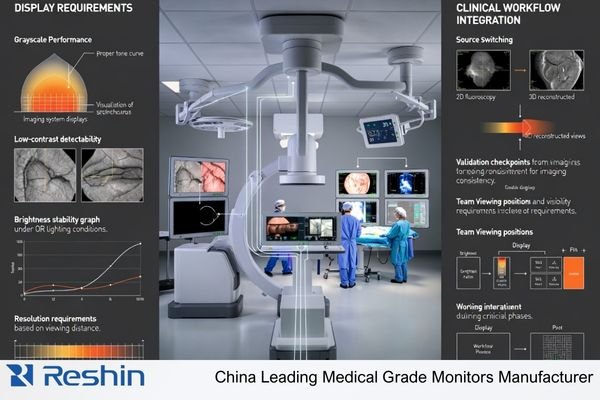
Successful 3D imaging display1 implementations must handle frequent switching between live 2D fluoro, reconstructed 3D volumes, and reference images while keeping appearance consistent enough for quick comparisons. That consistency is not cosmetic: it supports confidence when confirming device position, checking alignment, and deciding whether another scan is necessary. A practical approach is to treat the display as part of the imaging chain, verifying not only panel performance but also routing, scaling, and switching behavior that can alter what clinicians see.
Why do intraoperative 3D imaging workflows raise the bar for displays?
Intraoperative 3D imaging creates exceptional display performance demands due to real-time clinical decision-making requirements.
Intraoperative 3D imaging supports on-table decisions while teams switch between live 2D fluoro, reconstructed 3D views, and reference images. Displays must preserve subtle contrast for navigation, keep fine detail readable during zoom/pan/rotation, and present images consistently across sources and viewing positions. Inconsistency can slow decisions and increase verification steps.
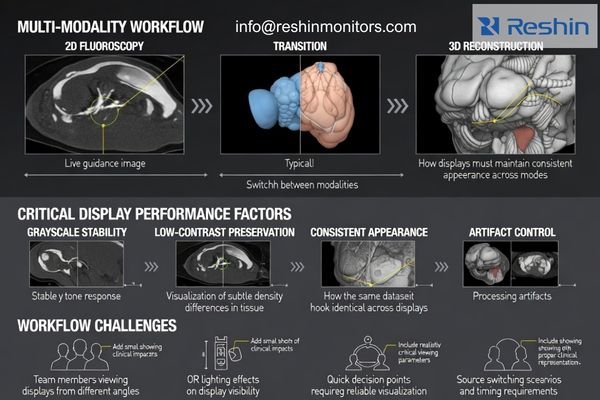
Because surgical teams split attention between the sterile field and multiple screens, small differences in brightness, tone response, or switching behavior become workflow issues. The goal is not “prettier” images but dependable perception: the same dataset should look the same each time it appears, whether it is routed directly from an imaging console or through video distribution equipment. When consistency is achieved, the team can focus on anatomy and device position rather than questioning the display.
Multi-Modal Visualization Complexity
Intraoperative 3D workflows require displays that can transition between different imaging modalities while maintaining consistent visual characteristics, because teams rely on rapid comparison between live guidance images and reconstructed volumes for real-time navigation decisions. The more often clinicians compare two sources side-by-side, the more important it becomes that grayscale behavior, brightness, and scaling look aligned so differences are interpreted as clinical, not as display variance. This is especially relevant when rotating volumes, scrolling slices, or adjusting window/level, where unstable tone mapping or edge artifacts can distract and reduce confidence.
Real-Time Decision Support Requirements
The high-stakes nature of intraoperative imaging2 demands displays that preserve clinical information without introducing processing artifacts or timing inconsistencies that could affect surgical team confidence during device positioning and anatomical navigation phases of complex procedures. In practice, this means prioritizing predictable behavior under real-world actions: quick source changes, frequent zooming, and continuous updates from the imaging system. If the display or the signal chain adds delays, blanking, or inconsistent rendering, teams may compensate by moving more slowly or repeating checks, which can extend procedure time.
What image quality characteristics matter most for 3D fluoro/CT?
Image quality requirements for 3D fluoro/CT extend beyond simple sharpness to encompass depth perception and contrast stability.
For 3D fluoro/CT, sharpness alone is not enough. Displays should support subtle density differences in reconstructed volumes while remaining dependable for live guidance. Key needs are adequate pixel density for viewing distance, consistent grayscale and luminance so low-contrast detail stays visible, and controlled processing that avoids halos, over-sharpening, or aggressive noise reduction.
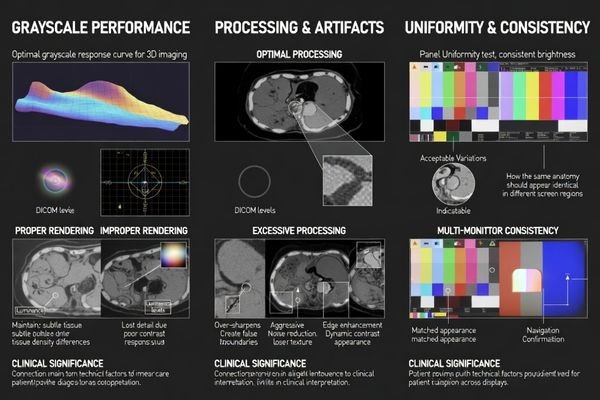
Successful 3D imaging requires panel uniformity3 and stable tone mapping so clinicians can trust that changes they perceive come from the dataset, not from the screen. Uniformity matters during wide-field viewing as well as when clinicians focus on small regions, because the same density should not appear different depending on where it lands on the panel. Likewise, processing should be conservative: edge enhancement can create false boundaries, and heavy smoothing can suppress clinically relevant texture. Consistency across panels is also important when two displays are compared during confirmation steps.
Because 3D visualization often relies on window/level adjustments and rapid viewpoint changes, displays must remain stable during interaction. Window/level adjustments should not cause distracting banding, flicker, or sudden tone shifts, and rotating or scrolling through slices should preserve readable detail without motion artifacts that feel like anatomy is changing. A good validation practice is to test representative datasets through the full routing chain and confirm that interactive operations remain smooth and visually consistent at typical working distances.
How do latency, refresh behavior, and synchronization affect intraoperative decisions?
Latency and synchronization performance directly impact surgical workflow efficiency and clinical confidence during navigation procedures.
During navigation and confirmation, clinicians expect on-screen motion to match hand movement and device response. Excess latency or inconsistent frame delivery breaks that link and encourages slower maneuvers. Displays should switch sources predictably, avoid long blanking/handshakes, and maintain stable motion portrayal so slice scrolling or volume rotation does not introduce judder that mimics anatomical change.
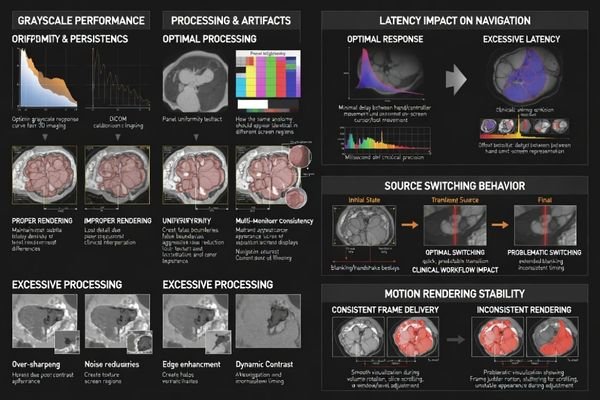
Workflow disruptions in hybrid ORs often trace back to the signal chain rather than the panel alone. Extra scaling, format conversion, or capture/encode stages can add delay and sometimes alter contrast, which becomes obvious when teams compare two monitors side-by-side. The most effective strategy is to reduce unnecessary processing stages, verify that switchers and extenders handle the chosen resolution and refresh modes predictably, and confirm that the display does not add avoidable smoothing or motion effects that interfere with rapid interpretation.
| Performance Factor | Clinical Impact | Workflow Risk | Technical Requirement | Validation Method |
|---|---|---|---|---|
| Input Latency4 | Hand-eye coordination disruption | Slower, cautious maneuvers | Minimize end-to-end delay (system-validated) | Coordinated motion-response check |
| Source Switching | Workflow interruption | Navigation discontinuity | Predictable switching with minimal blanking | Timed switching trials (repeatable) |
| Frame Consistency | Motion perception accuracy | False anatomical appearance | Stable frame delivery in use-case modes | Slice-scroll and rotation smoothness test |
| Signal Processing | Contrast preservation | Clinical interpretation errors | Avoid unnecessary scaling/conversion | Side-by-side appearance comparison |
| Synchronization | Multi-display coordination | Team communication issues | Consistent timing across key screens | Cross-monitor timing/appearance check |
Treat timing as an end-to-end property of the chain, not a single device spec. Test switching, slice scrolling, and 3D rotation through the actual routing path, then document settings so the same behavior can be reproduced after maintenance or upgrades.
What physical and safety requirements are unique to the OR and hybrid rooms?
OR and hybrid room environments create specific physical and safety demands that influence display design and integration.
In OR environments, displays are part of infection-control and equipment-safety systems. They must remain legible under bright surgical lighting, resist reflections that hide low-contrast detail, and stay readable across wide viewing angles. Sealed, easy-to-clean housings support disinfection routines, while mounting compatibility and cable management reduce trip hazards and help keep sterile areas organized.
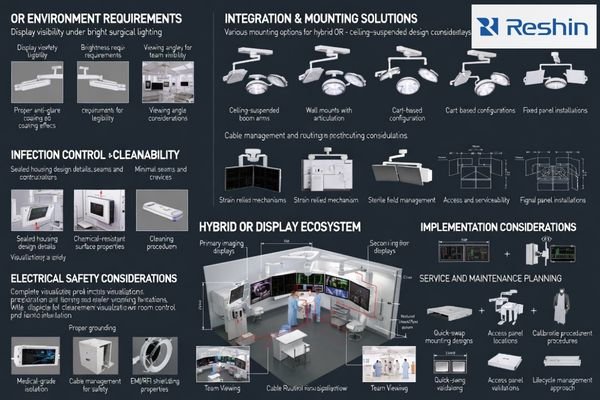
Electrical safety, reliability, and serviceability are critical because downtime can disrupt scheduled procedures. Beyond basic durability, consider how the display integrates with existing carts, booms, and video routing, and whether service access allows quick replacement without major reconfiguration. Hybrid rooms also evolve: when imaging systems, switchers, or workstations change, the display setup should support re-validation through documented settings, consistent routing, and straightforward checks that confirm image appearance and switching behavior remain stable.
Environmental Durability Standards5
OR environments require displays with sealed housings and chemical-resistant surfaces that can withstand frequent disinfection while maintaining image quality and electrical safety throughout extended operational lifespans in demanding clinical environments. In practice, this includes minimizing seams and exposed edges, ensuring the front surface tolerates common cleaning agents, and maintaining stable performance over long operating hours. Durability should be evaluated alongside visibility: glare control, stable brightness behavior, and wide-angle readability all contribute to reliable teamwork when clinicians view from different positions around the table.
Integration and Serviceability Planning
Hybrid room displays must accommodate evolving equipment configurations through compatible mounting systems and accessible service procedures that minimize downtime during maintenance or upgrades that could affect surgical scheduling and patient care continuity. Plan the installation around cable routing, strain relief, and connector access so changes do not require major teardown. If your team needs help evaluating physical and safety requirements for specific intraoperative 3D imaging display installations in OR or hybrid room environments, contact us for guidance.
How to choose medical-grade displays for intraoperative 3D fluoro/CT?
Display selection for intraoperative 3D fluoro/CT requires systematic workflow analysis and technical validation.
Map who views which content (live 2D guidance versus 3D review) and from what distance, then size and resolve each screen accordingly. Prioritize stable grayscale behavior and uniformity for low-contrast cues, confirm clean source switching through the real routing chain, and validate cleanability, mounting, and service access for OR operations.
| Clinical Role / Application | Usage Pattern | Display Requirements | Recommended Model | Key Integration Considerations |
|---|---|---|---|---|
| Cathlab 3D Navigation | Real-time vascular guidance | High contrast, minimal latency | MS551 | Direct signal processing, stable grayscale |
| Large Format 3D Visualization | Team coordination platform | Extended viewing capability | MS550P | Wide viewing angles, consistent uniformity |
| Multi-Modal OR Integration | Hybrid surgical support | Flexible input compatibility | MS431P | Multiple interface support, reliable switching |
| Advanced 3D Workstation | Complex reconstruction display | Superior image processing | MS430PC | Enhanced processing control, precise calibration |
| Precision 3D Navigation | High-magnification procedures | Optimal detail preservation | MS321PC | Fine-tuned grayscale response, artifact control |
Verify inputs, routing, and scaling behavior using representative cases so appearance and switching remain consistent in daily use.
Maintain configuration control and repeatable checks so performance stays stable after room changes, servicing, or upgrades.
FAQ
Is a "3D-ready" display required for intraoperative 3D fluoro/CT?
In most intraoperative settings, the key requirement is accurate and stable presentation of the 2D/3D image output from the imaging system, not a special "3D-ready" feature; what matters more is consistent contrast, uniformity, and predictable behavior during source switching and interactive viewing.
How important is brightness compared with contrast performance?
Brightness helps maintain legibility under surgical lighting, but contrast stability and grayscale behavior often dominate clinical confidence in low-contrast structures; a well-balanced choice keeps images readable without washing out subtle detail.
Will consumer 4K monitors work if the picture looks sharp?
Sharpness alone is not enough; OR use adds requirements around cleanability, reliability, consistent tone response, predictable signal behavior, and safe mounting/serviceability, which are often the deciding factors beyond resolution.
What causes motion discomfort or "unstable" viewing when rotating 3D volumes?
Common culprits include inconsistent frame delivery, aggressive internal processing, or added latency from scaling/conversion in the signal chain; reducing unnecessary processing and keeping switching/scaling controlled typically improves stability.
Do we need identical displays across the room?
For multi-screen comparison and team communication, matching key characteristics (size class, tone response, and source behavior) reduces confusion; full identity is ideal but not always necessary if roles and viewing needs differ.
What should we think about validation and long-term consistency?
Treat the display setup as part of the imaging system configuration: keep routing and settings controlled, document changes, and use repeatable checks so image appearance remains consistent after maintenance, upgrades, or room reconfiguration.
Conclusion
Intraoperative 3D fluoro/CT pushes displays to be clinically dependable under pressure through stable contrast and uniformity for subtle cues, predictable timing and source behavior for uninterrupted workflow, and OR-ready physical design for cleaning, mounting, and reliability requirements. The most effective selection approach starts from understanding who views which content and when, then aligns image quality behavior and signal-chain design to minimize distortion and delay while ensuring systems can be maintained and validated throughout operational lifecycles. When these elements are properly integrated, displays become enabling components of intraoperative 3D workflows rather than hidden sources of variability that could compromise clinical decision-making.
Our engineering approach at Reshin emphasizes systematic workflow analysis combined with technical validation that addresses the unique demands of hybrid OR environments where display performance directly impacts surgical confidence and patient safety outcomes. When displays successfully preserve clinical information content while maintaining consistent behavior across complex multi-modal imaging workflows, healthcare teams can maximize the benefits of sophisticated 3D imaging technologies while ensuring the reliability and precision that intraoperative procedures demand throughout challenging cases requiring sustained visual accuracy and real-time decision-making capabilities.
✉️ info@reshinmonitors.com
🌐 https://reshinmonitors.com/
-
Explore this link to understand effective strategies for implementing 3D imaging displays in clinical settings. ↩
-
Explore this link to understand the latest techniques and technologies that enhance surgical outcomes through effective imaging. ↩
-
Understanding panel uniformity is crucial for ensuring accurate 3D imaging, which directly impacts clinical decisions. ↩
-
Exploring input latency will reveal its critical role in maintaining hand-eye coordination and efficient surgical maneuvers. ↩
-
Exploring these standards helps ensure that medical displays can withstand harsh conditions, enhancing reliability and performance. ↩


