As an engineer supporting ASC equipment installations, I see surgical monitors create outsized maintenance challenges because tight schedules, limited technical support, and high room utilization make every minute of downtime expensive.
Ambulatory Surgery Centers should choose surgical monitors by prioritizing predictable signal behavior, OR-ready cleanability with sealed housings, robust mounting with strain relief, and fast serviceability. In ASC environments, time-to-restore is the critical KPI: small issues like intermittent video, connector looseness, or cleaning-related wear can quickly cascade into delayed cases, rescheduled lists, and lost revenue.
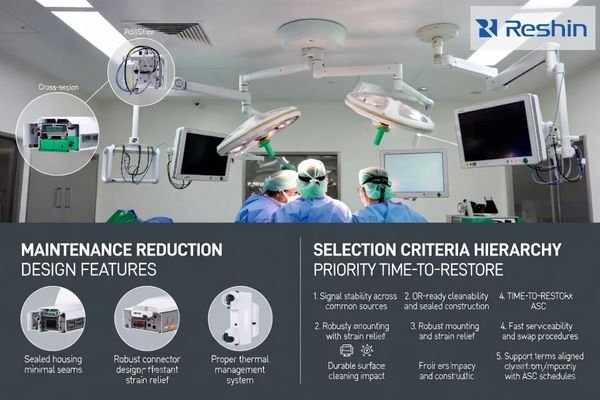
What consistently works in ASCs is treating the monitor as part of a complete video chain and operational routine, not a standalone screen. The highest service burden usually comes from repeatable stressors—wipe-down cycles, boom movement, cable handling, and source switching through extenders or switchers—so the selection process should focus on reducing those stressors and making troubleshooting and replacement1 predictable when something inevitably goes wrong.
Why is maintenance a bigger pain point for ASCs than hospitals?
ASCs face unique operational constraints that amplify the impact of monitor maintenance issues on clinical workflow and revenue.
Ambulatory Surgery Centers run on tight schedules with lean staffing and high utilization, so even small monitor issues can cascade into delays and lost revenue. Unlike hospitals with on-site biomed teams and spare inventory, ASCs often rely on limited support windows, making time-to-restore the key metric. Monitors also face heavy cleaning, cable handling, and frequent repositioning.
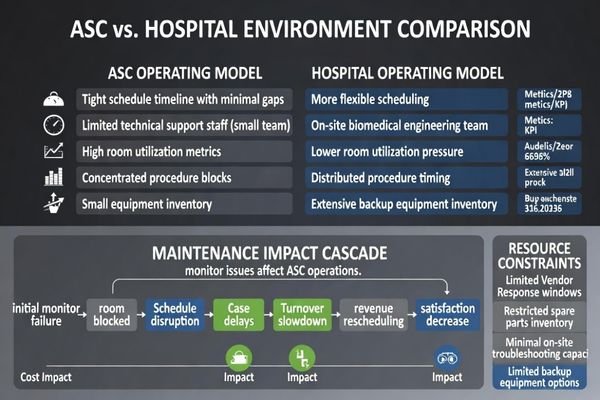
The operational math is simple: if a room is blocked, the schedule shifts, turnover slows, and downstream cases become harder to recover. That’s why I evaluate monitor choices by the failure modes most likely to stop cases—signal instability, cleaning-related wear, and mounting/connector problems—then design the setup so a staff member can quickly isolate whether the issue is the monitor, the cable, or the upstream source path.
Resource and Support Limitations
ASCs typically lack the extensive biomedical engineering departments and spare equipment inventory that large hospitals maintain, so vendor response time and on-site troubleshooting capacity are limited. A monitor failure2 that would be a short swap in a hospital can become a multi-case disruption in an ASC if spares, mounts, and configurations are not standardized. Designing for fast triage—clear connection access, simple swap steps, and predictable behavior after replacement—reduces the operational impact even when support resources are constrained.
High-Utilization Operational Demands
The rapid turnover and intensive daily usage patterns in ASC environments accelerate wear: repeated wipe-downs, frequent cable movement, and constant viewing-position adjustments. Over time, these stresses surface as intermittent faults that are hard to reproduce—dropouts that appear only when the boom arm moves, or readability issues that worsen after months of cleaning. The maintenance-reduction goal is to lower the probability of these recurring faults and make them easier to isolate when they do occur.
What are the most common surgical monitor failure modes that drive service calls?
Common ASC monitor failures often involve operational wear patterns rather than catastrophic component failures.
In ASCs, service calls are most often driven by repeatable operational issues: unstable video from worn or loose connectors, cable strain from frequent boom movement, and compatibility problems when sources or switchers negotiate formats unpredictably. Cleaning is another major driver—harsh disinfectants, moisture ingress at seams, and front-surface damage can reduce readability or create intermittent faults over time.
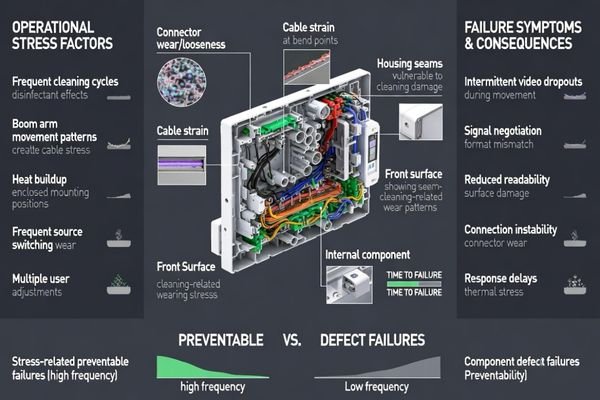
From a maintenance-reduction standpoint, I separate faults into two buckets: defects (rare, but unavoidable) and stress-related failures (common, preventable). The second bucket dominates ASC downtime, especially when symptoms are intermittent. Heat and uptime amplify this: long operating days in enclosed mounts can accelerate aging if thermal paths are marginal, and the resulting issues often look like “random” behavior.
The practical way to reduce service calls is to map each likely failure mode3 to a prevention tactic. For example, if dropouts occur when the boom moves, prioritize secure connectors plus strain relief and a fixed cable route, then test the full chain while repositioning the arm. If cleaning causes haze or glare hot spots, prioritize sealed edges and disinfectant-tolerant front surfaces, then validate durability with your actual wipe-down protocol.
How do cleanability, sealing, and mounting design reduce downtime?
Physical design features directly impact maintenance frequency and service complexity in ASC environments.
Maintenance drops when monitors match OR routines: rapid turnover, frequent wipe-downs, and constant repositioning. Sealed housings and minimized seams help prevent fluid ingress and long-term cleaning damage, while durable front surfaces preserve readability and reduce micro-scratches that trap residue or create glare. Mounting stability and proper strain relief reduce intermittent signal faults.
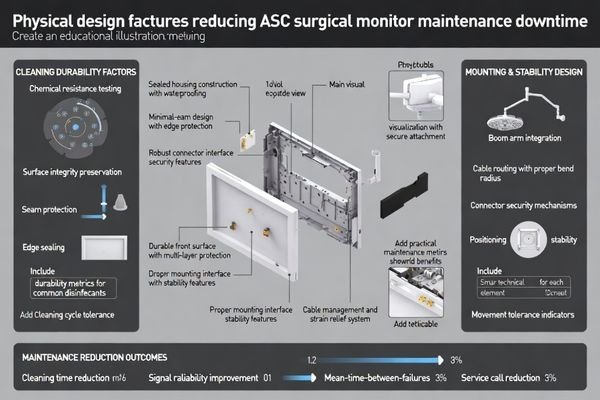
When I troubleshoot recurring ASC issues, the root cause is often mechanical: connectors loosen over time, cables are bent at tight radii, or the boom’s movement repeatedly loads the same point on the cable. A monitor that supports secure connection, accessible ports, and clean strain relief eliminates a large share of “mystery” service calls that only appear under motion.
| Design Feature | Maintenance Impact | Downtime Reduction | ASC Benefit | Implementation Requirement |
|---|---|---|---|---|
| Sealed Housing | Reduces fluid ingress risk | Lowers cleaning-related failures | Fewer emergency calls | Sealed construction |
| Robust Connectors4 | Reduces signal dropouts | Lowers intermittent faults | Less troubleshooting time | Secure connection method |
| Strain Relief | Reduces cable wear | Lowers motion-related issues | More stable boom operation | Proper cable management |
| Durable Surfaces | Resists cleaning damage | Preserves readability over time | Consistent viewing quality | Disinfectant tolerance |
| Minimal Seams | Reduces residue traps | Simplifies wipe-down routines | Faster room turnover | Low-seam enclosure design |
Use this table as a selection and install checklist: confirm sealing and surfaces match your cleaning protocol, and confirm mounting plus cable routing prevents repeated connector loading during boom movement.
What procurement checklist helps ASCs minimize lifecycle service cost?
Effective ASC monitor procurement requires systematic evaluation of serviceability and integration factors beyond basic specifications.
A maintenance-focused procurement checklist should evaluate the whole system, not just monitor spec sheets. Confirm predictable behavior in the room’s actual video path—sources, extenders, switchers, and scaling—because many “monitor problems” are integration problems. Prioritize serviceability, durability under cleaning, and support terms that reduce downtime.
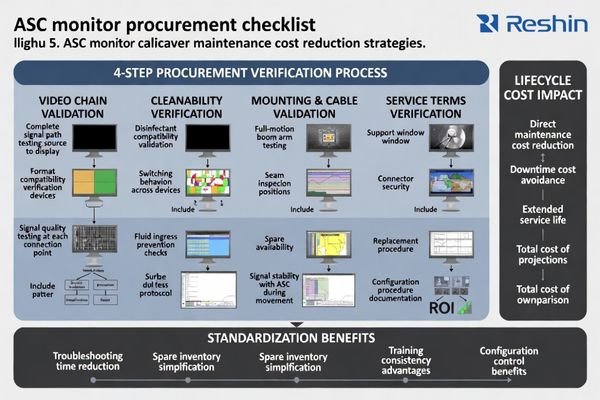
I build ASC procurement around four verification steps5: first, validate source switching and format behavior across the real routing chain; second, confirm cleanability and sealing against the facility’s disinfectant routine; third, confirm mounting and cable strain relief with the boom’s full motion range; and fourth, confirm service terms and swap procedures that fit your schedule. This approach prevents recurring “ghost faults” that cost more in repeated troubleshooting than the monitor itself.
System Integration Validation
ASC procurement must verify compatibility across the entire video signal chain to prevent integration-related failures that look like monitor defects. I recommend testing with the actual sources and routing equipment used in daily cases, including switching between typical inputs, confirming stable resolution/refresh behavior, and ensuring scaling or conversion steps are controlled. A simple, repeatable test plan—source switch timing, slice/scene motion checks, and side-by-side comparison where applicable—reduces surprises after go-live.
Vendor Support Alignment
ASC procurement should examine support terms that directly affect downtime: advance replacement options, spare availability, warranty turnaround, and configuration control so replacements behave consistently. If a replacement unit does not match the same mounting, cabling, or input behavior, the “fix” can become another integration project. Keep room configurations documented and standardized where possible so swaps are fast and predictable.
Which Reshin surgical monitors best fit ASC maintenance-reduction goals?
ASC monitor selection should prioritize models that address the highest-frequency maintenance drivers in ambulatory surgical environments.
For ASCs, I recommend selecting monitors to reduce the most common downtime triggers—cleaning wear, intermittent signal faults from movement and cable strain, and time-consuming troubleshooting when failures occur mid-day. Focus on stable integration with your existing routing, cleanable sealed designs, and practical serviceability so units can be swapped quickly without rework.
| Clinical Role / Application | Usage Pattern | Display Requirements | Recommended Model | Key Integration Considerations |
|---|---|---|---|---|
| Precision-First ASC Procedures | Close-up viewing, frequent repositioning | Stable grayscale, easy cleaning | MS321PC | Consistent appearance, service-friendly access |
| Advanced Visualization Workstation | Detailed review and guidance | Controlled processing, predictable input behavior | MS430PC | Stable routing through switchers/extenders |
| Multi-Specialty Room Integration | Variable sources and workflows | Flexible connectivity, reliable switching | MS431P | Fast source switching, consistent format handling |
| Large Room Team Viewing | Shared viewing across staff | Wide viewing angles, uniform presentation | MS550P | Clean boom mounting, durable front surface |
| High-Utilization ASC Platform | Long operating days, minimal downtime tolerance | Robust operation, practical serviceability | MS551 | End-to-end validation with the full signal chain |
Treat this table as a starting point, then validate the shortlist in your actual rooms with your signal chain and cleaning routine.
FAQ
Should ASCs standardize on one monitor model across all rooms to reduce maintenance?
Standardization often reduces troubleshooting time and spare complexity, but it works best when the chosen size and connectivity fit each room’s workflow; many ASCs standardize a core model and add a larger shared display only where needed.
What matters more for maintenance—panel image quality or physical design?
Both matter, but physical design often drives service calls: sealing, cleanability, connector robustness, mounting stability, and strain relief prevent the intermittent faults that cause the most downtime.
How can we reduce signal dropout issues on boom-mounted monitors?
Use secure connectors, proper strain relief, and a consistent cable routing path, and validate the full source-to-display chain with room movements; many dropouts only appear when arms are repositioned.
Do ASCs need calibration and ongoing QA for surgical monitors?
It depends on use case and policy, but ASCs benefit from simple, repeatable checks for brightness, uniformity, and input behavior so replacements and multi-room setups remain consistent over time.
What service terms should ASCs prioritize when buying monitors?
Focus on terms that reduce downtime: advance replacement options, spare availability, predictable turnaround, and configuration control so a swapped unit behaves the same in the room.
Conclusion
ASCs reduce monitor maintenance by selecting for the real drivers of downtime: predictable signal behavior across the complete video chain, OR-ready cleanability and sealing, robust mounting with strain relief, and fast, practical serviceability. A procurement checklist that validates these items before purchase prevents recurring issues that are especially expensive when schedules are tight and support resources are limited. When monitors are sized correctly for workflows and standardized where sensible, troubleshooting becomes faster, spares become simpler, and rooms stay productive with fewer interruptions.
At Reshin, I approach ASC projects by validating the monitor, the mounting, and the routing path as one system, then documenting configurations so swaps and expansions stay consistent. When maintenance reduction is designed in from the start—rather than treated as an afterthought—ASCs can protect uptime, control service costs, and maintain the efficient case flow their business model depends on.
✉️ info@reshinmonitors.com
🌐 https://reshinmonitors.com/
-
Learning troubleshooting techniques can save time and resources when dealing with equipment failures. ↩
-
Understanding monitor failure can help improve operational efficiency and reduce disruptions in healthcare environments. ↩
-
Mapping failure modes to prevention tactics is crucial for effective maintenance and can significantly reduce service calls. ↩
-
Explore how robust connectors can significantly reduce signal dropouts and troubleshooting time, enhancing system reliability. ↩
-
Understanding effective verification steps can enhance your procurement process and prevent costly errors. ↩