Legacy endoscopic towers present complex compatibility challenges in modern OR environments, where established surgical workflows depend on aging equipment that may not integrate smoothly with contemporary display technology and distribution infrastructure.
Successful integration of endoscopic monitors with legacy towers requires systematic validation of signal formats, careful management of conversion boundaries, and prioritization of latency and stability over advanced display features to ensure reliable surgical visualization.

In my experience integrating endoscopic display systems at Reshin, legacy tower compatibility1 is one of the most technically challenging aspects of OR retrofits and equipment upgrades. These towers, often representing significant capital investments with decades of expected service life, were designed during an era when display standards and signal distribution architectures differed substantially from current practices. In most problem cases, compatibility is driven by three factors working together: tower output mode changes, negotiation and conversion boundaries, and the lock/recovery behavior of the downstream chain.
The complexity becomes apparent when considering that legacy towers may change their output characteristics depending on operational mode—displaying different resolutions during boot sequences, switching color formats when recording functions activate, or altering timing parameters when overlay graphics are enabled. Modern monitors and distribution equipment, designed for more predictable signal behavior, may interpret these variations as faults and respond with protective measures like signal dropout or format renegotiation.
I’ve encountered installations where perfectly functional tower-monitor combinations worked during initial bench testing but failed unpredictably during actual surgical procedures when specific operational sequences triggered edge cases. The most successful integrations treat legacy compatibility as an engineering discipline: characterize real outputs across modes, validate the full chain under stress conditions, and document a baseline that can be repeated after maintenance or component replacement.
What breaks compatibility between endoscopic monitors and legacy towers in ORs?
Legacy endoscopic towers create compatibility challenges through inconsistent signal formats, rigid timing requirements, and operational mode changes that can overwhelm modern display and distribution equipment designed for more standardized behaviors.
Compatibility failures typically occur at EDID negotiation boundaries, format conversion interfaces, and during tower operational mode transitions. Common symptoms include black screens during startup, incorrect aspect ratios, unstable switching behavior, and signal dropouts when towers change between clinical, recording, or overlay modes.
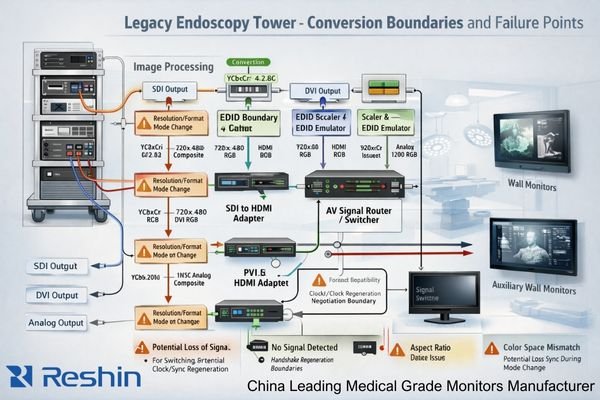
When I analyze compatibility failures in legacy tower installations, the root causes consistently trace to mismatches between legacy equipment assumptions and modern display system behaviors. These failures are rarely random; they tend to cluster around predictable triggers such as handshake expectations, interlaced handling, conversion stability, and cable/connector margin.
The highest-risk compatibility breakpoints occur where legacy signal formats encounter modern conversion or distribution equipment. Legacy towers may output older or rigid signal formats2 including HD-SDI, 3G-SDI, single-link DVI, or early HDMI implementations that lack the flexibility of current standards. These outputs can use interlaced scanning, non-standard timing parameters, or fixed EDID expectations that modern monitors and distribution devices may negotiate away during handshake procedures, resulting in black screens, incorrect aspect ratios, or unexpected scaling behaviors.
Signal Format and Timing Mismatches
Legacy towers frequently employ fixed output formats that don’t adapt to downstream device capabilities, creating compatibility requirements that must be accommodated rather than negotiated. When these towers encounter modern equipment designed for flexible format adaptation, the resulting handshake failures can cause complete signal loss or degraded image quality. Interlaced output handling becomes particularly problematic, as many modern displays and scalers assume progressive scanning and may introduce artifacts, unstable deinterlacing behavior, or added processing delay when handling interlaced sources.
Operational Mode Transition Issues
The most disruptive compatibility problems occur when legacy towers change operational modes during surgical procedures. Boot sequences, recording function activation, and overlay graphics can trigger resolution changes, color format shifts, or timing parameter modifications that cause downstream equipment to lose lock or initiate renegotiation cycles. These transitions, which may have been tolerated in the original tower-era ecosystem, can create seconds of signal interruption on modern distribution chains that prioritize signal integrity and compliance behavior over rapid recovery.
Signal and timing realities: SDI, DVI, HDMI, and analog video pitfalls
Understanding the technical characteristics and limitations of legacy signal formats enables systematic compatibility planning that addresses format-specific challenges before they disrupt surgical workflows.
Legacy tower compatibility requires detailed analysis of actual output formats including SDI level specifications, DVI link configurations, HDMI color space implementations, and interlaced handling requirements. Conversion devices can introduce subtle format changes and latency that affect surgical usability.

From my experience with diverse legacy tower installations, compatibility decisions must begin with precise characterization of what each tower actually outputs rather than relying on published specifications that may not reflect real-world behavior. Practically, that means recording output resolution, refresh rate, scanning type (interlaced/progressive), and color format across all relevant operational modes, then using those findings as the system’s baseline for selection and validation.
Serial Digital Interface (SDI)3 implementations require careful attention to level specifications and embedded timing requirements. HD-SDI and 3G-SDI outputs may use specific signal levels or embedded audio that not all conversion equipment handles consistently, particularly in installations where multiple conversion stages are involved. DVI outputs from legacy towers often use single-link implementations with specific timing requirements that may not match modern monitor EDID preferences, and some legacy DVI implementations lack robust hot-plug behavior that modern displays and switchers expect.
HDMI implementations on legacy towers frequently predate current color space and deep color standards, potentially creating unexpected color format conversions or bit depth limitations when interfaced with modern distribution equipment. Many legacy HDMI outputs assume specific EDID timing configurations to enable their native output modes, and deviation from these expectations can force fallback to lower-quality formats or unstable behavior. Conversion devices positioned between legacy outputs and modern displays can silently alter color formats, introduce color space transformations, or modify bit depth in ways that affect image quality or add processing delay. From an integrator’s perspective, these realities should translate into monitor and system requirements: stable lock/recovery behavior, controlled scaling policy, tolerance for legacy timing quirks, and predictable handling of interlaced sources where they still exist.
How to prioritize scaling, latency, and color for safe surgical viewing?
Endoscopic monitor selection for legacy tower integration should prioritize operational safety and workflow predictability over advanced display features, focusing on consistent geometry, minimal latency, and stable color reproduction.
Successful endoscopic viewing requires treating display performance as a real-time visual control system that prioritizes predictable latency, stable aspect ratio handling, and consistent color appearance. Scaling strategies must preserve surgical detail while maintaining deterministic switching and lock-time behavior.

Based on my analysis of surgical workflow requirements, integrators should approach endoscopic display selection as an engineering exercise that balances technical capabilities with clinical safety requirements. The most important parameters are those that affect precision and confidence during active manipulation, not those that only improve appearance in ideal conditions.
Latency management4 becomes paramount in endoscopic applications where hand-eye coordination depends on immediate visual feedback from instrument movements. Every conversion stage, scaling operation, and signal processing function introduces potential latency that accumulates through the signal chain. When combined with inherent camera and tower processing delays, additional display-related latency can create noticeable lag that affects surgical precision and surgeon comfort. Rather than relying on generic thresholds, the practical approach is to measure end-to-end latency in the final room configuration and confirm acceptability with key users under representative tasks and switching scenarios.
Aspect ratio and scaling behavior must preserve surgical image integrity without introducing geometric distortions that affect depth perception or instrument positioning accuracy. Legacy tower outputs may use non-standard resolutions or aspect ratios that require deliberate scaling strategies to avoid unintended stretching, cropping, or unstable framing during mode changes. Color reproduction consistency matters for tissue assessment and intraoperative decision-making, and the goal is stable appearance across rooms and lighting conditions—not constant re-adjustment by the surgical team. For a tower output characterization and acceptance test plan tailored to your OR retrofit, feel free to reach out to info@reshinmonitors.com for detailed integration planning support.
How should integrators validate cables, converters, and redundancy with legacy towers?
Systematic validation procedures ensure that legacy tower integration maintains reliable performance under all operational conditions through comprehensive testing of signal paths, conversion equipment, and failover scenarios.
Effective validation requires commissioning procedures that qualify cable performance, validate converter behavior across all tower operational modes, and verify monitor lock and recovery characteristics through repeated switching and power cycling scenarios.

Implementation success depends on establishing and maintaining a validated compatibility baseline through systematic commissioning that addresses both normal operation and edge case scenarios. The validation process must account for the reality that legacy towers may behave differently under clinical conditions than during bench testing, especially during boot/record/overlay transitions and under repeated switching cycles.
| Validation Component | Test Requirements | Acceptance Criteria | Documentation Needs |
|---|---|---|---|
| Cable Qualification | Length limits, connector integrity, signal margin | Clean signal at maximum distance | Cable type, length, test results |
| Converter Validation | All tower modes, format changes, power cycling | Stable conversion, consistent timing | Mode compatibility matrix |
| Monitor Response | Lock time, recovery behavior, switching stability | Predictable lock and recovery under all tower modes | Response behavior records |
| System Integration | End-to-end signal path, failover testing | Complete system reliability | Full system documentation |
| Environmental Testing | EMI conditions, temperature variations | Consistent performance | Environmental limits |
Cable qualification must address both signal integrity5 and mechanical reliability under clinical conditions. Legacy signal formats may have specific cable requirements for impedance, shielding, or connector types that differ from modern standards. Validation should include testing at maximum required cable lengths with appropriate strain relief and connector protection to prevent degradation during routine clinical use, including “worst-case” connector wear and cable movement at mounts and booms.
Converter validation requires comprehensive testing across all tower operational modes including boot sequences, recording functions, and overlay operations that may trigger format changes. Each converter in the signal path should demonstrate stable behavior during these transitions, with recorded recovery behavior and consistent output characteristics. Monitor lock and recovery behavior should be validated through repeated switching scenarios and power cycling tests that simulate real-world operational conditions including emergency power events and equipment restart sequences, then documented as the baseline for future troubleshooting and change control.
Reshin endoscopic monitor options for stable integration with legacy towers
Selecting appropriate endoscopic monitors for legacy tower integration requires matching display capabilities with specific surgical workflow demands and legacy equipment characteristics across diverse OR environments.
When evaluating endoscopic monitors for legacy tower compatibility, I focus on models that demonstrate predictable signal handling behavior and stable performance across varying input conditions. Reshin’s endoscopic monitor portfolio supports legacy integration goals by focusing on operational reliability: stable lock behavior, consistent geometry under scaling, and deployment that remains serviceable after installation. In legacy retrofits, dependable performance under mode transitions and repeatable commissioning outcomes usually matter more than maximum feature density.
| Clinical Role / Application | Usage Pattern | Integration Requirements | Recommended Model | Key Compatibility Benefits |
|---|---|---|---|---|
| Primary OR Viewing Position | Boom/wall mount, critical procedures | Reliable switching, stable geometry | MS430PC | Predictable legacy signal handling |
| Near-field Clinical Review | Direct viewing, frequent interaction | Stable lock, serviceability access | MS321PB | Consistent signal compatibility |
| Advanced Integration Setup | Complex signal routing, multiple inputs | Advanced input management | MS322PB | Multiple legacy format support |
| Auxiliary Cart Deployment | Mobile positioning, flexible setup | Portable reliability, simple connection | MS270P | Straightforward legacy connection |
| Legacy Room Retrofit | Existing infrastructure, space constraints | Flexible mounting, retrofit compatibility | MS275PA | Adaptive legacy integration |
FAQ
How do I identify what signal formats a legacy endoscopy tower truly outputs?
Use a signal analyzer or format detector to capture actual output characteristics during different operational modes including boot, clinical use, recording, and overlay functions. Document resolution, refresh rate, scanning type, color format, and timing parameters for each mode, as published specifications may not reflect real-world behavior.
Do we need SDI, DVI, or HDMI inputs to avoid converters—and when are converters acceptable?
Direct connections are preferable when available, but quality converters are acceptable if they maintain signal integrity and don’t introduce avoidable processing delay. The key is systematic validation of converter behavior across all tower operational modes and documentation of any format changes or stability risks that appear during transitions.
What causes black screens when the tower boots or switches overlay/record modes?
Mode transitions can trigger resolution or timing changes that cause downstream equipment to lose lock or initiate renegotiation cycles. This is often mitigated by controlling conversion boundaries, choosing converters that maintain stable output behavior, and validating display lock and recovery performance under the exact transition sequences used in the OR.
How much latency is acceptable for endoscopic manipulation, and where does it come from?
Latency should be evaluated as an end-to-end system behavior in the final room configuration and confirmed with key users performing representative tasks. Sources include camera processing, tower processing, format conversion, scaling operations, distribution devices, and display processing; the engineering goal is to minimize unnecessary processing stages and document the baseline for future changes.
What commissioning tests prove compatibility before go-live in a retrofitted OR?
Test all tower operational modes, power cycling scenarios, cable connections at maximum lengths, converter behavior during format changes, and repeated switching cycles under realistic room conditions. Document results as the room baseline so future maintenance or replacements can be validated against known-good behavior.
Conclusion
The safest approach to choosing endoscopic monitors for legacy tower integration involves treating compatibility as an engineered baseline that must be systematically validated rather than assumed. Success depends on thorough characterization of legacy tower output behaviors, careful management of signal conversion requirements, and prioritization of operational reliability over advanced display features.
As a provider of endoscopic display solutions designed for clinical environments, Reshin recognizes that legacy tower integration requires specialized expertise that extends beyond product specifications to encompass systematic compatibility engineering and validation procedures. Our team works closely with integrators to develop robust legacy integration strategies that ensure reliable surgical workflows while maintaining the performance standards essential for safe endoscopic procedures. For detailed assistance with your specific legacy tower integration challenges and access to our compatibility validation resources, please contact the Reshin team using the email below to develop solutions that prioritize surgical workflow continuity and patient safety.
✉️ info@reshinmonitors.com
🌐 https://reshinmonitors.com/
-
Understanding these challenges can help improve integration strategies and ensure smoother upgrades. ↩
-
Exploring signal formats will provide insights into optimizing legacy systems for modern technology. ↩
-
Understanding SDI specifications is crucial for ensuring compatibility and optimal performance in video installations. ↩
-
Understanding latency management is crucial for ensuring precision in surgical procedures, enhancing surgeon comfort and performance. ↩
-
Understanding signal integrity is crucial for ensuring reliable performance in clinical settings, making this resource invaluable. ↩