Legacy hospital video infrastructure often creates signal-integrity problems that compound across long cable runs, mixed generations of equipment, and repeated conversions between formats in procedure environments.
Medical-grade monitors can improve robustness in legacy hospital video systems by supporting broader input compatibility, tolerating imperfect timing and sync conditions, and providing cleaner endpoint processing—reducing the chance that marginal signals become clinically unusable.
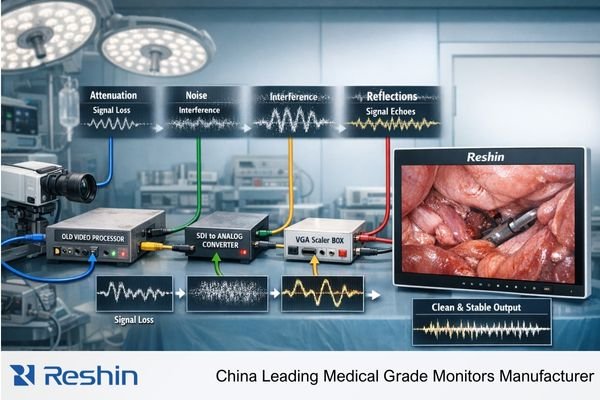
Signal degradation in legacy systems rarely comes from a single failure. It typically accumulates across the video chain—from aging camera heads and processors, through distribution and conversion hardware, to the display endpoint. This is why the monitor often appears to be “the problem”: it is the first place clinicians clearly see the combined effect of upstream attenuation, reflections, noise, and timing instability.
The most effective upgrades start with the complete signal path rather than the display alone. The same monitor can look stable on one route and unreliable on another, simply because losses and artifacts build up differently depending on cable length, connectors, conversions, and grounding. In practice, a monitor upgrade delivers the best results when it is paired with an end-to-end signal strategy1 that reduces avoidable weak links and standardizes how video is transported and presented.
Where does signal degradation happen in legacy hospital video systems?
Legacy hospital video systems create multiple points where signal quality can deteriorate, with degradation typically accumulating across the entire transport chain from source to display.
Signal degradation in older hospital video chains usually builds up across aging camera sources, legacy processors, long cable runs, format converters, and distribution hardware, with each handoff potentially introducing attenuation, reflections, timing jitter, or electromagnetic interference.
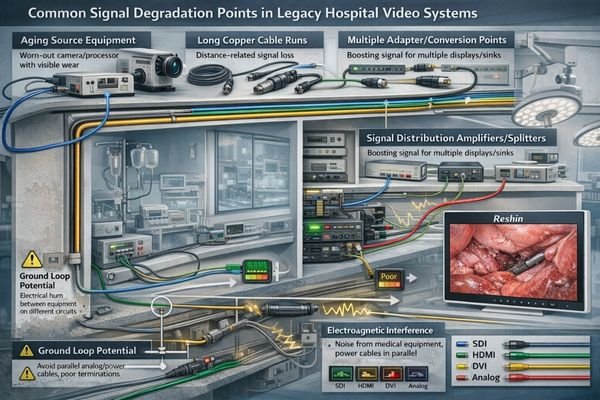
Degradation commonly begins at the source side when older camera heads, endoscopy processors, or output boards drift from original signal levels and timing margins. That weakness becomes more visible as the signal passes through additional handoffs.
Legacy Distribution and Conversion Points
The distribution layer is often the highest-risk area: long copper runs through walls and surgical booms, mixed connector quality, and inconsistent termination can create impedance mismatches that cause reflections and reduced margin. Multiple format conversions add further risk—especially analog-to-digital conversions, SDI-to-HDMI adaptations, and scaling steps that can introduce timing instability and artifacts. Each conversion is not just a “format change,” but another opportunity for signal integrity2 to degrade.
Infrastructure and Environmental Factors
Procedure rooms can be electrically complex. Shared power and grounding, bundled cable paths, and proximity to high-frequency devices can inject interference into video transport—particularly if video cables run parallel to power lines or pass near electrosurgical equipment. The result is that the display shows the cumulative effect of upstream weaknesses, even when the panel itself is functioning normally.
What are the most common symptoms and root causes of degraded video signals?
Legacy video systems exhibit characteristic failure patterns that typically correspond to specific underlying signal integrity issues in the transport chain.
Legacy hospital video systems commonly show intermittent dropouts, sparkles/noise, rolling bars, color shifts, unstable sync, ghosting, and “soft” detail—symptoms that usually trace back to attenuation, poor termination and reflections, electromagnetic interference, or ground-loop behavior.
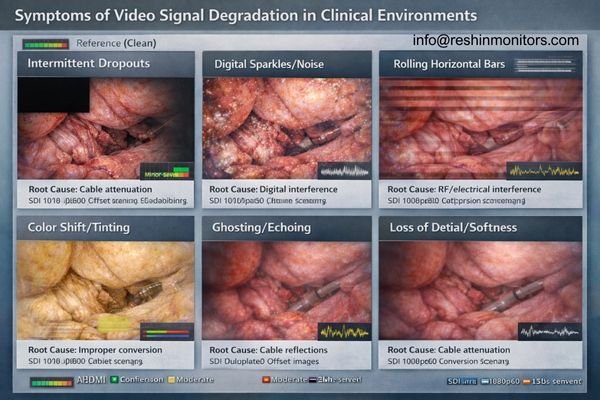
Intermittent blackouts and sync instability often indicate a timing margin problem—commonly caused by long runs, marginal converters, or distribution hardware operating at the edge of capability. Sparkles, random noise, and rolling bars frequently point to interference or grounding issues, especially in rooms with multiple powered devices sharing infrastructure.
Color shifts, ghosting, and “soft” detail are often linked to high-frequency attenuation, reflections from improper termination, or impedance mismatches across connectors and adapters. In mixed digital workflows, additional failure modes appear: EDID mismatches3 can force suboptimal output formats, handshake instability can trigger intermittent dropouts, and converters can introduce scaling artifacts or timing irregularities. The practical point is that many “image quality” complaints in legacy environments are transport-level signal integrity problems first, not panel-quality problems.
How can medical-grade monitors stabilize and recover degraded signals?
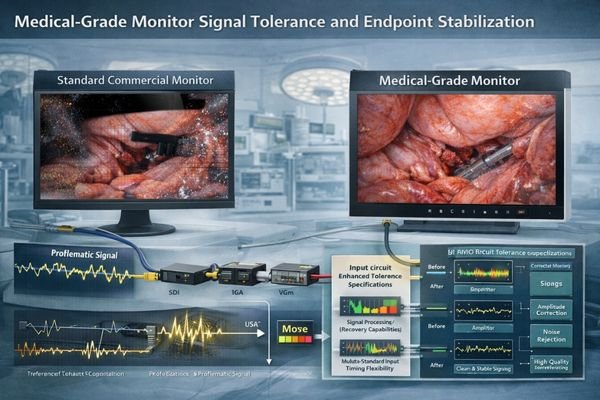
Medical-grade monitors improve signal robustness through enhanced input compatibility, superior sync tolerance, and endpoint processing that helps maintain usable video even when inputs are marginal.
Medical-grade monitors enhance stability by supporting more clinical input standards, tolerating timing variation and imperfect sync more reliably, and presenting a cleaner endpoint image—reducing the likelihood that borderline signals become unusable in clinical applications.
| Signal Challenge | Legacy System Impact | Medical Monitor Solution | Clinical Benefit |
|---|---|---|---|
| Long Cable Runs | Attenuation, timing drift | SDI-capable inputs suited for professional transport | More stable video over longer distances |
| Multiple Conversions | Artifacts, sync issues | Native multi-standard inputs (SDI/DVI/VGA/Video) | Reduced converter dependency |
| Timing Variations | Sync loss, intermittent display | Improved tolerance to marginal timing and sync | More consistent display under borderline conditions |
| Noise and Interference | Visual artifacts, rolling bars | Cleaner endpoint processing and handling of imperfect signals | Less distracting artifacts in electrically complex rooms |
In legacy environments, multi-standard input capability can reduce reliance on fragile converter chains by allowing the most stable native interface to reach the display. For long runs, professional SDI transport4 is often preferred in clinical distribution because it is designed for structured routing and repeatable connectivity. Even when upstream quality remains imperfect, well-implemented endpoint processing (such as scaling, deinterlacing, and stable handling of marginal signals) can reduce visible artifacts and improve usability.
It is important to set expectations correctly: a monitor can improve tolerance and presentation stability, but it cannot restore image information that has already been lost upstream. Durable improvement typically comes from combining a more robust endpoint with fewer conversions, better cabling practices, and validated distribution behavior.
What deployment practices prevent degradation from coming back after a monitor upgrade?
Sustainable improvements require systematic attention to the complete signal path, standardizing interfaces, and validating integrity end-to-end rather than focusing solely on the endpoint display.
Monitor upgrades achieve lasting results when paired with end-to-end validation that standardizes interface selection, minimizes unnecessary conversions, and ensures cable, connector, and grounding quality throughout the transport chain.
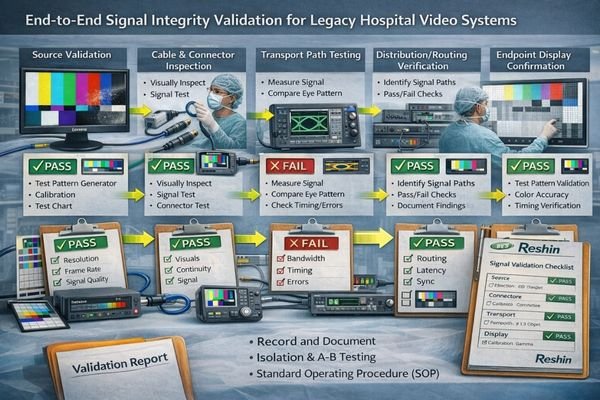
Treat deployment as a system upgrade, not a single-device swap. The most effective practice is to select the simplest native interface path from source to display and reduce conversion sprawl wherever possible.
Signal Path Standardization
For legacy analog pathways, correct termination, shielding, and separation from power lines meaningfully affect stability over time. In mixed digital environments, consistent EDID behavior and stable distribution hardware reduce “works here but not there” outcomes. When long-distance transport is required, adopting a structured transport approach5—often SDI in procedure environments—works best when maximum run lengths and connector practices are validated and documented.
System-Level Validation
The operational goal is repeatability: the same imaging source should present consistently at every location. Use known test patterns at the target resolution and refresh rate, and isolate the chain step-by-step (source, conversion, transport, distribution, endpoint) to confirm where margin is lost. Validating each segment before sign-off prevents recurring dropouts and reduces the need for on-the-fly clinical workarounds.
Which Reshin medical-grade monitors best address signal degradation in legacy video systems?
Different legacy system configurations benefit from specific monitor capabilities designed to handle varying signal transport challenges and interface requirements.
Monitor selection should match the current transport reality and the facility’s migration plan. Environments relying on long-distance distribution benefit from professional transport compatibility, while mixed-generation rooms often benefit most from multi-input flexibility that reduces converter stacking during phased upgrades.
| Clinical Application | Signal Transport Challenge | Interface Requirements | Recommended Model | Key Compatibility Features |
|---|---|---|---|---|
| High-Bandwidth OR Video | Long SDI runs, 4K surgical imaging | 12G-SDI, higher-bandwidth transport | MS550P | 55" 4K surgical monitor with 12G-SDI module support (per configuration) |
| Mixed Infrastructure Surgical | SDI + computer signals, boom mounting | Multi-standard inputs, compact form factor | MS321PB, MS322PB | 32" 4K surgical monitors suited to mixed interface environments |
| Legacy Equipment Integration | Analog + digital mixed systems | VGA/Video/S-Video/RGB/YPbPr + SDI | MS247SA | Built for SDI plus legacy input integration to reduce converter dependence |
| Cart/Secondary Applications | Basic legacy connectivity, cost-sensitive | Multi-input flexibility, compact design | MS192SA | Compact option with legacy input support for practical integration |
FAQ
1. How do you troubleshoot video dropouts in an older OR video system?
Start with a known-good source and cable, then test the chain step-by-step using a consistent test pattern at the target format. Isolate whether the failure occurs at the source, conversion, transport/distribution, or the endpoint.
2. What causes “sparkles” or random noise on SDI/HDMI signals in procedure rooms?
Sparkles and random noise commonly indicate interference, marginal signal levels over long runs, poor connectors/termination, or converter instability. Electrically complex rooms can amplify these issues if grounding and routing are not controlled.
3. Why does HDMI tend to be less reliable than SDI in legacy hospital cabling?
Legacy infrastructure often involves long in-wall runs and mixed connector quality. HDMI can be more sensitive to run length, connector conditions, and handshake behavior, while SDI is commonly used for structured professional distribution—assuming cabling and termination are done correctly.
4. Can replacing the monitor alone solve signal degradation?
A medical-grade monitor can improve tolerance and reduce visible artifacts, but it cannot restore information already lost upstream. Long-term improvement usually requires addressing cabling quality, termination, grounding, and excessive conversion points.
5. What are the most common signs of grounding or ground-loop problems on clinical displays?
Ground-related issues often appear as rolling bars, flicker, or intermittent noise that changes when equipment is connected, powered, or moved. Correcting grounding and adding appropriate isolation in the chain is typically required.
Conclusion
Legacy hospital video systems develop signal degradation through accumulated loss, interference, reflections, and conversion artifacts across the transport chain, with problems becoming most visible at the display endpoint. Medical-grade monitors add value by supporting broader clinical inputs, tolerating imperfect timing and sync more reliably, and presenting a cleaner endpoint image even when upstream signals are marginal.
The most reliable results come from combining the monitor upgrade with a system-level signal integrity approach: simplify native signal paths, reduce converter stacking, validate transport and distribution behavior end-to-end, and document repeatable deployment practices. This approach improves day-to-day clinical usability now while supporting a practical migration toward more robust, standardized transport over time.
✉️ info@reshinmonitors.com
🌐 https://reshinmonitors.com/
-
Exploring this strategy can provide insights into optimizing video transport and presentation for better performance. ↩
-
Understanding signal integrity is crucial for maintaining high-quality video transmission and avoiding degradation. ↩
-
Exploring EDID mismatches will provide insights into optimizing display setups and preventing output issues. ↩
-
Learn about the advantages of professional SDI transport for stable video distribution in clinical environments. ↩
-
Exploring structured transport approaches can enhance your knowledge of effective signal transport methods, especially for long distances. ↩