In OR (Operating Room) routing projects, teams often attribute latency to the display, even though the more common drivers are upstream format conversions and processing stages introduced to “make signals fit” through the chain.
Medical-grade monitor signal capabilities directly determine whether OR routing systems can maintain native signal paths with minimal conversion, which is critical for preserving both surgical image quality and low latency. When monitors accept the routed formats natively, the system can avoid unnecessary scaling and re-timing stages; when sync handling is stable, switching is less likely to trigger disruptive re-lock events (forced re-synchronization) that interrupt workflow.

In most routed OR environments, latency is rarely caused by a single component—it accumulates across the entire signal chain. “Signal capability” on the monitor side is not just about ports; it includes which resolutions and frame rates the display can accept, whether it supports progressive vs. interlaced timings, how it handles chroma subsampling (color sampling formats), and how reliably it negotiates EDID (the display’s capability declaration) so the chain stays stable during switching. Every unnecessary conversion can add buffering, and every timing mismatch can trigger extra processing that softens detail or creates judder. The practical goal should be “native in, native out1” wherever possible: the closer the routed signal matches what the monitor can accept directly, the fewer processing stages activate and the more predictable both timing and image quality become.
Mapping the OR video path: where latency and image loss actually happen?
Understanding the complete signal path reveals where delays and quality degradation actually occur in OR routing systems.
In a routed OR, monitor latency is rarely caused by a single device—it’s the cumulative effect of the entire signal path including source encoding, format conversion, transport, switching, and final display processing. Signal capability on the monitor side determines how often the system must convert or scale signals before they’re usable.

When reviewing stalled deployments, it’s common to see teams focus on individual component specs without mapping the complete signal flow2. The path typically includes source devices (endoscope, ultrasound, fluoroscopy), conversion stages (format or frame-rate changes), transport systems (copper or fiber extenders), routing infrastructure (matrix switchers, scalers, multiview processors), and finally the display. Because delay and quality loss are cumulative, the most reliable way to locate the bottleneck is to establish a direct source-to-display baseline using the same timing, then reintroduce routing stages one at a time while tracking what changes (added delay, brief black screens, dropped frames, or visible softening).
Signal Processing Accumulation
Each stage in the routing path can introduce processing delays, especially when signal formats don’t match between components. Sources may output in different resolutions, frame rates, or color formats than what routing equipment expects natively. Transport systems may compress or subsample signals for bandwidth management. Routing matrices may scale or convert signals to match downstream requirements. When a chain must repeatedly scale, convert, or re-time signals to maintain compatibility, it becomes harder to keep latency low and motion behavior consistent.
Monitor Signal Acceptance Impact
The monitor’s signal capability determines whether additional conversion stages are necessary at the end of the chain. If a display can accept the routed signal format natively—matching resolution, refresh rate, chroma format, and progressive versus interlaced timing—no final conversion is required. However, if there’s a mismatch, an external scaler or the monitor’s internal processing must bridge the gap, which typically increases buffering and raises the risk of detail loss through resampling and format translation. A simple rule of thumb is: if the routed signal must be scaled or re-timed to fit the display, you should expect higher latency and a greater chance of lost fine detail.
Interface and bandwidth choices: why formats and sync behavior matter
Interface selection and bandwidth management directly affect signal integrity and switching stability in OR environments.
Medical-grade monitors often support multiple interfaces to meet sources where they are, but the real impact comes from bandwidth headroom and timing stability. Higher-bandwidth links preserve fine textures and edge detail, while stable sync handling reduces re-lock events during switching.

Interface choice affects more than connectivity—it determines whether signals can pass through the routing system without modification. Higher-bandwidth connections3 reduce the need for compression or chroma subsampling that can degrade fine surgical detail. Stable sync behavior helps prevent momentary black screens, frame drops, or intermittent “no signal” events that occur when devices must re-lock after a timing or metadata change. In practical terms, stability comes from consistent timing policies across the chain and predictable EDID behavior so sources and routers don’t “fight” over output formats during switching.
In routing-heavy operating rooms, the monitor’s ability to accept common OR timings—including the frame rates used by surgical cameras—often determines whether the routing system needs intermediate scaling or re-timing. That intermediate processing is a frequent contributor to added delay and image softening, which is why native format acceptance at the display endpoint can have an outsized effect on the entire system’s responsiveness.
The best interface decision is the one that preserves the source signal end-to-end with the fewest required conversions, while keeping switching stable under real workflow conditions (frequent source changes, varied devices, and different room configurations).
Inside the monitor: processing modes that add delay vs. modes that protect clarity?
Internal monitor processing can significantly impact both latency and image quality depending on configuration and feature selection.
Even when routed signals arrive cleanly, monitors can introduce meaningful delay through internal processing like deinterlacing, frame rate conversion, scaling, noise reduction, and color enhancement. Low-latency display modes minimize frame buffering and limit processing to what’s necessary for accurate medical rendering.
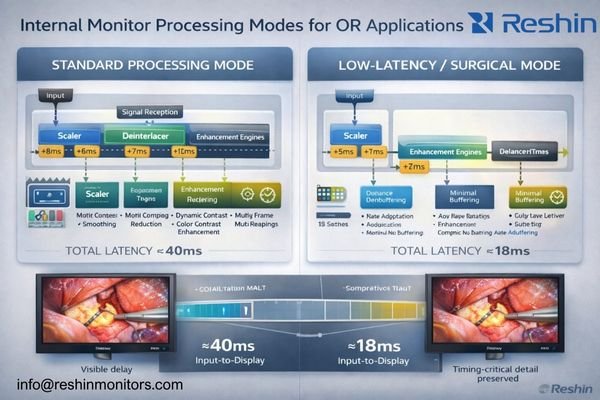
From an engineering perspective, problems often appear when displays apply consumer-style enhancement features that trade timing for “pleasing” imagery. Motion smoothing, dynamic contrast, aggressive sharpening, heavy noise reduction, or extensive color remapping can require additional buffering, which is the opposite of what surgical teams need when instrument motion and image response must align. For routed surgical viewing, the priority is predictable timing and faithful reproduction of clinically relevant textures, not subjective enhancement.
| Processing Type | Latency Impact | Image Quality Effect | OR Suitability |
|---|---|---|---|
| Native Pass-Through | Typically lowest; minimal buffering when supported | Preserves source characteristics | Recommended for primary surgical view |
| Basic Scaling | Can increase latency depending on scaling complexity and timing | May introduce minor resampling softness | Acceptable when required for format matching |
| Deinterlacing | Often increases buffering, especially for motion-adaptive methods | Can improve legacy interlaced sources but may add artifacts | Use when necessary; validate motion behavior |
| Enhancement Features | Frequently increases buffering and variability | Can distort clinically relevant detail (halos, crushed low-contrast cues) | Generally avoid for primary view; use only with validation |
A monitor that supports genuine low-latency or real-time display behavior minimizes frame buffers and limits processing to what’s required for accurate rendering. For multi-source layouts like picture-in-picture or split views, the implementation method matters significantly—efficient compositing with predictable timing keeps multi-view usable for teamwork and teaching without compromising the primary surgical feed. The safest approach is to validate the main view in the exact configuration that will be used in the room (same inputs, same routing stages, same display mode), rather than assuming a feature behaves the same across all timings.
The goal is to maintain medically relevant image consistency4 (stable brightness behavior and controlled tone response) while avoiding consumer-oriented features that prioritize subjective enhancement over clinical clarity and timing predictability.
Image quality in routed surgery: what "good" looks like beyond resolution
Image quality in OR routing extends beyond resolution specifications to include signal integrity and display consistency factors.
In a routed OR, image quality is defined by whether clinically meaningful visual cues survive the complete signal path—fine vessel edges, tissue texture, specular highlights, subtle color differences, and motion continuity. Strong signal capability provides the foundation that lets optical and display qualities show up as intended.
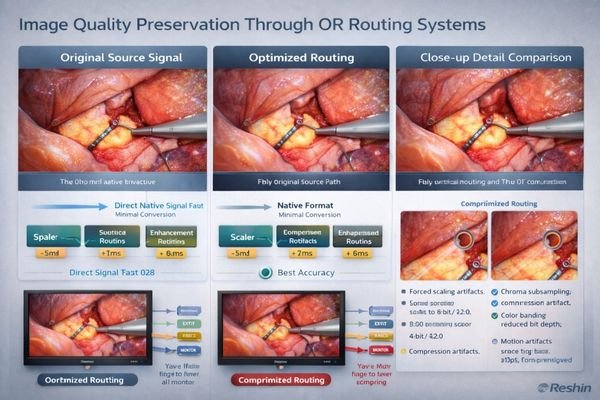
Resolution alone often fails to predict what teams will see in practice, because it can be undermined by scaling, forced chroma subsampling, mismatched timings, or aggressive processing that introduces artifacts and suppresses low-contrast cues. In routed environments, “good” is the consistent preservation of clinically meaningful information: fine anatomical boundaries, tissue texture gradients, accurate highlight behavior, stable color relationships, and smooth motion without judder, frame drops, or intermittent brief blackout during switching.
Critical Visual Elements
Brightness and uniformity matter significantly because surgical lighting conditions5 vary, and the same routed feed may be viewed from different angles on booms or wall mounts. A stable, uniform panel reduces the risk of perceived flicker, patchy shading, or color shifts across the screen that can distract teams and complicate interpretation. Reflection control and stable luminance behavior also help preserve subtle detail when ambient conditions change.
Multi-Display Consistency
For collaborative workflows involving multiple team members, consistent tone and color behavior across displays becomes essential. If primary and secondary displays render the same routed signal differently, decision-making slows and confidence drops because team members may be reacting to different apparent contrast and color cues. Consistency across endpoints is also a practical integration goal: you can’t reliably “calibrate back” detail that has already been lost to upstream conversion or compression.
Contact us at info@reshinmonitors.com if you want a practical validation checklist for evaluating image quality and switching stability in your specific OR routing configuration.
Choosing monitors for OR routing: selection logic for low latency and faithful images
Monitor selection for OR routing requires systematic evaluation of signal compatibility, processing capabilities, and display performance characteristics.
Start with documenting your complete signal environment: list every source format you must support, including resolution, frame rate, progressive versus interlaced timing, and color format specifications. The goal should be avoiding forced conversion for primary surgical feeds, since external scalers and format converters are common sources of added latency and detail loss. When teams standardize on a “truth set” of required timings and validate pass-through behavior early, they reduce late-stage surprises during installation and acceptance testing.
| Clinical Role / Application | Usage Pattern | Display Requirements | Recommended Model | Key Integration Considerations |
|---|---|---|---|---|
| Primary Surgical Display | Direct surgeon view, low latency critical | Native format support, minimal processing | MS430PC | Validate native acceptance of required timings; confirm low-latency mode for primary feed |
| Secondary Surgical View | Team collaboration, moderate latency tolerance | Multi-input flexibility, consistent quality | MS321PB | Confirm format compatibility across sources; verify stable switching with your router/EDID policy |
| Teaching/Documentation Display | Multi-source viewing, layout flexibility | PIP/PBP support, larger canvas | MS551 | Validate compositing behavior; confirm main-view timing remains predictable under multi-view |
| Anesthesia/Monitoring Station | Vital signs integration, moderate resolution | Stable presentation, reliable operation | MS275PA | Verify long-duration stability; confirm integration with station outputs and switching routines |
| Mobile/Flexible Application | Multiple room use, versatile connectivity | Portable design, broad format support | A430S | Validate fast setup with varied sources; confirm stable sync across different room infrastructures |
Next, validate that your selected monitors can operate in genuine low-latency modes by minimizing internal frame buffering and avoiding consumer-style enhancement features. If workflows require multi-view capabilities, confirm that compositing timing remains predictable and doesn’t penalize the main surgical view, especially under the exact input timings and layouts the room will use.
Size and brightness specifications should follow viewing geometry requirements: closer surgeon-facing positions benefit from pixel density and controlled reflections, while wall-mounted or boom-mounted teaching displays prioritize wider viewing angles and consistent appearance from multiple positions.
Finally, plan the complete signal chain as part of monitor selection. Choose interfaces that match your routing and extension infrastructure, standardize EDID and timing policies to reduce re-lock events during source switching, and ensure that cleaning protocols, mounting systems, and lifecycle management align with hospital maintenance practices.
FAQ
What is the biggest cause of latency in a routed OR video chain?
The largest jumps usually come from format conversion and scaling, especially when a router or extender can’t pass the signal natively, followed by deinterlacing and any multi-view compositing that requires full-frame buffering. To reduce risk, aim for native pass-through on the primary feed and validate each stage by adding components back one at a time.
Does higher resolution automatically mean better surgical image quality?
Not automatically—if the chain forces scaling, subsampling, or heavy enhancement, fine detail can be lost even at high resolution; the best results come from keeping the signal native end-to-end and minimizing processing. In practice, stable timing and minimal conversion often matter as much as pixel count.
Why do switching events sometimes cause a brief black screen?
That’s typically a re-sync event: the output timing or metadata changes and the monitor must re-lock; stable timing policies and predictable EDID handling reduce these disruptions. Testing under real switching patterns (the same sources and routes used clinically) is the most reliable way to confirm stability.
What monitor features can unintentionally increase delay?
Deinterlacing, motion smoothing, noise reduction, dynamic contrast, extensive color remapping, and aggressive sharpening often require extra buffering and can also distort clinically relevant textures. For primary viewing, use a low-latency mode and disable enhancement features unless you can validate that they don’t add delay or artifacts under your required timings.
Is multi-view safe to use for the primary surgical view?
It depends on implementation—multi-view is great for teamwork and teaching, but you should validate that the main view’s timing isn’t penalized and that the compositing method doesn’t add unpredictable buffering. If the primary view feels less responsive or switching becomes unstable in multi-view, keep multi-view for secondary displays and preserve a clean path for the main feed.
How can we troubleshoot whether the monitor or the router is adding most of the delay?
Compare a direct source-to-monitor connection against the full routed path using the same timing, then add components back one by one; if delay jumps when a scaler or multiview stage is inserted, the bottleneck is upstream rather than the display itself. Track both timing symptoms (responsiveness, switching blackouts) and image symptoms (softness, motion artifacts) to locate the stage that changes behavior.
Conclusion
In OR routing environments, signal capability is the foundation that determines whether the video chain can maintain native signal paths with minimal conversion and processing. Monitors that accept the required OR formats directly and render them with minimal buffering reduce dependence on external conversion stages, helping preserve both fine surgical detail and timing predictability throughout the routing path.
At Reshin, we engineer medical-grade monitors for routing environments where signal integrity and predictable timing support reliable visualization and clinical decision-making. Our displays are designed to minimize avoidable processing delay while maintaining consistent optical performance that teams can depend on across rooms and use cases. We work with OR integrators to align monitor signal capabilities with routing infrastructure requirements, so systems can be validated with repeatable acceptance criteria and maintained with confidence over their lifecycle.
✉️ info@reshinmonitors.com
🌐 https://reshinmonitors.com/
-
Exploring the concept of native in, native out can help you achieve better image quality and reduce latency in your video setups. ↩
-
Understanding signal flow is crucial for identifying bottlenecks in deployment, ensuring optimal performance. ↩
-
Explore how higher-bandwidth connections enhance video quality and reduce the need for compression, ensuring clearer surgical details. ↩
-
Learn about techniques to maintain image consistency for accurate medical diagnostics. ↩
-
Understanding optimal surgical lighting conditions is crucial for enhancing visibility and precision during procedures. ↩