Choosing a medical display based on marketing specs can be misleading. This often results in purchasing expensive equipment that fails to deliver the real-world performance needed in clinical settings.
Focus on the metrics that sustain diagnostic accuracy and OR confidence: calibrated luminance, DICOM-true grayscale, anti-glare contrast, and robust 2160p60 signal integrity.

Beyond the headline numbers, a professional medical display is defined by its ability to deliver consistent, reliable, and accurate images day after day. The metrics that truly matter are those that directly impact clinical confidence and workflow efficiency1. This guide breaks down the five key performance areas that separate a true medical-grade display2 from a standard monitor. From the stability of its luminance and grayscale rendering to its ability to maintain contrast in a bright OR, these metrics provide a clear framework for evaluating and selecting a display that meets the rigorous demands of modern healthcare.
Calibrated luminance & DICOM-true grayscale: acceptance and drift control
A monitor’s brightness degrades over time, causing images to look different year-to-year. This slow drift can lead to missed diagnoses and undermines confidence in radiological reads.
It is not peak nits, but sustained, verified luminance and grayscale fidelity that matter. Auto-QC and brightness stabilization ensure year-two images match day-one, preventing diagnostic drift.
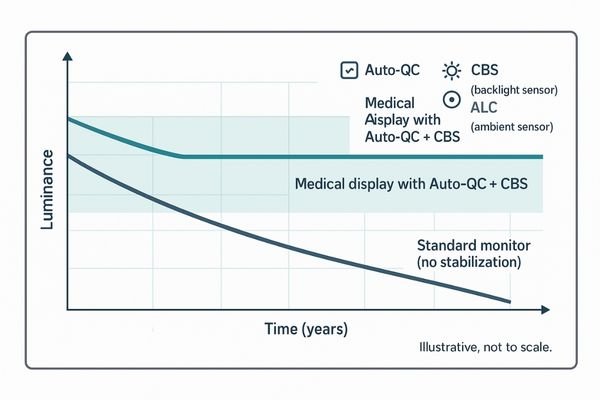
The cornerstone of any diagnostic display is its ability to render medical images with consistent, verifiable accuracy. Professional medical displays achieve this through several key technologies:
- Auto-QC3 keeps the DICOM GSDF response within a tight ±5% tolerance.
- CBS (Constant Brightness System4) uses an internal sensor to hold luminance stable across years.
- ALC (Ambient Light Control) adapts the display’s brightness to the specific lux level of the reading room.
This combination of stabilized luminance and verified grayscale performance means an image reviewed today is perceptually identical to one reviewed years ago, eliminating drift and costly re-reads. A clinical display like the MD46C provides this foundational stability, while high-end models such as the MD120C extend this with per-window gamma and color temperature controls for advanced multimodality reading.
Perceived contrast in bright ORs: AR glass, optical bonding, uniformity
In a bright operating room, glare from overhead lights washes out the screen. This veiling glare destroys image contrast, making it difficult for surgeons to distinguish critical tissues.
In bright conditions (e.g., OR 800–1000 lx), perceived contrast is more important than a spec sheet number. Anti-reflective glass, optical bonding, and screen uniformity work together to suppress glare and deliver a clear image.
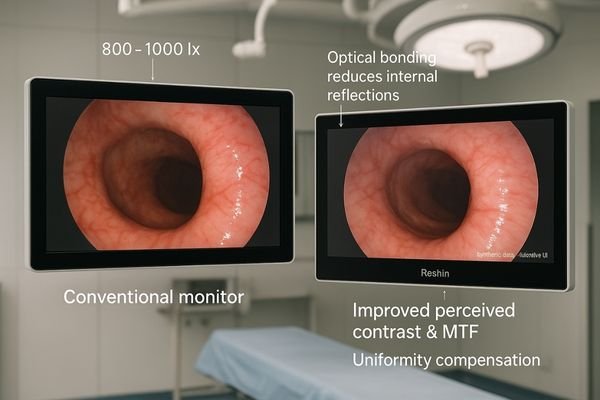
In the operating room, a monitor’s stated contrast ratio is meaningless if the image is obscured by glare. The real measure of performance is perceived contrast5 under challenging lighting. We enhance this with anti-reflective (AR) protective glass and optical bonding. Bonding removes the two-air-surface cavity between the glass and the panel, which cuts internal reflectance and raises perceived MTF (Modulation Transfer Function). Advanced uniformity compensation also ensures even brightness across the screen. This combination, found on surgical displays like the MS321PB, ensures surgeons see sharp tissue edges. These models feature AR protective glass with optical bonding6, a bright 500 cd/m² default luminance, and robust 12G-SDI connectivity to deliver a clear, confident view.
Resolution & pixel density by modality: FHD, 4K, 3–12MP
Using a one-size-fits-all approach to resolution is inefficient. A low-resolution screen for mammography can hide micro-calcifications, while an overly expensive 12MP screen for simple review is a wasted investment.
Match the display resolution and pixel density directly to the clinical task. This ensures sufficient detail for diagnostic accuracy without overspending on unnecessary pixels for simpler review workflows.
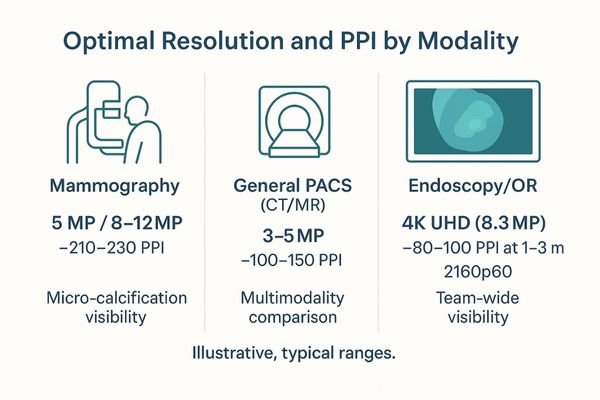
Effective display selection requires matching the pixel density to the imaging modality.
- Mammo Target: ~210–230 PPI for visualizing micro-calcifications.
- PACS Target: ~100–150 PPI for general diagnostic reading.
- OR 4K Large Screens: ~80–100 PPI, where smooth 4K@60fps motion is crucial.
For diagnostic reading, a 5MP grayscale display like the MD52G is ideal for mammography. For multimodality comparison, an 8MP fusion display like the MD85CA excels, while a single 12MP screen can integrate multiple studies, eliminating the central bezel of a dual-head setup.
| Modality / Task | Recommended Resolution | Bit Depth | ALC/CBS |
|---|---|---|---|
| Diagnostic Mammography | 8MP – 12MP | 10–12 bit | Yes |
| General PACS (CT/MRI) | 3MP – 5MP | 10 bit | Yes |
| Primary Surgical | 4K UHD (8.3MP) | 10 bit | No (fixed high bright) |
| Clinical Review | FHD (2MP) | 8–10 bit | Optional |
Signal integrity & latency: 12G-SDI vs HDMI for 2160p60
Using consumer-grade HDMI cables over long distances in an OR is risky. Signal degradation can cause image flicker, dropouts, or increased latency at critical moments.
A stable 2160p60 signal is better than theoretical bandwidth. For ORs, 12G-SDI provides a robust, low-latency, long-run link that is superior to HDMI for mission-critical video.
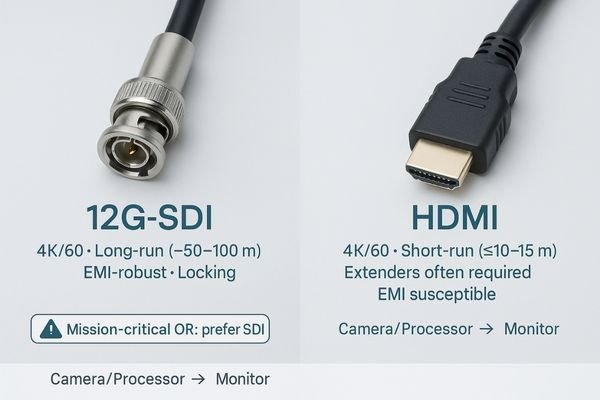
In a surgical environment, video signal chain reliability7 is non-negotiable. While HDMI is common, it is not optimized for the long runs and high-EMI environment of an OR. HDMI runs over 15–20 meters often require extenders, which add points of failure and increase downtime risk. For delivering a 4K 60fps signal, 12G-SDI is superior. A single 12G-SDI8 cable can carry an uncompressed 4K signal over distances up to 50 meters or more. By choosing a monitor with native 12G-SDI inputs and loop-through outputs, like the MS322PB, institutions build simpler, more reliable video systems. Use an OR video chain checklist: assess cable grade, path length, use of lockable connectors, and map potential EMI sources.
Multi-image workflows & per-window control; ergonomics & hygiene
A monitor with multiview is useless if all windows are stuck with the same settings. Surgeons need to view a color image and a DICOM image simultaneously with correct parameters.
Effective multi-image modes require per-window control of gamma, color temperature, and luminance, with hotkey layout toggles. This, combined with smart ergonomics and a hygienic design, creates measurable workflow improvements.
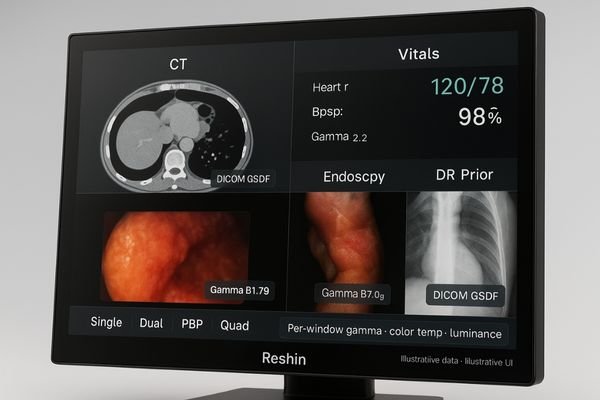
True workflow efficiency comes from features that reduce repetitive steps. A multiview display9‘s value is unlocked by providing per-window control over gamma, color temperature, and luminance. Diagnostic displays like the MD85CA and MD120C offer up to eight-way splits with this granular control. In the OR, a monitor such as the MS321PB provides essential PIP/PBP and three/four-way splits for simultaneous viewing. Ergonomics and hygiene also deliver significant gains. An IEC 60601-1 compliant flat, wipe-clean front reduces OR turnaround time. Meanwhile, features like an Ambient Light Sensor (ALC)10 and automatic image rotation cut the micro-steps required from staff daily, compounding into measurable ROI.
Conclusion
Focus on sustained, verifiable performance in luminance, grayscale, and signal integrity to ensure a display supports clinical confidence and workflow efficiency over its entire lifecycle. ✅
👉 For advanced medical-grade display solutions, contact martin@reshinmonitors.com.
-
Exploring ways to enhance workflow efficiency can lead to better patient care and optimized operations in medical environments. ↩
-
Understanding medical-grade displays is crucial for healthcare professionals to ensure accurate imaging and improve patient outcomes. ↩
-
Understanding Auto-QC is crucial for ensuring accurate medical imaging, making it a valuable resource for professionals in the field. ↩
-
Exploring the Constant Brightness System can enhance your knowledge of display technology, ensuring consistent image quality over time. ↩
-
Understanding perceived contrast is crucial for evaluating display performance, especially in challenging lighting conditions. ↩
-
Exploring optical bonding can reveal its benefits in reducing glare and enhancing image clarity, vital for surgical displays. ↩
-
Learn effective strategies to maintain video signal chain reliability in ORs, crucial for successful surgical procedures. ↩
-
Explore the benefits of 12G-SDI for reliable video transmission in surgical settings, ensuring optimal performance and minimal downtime. ↩
-
Explore how multiview displays enhance workflow efficiency by reducing repetitive tasks and improving control. ↩
-
Learn about the advantages of ALC technology in monitors and its impact on user experience and efficiency. ↩