In clinical display deployments, intermittent issues are often blamed on “bad cables” or “random GPU problems,” when a frequent root cause is unstable communication between the workstation and the monitor during signal negotiation—especially around state changes.
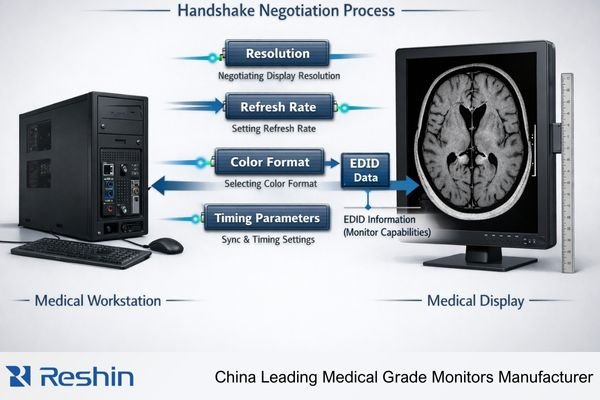
A handshake is the negotiation process between a workstation and medical display to establish compatible signal parameters like resolution, refresh rate, and color format. Medical displays are particularly susceptible to handshake failures due to complex signal chains, intermediate devices, and strict consistency requirements that make "works most of the time" operationally unacceptable.
Handshake problems are commonly misdiagnosed because they resemble “random connectivity” rather than a systematic negotiation failure. Symptoms such as intermittent black screens1, delayed image appearance, brief dropouts, or subtle mode changes often cluster around predictable triggers—boot-up, wake from sleep, docking/undocking, or input switching—yet those triggers are not always recorded, making the issue hard to reproduce and troubleshoot consistently.
What Does a "Handshake" Mean Between a Workstation and a Medical Display?
A handshake is the initial communication protocol that establishes compatible operating parameters between connected devices.
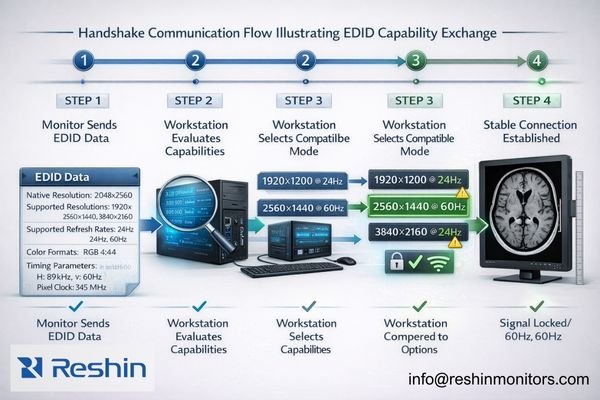
A handshake is the negotiation process that occurs when a workstation and medical display first connect or when something changes in the signal path. Both devices exchange identification and capability information to agree on signal timing, resolution, refresh rate, and color format, then lock onto a stable communication link.
It’s helpful to treat a handshake as more than “getting an image on screen.” In medical environments, the goal is repeatably getting the correct image mode—every boot, every wake, every switch. A handshake that succeeds only intermittently can lead to unintended scaling, unexpected timing changes, or different color handling, which may not throw an obvious error but can still disrupt clinical consistency and workflow.
Information Exchange Process
During handshake negotiation, the display reports its capabilities through EDID (Extended Display Identification Data)2, including supported resolutions, refresh rates, color formats, and timing preferences. The workstation evaluates this information against its output capabilities and selects compatible parameters that both devices can support reliably. EDID is a key input, but the handshake also includes the broader process of mode selection and the final link settling into a stable, repeatable state.
Clinical Accuracy Requirements
In medical applications, the handshake must establish parameters that support calibrated display behavior, consistent image geometry, and predictable signal handling. A successful handshake ensures the display receives signals in formats that avoid unintended scaling, unnecessary conversions, or timing instability—because even when an image appears, the wrong negotiated mode can change how that image is presented from one session to the next.
Why Are Handshakes Especially Sensitive in Clinical Display Setups?
Clinical environments introduce complexity factors that make handshake negotiation more challenging and failure-prone than standard office configurations.
Clinical display setups often involve multiple monitors, multi-output GPUs, specialized viewers, calibrated modes, long cable runs, and intermediate devices like KVMs, extenders, or switchers. Each component can alter negotiation information, and clinical environments require consistency that makes intermittent handshake issues operationally unacceptable.
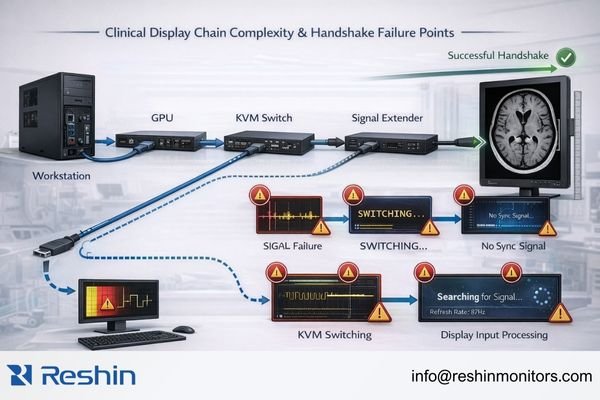
Clinical environments amplify handshake sensitivity3 because they increase both chain complexity and the number of renegotiation events. Multi-monitor setups require the GPU to negotiate with several displays while maintaining stable timing. Intermediate devices like KVM switches, extenders, splitters, and capture systems can introduce their own device states, timing behavior, or capability reporting, which can change what the workstation “sees” during negotiation.
Environmental Complexity Factors
Long cable runs, signal splitters, and format converters add layers where timing, integrity, or device-state transitions can disrupt negotiation. In addition, controlled clinical configurations may standardize specific output parameters to maintain consistent behavior, which reduces tolerance for “close enough” matching and makes negotiation drift more noticeable when it occurs.
Consistency Requirements
Clinical readers notice when display behavior changes between sessions, so a handshake that “works most of the time” becomes an operational problem. Frequent triggers like power cycling, input switching, laptop docking, and system updates increase how often renegotiation must occur, which is why latent compatibility issues often appear as intermittent, hard-to-reproduce problems—especially if the environment and state transitions are not standardized.
How Do Handshake Failures Usually Present on Medical Displays?
Handshake failures typically manifest as signal instability symptoms rather than clear error messages, making diagnosis challenging.
Handshake failures usually appear as intermittent black screens, repeated brief dropouts, flicker during mode changes, delayed image appearance after boot, or displays that work only after cable replugging. In multi-device chains, systems may fall back to unexpected safe modes with wrong resolution or color format behavior.
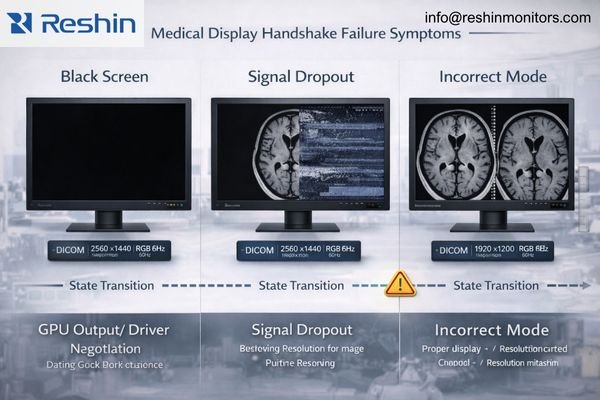
A key diagnostic pattern is that problems occur during state transitions—boot sequences, wake from sleep, input switching, docking events, or mode changes—rather than during steady-state operation. While cable issues are possible, a symptom pattern that repeatedly clusters around these transitions often indicates renegotiation instability somewhere in the chain.
Common Symptom Patterns
Systems may display images in incorrect resolution or refresh modes, introduce unexpected scaling that affects perceived sharpness, or show intermittent signal dropouts during transitions between applications or display states. Multi-monitor setups may lose one display during boot while others work correctly, or displays may work individually but fail when connected simultaneously through the full chain of intermediates.
Timing-Dependent Issues
Some failures appear only under specific conditions, such as cold boot versus warm reboot, a particular KVM port switching sequence, sleep/wake behavior, or an application that triggers a mode change. Because automatic recovery often occurs, teams may assume the behavior is “random,” but handshake failures4 are frequently timing- and state-dependent. Troubleshooting becomes far more effective when the trigger is documented precisely (boot order, port used, device chain, driver version, and the exact state transition that preceded the failure).
Silent Fallback Modes
Particularly problematic are failures that result in silent mode changes—the system establishes a connection but negotiates different parameters than expected. That can mean a different refresh/timing, a changed resolution, or unintended scaling, subtly altering image presentation even though the screen is “working.” Contact us at info@reshinmonitors.com if you need assistance developing diagnostic procedures for identifying handshake-related display issues in your clinical environment.
What Practical Steps Reduce Handshake Failures in Medical Environments?
Systematic configuration control and environmental standardization significantly improve handshake reliability.
The most effective approach is simplifying and stabilizing negotiation conditions: standardize known-good output modes per workstation profile, maintain validated firmware and driver versions, and minimize mode switching during clinical sessions. Control physical layer factors and document power-on sequences to reduce renegotiation triggers.
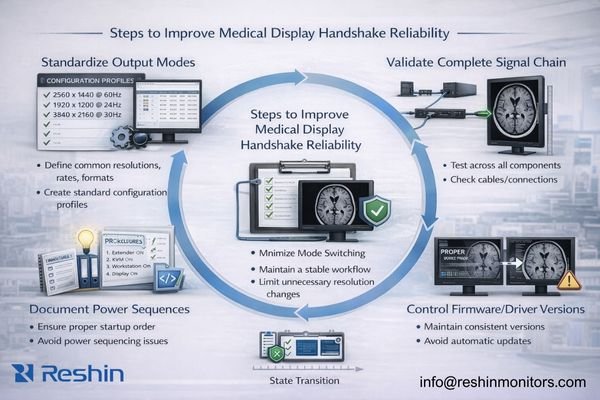
A practical way to reduce handshake failures is to make negotiation conditions predictable. Instead of chasing isolated incidents, define a known-good baseline for each workstation type, validate it end-to-end across the actual signal chain, and treat changes as triggers for requalification.
Configuration Standardization
Document and enforce specific output modes for each clinical application, avoiding configurations that frequently renegotiate or fall back to compatibility modes. Maintain graphics drivers5 and display firmware on validated versions that have been tested with your complete signal chain, and avoid automatic updates that can change negotiation behavior unexpectedly. Where possible, reduce variability by using a workstation profile that consistently applies the same display settings after reboot and after wake.
Physical Layer Control
Use consistent interface types and minimize adapters or converters that can disrupt negotiation timing. When intermediate devices like KVMs or extenders are required, validate the complete chain as an integrated system rather than testing components individually, since handshake behavior often depends on interactions among multiple devices and their state transitions.
Operational Procedures
Establish power-on sequences that allow displays and intermediate devices to initialize before workstations attempt connection. Document correct input port usage and cable routing to ensure consistent signal paths. Design clinical workflows to minimize input switching and unnecessary mode changes during active sessions, reducing opportunities for renegotiation failures and silent fallbacks.
How to Choose Medical Displays and System Configurations for More Reliable Handshakes?
Selection strategy should prioritize compatibility validation across the complete signal chain and real-world state transitions.
Selecting for reliable handshakes requires designing the deployment as a complete signal system rather than individual component selection. Align expected workstation output modes with display native capabilities to minimize fallback negotiation, and plan interface strategies that avoid unnecessary conversions or adapters that complicate the handshake process.
| Clinical Role / Application | Usage Pattern | Display Requirements | Recommended Model | Key Integration Considerations |
|---|---|---|---|---|
| Primary Diagnostic Reading | Single workstation, stable connection | Native mode compatibility, reliable EDID | MD33G | Validated timing modes, consistent negotiation |
| Multi-Monitor Diagnostic | Synchronized display operation | Multi-output GPU compatibility | MD45C | Coordinated handshake behavior across displays |
| Clinical Review Workstation | Mixed input sources, switching | Stable multi-input negotiation | MD32C | Reliable input switching, consistent modes |
| Portable Clinical Use | Multiple connection scenarios | Broad compatibility, reliable negotiation | MD26C | Flexible handshake support, stable performance |
| High-Resolution Diagnostic | Advanced workstation configurations | Complex signal parameter support | MD50C | Advanced timing support, stable high-bandwidth negotiation |
Evaluate display behavior across real clinical state changes including cold boot, warm reboot, sleep/wake cycles, input switching, and KVM port changes. Handshake reliability is proven by repeatability across these transitions, not by single successful connections under ideal conditions.
Consider serviceability factors that prevent configuration drift over time. Choose displays with clearly labeled input ports, consistent configuration profiles, and documented compatibility with your standard GPU settings that can be restored after system updates or hardware maintenance.
Plan validation and lifecycle management procedures that can verify handshake stability after changes. If your environment requires intermediate devices, ensure the complete configuration can be tested end-to-end and requalified after component updates or replacements, maintaining stable negotiation behavior throughout the display lifecycle.
FAQ
Is a "handshake" the same thing as EDID?
EDID is a key part of the handshake because it describes the display’s capabilities, but the handshake is broader—it includes link training, mode selection, and how the source and display settle on a stable signal.
Why does the display work after I replug the cable?
Replugging forces renegotiation from a clean state, which can bypass a timing or state issue that occurred during boot, wake, or switching; it’s a symptom of unstable negotiation conditions rather than a permanent fix.
Do KVMs and extenders commonly cause handshake failures?
They can, because they add another device state and may modify or delay capability information; reliable operation usually requires validating the entire chain, not just the display and GPU.
Why do handshake issues appear after OS or GPU driver updates?
Updates can change default scaling behavior, timing selection, or link training logic, which may alter how modes are negotiated; reapplying validated settings often restores stability.
Can handshake failures silently change image sharpness or geometry?
Yes. A failed negotiation may fall back to a different mode or trigger scaling, which can subtly change sharpness and geometry even if an image still appears on screen.
What’s the first thing to standardize to improve handshake reliability?
Standardize a known-good resolution/refresh profile and keep GPU scaling and unnecessary mode switching disabled, then validate behavior across boot, wake, and any switching devices in the chain.
Conclusion
Handshake negotiation determines whether medical displays and workstations can establish and maintain stable, correct video modes across the state transitions that occur in real clinical environments. The complexity of medical display setups—with multiple monitors, intermediate devices, and strict consistency requirements—makes handshake failures more likely and more problematic than in standard office configurations.
At Reshin, we design medical displays with robust handshake capabilities and provide documentation for establishing reliable negotiation profiles that work consistently across clinical workflows. Our engineering approach focuses on compatibility validation across complete signal chains, including the intermediate devices and state transitions that clinical environments require. By standardizing configurations, controlling environmental factors, and validating behavior across real-world usage patterns, medical facilities can achieve the consistent display performance that diagnostic accuracy demands.
✉️ info@reshinmonitors.com
🌐 https://reshinmonitors.com/
-
Exploring the causes of intermittent black screens can provide insights into device performance and potential fixes. ↩
-
Understanding EDID is crucial for ensuring optimal display performance in medical environments. ↩
-
Understanding handshake sensitivity can help improve device negotiation and stability in clinical setups. ↩
-
Learn about handshake failures to troubleshoot display issues effectively and improve your system’s reliability. ↩
-
Explore this link to learn how to effectively manage graphics drivers for optimal performance in clinical settings. ↩