As an OR display and video-integration engineer, I see Composite and S-Video come up whenever a facility is balancing legacy compatibility with digital standardization across the OR video chain (sources, routing, extension, and displays).
Most modern OR workflows don’t need Composite/S-Video on every medical display. However, long-lifecycle legacy devices can still justify analog support at specific endpoints or through converters. The decision should be inventory-driven: identify which sources are still analog, estimate the downtime impact if they fail, and standardize on digital while keeping a validated fallback for critical legacy feeds.
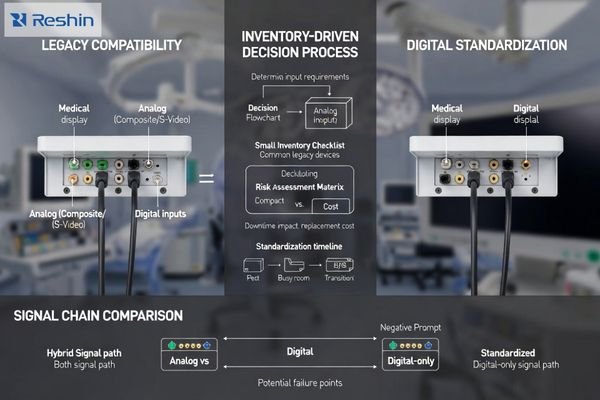
In practice, the best outcomes come from treating analog as an operational risk-control decision, not a feature checklist. Composite/S-Video can keep a room running when a legacy cart shows up or a digital handshake fails, but every additional analog path increases validation scope, support burden, and variability between screens. The goal is to preserve continuity today while reducing long-term complexity by standardizing signal transport1, documenting routing behavior, and validating any fallback path before it’s needed in a live case.
Why are Composite and S-Video still showing up in clinical environments?
Legacy clinical equipment creates persistent analog video requirements despite widespread digital adoption in consumer markets.
Composite and S-Video persist because clinical device lifecycles are long and integration changes are costly, so older imaging sources can remain in service long after consumer markets move on. Legacy endoscopy processors, older C-arm auxiliary outputs, bedside cameras, and specialty carts may still provide analog outputs as a practical fallback when digital handshakes or format negotiation fails.
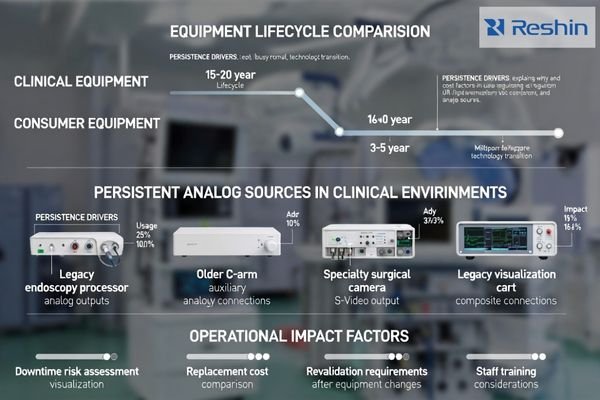
In multi-room facilities, a single legacy source can force the overall routing strategy to accommodate it—especially when downtime is unacceptable and replacement triggers formal validation and scheduling constraints. That reality is why analog inputs still appear in specs: not because they are clinically ideal, but because they can prevent a room from going dark when a legacy device2 is still operationally important.
Clinical Equipment Lifecycle Constraints
Medical devices often remain operational for decades due to high replacement costs, regulatory validation requirements, and proven reliability records that make hospitals reluctant to upgrade functioning systems that continue to meet clinical needs effectively. When those devices output only analog, the question becomes less about “modernizing” and more about managing risk during a controlled refresh cycle.
Integration Continuity Requirements
Composite and S-video inputs on displays serve less as image quality solutions and more as operational continuity measures, ensuring that if legacy sources appear or digital paths fail, staff can still obtain usable pictures without re-engineering rooms during active clinical procedures. A concise rule I use is: keep a fallback only where it prevents a real schedule-impacting outage.
Quotable takeaway: Analog video exists in ORs mainly to protect uptime when legacy sources cannot be retired yet.
What are the real trade-offs of keeping analog inputs on medical displays?
Analog input support creates complex trade-offs between compatibility benefits and long-term operational costs.
The trade-off is complexity versus compatibility: analog inputs can simplify last-mile troubleshooting and keep older devices usable, but they add ports and configuration paths that must be supported, tested, and maintained. Image quality is inherently limited—Composite can show noise, color bleeding, and reduced sharpness—so it’s best reserved for backup or non-critical views, not detail-critical decisions.
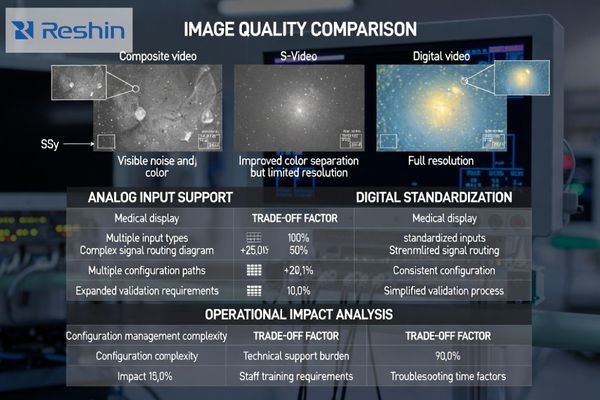
There is also an integration cost. If the room is otherwise digital, analog often pushes the system toward additional conversion stages (analog-to-digital) before the signal can traverse extenders, switchers, or KVM paths. Each added stage increases points of failure, can introduce delay, and creates another device to validate during troubleshooting.
For many modern ORs, the better long-term strategy is to standardize on digital transport3 and keep analog only where it measurably reduces downtime risk for a specific legacy source that cannot be economically upgraded or replaced during current refresh windows.
The decision is ultimately operational: supporting analog means validating more signal paths, maintaining more configuration knowledge, and accepting higher variability in appearance compared with all-digital feeds. If teams routinely compare adjacent screens, analog variability can slow confirmation steps and increase “double-check” behavior.
Quotable takeaway: Keep analog only when it clearly reduces downtime risk; otherwise standardize on digital to cut maintenance burden.
How do cleanability, sealing, and mounting design reduce downtime?
Converter-based solutions often provide better operational outcomes than native analog inputs for mixed-technology environments.
This section’s downtime theme is reducing failure points and configuration branches: converters can localize legacy support while keeping the room’s displays standardized. Converters make sense when you have one or two analog sources and want the rest of the room to stay digital, because conversion at the source cart preserves consistent cabling, routing, and display configuration across endpoints.
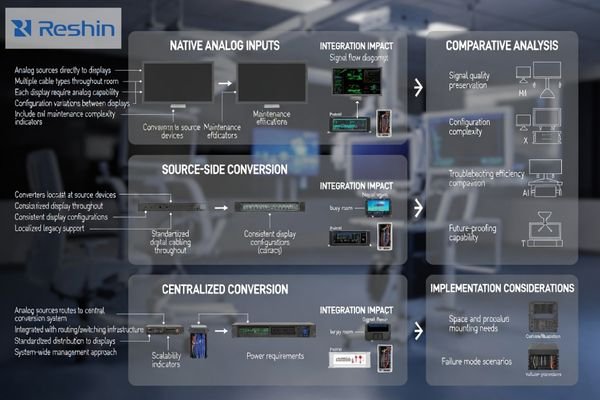
When I assess mixed analog/digital rooms, converters are especially useful with centralized switching and extension: conversion can happen before the signal enters the digital transport layer, avoiding long analog runs and making source switching behavior more predictable. That predictability reduces downtime because troubleshooting becomes faster and the room has fewer “special cases.”
| Integration Approach | Compatibility Benefit | Maintenance Impact | Image Quality | Scalability Factor |
|---|---|---|---|---|
| Native Analog Inputs | Direct source connection | Multiple configuration paths | Limited by analog format | Requires analog on every display |
| Source-Side Converters | Localized legacy support | Standardized digital routing | Conversion-dependent quality | Digital consistency across room |
| Centralized Conversion | Routing system integration | Single conversion point | Predictable processing | Scalable to multiple rooms |
| Hybrid Configurations | Flexible source handling | Complex validation requirements | Variable quality paths | Room-specific customization |
| Full Digital Migration | Simplified signal chain | Minimal maintenance overhead | Native digital quality | Maximum standardization |
The downside is that converters become another device to power, mount, and support, so decisions should be driven by failure modes and workflow impact. If analog is needed only occasionally, a converter-based contingency plan is often more economical and scalable than specifying analog ports on every display throughout the facility.
Successful converter implementation4 depends on validation. Before relying on a converter clinically, verify readability, aspect handling, and switching behavior in the actual chain, because converter designs vary in scaling and processing and can change how overlays or geometry appear compared with digital feeds.
Quotable takeaway: Converters often reduce downtime by containing legacy complexity at the source while keeping displays and routing standardized.
How should hospitals and OR integrators decide whether to deprecate analog video?
Systematic assessment of legacy sources and operational risks should drive analog deprecation decisions.
Start with inventory and risk, not ideology: list every Composite/S-Video source, where it is used, how often it is used, and what happens operationally if it is unavailable for a day. Then map the migration path—upgrade the source where possible, convert cleanly where necessary, and account for re-validation or staff retraining that may be triggered by routing or workflow changes.
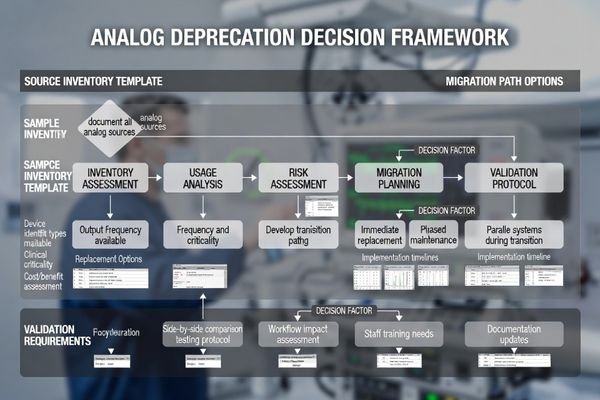
In many rooms, analog can be deprecated safely when digital alternatives exist and the team has a tested fallback plan. In others, one high-impact legacy device may justify keeping an analog path until the next scheduled refresh cycle, especially if replacement requires a larger clinical validation effort.
Source Inventory and Risk Analysis
Comprehensive deprecation planning requires documenting every analog source, its clinical criticality, usage frequency, and replacement complexity to ensure that migration decisions are based on actual operational requirements rather than assumptions about legacy equipment needs. A practical way to score criticality is to ask: is this feed primary, secondary, or emergency-only, and what is the recovery plan if it fails?
Migration Path Validation
The best practice treats analog deprecation5 as controlled change by standardizing outputs, documenting EDID and routing profiles, and running acceptance tests so clinical views remain stable before and after transitions, minimizing workflow disruption during equipment upgrades. Validation should include side-by-side comparison against the prior baseline where feasible, so teams see “same content, same geometry, same usability.”
Quotable takeaway: Deprecate analog only after inventory, a validated migration path, and a proven fallback plan are in place.
Which Reshin medical displays fit mixed analog-to-digital transition scenarios?
Display selection for transition environments should prioritize stability across varied sources rather than maximum interface count.
In mixed-transition environments, selection should prioritize stable behavior across varied sources rather than maximizing interface count, starting by clarifying where legacy analog still exists in endoscopy carts, older camera systems, or backup feeds.
Decide whether room strategy involves native analog on some endpoints or converter at source with digital everywhere else, then size and place displays by workflow including primary clinical view versus secondary reference needs.
| Clinical Role / Application | Usage Pattern | Display Requirements | Recommended Model | Key Integration Considerations |
|---|---|---|---|---|
| Basic Legacy Support | Occasional analog sources | Simple analog compatibility | MS192SA | Direct analog input handling |
| Mixed Source Environments | Frequent source switching | Stable multi-input behavior | MS220SA | Predictable switching performance |
| Transition Planning | Gradual digital migration | Flexible input options | MS247SA | Comprehensive format support |
| Advanced Integration | Complex routing requirements | Superior signal processing | MS270P | Robust format handling |
| Large Format Applications | Team coordination displays | Wide source compatibility | MS550P | Extensive input flexibility |
Focus on predictable input behavior during switching, consistent aspect handling, and easy configuration recovery after swaps while prioritizing standardization and serviceability to reduce maintenance through fewer unique cabling types, clear port access, and documented settings that can be restored quickly.
If analog must be supported, keep it purposeful by limiting it to endpoints that truly need it, and validate that converted or native analog feeds remain readable without introducing confusing differences versus digital sources that could affect clinical interpretation.
This approach preserves operational continuity while preparing for eventual full digital standardization, ensuring that transition periods do not compromise clinical workflow effectiveness or introduce unnecessary complexity during equipment migration.
FAQ
Is Composite or S-Video acceptable for detail-critical surgical viewing?
Usually not—Composite especially is limited in sharpness and noise performance, so it’s better reserved for backup or non-critical views; use digital outputs for primary clinical decisions whenever possible.
If my room is mostly digital, why not keep analog inputs "just in case" on every display?
Because it increases complexity and validation scope; a targeted converter-based fallback often achieves the same resilience with less long-term maintenance burden.
Do converters add latency or degrade image quality?
They can, depending on design and scaling; that’s why you should validate readability, aspect handling, and switching behavior in the actual chain before relying on them clinically.
What is a safe migration path for legacy endoscopy carts?
Start by standardizing digital outputs where available, then use converters only for unavoidable analog sources, and plan a controlled refresh cycle with documented routing/EDID profiles and acceptance tests.
How do we avoid inconsistent appearance between analog and digital feeds?
Use consistent aspect modes, minimize extra scaling, and validate side-by-side on the same content; standardizing the signal chain reduces surprises more than tweaking individual monitors.
When should we fully remove Composite/S-Video from procurement specs?
When your inventory shows no operationally critical analog sources and you have a tested fallback plan; remove it as part of a controlled change during a scheduled refresh cycle.
Conclusion
Most modern medical video workflows don’t need Composite and S-Video inputs on every display, but real-world legacy devices can still justify analog support in targeted endpoints or via converters when systematic assessment reveals operationally critical sources that cannot be immediately upgraded. The right approach is inventory-driven by identifying which sources remain analog, quantifying operational impact, and choosing transition strategies that standardize rooms on digital while preserving validated fallbacks for equipment that must continue operating during migration periods. By keeping analog purposeful through either localized converters or limiting it to displays that truly require it, hospitals can reduce complexity, improve consistency, and migrate without disrupting clinical operations that depend on reliable visual information throughout patient care procedures.
Our approach at Reshin emphasizes helping healthcare facilities navigate analog-to-digital transitions through systematic assessment of legacy equipment requirements and practical migration strategies that maintain clinical workflow continuity while preparing for future standardization on digital video systems. When analog input decisions are based on actual operational needs rather than assumptions about legacy compatibility, medical facilities can achieve optimal balance between current equipment requirements and long-term maintenance efficiency while ensuring that display systems continue supporting high-quality patient care throughout technology transition periods.
✉️ info@reshinmonitors.com
🌐 https://reshinmonitors.com/
-
Exploring the benefits of standardizing signal transport can lead to more efficient and reliable technology setups. ↩
-
Learn about the challenges and strategies for managing legacy devices in healthcare to ensure reliability and compliance. ↩
-
Exploring the advantages of digital transport can enhance your knowledge of efficient system design and operation. ↩
-
Discover essential tips for successful converter implementation to ensure optimal performance in your AV setup. ↩
-
Understanding best practices for analog deprecation can help ensure a smooth transition to digital alternatives, minimizing disruptions. ↩