Hospital technical directors consistently report that a large portion of imaging workflow disruptions come from monitor compatibility rather than true modality failure. When OR integration, PACS workstations, endoscopy towers and legacy systems all push video into the same display infrastructure, the weakest link is often the monitor’s interface design—not the scanner or camera.
Interface designs on medical-grade monitors reduce compatibility issues by accepting multiple video protocols natively, tolerating real-world timing and voltage variations, isolating medical equipment electrically, and keeping processing latency low. At Reshin, we engineer these interface layers so mixed-generation imaging systems can connect reliably without converters or recurring handshake failures.

As an engineer at Reshin specializing in medical imaging integration1, I work closely with hospital technical directors, PACS managers, biomedical engineers and OR integration partners who are accountable for uptime and diagnostic quality. In this article I focus on how the interface designs on our medical-grade monitors reduce compatibility issues in modern medical imaging solutions—and what that means for clinical risk, maintenance cost and long-term scalability.
Why do compatibility issues frequently occur in medical imaging environments?
Healthcare facilities often see “mysterious” image problems or random disconnects even when they’ve invested in premium imaging equipment. Why do these issues persist?
In many of my deployments, the most stubborn compatibility problems come from protocol diversity: a CT from ten years ago, a new angio system, imported ultrasound carts and PACS workstations all speaking slightly different “dialects” of HDMI, SDI or DVI. Commercial displays expect textbook signals; our medical-grade monitors at Reshin are engineered to cope with these variations.
Medical imaging environments are built around long equipment lifecycles. A CT scanner may remain in service for 10–15 years, while OR cameras are refreshed more frequently and PACS workstations evolve with each IT upgrade. Each generation brings its own timing expectations, color handling and bit-depth requirements. When these devices share the same display infrastructure, any monitor that assumes clean, uniform signals will fail first.
From a technical perspective, I’ve seen facilities struggle most where older modalities use borderline timing or non-standard voltage levels that commercial monitors quietly reject. Our medical-grade displays2 at Reshin add tolerance ranges, stronger signal conditioning and isolation that absorb these differences rather than turning them into black screens, handshake loops or shifting colors. For decision makers, that extra interface engineering directly reduces unexplained downtime and emergency “plan B” workarounds at the clinical level.
How do multi-protocol input designs improve real-world system compatibility?
When hospitals try to make mixed systems talk to each other, they often build long chains of converters—SDI to HDMI, HDMI to DisplayPort and back again. Every box adds cost, latency and another point of failure.
From an engineering standpoint, real compatibility comes from how many protocols a monitor can handle natively. In ORs and imaging suites I routinely see 3G/12G-SDI, HDMI 2.0, DVI-D, DisplayPort and even legacy analog outputs. Our medical-grade monitors at Reshin support these inputs directly, removing converters, preserving full-bit grayscale and avoiding extra latency in the signal chain.
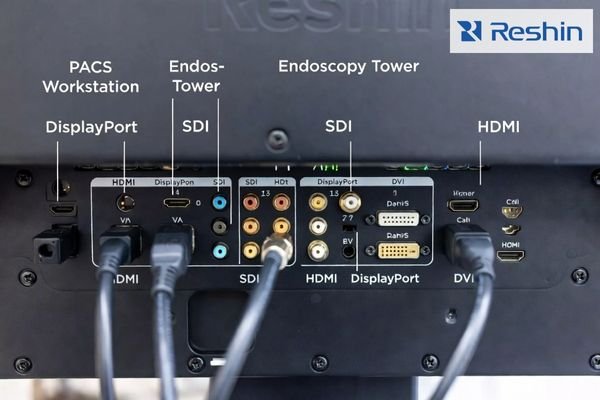
In one OR project, replacing commercial displays plus six converters with Reshin medical-grade monitors offering native SDI and HDMI immediately removed more than 100 ms of cumulative latency3 and eliminated several recurring color and handshake issues—without changing the cameras or routers. Our multi-protocol input designs also simplify cabling, documentation and training: staff plug sources into labeled ports rather than tracing complex conversion chains.
For hospital leadership, this design choice turns into fewer integration surprises when new devices arrive, lower support tickets related to “no signal” or “wrong format,” and clearer accountability when genuine modality defects occur. Instead of guessing which converter failed, teams can trust a direct, medically engineered connection between imaging systems and our monitors.
Why is signal integrity crucial for medical imaging accuracy?
Clinicians often notice that the same study “looks better” on one monitor than another, even when the resolution spec is identical. The difference usually isn’t just the panel—it’s the entire signal path up to the panel.
In diagnostic environments, small distortions like jitter, added noise or chroma shifts can change how subtle lesions appear. These issues often start in the connection chain: poor grounding, weak shielding or receiver circuitry that isn’t robust enough for noisy clinical spaces. When I specify PACS or modality monitors, I look for medical-grade impedance control, differential signaling and EM shielding in our Reshin designs to protect grayscale and color all the way to the screen.
When signal integrity is weak, I’ve seen grayscale compression that hides faint lung markings, color shifts that mislead surgical teams about tissue appearance and fine structures that lose sharpness. These are not theoretical risks—they show up as more repeat scans, longer reading times and discrepancies between rooms. Our medical-grade designs at Reshin add better impedance matching, shielding and error handling so the panel actually receives what the modality outputs.
For technical directors, investing in higher signal integrity4 through properly engineered monitor interfaces is effectively investing in diagnostic consistency: fewer image-quality complaints, fewer “this looks different in room B” conversations and a more stable baseline for calibration and QA programs across the imaging department.
How does latency control influence clinical workflows?
Surgical and interventional teams quickly pick up if a visualization system feels “laggy,” even if the picture looks sharp. That lag can come from the display side rather than the camera or scope.
When I’m called into OR integration projects, display latency is one of the first metrics I measure. Converters, generic scaling chips and mismatched resolutions can all add tens of milliseconds. In endoscopy, ultrasound-guided procedures and minimally invasive surgery, those delays break hand-eye coordination and erode surgeon confidence, so we tune our Reshin surgical monitors specifically for low and predictable latency.
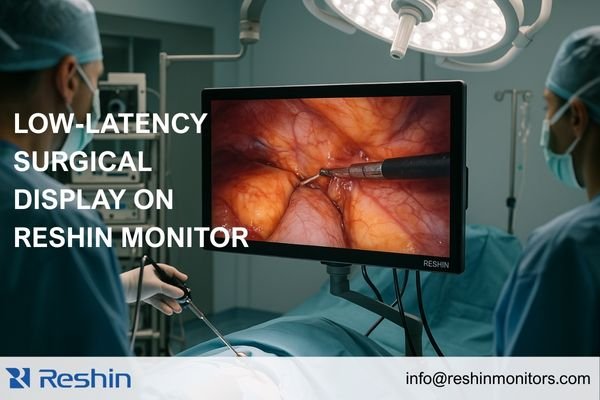
In practice, I’ve seen surgeons quickly adapt to a consistent 20–30 ms delay but struggle when total latency creeps above 60–80 ms or varies case to case. Our medical-grade displays optimized for OR work minimize “extra” processing—no unnecessary heavy algorithms in the live surgical path—and are tuned to keep timing stable even when formats or routing change. That translates into more natural instrument control, less fatigue and fewer complaints that a new system “feels worse” despite better specs on paper.
From a management viewpoint, specifying low-latency Reshin monitors5 is a relatively small line item that supports procedural safety, surgeon acceptance of new technology and smoother go-lives when imaging upgrades roll out.
How does interface standardization support long-term scalability?
Most hospitals can’t replace all imaging systems at once. CT and MRI may stay for a decade, while cameras, routers and monitors change much faster. If your display interfaces age out too quickly, you end up in a permanent cycle of adapters and emergency upgrades.
In long-term planning sessions with our customers, I treat Reshin medical-grade monitor interfaces as the stabilizing layer in the imaging stack. By choosing displays with forward-compatible sets—12G-SDI, HDMI 2.0+ and DisplayPort as standard—you create a consistent landing zone for both older and newer modalities without redesigning the whole video chain.
Over multiple projects, I’ve seen that a well-chosen interface baseline allows hospitals to sequence their investments: first stabilize the monitors and routing, then upgrade modalities and workstations over time. This reduces integration risk when new equipment arrives and prevents “forced” display replacement just because a new device only supports a newer format. It also gives IT and biomedical engineering a clearer architecture to document and support.
For decision makers, standardized, forward-compatible interfaces on our Reshin monitors become a strategic tool: they reduce total cost of ownership, lower project risk during technology transitions and give procurement more freedom to negotiate device purchases without fearing downstream video chaos.
How do medical monitor interface designs reduce maintenance and troubleshooting costs?
Support teams spend a surprising amount of time chasing intermittent image issues that never appear when a technician is standing in front of the monitor. Interface design determines how much of that time is wasted.
One of the most persistent hidden costs I see in imaging departments comes from repeated troubleshooting of unstable connections, converter failures and “unsupported mode” errors. Our medical-grade monitors at Reshin include interface intelligence—signal detection, auto-configuration and compatibility safeguards—that significantly reduce both the number and length of these incidents.
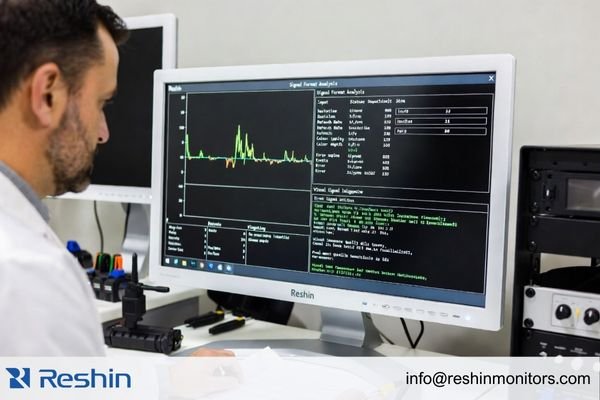
In deployments where we replaced commercial displays with Reshin monitors that expose detailed signal status and error logs, average troubleshooting time dropped sharply because technicians could see whether the problem came from the source, cabling or monitor. Features like automatic input detection, graceful recovery after brief signal loss and intelligent fallback modes keep rooms usable instead of dropping to a black screen with a cryptic error.
From a cost perspective, that means fewer delayed cases, fewer rescheduled studies and fewer engineering hours spent on low-value “why is this port suddenly not working” detective work. Across the life of a monitor fleet, those incremental savings compound into a substantial reduction in operational burden for our customers.
Which Reshin medical-grade monitors provide stronger interface compatibility?
In real projects, I don’t just ask “which monitor has the best panel.” I ask “which interface designs will make this imaging solution stable for years, not months.” That’s where our engineering depth at Reshin matters most.
At Reshin, we specialize in medical-grade displays for operating rooms, endoscopy, radiology and PACS environments. In my deployments, I usually group our monitors into two families when I evaluate interface design and compatibility: surgical/endoscopy visualization and diagnostic/PACS reading.
Surgical & Endoscopy Monitors
For ORs and endoscopy suites, I prioritize native SDI support, low latency and multi-source viewing. These models are typically at the core of those solutions:
| Model | Environment | Key Interface Features | Clinical Benefits |
|---|---|---|---|
| MS275PA | Surgical & Endoscopy | HDMI, DP, 3G/12G-SDI; 4K UHD input; multi-view modes | Direct connection to 4K surgical cameras and routers; low latency; flexible layouts |
| MS322PB | Surgical & Endoscopy | HDMI, DP, 3G/12G-SDI; multi-view and PIP | Handles multiple sources on one screen; ideal for complex OR setups |
| MS321PB | Surgical & Endoscopy | HDMI, DP, 3G/12G-SDI; anti-reflection front glass | Large 4K screen with robust OR-grade connectivity and visibility |
| MS430PC | Surgical & Endoscopy | HDMI, DP; 4K large-format interface design | Large 42" 4K visualization for hybrid ORs and teaching environments |
| MS550P | Surgical & Endoscopy | HDMI, DP, 3G/12G-SDI; long-distance SDI support | 55" 4K display with long-run SDI for wall-mounted OR and control room workflows |
In practice, these monitors let OR teams plug cameras, routers and recorders straight into labeled ports while keeping latency low and cabling straightforward.
Diagnostic & PACS Monitors
For radiology and PACS reading rooms, grayscale fidelity, DICOM compliance and workstation compatibility are the main priorities:
| Model | Environment | Key Interface Features | Clinical Benefits |
|---|---|---|---|
| MD32C | Diagnostic & PACS | DP, DVI, HDMI plus VGA/BNC; CBS stabilization | Flexible connection to varied workstations; stable luminance for general CT/MRI/DR |
| MD33G | Diagnostic & PACS | DP, DVI, HDMI, BNC; grayscale-focused interfaces | Preserves high-bit grayscale paths for precise diagnostic reading |
| MD85CA | Diagnostic & PACS | DP, DVI, HDMI; multi-window 8MP interface support | High-resolution multi-window viewing for consolidated reading rooms |
| MD120C | Diagnostic & PACS | DP, HDMI; ultra-high resolution signal handling | 12MP layouts for complex multi-series, multi-modality diagnostic work |
These recommendations are based on real-world deployments of our Reshin monitors in ORs, endoscopy suites and PACS reading rooms with mixed-generation equipment, where interface design directly determined how much integration pain each site experienced.
FAQ: Interface design on medical-grade monitors
Do I really need SDI support on every medical-grade monitor?
Not necessarily. SDI is critical for surgical and endoscopy cameras and video routers. For PACS workstations, high-quality HDMI or DP inputs with medical-grade engineering are usually sufficient.
Why are commercial displays risky for medical imaging compatibility?
Commercial displays assume clean, standard signals and short lifecycles. Medical environments mix generations, vendors and protocols. Without medical-grade tolerance, isolation and diagnostics, small deviations quickly turn into black screens, handshake loops or unstable colors.
How can I future-proof my imaging system’s interface design?
Treat medical-grade monitors as the stable interface layer. Choose displays with forward-compatible inputs (12G-SDI, HDMI 2.0+, DP) and strong diagnostics so new modalities can plug in without rebuilding your video chain each time.
Conclusion
Interface design is one of the most underestimated parts of medical display selection, yet it sits at the center of imaging compatibility. Native multi-protocol inputs reduce the need for fragile converter chains. Robust signal integrity protects diagnostic information. Low-latency processing supports procedural safety. Forward-compatible interfaces and better diagnostics reduce maintenance workload and extend the life of your medical imaging solutions.
In my experience working with hospitals and imaging centers, facilities that intentionally choose medical-grade monitors with strong interface designs see fewer unexplained disconnects, fewer image-quality complaints and far fewer emergency workarounds when new equipment arrives. Our portfolio at Reshin is engineered with these realities in mind, combining multi-protocol support, stable grayscale pipelines and OR-grade connectivity into displays that integrate cleanly into complex environments and support future growth.
If your team is planning an OR refresh, a PACS expansion or a broader imaging solution upgrade, engaging with us at Reshin early can help you map clinical requirements to a monitor interface strategy that is compatible today and resilient to tomorrow’s changes.
📧 info@reshinmonitors.com
🌐 https://reshinmonitors.com
-
Explore this link to understand the latest trends and best practices in medical imaging integration, enhancing your knowledge in the field. ↩
-
Explore how medical-grade displays enhance reliability and performance in medical imaging, ensuring optimal patient care. ↩
-
Learn about the impact of cumulative latency on medical imaging to improve system performance and patient outcomes. ↩
-
Understanding signal integrity is crucial for improving diagnostic accuracy and reducing image quality issues in medical imaging. ↩
-
Explore how low-latency Reshin monitors enhance surgical precision and safety, ensuring better outcomes for patients. ↩