When medical projects fail or exceed budgets, the root cause is rarely about panel specifications or image quality. Instead, it’s typically tied to integration problems that emerge during implementation—incompatible interfaces, unstable signal connections, inconsistent control behavior, or undefined responsibility boundaries between vendors. These integration failures translate directly into costly delays, on-site troubleshooting, and damaged client relationships.
Global distributors must evaluate medical-grade monitor brands beyond basic specifications by assessing their integration capabilities across five critical dimensions: signal interface compatibility, multi-source visualization, calibration consistency, control interoperability, and lifecycle documentation. These elements determine the true total cost of ownership and project success rates in complex medical visualization projects.
In my engineering work at Reshin, I’ve found that most distributors underestimate how deeply integration capabilities1 affect project economics. When analyzing failed installations, I frequently discover that the issues weren’t about resolution or brightness—they were about handshake failures between devices, inconsistent control protocols across similar models, or missing documentation for proper system validation. These integration problems don’t just delay projects; they fundamentally undermine distributor margins through extended engineering hours, multiple site visits, and damaged client confidence, especially when global customers expect predictable rollout across multiple sites.
Why "integration risk" is the real cost driver for medical-grade monitor distributors?
Many distributors approach medical display selection primarily by comparing specification sheets—resolution, brightness, contrast ratios—yet these parameters rarely determine project success or failure. Instead, the hidden costs emerge from unexpected integration friction: signal incompatibilities discovered during installation, unstable handshake behavior between devices, inconsistent control interfaces across product lines, and unclear responsibility boundaries between equipment vendors.
The real costs of poor integration manifest in at least four measurable ways: increased pre-sales engineering hours (typically 20–40 additional hours per complex project), on-site troubleshooting visits (often costing $2,000–5,000 per incident), elevated RMA rates (5–15% for poorly integrated systems), and project delays that can postpone revenue recognition by 30–90 days for distributors and their OEM partners.
When I analyze distributor performance metrics across different monitor brands, the data consistently shows that integration capability—not panel specifications—drives key business outcomes including project qualification speed, first-time installation success rates, and post-installation support ticket volume. This requires a fundamental shift in how distributors evaluate and select monitor partners, treating integration risk as a primary cost driver rather than a secondary technical detail.
Integration Risk Assessment Framework
To properly quantify integration risk, distributors need a structured approach. I typically recommend building a project integration risk score that includes:
- Interface Compatibility Risk2: Percentage of required connections that need adapters or converters
- Signal Stability Risk: Historical data on handshake failures and signal degradation
- Documentation Completeness: Availability of integration artifacts like timing charts and validation protocols
- Responsibility Matrix: Clarity of troubleshooting ownership between vendors
Distributors who adopt this approach can predict with surprising accuracy which projects will run smoothly and which will become resource drains. For example, I’ve seen projects where seemingly minor interface incompatibilities led to cascade failures, ultimately requiring complete system redesigns at the distributor’s expense. Contact us at info@reshinmonitors.com for guidance on building your own integration risk assessment framework based on real-world OR, endoscopy, and PACS deployments.
Mapping real-world system topologies: OR integration, endoscopy carts, PACS workstations, and KVM rooms
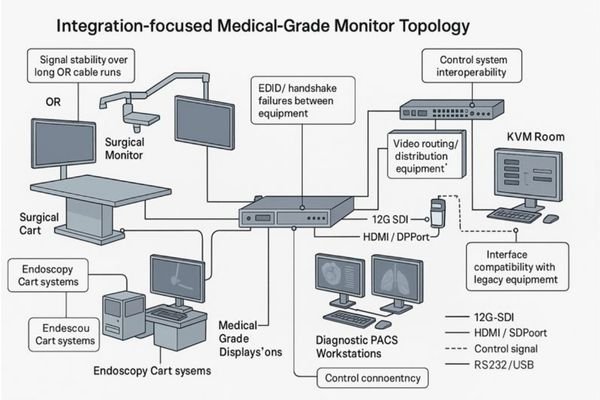
Integration evaluation must begin with understanding the system topology—the complete signal chain and control paths—rather than individual model numbers. Each medical visualization environment presents distinct integration challenges that require specific monitor capabilities and verification methods.
Effective medical-grade monitor selection requires mapping four common system topologies: integrated operating rooms (with long-run signal transmission and routing requirements), endoscopy carts (with mixed legacy and modern interfaces), diagnostic PACS workstations (requiring consistent calibration and ambient compensation), and control/KVM rooms (needing multi-input, multi-window capabilities with minimal latency and clear responsibility boundaries).
In my integration projects at Reshin, I’ve found that creating a "signal chain checklist" for each topology dramatically improves selection accuracy. This involves tracing the complete path from signal source (cameras, imaging devices, computers) through transport mechanisms (cables, optical converters, routers) to the display and any downstream devices (recorders, streaming systems). For global distributors, standardizing these topology templates across markets makes it much easier to reuse proven design patterns instead of reinventing the wheel for every project.
Operating Room Integration Topology
OR integration presents particularly complex challenges due to:
- Long cable runs (often 15–50+ meters) requiring signal stability
- Multiple signal sources needing simultaneous visualization
- Sterile field considerations affecting control methods
- Rigorous cleaning requirements impacting physical design
For OR integration scenarios, monitors must not just receive signals—they must maintain signal integrity over distance, handle multiple sources efficiently, and offer sterile-compatible control options. When evaluating monitors for OR integration3, I recommend focusing particularly on the signal transport layer and control pathways, where the most expensive failures typically occur and where differences between monitor brands become most visible in real installations.
Video I/O and signal-transport readiness: SDI/12G-SDI, HDMI/DP, legacy ports, and long-run stability
Signal interface compatibility is the foundation of successful integration, yet it’s frequently reduced to a checklist of connector types without proper validation of real-world performance. Effective evaluation requires looking beyond the presence of ports to assess their actual behavior under clinical conditions and typical installation distances.
Medical-grade monitor brands should demonstrate proven performance across four signal dimensions: native support for full 4K60 over 12G-SDI (for OR integration), stable EDID/handshake behavior with HDMI/DP sources (for workstations), comprehensive legacy port availability (for endoscopy and mixed environments), and consistent performance over cable distances matching real installation scenarios.
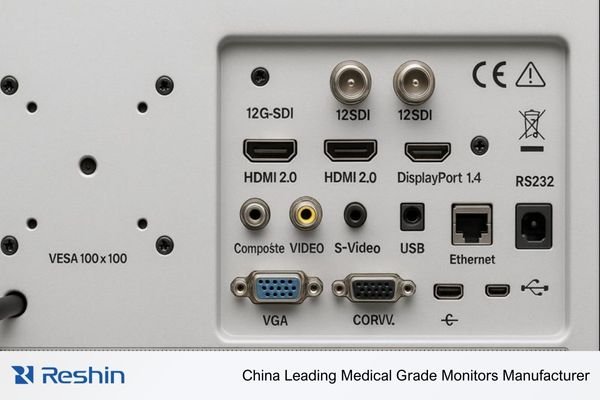
When I evaluate monitors for client projects, I assess signal capabilities through rigorous testing rather than specifications alone. For surgical environments requiring 12G-SDI, I verify not just the presence of connections but confirm true 2160p60 operation over cable lengths exceeding 50 meters with proper signal integrity and documented jitter margins. Many monitors claim "12G-SDI4 support" but fail when pushed to full bandwidth over realistic distances and routing topologies.
Similarly critical is the often-overlooked "legacy reality" in medical environments. While new installations increasingly use digital standards, many endoscopy towers and imaging systems still require VGA, composite video, S-Video, RGB, or YPbPr connectivity. Monitors that include these interfaces as standard equipment—not expensive add-ons—reduce adapter risk and improve first-time compatibility rates, especially when distributors support both new and legacy hospitals within the same portfolio.
Signal Stability Under Real Conditions
Beyond connection types, signal stability determines project success. Key elements to validate include:
- EDID management: Does the monitor reliably identify itself to source devices and maintain stable reported capabilities?
- Hot-plug behavior: Does reconnection work consistently without requiring reboots or manual input cycling?
- Loop-through performance: For monitors providing output loops to downstream devices, is signal quality maintained under full 4K load?
- Power cycle recovery: Does the monitor reliably restore proper connections after power interruptions and upstream device restarts?
These behaviors can only be verified through actual testing, not specification sheets. In my Reshin projects, 12G-SDI and HDMI/DP validation always includes simulated OR cable runs, deliberate hot-plug events, and power cycling scenarios. This kind of documented test methodology—rather than brand statements alone—is exactly what distributors should demand from any vendor that claims to be “integration ready.”
Multi-source visualization for OR integration: PIP/PBP, split-screen, and independent window control
In modern integrated operating rooms, displays frequently function as visual hubs combining multiple imaging sources—endoscopy cameras, PACS images, vital signs, and room cameras. This convergence makes multi-source visualization capability a critical integration factor rather than a luxury feature.
Effective multi-source visualization requires more than basic picture-in-picture; distributors should evaluate whether monitors provide consistent window management across product lines, predictable source prioritization, state recall after power cycling, and—for diagnostic or hybrid applications—independent calibration parameters for separate windows.
When I assess OR integration scenarios, I focus on whether multi-view capabilities actually enhance clinical workflow rather than just multiplying complexity. Key features that improve integration include:
- Quick access methods that don’t require deep menu navigation or on-the-fly manual tuning
- Consistent UI behavior across different models in the same family
- Predictable source prioritization that maintains critical imaging in the main window
- "Last known state" recall after power interruptions and system restarts
The engineering reality is that window management isn’t merely cosmetic—it directly impacts patient safety by ensuring the right source is viewed at the right time, supports teaching scenarios through secondary windows, and can reduce system complexity by eliminating external multiviewers in appropriate scenarios.
Window Management Consistency Assessment
One test I always perform is the "power cycle recall test5"—does the monitor reliably return to the same multi-window configuration after a power interruption or upstream device reboot? Many products fail this basic test, requiring manual reconfiguration that disrupts workflow in critical moments. In my work with Reshin surgical monitors, we design and verify PIP/PBP and multi-split layouts specifically to survive these events, and we document those behaviors for distributors as part of the integration package so they can set clear expectations with OR integration partners.
For diagnostic and PACS applications, an additional layer of complexity emerges: do separate windows maintain independent calibration parameters and appropriate gamma curves? This capability can be crucial for comparing images with different optimal viewing conditions without compromising overall QA compliance.
Calibration, DICOM, and brightness stability: integration with clinical QA, not just "image quality"
For diagnostic and PACS workstations, "integration" extends beyond physical connections to encompass quality assurance systems and clinical workflows. Monitors must fit seamlessly into established calibration routines while maintaining consistent performance over time and across reading rooms.
Medical display calibration capabilities should be evaluated as integration features rather than isolated specifications, focusing on four key dimensions: automatic DICOM Part 14 compliance (ideally within ±5% tolerance), long-term luminance stabilization technology, ambient light compensation with documented response curves, and orientation/rotation sensing for portrait workflow environments used by radiologists.
In my experience integrating diagnostic display systems, the most successful implementations treat calibration as an ongoing relationship rather than a one-time setup. When evaluating monitor brands for PACS environments, I recommend focusing on how they integrate with established QA processes:
- Does the monitor provide clear documentation of its DICOM compliance methodology?
- What stabilization technologies ensure consistent brightness over the deployment lifecycle?
- How does ambient light compensation behave in variable lighting conditions?
- What remote calibration options exist for enterprise-wide management across multiple sites?
These integration aspects directly impact distributor economics by reducing periodic recalibration disputes, minimizing "display inconsistency" complaints between rooms, and simplifying standardization across hospital imaging fleets.
QA Integration Testing Protocol
From an engineering standpoint, I’ve developed a standard protocol for validating calibration integration:
- Initial calibration documentation: Verify factory calibration reports and repeatability claims
- DICOM conformance testing: Measure actual grayscale performance against DICOM Part 14 using appropriate test patterns
- Stability projection: Test brightness consistency over accelerated usage cycles or extended burn-in periods
- Ambient response validation: Document display behavior under controlled light changes and compare to vendor claims
Reshin diagnostic monitors are specified and verified against these criteria, with DICOM-QC auto calibration within ±5% tolerance, built-in brightness stabilization systems, and ambient light compensation on relevant models. For distributors, the key is not just these features themselves, but the fact that they are documented, testable, and designed to plug directly into existing hospital QA workflows rather than requiring fragile custom processes.
Control, interoperability, and serviceability: RS232/USB, mounting, cleaning design, and lifecycle support
Integration capability extends beyond initial installation to encompass the full operational lifecycle. Distributors must evaluate how monitors support ongoing operations, maintenance, and eventual replacement or upgrade paths in real hospitals.
Operational integration assessment should verify four key capability areas: remote control protocols (RS232/USB) with documented command sets, standardized mounting configurations with clear weight/balance documentation, cleaning-optimized physical design suitable for clinical protocols, and comprehensive lifecycle documentation covering spare parts, warranty support, and end-of-life transition plans.
I find that physical and operational integration failures often emerge months after initial installation, when routine maintenance or reconfiguration requirements surface incompatibilities. When evaluating operational integration, distributors should focus on:
- Control system compatibility: Does the monitor support standard control protocols with clear and complete command documentation?
- Physical integration stability: Are mounting patterns, weight distribution, and thermal characteristics fully documented and compatible with common OR booms and carts?
- Clinical workflow compatibility: Is the physical design optimized for infection control procedures and frequent cleaning cycles?
- Lifecycle documentation: Are spare parts strategies, warranty terms, and product roadmaps clearly defined and accessible?
For surgical environments particularly, cleaning-optimized design becomes a critical integration factor. Reshin surgical monitors feature full mirror-like front surfaces that simplify wipe-down procedures and optical bonding to reduce liquid and dust contamination risks—details that directly impact acceptance testing and ongoing operations. For distributors, these design decisions translate to fewer "fitness for use" disputes, clearer installation guidelines, and simplified staff training.
Integration Documentation Requirements
What truly separates integration-ready monitor brands is their "integration artifacts"—the comprehensive documentation package that supports the entire project lifecycle:
- Pre-installation guides: I/O diagrams, supported timing charts, and cable specification guidelines
- Integration testing protocols: Validation checklists for signal integrity, control functionality, and calibration integration
- Operational documentation: Cleaning procedures, preventive maintenance schedules, and troubleshooting trees
- Lifecycle management: Spare parts availability windows, field replacement procedures, and end-of-life timelines for each series
In my work with distributors, we often treat this documentation pack as part of the brand selection criteria itself. Brands that can provide complete, engineering-level integration documentation tend to produce more predictable, scalable projects, while brands that cannot usually generate higher support costs and slower international rollout.
Integration-focused selection checklist for distributors: what to verify before you sign a brand
Translating these integration concepts into actionable selection criteria requires a structured approach. This checklist provides a framework for systematically evaluating medical-grade monitor brands against integration requirements—before committing to distribution agreements or long-term portfolio decisions.
Medical monitor brand selection requires systematic evaluation across seven integration dimensions: interface comprehensiveness, signal transport reliability, multi-source visualization capabilities, calibration/QA system compatibility, control interoperability, physical integration readiness, and lifecycle documentation completeness. Each dimension should be verified through a combination of specification review, bench testing, and pilot installation validation.
| Integration Dimension | Verification Method | Acceptance Criteria |
|---|---|---|
| Interface Coverage | Spec review + physical inspection | All required interfaces present as standard features (not add-ons) |
| Signal Transport | Bench testing at max resolution/distance | Stable performance at 2160p60 over specified distances; consistent EDID behavior |
| Multi-Source Visualization | Operational testing | Consistent window behavior across power cycles; documented source priority |
| Calibration/QA Integration | Reference installation + documentation | DICOM conformance within ±5%; compatibility with enterprise QA systems |
| Control Interoperability | Protocol testing + documentation review | Complete command documentation; consistent behavior across product line |
| Physical Integration | Installation simulation + documentation | Standardized mounting; cleaning-optimized design; cable management support |
| Lifecycle Documentation | Document package review | Complete integration artifacts; clear warranty terms; defined spare parts strategy |
When I perform integration capability assessments, I’ve found that most monitor brands perform well in two or three categories but struggle with comprehensive coverage. The brands that consistently succeed in complex integrations are those that treat these dimensions as core design requirements rather than marketing features and are willing to document their behavior in a way distributors can independently verify.
Pilot Installation Assessment
Beyond bench testing, I strongly recommend that distributors conduct structured pilot installations for any new monitor brand. These should:
- Represent the most complex topology the distributor typically supports
- Include deliberate "failure mode" testing (disconnection/reconnection, power cycling, multi-source switching, etc.)
- Document integration time requirements and troubleshooting incidents in a repeatable format
- Compare results against current reference brands using the same checklist
This approach provides quantifiable data about true integration capability that specification sheets cannot reveal and creates a durable internal knowledge base for distributor engineering teams across regions.
Reshin integration-ready medical displays for distributor portfolios
Reshin’s medical display portfolio is specifically designed to address the integration challenges distributors face across various clinical environments. Our product development process focuses on meeting integration requirements such as signal interfaces, control protocols, mounting scenarios, QA integration, and lifecycle documentation from the outset—ensuring that these essential features are not added as afterthoughts.
For integrated OR environments requiring reliable long-run signal transmission, Reshin’s surgical 4K monitors are equipped with dedicated 12G-SDI modules supporting 2160p60, with validated performance over cable runs exceeding 50 meters. These models undergo rigorous engineering validation, including OR-scale cable runs, simulated interference, and repeated hot-plug events, providing distributors with summarized results so they can confidently plan routing and redundancy strategies.
Our large-format monitors are designed for OR wall displays and teaching environments. They combine 4K surgical display capabilities with multi-view modes optimized for teaching and collaborative workflows. These displays integrate seamlessly with central routing systems and OR control platforms, ensuring streamlined functionality.
| Clinical Role | Usage Pattern | Integration Requirements | Recommended Model | Key Integration Considerations |
|---|---|---|---|---|
| Primary OR display | Long-run 4K routing | 12G-SDI signal stability; multi-source viewing; boom mounting | MS321PB, MS322PB | Validated for 50m+ cable runs; consistent multi-view behavior after power cycles; documented 12G-SDI timing charts |
| OR wall display | Large-format surgical visualization | Multiple input sources; teaching/collaboration layouts | MS430PC, MS550P | Multi-view modes suitable for teaching; integration with OR control systems; clear mounting and weight documentation |
| Endoscopy cart | Mixed legacy + modern sources | Broad interface compatibility; cart mounting; cleaning constraints | MS192SA, MS247SA | Comprehensive legacy connectivity; balanced weight for carts; legacy signal validation guidance |
| Primary diagnostic | PACS workstation | DICOM compliance; calibration stability; ambient compensation | MD26GA, MD32C | DICOM-QC auto calibration; brightness stabilization; enterprise QA integration support |
| Multi-modality diagnostic | Advanced radiology | Multi-channel inputs; grayscale and color consistency | MD33G, MD52G | Independent window calibration support (where available); strong panel uniformity for side-by-side comparison |
| Large-format diagnostic | Conference/collaboration | High-resolution consistency; wide viewing angle | MD85CA, MD120C | Wide viewing angle with DICOM consistency; modes suitable for case discussion and teaching environments |
For endoscopy cart integration, Reshin monitors provide the comprehensive legacy connectivity required for mixed-source environments. These models come standard with commonly needed legacy interfaces, eliminating the adapter chain complexity that often plagues cart installations and reducing integration risks in older facilities.
In the diagnostic realm, our MD series monitors are engineered for seamless integration into PACS environments. These monitors support DICOM-QC workflows, brightness stabilization, and ambient light compensation, ensuring alignment with radiology reading room requirements. For specialized diagnostic environments, large-format displays maintain DICOM consistency across the entire viewing area, facilitating collaborative interpretation without position-dependent variations.
What truly distinguishes Reshin’s approach is that each model family ships with all the necessary integration artifacts: detailed I/O diagrams, validated timing charts, cable specifications, control protocol documentation, and troubleshooting decision trees. This combination of robust hardware capabilities and comprehensive engineering documentation empowers distributors to roll out consistent, reliable solutions across markets while managing integration risks effectively.
FAQ
1. How can distributors validate 12G-SDI 4K60 compatibility without relying only on spec sheets?
Request documented test results or perform internal bench tests showing stable 2160p60 performance over cable lengths matching your typical OR installations (30–50+ meters), including hot-plug recovery behavior and power cycling scenarios.
2. What are the most common EDID/handshake problems in HDMI/DP medical imaging chains, and how should a brand prove stability?
Resolution/refresh rate mismatches and cold-boot detection failures are most common. Brands should provide EDID mapping documentation, recommended configuration presets, and demonstrate automatic recovery after connection interruptions without requiring manual intervention or source reconfiguration.
3. For PACS workstations, what evidence should distributors request to support DICOM Part 14 QA acceptance and long-term luminance stability?
Request calibration methodology documentation, real measurement data (not just “DICOM compliant” claims), stabilization technology descriptions, and performance records showing brightness consistency over extended usage periods (for example 3000+ hours of operation).
4. When selling into hybrid OR integration projects, when is split-screen/PIP a substitute for external multiviewers—and when is it not?
Monitor-based multi-view works well for 2–3 fixed sources with consistent layouts and stable resolutions. External multiviewers remain necessary for dynamically changing sources, complex layouts (4+ windows), or when sources require independent processing, scaling, or routing separate from the monitor.
5. What should a distributor’s "integration documentation pack" include to reduce pre-sales and post-sales engineering load?
Comprehensive packs should include validated interface diagrams, cable specifications, timing charts, control protocols, mounting templates, cleaning procedures, troubleshooting trees, and example system topology diagrams for common OR, endoscopy, and PACS scenarios, all in a format that can be reused across projects.
Conclusion
For global distributors of medical imaging equipment, the path to improved margins and customer satisfaction runs directly through integration capability—not just panel specifications. Selecting the right medical-grade monitor brands requires systematic evaluation of how they perform across the entire integration chain: signal interfaces, transport reliability, multi-source visualization, calibration consistency, control interoperability, physical integration, and lifecycle documentation, all validated through structured testing and pilot projects.
In my engineering role at Reshin, I’ve seen how distributors who adopt this integration-focused evaluation approach gain clear advantages in project predictability, support workload, and win rates in complex OR, endoscopy, and diagnostic deployments. By combining a rigorous assessment checklist with integration-ready product portfolios and comprehensive documentation, we help partners turn medical-grade monitors from potential risk points into stable, repeatable building blocks for their global solutions. If you are planning to optimize your medical display portfolio or prepare for larger integration projects, I encourage you to reach out using the contact details below so we can review your requirements and evaluation framework together.
✉️ info@reshinmonitors.com
🌐 https://reshinmonitors.com/
-
Understanding integration capabilities can help improve project outcomes and distributor margins. ↩
-
Learn about assessing Interface Compatibility Risk to ensure smooth project execution and avoid costly failures. ↩
-
Exploring the challenges of OR integration will provide insights into best practices and solutions for complex medical setups. ↩
-
Understanding 12G-SDI is crucial for ensuring high-quality video transmission in demanding environments. Explore this link for in-depth insights. ↩
-
Understanding this test can help ensure your monitor maintains configurations, preventing workflow disruptions. ↩