In my experience supporting complex OR installations, I’ve found that microsurgery monitor selection requires understanding how surgical microscope video differs from typical endoscopy feeds, particularly regarding fine-detail preservation and sustained viewing requirements during delicate procedures.
Microsurgery monitors must preserve fine-detail visualization and stable tone reproduction from surgical microscope video feeds, emphasizing crisp edge definition, low-contrast tissue texture separation, and consistent color rendering throughout extended procedures. Selection should prioritize native timing compatibility, predictable picture behavior, and viewing characteristics that support multiple clinicians observing subtle surgical details simultaneously.
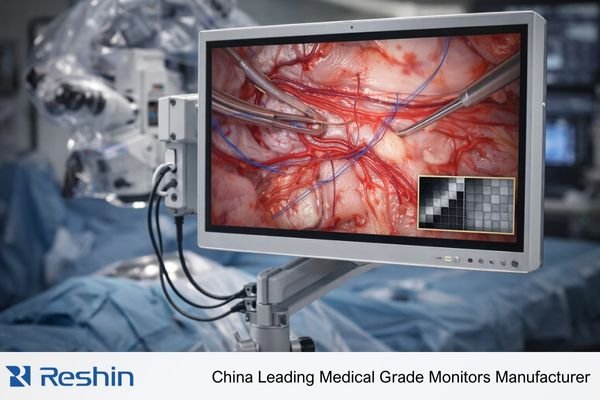
Based on the projects I support with PACS and KVM partners, microsurgery video workflows demand monitors that maintain consistent presentation across mode transitions and support sustained viewing without processing drift that could affect surgical decision-making. The challenge lies in balancing fine-detail preservation with practical workflow requirements including team visibility, predictable re-lock behavior, and signal-chain repeatability1 under the real transitions that occur in the OR.
What Makes Microsurgery Video Different from Typical Endoscopy Feeds?
Understanding microsurgery video characteristics helps identify appropriate display requirements.
Microsurgery video from surgical microscopes emphasizes fine-detail visualization, stable framing, and continuous viewing rather than rapid scene changes, requiring displays that preserve subtle texture and micro-contrast without processing drift. Unlike typical endoscopy feeds, microscope video prioritizes minute edge definition, small vessel structures, and depth cues that can be degraded by scaling or unstable color handling.
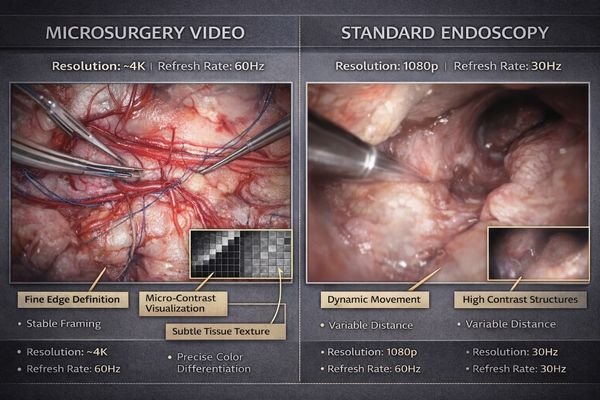
When I review microsurgery installations, I often find that consistency across brightness, contrast, and color appearance during mode transitions becomes as important as peak image quality. Microscope video is less forgiving of “almost correct” presentation because tiny changes in sharpness, tone, or color can alter how sutures, vessel walls, and tissue planes appear over long viewing periods. The monitor should behave predictably after boot, wake, and input switching so the same microscope scene looks the same each time, without silent changes caused by scaling, auto processing, or negotiation fallbacks.
Content Characteristics
Microsurgery video often features static or slowly changing scenes where micro-contrast and edge stability carry clinical meaning. A suitable monitor should preserve fine structures without introducing ringing from aggressive sharpening, and it should avoid dynamic image behaviors that “help” consumer content but can shift tissue appearance in the OR. In practice, teams want a stable picture mode that does not wander between states, so the same anatomy looks consistent throughout the case.
Viewing Duration Requirements
Extended procedures demand stable performance2 over time, not just a good first impression. The monitor should avoid auto brightness behaviors and processing changes that can creep in during long sessions, and it should maintain consistent tone so low-contrast textures remain separable from the background. Because surgical teams may rely on the monitor continuously, small drift in brightness, contrast, or color can become more noticeable and more disruptive than short-lived artifacts.
Which Image Quality Priorities Matter Most for Microscope Video?
Identifying critical image quality factors guides appropriate monitor selection for microsurgery applications.
The most important priorities are fine-detail preservation and stable tone reproduction: monitors should maintain crisp edge definition without ringing, keep low-contrast tissue textures separable from background, and avoid processing that changes perceived sharpness over time. Microsurgery teams benefit from predictable grayscale behavior and consistent color rendering for comparable tissue tone and vascular appearance throughout cases. Stable uniformity and viewing-angle behavior also matter because assistants and residents often depend on the same picture to track fine structures without seeing brightness roll-off or color shift.
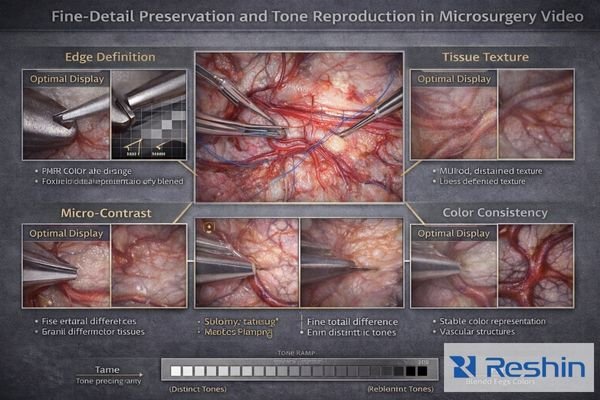
From my work with surgical teams, practical selection must consider the shared-view reality of microsurgery: multiple clinicians may observe subtle cues from different positions, and any unevenness or color shift reduces shared situational awareness. In my OR integration work at Reshin, I’ve learned that microsurgery3 depends more on consistency and repeatability than on peak spec comparisons, because reliable interpretation of micro-detail requires the display to behave the same way across time, temperature, and routine state transitions.
What Input Formats and Timing Should You Confirm from the Microscope System?
Signal compatibility verification ensures reliable microsurgery video presentation.
Start by confirming the microscope video output profile used clinically—resolution, refresh rate, scan format, and color space encoding—because these determine whether monitors can lock quickly and repeatably without silent fallbacks. Microscope setups often include routing, recording, or teaching outputs, requiring validation of the exact signal path that feeds the monitor during real cases.
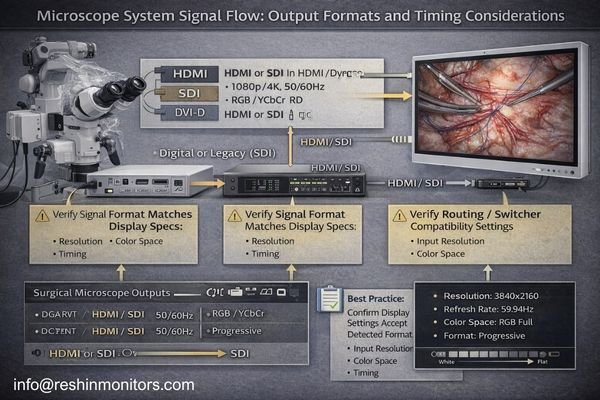
Even when images appear, mismatched timing or unexpected range or encoding changes can subtly alter contrast and color, so the objective is “same mode every time” across boot, wake, and switching events. Confirm the exact port used in cases, then verify that the monitor re-locks consistently and does not fall back to a different resolution, refresh, or color format after transitions. This reduces the risk of silent mode changes that keep the image on screen but shift how micro-contrast and tissue tone are perceived during delicate work.
| Signal Parameter | Clinical Impact | Verification Method | Common Issues | Recommended Approach |
|---|---|---|---|---|
| Resolution | Detail preservation, scaling requirements | Native mode testing | Automatic fallback modes | Document validated resolution |
| Refresh Rate4 | Motion smoothness, compatibility | Lock time measurement | Renegotiation delays | Confirm stable refresh support |
| Color Space | Tissue tone accuracy | Color range verification | RGB/YCbCr mismatches | Validate encoding consistency |
| Scan Format | Edge definition quality | Progressive/interlaced testing | Format conversion artifacts | Prefer progressive when available |
| Signal Chain | Overall reliability | End-to-end path testing | Intermediate device effects | Minimize unnecessary hops |
Establish a repeatable signal profile that produces identical results across power cycles, input switching, and routing changes, then document it as the baseline used for acceptance and post-maintenance checks. When the same microscope feed always lands in the same validated mode, teams spend less time troubleshooting “it looks different today” issues and more time focusing on the surgical task.
How Do Workflow Factors Change the Best Monitor Choice for Microsurgery?
Workflow considerations significantly influence optimal monitor selection for microsurgery applications.
Monitor requirements depend on whether the display serves as primary surgeon view, shared team view, or teaching preview, because each role affects size, viewing distance, and detail visibility trade-offs. Team viewing may require larger screens for shared visibility, but systems must preserve micro-detail without scaling that softens images, while frequent source switching demands fast re-lock behavior and stable picture presets.
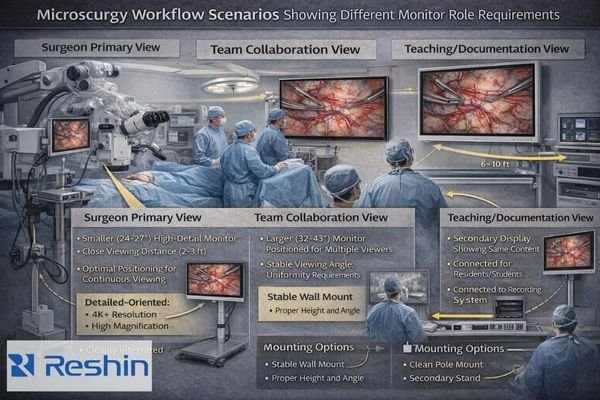
From an engineering standpoint, I usually find that mounting stability5, cable management, cleaning compatibility, and service access matter more than teams expect because small physical changes can trigger renegotiation or port drift. The best monitor choice is the one that fits the real workflow—where the same chain is used repeatedly, transitions happen under pressure, and the display must return to the same known behavior without extra manual intervention.
Primary Surgeon Display
Surgeon-adjacent viewing requires a size and resolution that support comfortable continuous observation at typical microscope workstation distances without relying on OS/GPU scaling. The monitor should hold fine edges without ringing, preserve low-contrast texture, and keep tone stable throughout long sessions. Just as important, it should re-lock to the microscope’s output quickly and predictably after routine transitions, so the surgeon is not forced into repeated input resets or mode re-selection.
Team Collaboration Display
Shared viewing applications need larger formats that maintain uniformity and viewing-angle stability for multiple clinicians who may stand off-axis. At the same time, the system must avoid scaling behaviors that soften micro-detail when displayed at larger size, and it should minimize renegotiation delays when switching between microscope video and other sources. Contact us at info@reshinmonitors.com to discuss microsurgery display configurations that support your specific team viewing and workflow requirements.
Selecting Surgical Monitors for Microsurgery Use Cases
Monitor selection should align with specific microsurgery workflow requirements and microscope system capabilities.
Selection starts with mapping the microscope’s dominant output mode to clinical monitor roles while ensuring reliable signal compatibility.
| Clinical Role / Application | Viewing Requirements | Display Characteristics | Recommended Model | Key Selection Factors |
|---|---|---|---|---|
| Surgeon Primary View | Close viewing, fine detail | Optimal size for workstation distance | MS247SA | Comfortable viewing distance, detail preservation |
| Assistant/Resident View | Shared observation, detail clarity | Consistent presentation, stable viewing angles | MS270P | Viewing angle stability, uniform brightness |
| Team Collaboration | Multiple viewers, larger format | Size and uniformity for group viewing | MS275PA | Large format, consistent presentation |
| Teaching/Documentation | Flexible viewing, reliable operation | Stable operation, predictable behavior | MS321PB | Reliable switching, consistent modes |
| Large Format Team Display | Maximum visibility, detail preservation | Large size without detail compromise | MS430PC | Large format, native detail preservation |
For surgeon-adjacent viewing, prioritize sizes and resolutions that enable comfortable continuous observation without relying on scaling, and confirm that the display locks to the microscope timing quickly and repeatably. For team viewing or teaching, larger formats can improve shared visibility, but they must maintain uniformity and stable viewing-angle behavior so fine structures look consistent for everyone in the room.
Across all use cases, keep the signal path clean: minimize adapters, validate any switchers or recorders, and avoid unnecessary hops that can introduce silent mode changes or re-lock delays. As a surgical monitor manufacturer, Reshin focuses on predictable input behavior, repeatable picture performance, and documentable baselines so teams can maintain the same validated presentation after updates, maintenance, and unit replacement.
FAQ
Is a "bigger screen" always better for microscope video in microsurgery?
Not always—larger screens improve team visibility, but you must confirm the microscope output can be shown without scaling that softens fine details and that the viewing distance supports comfortable continuous observation.
What is the first signal parameter to confirm from the microscope system?
Confirm the resolution and refresh profile actually used in cases, then verify the monitor can lock to that mode repeatably across boot, wake, and switching.
Can scaling or processing make microscope details look "soft"?
Yes—OS/GPU/monitor scaling and aggressive sharpening can change perceived edge definition and micro-texture, so keep the chain in native timing and stable picture presets.
Do switchers, recorders, or extenders matter for microsurgery video?
They can—intermediate devices may change capability exposure or add renegotiation delays, so validate the exact chain used in surgery and avoid unnecessary adapters.
What should be included in acceptance testing for microsurgery displays?
Repeatability checks across cold boot, wake, and input switching, plus a fine-detail/pixel-pattern verification to detect unintended scaling or processing drift.
How do you keep performance consistent over the lifecycle?
Document baseline settings, standardize ports and cabling, and re-verify after updates, device replacements, or routing changes to prevent configuration drift.
Conclusion
Microsurgery monitor selection prioritizes fine-detail preservation and consistency over peak specifications, requiring stable low-contrast visibility, predictable color reproduction, and repeatable locking to microscope output modes without scaling or processing drift. Because microscope video workflows involve sustained viewing periods and frequent reliance on subtle visual cues, optimal surgical monitors maintain validated presentation across boot, wake, switching, and routing changes that occur during normal OR operations.
Our experience at Reshin demonstrates that successful microsurgery display implementations depend on systematic validation of the complete signal chain from microscope output to monitor presentation, ensuring that fine details essential for surgical decision-making remain consistent throughout extended procedures. By establishing standard output profiles, validating full signal paths, and maintaining documented baseline settings for lifecycle management, surgical teams can rely on microsurgery visualization systems that support both individual surgeon needs and collaborative team workflows. The most effective approach treats microsurgery monitors as integrated components of the surgical microscope system rather than standalone displays, ensuring that visualization quality supports the precision and reliability requirements of delicate surgical procedures.
✉️ info@reshinmonitors.com
🌐 https://reshinmonitors.com/
-
Understanding signal-chain repeatability is crucial for maintaining video quality and reliability during surgeries. ↩
-
This resource will provide insights on maintaining stable performance in surgical monitors, crucial for long procedures. ↩
-
Understanding the principles of microsurgery can enhance your knowledge of surgical techniques and improve patient outcomes. ↩
-
Exploring Refresh Rate can help you grasp its impact on motion smoothness, vital for applications requiring high visual fidelity. ↩
-
Understanding mounting stability is crucial for ensuring optimal performance and reliability in engineering applications. ↩