Neurosurgery microscope video output is unusually demanding because surgical decisions depend on micro-detail, subtle contrast, and stable depth cues throughout long procedures. The best monitor choice is not about headline specifications—it’s about preserving true information content consistently across the real OR signal chain.
Choosing surgical monitors for neurosurgery microscope video output requires preserving micro-detail and maintaining repeatability across real OR signal chains rather than pursuing headline specifications. Prioritize clean scaling with minimal artifacts, confirm delivered formats and latency behavior, and lock stable brightness and picture modes that prevent drift during long cases to support both surgical precision and consistent team communication.
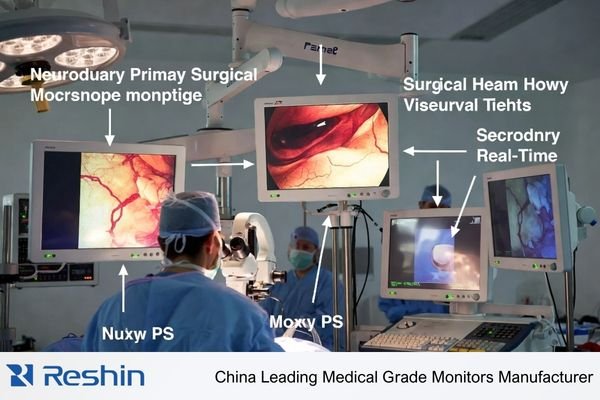
A practical selection process treats the monitor as part of an integrated microscope workflow1: live viewing, team viewing, teaching, and recording. The goal is repeatability—consistent appearance across screens, viewing angles, switching events, and power cycles—without enhancement artifacts that look “sharp” but distort fine anatomy.
What is unique about neurosurgery microscope video output requirements?
Neurosurgery microscope video demands exceptional fidelity because surgical decisions depend on micro-level visual information.
Neurosurgery microscope video is unusually unforgiving because clinical decisions rely on micro-detail, subtle contrast, and stable depth cues over long procedures. Tiny vessels, tissue planes, and fine instrument edges can be misrepresented by improper scaling, black handling issues, or enhancement processing that adds halos and ringing. Unlike endoscopy chains, microscope workflows often mix live viewing, team viewing, teaching, and recording, making repeatability across screens and system states critical.
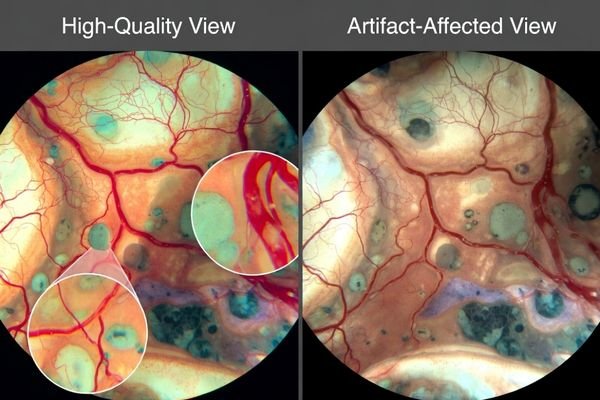
Successful selection focuses on protecting the microscope’s real signal information—without drift, hidden transforms, or processing that changes how boundaries and texture appear. If the image looks different after switching inputs, enabling recording, or rebooting, the workflow is not stable enough for consistent microsurgical viewing.
Micro-Detail Preservation Demands
Neurosurgical microscope imaging needs monitors that preserve true micro-contrast2 and fine edges without “false sharpness.” Over-aggressive enhancement can create halos around vessels and instruments, altering boundary perception and depth cues. Favor predictable, minimal processing so the same structure looks the same across time, screens, and viewing positions.
Multi-Modal Workflow Integration
Microscope workflows often combine surgeon viewing, assistant coordination, teaching displays, and recording. This requires consistent image behavior across different viewing angles and distances, plus stable performance across common OR events such as source switching, overlay/menu changes, and power cycling. Repeatability across these states is a primary selection requirement.
Which signal formats and latency risks should you confirm first?
Signal format verification and latency assessment must account for complete microscope-to-monitor signal chains.
Start by documenting microscope actual delivered output modes through real routing paths, not camera marketing labels, because converters, recorders, splitters, and KVM devices can change resolution, timing, or buffering. Confirm exact input types used in OR, negotiated resolution and refresh rates, and whether intermediate devices resample signals. For microsurgery assistance, consistent latency often matters more than single low numbers since switching sources or enabling recording can introduce variable delay disrupting hand-eye coordination.

Validate the delivered format through the real routing path, not the camera label. Record the exact input interface, negotiated mode, and every device in between (switchers, extenders, converters, capture/recording). If any stage resamples or buffers, it can change both perceived sharpness and delay.
Signal chain documentation should capture the conditions that change behavior: input switching, recording on/off, different routing paths, and long cable runs. Consistent latency across switching is safer than a single “low latency” number, because variable delay is what disrupts hand–eye coordination and team timing.
How do scaling and image processing affect micro-detail preservation?
Scaling and processing decisions directly impact microscope video fidelity and surgical visibility.
Microscope video clarity depends heavily on how monitors map incoming pixels to native panels because mismatched scaling can soften edges or create false sharpness through ringing and halos. Sharper-looking pictures can be less faithful if monitor enhancement exaggerates boundaries or suppresses subtle texture that surgeons use for plane discrimination. The safest strategy prioritizes clean scaling of expected input formats and ability to minimize or disable nonessential enhancements so micro-contrast remains natural.
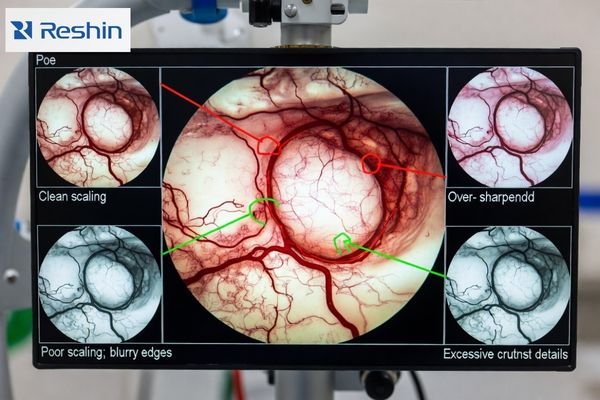
A monitor can look impressive in a demo while harming fidelity in real microscope scenes. Prioritize clean scaling3 for the delivered mode and the ability to minimize or disable nonessential processing so the image remains natural. If you can’t lock and restore the baseline mode, you can’t keep repeatability.
| Processing Feature | Microscope Impact | Surgical Risk | Recommended Setting | Validation Method |
|---|---|---|---|---|
| Edge Enhancement | Can create false halos around vessels | Distorted boundary perception | Minimal or disabled | Fine vessel edge inspection |
| Noise Reduction | May suppress subtle texture | Loss of tissue plane cues | Conservative settings | Micro-structure preservation |
| Dynamic Contrast | Unpredictable tonal shifts | Inconsistent depth perception | Disabled or locked | Stability across content |
| Color Processing | Altered tissue appearance | Clinical interpretation changes | Neutral or validated | Color accuracy verification |
| Scaling Algorithm | Affects detail sharpness | False or softened edges | Clean pixel mapping | Resolution transition testing |
Validation should include real microscope scenes and standardized patterns. Look for edge halos, ringing, texture suppression, and inconsistent boundary appearance when switching sources or changing overlays. The objective is not the “sharpest-looking” image, but stable micro-detail that remains trustworthy throughout the procedure.
What brightness, contrast, and stability controls matter in real OR conditions?
Brightness and contrast stability become critical factors in neurosurgical environments with changing ambient conditions.
In neurosurgery, stable brightness and controlled tonal handling often matter more than vivid color modes because glare, reflections, and ambient changes can shift perceived contrast during long cases. Monitors should maintain predictable luminance behavior without dynamic processing that drifts with content, so subtle tissue texture is not crushed in shadows or clipped in highlights while mode locking prevents mid-case surprises after power cycles and source switching.
Stability is the practical requirement: the same scene should not look different after warm-up, switching, or reboot. If dynamic processing4 changes tone response based on content, micro-contrast judgments become less reliable. Physical setup also matters—mounting position, glare control, and cleanable surfaces influence what the team can consistently see.
Luminance Stability Requirements
Monitors should maintain predictable luminance and tonal behavior throughout long cases. Avoid automatic adjustments that shift mid-procedure, because small changes can alter perceived tissue contrast and depth cues. A validated baseline should remain stable across warm-up and typical case duration.
Environmental Adaptation Controls
Controls should allow teams to optimize visibility for the actual OR lighting without introducing “content-dependent” drift. Practical requirements include locking the validated mode, ensuring the monitor returns to that mode after power cycles and source switching, and minimizing settings that can be accidentally changed during routine use.
How to select a surgical monitor setup for neurosurgery microscope video output
Monitor selection should work backward from real microscope signal chains and clinical viewing requirements.
Effective selection strategies integrate technical specifications with practical deployment considerations.
Select monitors by working backward from real microscope signal chains and clinical viewing roles including primary surgeon support, assistant view, wall and teaching displays, and recording endpoints, matching size and resolution to viewing distances so micro-detail remains discernible without aggressive sharpening.
| Clinical Role / Application | Usage Pattern | Display Requirements | Recommended Model | Key Integration Considerations |
|---|---|---|---|---|
| Primary Surgeon Display | Direct microscope visualization | Ultra-clean scaling, minimal latency | MS270P | Direct signal path, stable processing |
| Assistant Coordination | Team surgical support | Consistent detail rendering | MS275PA | Predictable input switching, locked modes |
| Multi-Position Flexibility | Various OR configurations | Reliable microscope compatibility | MS321PB | Clean scaling algorithms, mode stability |
| Advanced Microscopy | High-magnification procedures | Superior detail preservation | MS321PC | Enhanced micro-detail handling, processing control |
| Teaching and Documentation | Shared visualization platform | Large format microscope display | MS322PB | Wide viewing angles, consistent appearance |
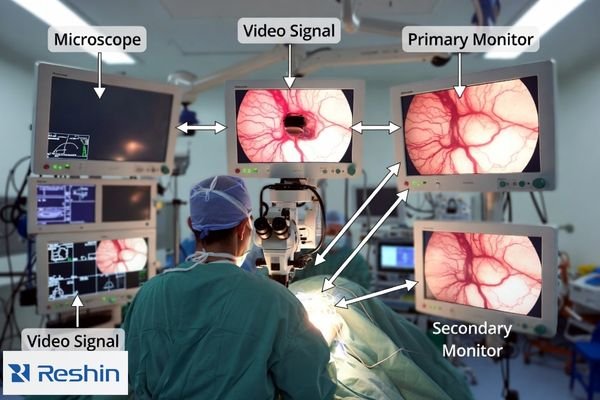
Choose a setup by mapping roles to the real signal chain5: surgeon view, assistant view, teaching wall display, and recording endpoints. Match size and resolution to viewing distance so micro-detail is visible without heavy sharpening, then confirm the exact inputs and routing devices so the monitor accepts the delivered format with clean scaling and predictable latency.
For acceptance and maintenance, define a baseline configuration package: delivered output mode, routing diagram, input port, firmware/versions, locked picture settings, and checks for scaling/latency/stability. Validate it with a minimum routine—confirm mode, switch inputs, toggle recording, power cycle recovery—then document restore steps so replacements replicate behavior without revalidation delays.
FAQ
Is a "4K camera" label enough to decide the monitor should be 4K?
Not by itself; confirm the actual delivered output format through routing and recording devices, then choose a monitor that scales that format cleanly and consistently.
How can we tell if sharpening is harming micro-detail?
Look for halos or ringing around fine vessels and edges, and compare with enhancements minimized; "sharper" can distort boundaries and texture.
What latency problem is most risky in microscope workflows?
Variable latency across switching, recording on/off, or routing changes is often more disruptive than a single static delay value.
Do converters and recorders change image quality?
They can resample or buffer video, affecting sharpness and delay; validate the full chain with the exact devices and modes you will deploy.
How do we keep the image consistent throughout long neurosurgery cases?
Lock a validated baseline mode, disable dynamic processing, and verify behavior across power cycles and source switching so settings don’t drift.
What should be documented for acceptance and maintenance?
Delivered output mode, routing diagram, baseline settings, and checks for scaling/latency/stability so replacements can replicate behavior without delays.
Conclusion
Choosing surgical monitors for neurosurgery microscope video output is fundamentally about preserving micro-detail and repeatability across the real OR signal chain. Confirm delivered formats and latency behavior, prioritize clean scaling with minimal artifacts, and lock stable brightness and picture modes that do not drift during long cases. When the baseline is validated, documented, and restorable, the monitor becomes a reliable extension of the microscope workflow for surgical precision and consistent team communication.
✉️ info@reshinmonitors.com
🌐 https://reshinmonitors.com/
-
Understanding integrated microscope workflows can enhance your knowledge of microscopy techniques and improve your practical applications. ↩
-
Understanding micro-contrast is crucial for ensuring accurate imaging in neurosurgery, enhancing surgical outcomes. ↩
-
Understanding clean scaling is crucial for maintaining image fidelity in microscopy, ensuring accurate and reliable results. ↩
-
Understanding dynamic processing is crucial for ensuring consistent visual quality in various setups. ↩
-
Understanding the signal chain is crucial for optimizing surgical setups, ensuring clarity and precision in operations. ↩