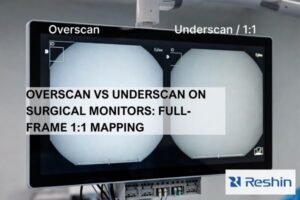
Medical imaging equipment relies on high-quality visualization for diagnosis, yet many vendors treat displays as interchangeable components rather than calibrated diagnostic instruments.
When DR, CT, and MRI manufacturers implement unified diagnostic monitor standards, they ensure consistent image interpretation across modalities, reducing clinical variation, simplifying maintenance, and creating auditability that strengthens both regulatory compliance and customer confidence in diagnostic accuracy.

In my experience as a Reshin medical display engineer, the greatest challenges in diagnostic imaging don’t typically come from PACS software or reconstruction algorithms—they come from inconsistent visualization. When display behavior varies between workstations, the same DICOM dataset can present dramatically different diagnostic information to clinicians, undermining the validity of the entire imaging chain.
Imaging vendors often underestimate display inconsistency’s impact on their reputation and support costs. When radiologists report that "images look different" between acquisition workstations and reading rooms, the finger-pointing begins: Is it the DICOM data? The PACS? The network? In reality, undocumented differences in grayscale response1, luminance targets, and ambient light conditions frequently cause these variations.
| Inconsistency Type | Clinical Impact | Business Impact for Vendors |
|---|---|---|
| Grayscale Response | Altered perception of subtle structures and pathology | Quality disputes, extended acceptance testing |
| Luminance Variance | Inconsistent window/level perception | Higher support calls, clinical workflow disruption |
| Color Management | Unreliable presentation of color overlays | Loss of confidence in 3D/fusion applications |
| Ambient Light | Reading environment influences diagnostic appearance | Site-to-site variations in acceptance testing |
Why do DR/CT/MRI teams need one diagnostic monitor standard?
Medical imaging equipment vendors typically focus on detector technology, reconstruction algorithms, and workflow efficiency—sometimes overlooking the final link in the diagnostic chain.
A unified diagnostic monitor standard allows imaging vendors to deliver consistent visual presentation across their DR, CT, and MRI product lines, transforming displays from mere components into controlled diagnostic instruments that maintain image fidelity from acquisition through interpretation.

In my daily work integrating display systems for imaging vendors, I’ve observed that equipment manufacturers without unified standards experience a cascade of avoidable problems. When DR teams follow one calibration approach, CT another, and MRI yet another, customer sites end up with workstations that show the same anatomical structures with noticeably different contrast, brightness, and detail perception.
This inconsistency becomes particularly problematic in modern imaging departments where radiologists frequently switch between modalities and expect consistent presentation. When displays behave differently across workstations, window/level settings no longer transfer reliably between systems, forcing clinicians to mentally adjust for display differences. This raises both clinical risk2 and customer dissatisfaction, often landing as technical support calls that could have been prevented with proper standardization.
What should a unified standard include: DICOM, luminance, color, QA?
Monitor standards for imaging equipment must go beyond basic technical specifications to ensure diagnostic consistency.
An effective unified monitor standard requires a comprehensive four-layer approach: verified DICOM grayscale compliance with documented deviation limits, stable luminance control with aging compensation, thoughtful color/multi-modality strategies for each clinical task, and a structured QA program with consistent reporting methodology.

Layer 1: DICOM Compliance Foundation
The DICOM GSDF (Grayscale Standard Display Function) serves as the foundation for diagnostic presentation, but simply claiming "DICOM compliance3" is insufficient. I’ve found that an effective standard must define exactly how conformance is measured, what conditions affect measurement validity, acceptable deviation limits, and corrective protocols when deviations exceed thresholds.
Layer 2: Luminance Control Framework
Luminance parameters define how the human visual system perceives diagnostic information. When I establish standards for imaging vendors, I include not just initial targets for maximum luminance, contrast ratio, and black level, but also stability requirements over time. Two identical monitors can become functionally different displays within six months if aging compensation isn’t properly managed. The standard must define stabilization methods, verification frequency, and acceptable drift limits.
Layer 3: Multi-modality and Color Strategy
Different modalities have distinct visualization needs—DR emphasizes grayscale detail perception, CT depends heavily on window/level flexibility, and MRI often incorporates color overlays and parametric maps. A unified standard needs to clearly state:
| Display Mode | Primary Use Cases | Critical Parameters | Configuration Control |
|---|---|---|---|
| Grayscale Primary | DR primary reads, baseline CT/MR diagnosis | GSDF conformance, luminance stability, uniformity | Locked, restricted changes |
| Color Diagnostic | MRI parametric maps, fusion/overlay review, Doppler-like overlays where applicable | Color accuracy, white point consistency, overlay visibility | Defined presets by task |
| 3D/Advanced Visualization | CT/MR volume rendering, MPR/VR navigation, post-processing applications | Perceptual contrast consistency, tone mapping behavior, response consistency | Controlled transitions |
Layer 4: QA/QC Infrastructure
The final layer transforms standards from documents into operational reality. Based on my implementation experience, this should include defined calibration methodologies, verification schedules, standardized reporting formats, ambient light measurement protocols, and clear responsibilities for routine monitoring and exceptions handling.
How can vendors define profiles, test patterns, and acceptance criteria?
Creating an implementable standard requires more than technical requirements—it needs practical deployment guidelines.
Effective diagnostic monitor standards should be structured as tiered profiles mapped to specific clinical roles, each with dedicated test patterns, objective measurement procedures, and clear pass/fail criteria that eliminate subjective interpretation during acceptance testing.
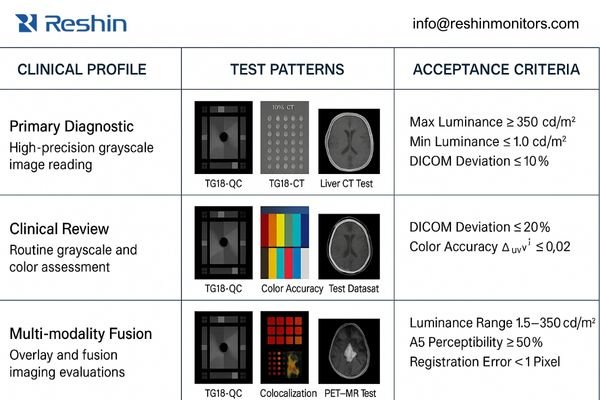
When implementing unified standards, I’ve found that a profile-based approach4 works best for imaging vendors. Instead of creating a single monolithic standard, profiles allow appropriate scaling of requirements based on clinical function—control room monitors shouldn’t need the same specifications as primary diagnostic displays.
Profile Structure and Differentiation
Each profile should define a specific use case with appropriate requirements. For example:
- Primary Diagnostic Profile: For final interpretation of all modalities
- Clinical Review Profile: For technologist QC and preliminary physician review
- Multi-modality Fusion Profile: For combined modality interpretation with color overlays
Test Pattern Requirements
Test patterns are the objective language of display quality. A comprehensive standard should include:
- Standard TG18 patterns for basic DICOM compliance
- Modality-specific test datasets that highlight critical diagnostic features
- Contrast-detail patterns that map to typical findings
- Fusion/overlay patterns to verify color accuracy and boundary perception
Acceptance Methodology
The most valuable element of a unified standard is its ability to eliminate ambiguity during system acceptance. I recommend a three-component approach:
- Quantitative Measurements: Objective metrics with specific measurement devices
- Visual Verification: Structured observer tests with predefined acceptance criteria
- Configuration Verification: Documentation that critical settings are preserved and protected
When implementing these standards across multi-site deployments, I find that having clear, repeatable methodologies prevents the endless cycle of rework and disputes that otherwise plague installations. For imaging vendors seeking implementation assistance or calibration methodology guidance, please reach out to info@reshinmonitors.com.
How do you implement the standard across PACS, GPUs, and service?
Even the most comprehensive standard will fail without proper implementation across the product lifecycle.
Successful diagnostic monitor standardization requires coordinated implementation across R&D configuration, manufacturing calibration, integration verification, and service maintenance—creating a closed loop where presentation quality remains consistent from factory to clinical use.
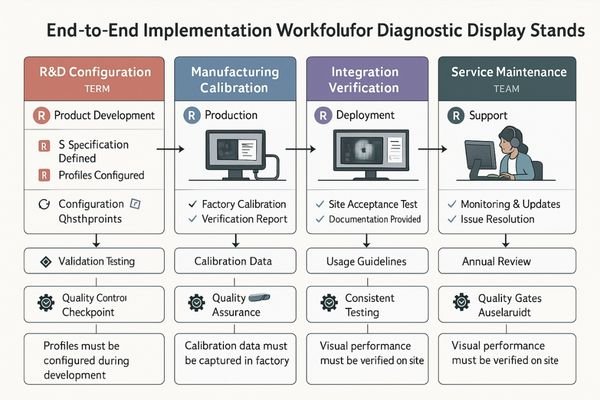
In my integration work with imaging vendors, I’ve observed that display standards often break down during transitions between teams. R&D creates specifications, manufacturing builds to them, integration delivers systems, and service maintains them—but without a unified approach, each group may interpret requirements differently.
R&D Configuration
For R&D teams, standards implementation means:
- Pre-defining profiles in firmware/software
- Creating protected settings for critical parameters
- Documenting exact DICOM and luminance targets
- Developing test procedures that survive knowledge transfer
Manufacturing Calibration
The factory calibration process must:
- Apply consistent methods with traceable equipment
- Generate unit-specific reports tied to serial numbers
- Validate that units meet profile specifications
- Create baseline data for long-term stability tracking
Integration Verification
The most common failure point is integration, where:
- PACS output settings5 must align with monitor calibration
- GPU rendering paths need verification and documentation
- Multi-display matching requires standardized procedures
- Ambient light conditions must be measured and documented
Implementation Checklist:
- Verify GPU driver settings match calibration assumptions
- Confirm PACS presentation states align with monitor profiles
- Measure and document ambient lighting conditions
- Validate matching across multiple displays
- Create baseline verification report with test patterns
- Document configuration locks and change control procedures
- Train local staff on verification procedures
Service Maintenance
Service teams close the quality loop through:
- Scheduled re-verification using standard procedures
- Consistent reporting formats that track drift over time
- Clear thresholds for recalibration or replacement
- Documentation that maintains regulatory compliance
Which Reshin monitors best match DR/CT/MRI unified standard profiles?
Implementing a unified display standard across modalities requires selecting displays that maintain consistent performance characteristics while adapting to each workflow’s specific needs.
From an engineering delivery standpoint, the safest way to scale a unified standard is to choose monitors that support the same acceptance evidence and lifecycle controls across roles: serial-number-bound calibration reports, predictable profile behavior that can be verified at the workstation, and repeatable re-verification routines that field teams can execute without improvisation. In practice, that means the “right” display is the one that fits the profile boundary you defined and can be managed under the same QA logic—so a primary diagnostic station, a multi-modality workstation, and a control-room review position all remain traceable to the same standard, even if their performance targets differ.
A unified standard becomes easier to maintain when the product selection aligns with how you will audit and service it. Rather than relying on broad claims like “high performance,” I recommend specifying what must be demonstrably consistent at acceptance and during follow-up visits: how profiles are selected and protected, how grayscale and color modes are verified for their intended tasks, and what artifacts are produced for compliance and customer confidence. This approach keeps the standard actionable for integrators and service teams while reducing disputes caused by undocumented configuration drift.
| Clinical Role / Application | Usage Pattern | Display Requirements | Recommended Model | Key Integration Considerations |
|---|---|---|---|---|
| Primary Diagnostic Reading | Daily interpretation of DR/CT/MRI | High accuracy grayscale, stable luminance, extended calibration validity | MD33G | DICOM calibration verification, ambient light controls, workstation-specific configuration |
| Multi-modality Workstations | Task-switching between modalities, color overlay visualization | Consistent performance across grayscale and color modes | MD32C | Profile switching validation, color accuracy verification, preset configuration management |
| Control Room / Technologist Review | Image acquisition QC, preliminary review | Consistent appearance with reading room within controlled bounds | MD26GA | Matching verification with primary diagnostic displays, appropriate luminance levels for environment |
| Extended Workspace Reading | Image-plus-report workflows, large dataset navigation | Larger visual canvas with maintained diagnostic quality | MD45C | Screen zone configuration, window arrangement validation, ergonomic positioning |
| Advanced Visualization / 3D | Volume rendering, fusion imaging, specialized post-processing | Color accuracy, responsive performance, specialized clinical presets | MD51CHY | Application-specific profile verification, color gamut validation, preset configuration |
When implementing a unified standard, the goal isn’t to select the highest specification for every position, but rather to maintain consistent quality control methodology across all displays while matching capabilities to clinical needs. In my integration projects, I’ve found that using a consistent product family with graduated specifications simplifies standardization significantly—allowing common calibration methods, reporting formats, and maintenance procedures that scale efficiently across an entire imaging product line.
FAQ
-
What procurement language ensures vendors deliver monitors meeting our unified standard?
Specify not just monitor models but required factory calibration, verification methods, documentation deliverables, and acceptance testing procedures. Include requirements for calibration reports tied to serial numbers, ambient light assessment, and demonstrated DICOM conformance under your operating conditions. -
How can we verify vendors are meeting DICOM GSDF standards during acceptance testing?
Request calibration reports with measured luminance values across the grayscale range, compared to DICOM target values with deviation percentages. Require demonstration with measurement equipment and standard test patterns. The verification should include ambient light measurement and its impact on DICOM conformance. -
What is the optimal recalibration frequency for diagnostic monitors in DR/CT/MRI installations?
Quarterly verification of basic performance and annual comprehensive recalibration is generally appropriate. However, frequency should be risk-adjusted: higher-volume reading stations or critical subspecialty stations may require more frequent checks. Always verify after any workstation configuration changes. -
Can one monitor standard truly cover both grayscale diagnosis and color/3D visualization needs?
Yes, with properly defined multi-mode profiles. The standard should specify which mode applies to which task and how consistency is maintained when transitioning between them. Modern medical displays can maintain DICOM conformance in grayscale while providing accurate color in specialized modes if properly configured and verified. -
What integration issues typically arise between PACS workstations, GPUs, and diagnostic monitors?
Common problems include mismatched color settings between GPU and display, incorrect luminance range mapping, incomplete DICOM implementation in the rendering chain, improperly configured ambient light sensors, and presentation state inconsistencies. The unified standard should include verification steps for each potential integration gap.
Conclusion
For imaging vendors, a unified diagnostic monitor standard is not just documentation—it’s an engineering methodology that transforms display management from a component-level concern to a system-level quality control process. By developing profile-based definitions matched to clinical tasks, implementing consistent test patterns with clear acceptance criteria, and maintaining calibration through structured verification procedures, vendors can ensure that DR, CT and MRI images maintain consistent appearance across the entire diagnostic enterprise.
Reshin’s approach to display standardization focuses on making consistency sustainable through the product lifecycle. Our engineering team specializes in helping imaging vendors develop unified standards that are practical to implement, efficient to verify, and maintainable by service teams in the field. If you’re facing challenges with display inconsistency across your modality product lines, reach out to our integration team to discuss calibration methodologies and standardization approaches.
✉️ info@reshinmonitors.com
🌐 https://reshinmonitors.com/
-
Exploring grayscale response can enhance image interpretation and reduce quality disputes in medical imaging. ↩
-
Understanding clinical risk in imaging can help improve practices and ensure better patient care and safety. ↩
-
Understanding DICOM compliance is crucial for ensuring accurate and reliable medical imaging, which can significantly impact patient care. ↩
-
Understanding the profile-based approach can enhance your knowledge of tailored imaging standards for different clinical functions. ↩
-
Understanding PACS output settings is crucial for ensuring accurate monitor calibration and optimal image quality. ↩