In OR integration deployments, a common and frustrating pattern is that surgical monitors appear stable during initial setup but fail unpredictably during cases because EDID inconsistencies lead sources to select incompatible output modes, causing “no signal” during switching or other state transitions.
EDID (Extended Display Identification Data) is the capability information that surgical monitors provide to video sources, influencing what resolution, refresh rate, and color format the source will output. In OR environments with complex routing chains, EDID inconsistencies can trigger EDID mismatch behavior—no signal failures, unstable switching, or silent mode changes—reducing workflow predictability when it matters most.
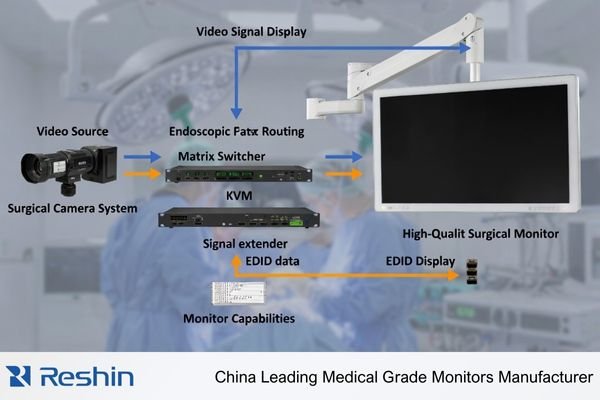
EDID problems are often misdiagnosed as hardware failures because they show up as intermittent surgical monitor compatibility issues1 rather than a clearly labeled configuration error. Symptoms tend to cluster around state transitions—powering up systems, waking devices, switching inputs, or changing OR video routing—because those are the moments when sources re-read EDID and may choose a different mode based on what they detect through the signal chain.
What Is EDID in an OR Video Signal Chain?
EDID serves as the foundational communication protocol that determines video compatibility between surgical sources and displays.
EDID is the "capability card" a surgical monitor presents to video sources, informing decisions about resolution, refresh rate, color format, and timing preferences. In OR video chains with cameras, processors, switchers, and extenders connected in series, EDID becomes the baseline data sources use to choose a compatible output mode.
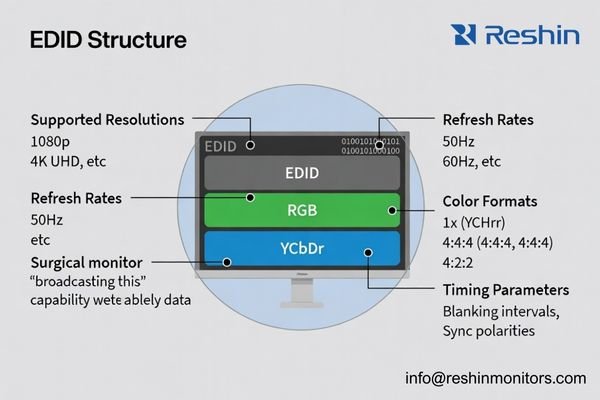
In many OR video chains, teams underestimate how strongly EDID drives behavior because it works silently in the background. EDID includes supported resolutions, refresh rates, timing preferences, and color capability signaling that sources use to auto-configure outputs; the practical result is that the “display capabilities” a source believes it is driving may be shaped as much by the routing chain as by the monitor itself.
Signal Chain Dependencies
In surgical environments, EDID travels through the complete signal path from monitor back to source. Each intermediate device—KVM switches, signal extenders, routing matrices, capture systems—can modify, cache, or filter EDID before presenting it upstream, changing what the source sees as the available capability set and increasing the chance of EDID drift between states.
Compatibility Decision Making
Video sources are designed to follow EDID guidance because it is the most reliable way to avoid sending an unsupported signal. When a surgical camera, image processor, or workstation reads EDID2, it selects output parameters intended to work end-to-end; if the EDID exposed upstream is incomplete, altered, or inconsistent, the source may choose a fallback mode, negotiate to a lowest common denominator, or fail to lock a stable signal.
Why Does EDID Decide Resolution, Refresh Rate, and Color Format for Surgical Displays?
EDID directly controls the fundamental display parameters that sources select for video transmission.
Most surgical video sources follow EDID guidance to ensure compatibility, automatically selecting resolution, refresh rate, pixel encoding, and related format behaviors based on what the display reports as supported. This is why surgical monitor compatibility can change simply by switching ports, altering OR routing, or inserting intermediate devices that change EDID exposure.
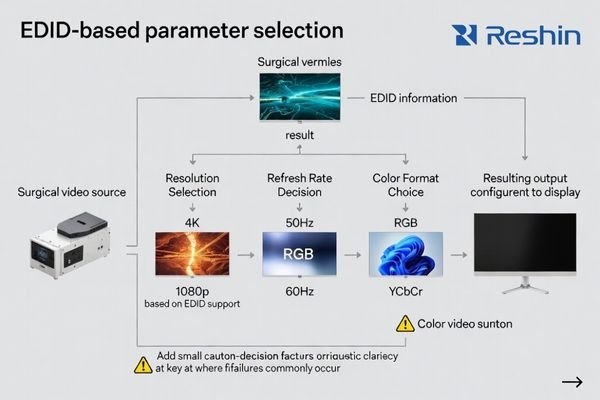
In typical OR chains, the source makes mode decisions based on the EDID it receives during connection establishment and re-establishment. That decision can include not just resolution and refresh rate, but also pixel encoding (RGB versus YCbCr), potential chroma behavior, and related format choices that can affect perceived sharpness, switching stability, and overall predictability during procedures.
Automatic Mode Selection Impact
The challenge in OR environments is that “wrong-but-still-working” modes can create operational problems that are difficult to trace back to EDID. A source might fall back to a lower mode, introduce scaling, or change format handling in a way that subtly shifts image presentation; during live procedures, those changes are noticed quickly but rarely point to a single obvious component without structured validation.
Dynamic Compatibility Changes
Monitor compatibility is not static—it changes based on the signal path configuration. Connecting a second display, inserting a switcher, adding an extender, or changing input ports can alter the EDID the source receives, leading to different operating mode choices even when the same surgical monitor is used. This dynamic behavior is why EDID management3 and end-to-end validation are critical for consistent OR performance.
What EDID-Related Failure Modes Cause "No Signal" or Unstable Switching?
EDID inconsistencies create predictable failure patterns that often appear random during surgical procedures.
The most common EDID failures come from inconsistency and timing sensitivity: sources reading different EDID at boot versus after switching, extenders presenting limited capabilities that exclude preferred modes, or multiple displays driving negotiation to the lowest common denominator. These issues typically appear during state transitions when EDID is re-read.
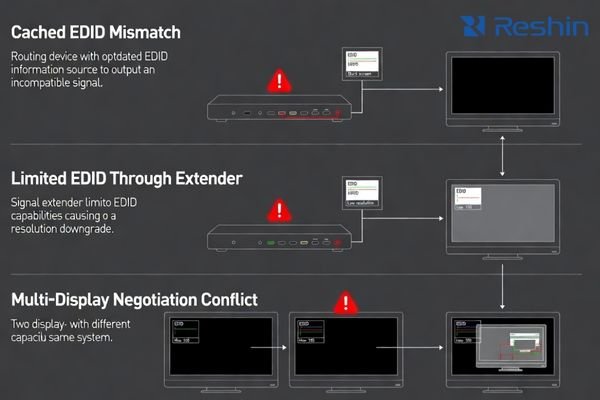
EDID-related failures often follow deterministic patterns rather than truly random behavior. The source is usually making a reasonable selection based on the EDID it sees at that moment, but that EDID may not represent what the complete signal path can actually support under real switching and power-state conditions.
State Transition Failures4
Problems typically occur when systems power cycle, switch inputs, change routing configurations, or wake from standby modes—all times when sources re-read EDID and re-select operating modes. If EDID information changes between these states, sources may output incompatible signals, fail to lock reliably, or select suboptimal fallback modes that reduce switching stability.
Chain Compatibility Issues
In complex routing environments, intermediate devices may present simplified or cached EDID that does not reflect the actual monitor capabilities at the endpoint. This can force conservative mode selection, reduce available formats, or cause a mismatch between what the source outputs and what the downstream path can accept during transitions.
Silent Mode Changes
Particularly problematic are situations where EDID changes result in different but still functional modes—the image appears on screen but with altered resolution, refresh rate, or format handling that subtly affects workflow without generating an obvious error condition.
How Can You Verify and Control EDID for Predictable OR Compatibility?
Systematic EDID management requires treating it as a controlled configuration element throughout the signal chain.
Treat EDID as a configuration-controlled asset by confirming what information sources actually read on the exact routing paths used in surgery, then ensuring that EDID remains consistent across boot cycles, wake events, input switching, and intermediate devices. Verification should focus on repeatability—the same source should select the same mode every time under the same state transitions.
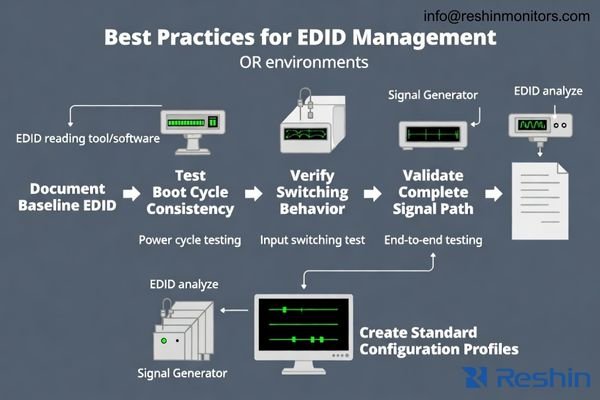
A reliable approach is to prioritize end-to-end validation over component-by-component assumptions. The goal is to ensure the complete OR video signal chain presents consistent EDID information to sources across the state transitions that occur in real procedures.
Verification Procedures
Document the actual EDID that sources read on each routing configuration used clinically, not just what a monitor specification claims to support. Test EDID consistency across power cycles, wake events, input switching sequences, and intermediate device operations that occur during normal workflow, and record the selected output mode each time to detect drift.
Configuration Control
Standardize routing profiles5 and minimize unnecessary mode changes during procedures to reduce EDID renegotiation opportunities. When intermediate devices are required, validate the complete chain as an integrated system and ensure EDID behavior remains predictable across maintenance cycles, firmware changes, and device updates that can alter caching or capability presentation.
Troubleshooting Approach
When investigating compatibility issues, focus on state transitions and look for silent mode changes where images appear but presentation characteristics have shifted. EDID problems often look like signal integrity or hardware failures until the trigger (boot order, switch event, port path, or device state) is made reproducible and the upstream EDID exposure is confirmed.
Choosing Surgical Monitors That Minimize EDID Compatibility Risk?
Monitor selection should prioritize predictable EDID behavior under real surgical routing and switching conditions.
Selection for OR deployments should focus on predictable behavior across the routing and switching conditions that occur during surgical procedures, rather than just compatibility under ideal single-connection scenarios.
| Clinical Role / Application | Usage Pattern | Display Requirements | Recommended Model | Key Integration Considerations |
|---|---|---|---|---|
| Primary Surgical Display | Direct camera connection, stable mode | Consistent EDID, reliable timing | MS430PC | Stable capability reporting, predictable mode selection |
| Multi-Source Surgical Display | Input switching, routing flexibility | Multi-input EDID stability | MS321PB | Consistent EDID across inputs, reliable switching |
| Large Format OR Display | Wall mount, team viewing | Stable high-resolution EDID | MS550P | Predictable 4K capability reporting, stable operation |
| Surgical Cart Display | Mobile use, multiple connections | Robust EDID, connection reliability | MS275PA | Flexible connectivity, consistent capability reporting |
| Compact Surgical Monitor | Space-constrained applications | Reliable basic EDID support | MS270P | Simple, predictable EDID behavior, stable connections |
Start by defining target operating modes based on your dominant surgical sources—camera systems, image processors, OR integration platforms—and the resolution, refresh rate, and color format requirements for your procedures. Evaluate monitor interface behavior as part of the complete signal system, testing how consistently displays present capabilities and how they behave across the power cycles and switching events that occur in surgical workflows.
Consider practical integration factors that affect EDID stability, including mounting systems that prevent cable strain, cleaning procedures that don’t disrupt connections, and serviceability approaches that maintain consistent compatibility profiles when monitors are replaced or updated.
Treat EDID stability as an acceptance criterion by testing with the exact intermediate devices and state transitions used in surgical procedures. The goal is achieving repeatable "same mode every time" operation that surgical teams can depend on throughout the monitor lifecycle.
FAQ
Is EDID the same as a "handshake"?
EDID is a core ingredient in the handshake because it describes the display’s capabilities, but the handshake also includes mode selection and link stabilization; EDID problems often show up as handshake instability or unexpected fallback modes.
Why does the same monitor work on one port but fail on another?
Different ports or routing paths can expose different capability sets to the source, so the EDID the source reads—and the mode it chooses—may change between connections.
Why do KVMs, extenders, or switchers cause EDID-related issues in OR setups?
They can modify, cache, or simplify what the source sees as the "display," so the EDID presented upstream may not match the final monitor capabilities, leading to mode changes or switching instability.
Why do EDID problems often appear during boot, wake, or input switching?
Those transitions are when sources re-read EDID and re-select modes; if EDID is inconsistent across states, sources may output different formats or fail to establish reliable connections.
Can EDID issues cause an image that "works" but looks softer or different?
Yes—fallback modes can introduce scaling, different timing, or changed color formats, so images appear but presentation subtly changes, which creates problems in fast-paced surgical workflows.
What’s the most practical way to reduce EDID-related compatibility risk?
Standardize target operating modes, validate the full signal chain with exact intermediate devices used in the OR, and ensure sources see consistent EDID across power cycles and switching events.
Conclusion
EDID is the capability information surgical video sources rely on to automatically select output modes across OR video routing chains. Because sources make decisions based on the EDID they see during boot, wake, and switching events, inconsistent or incomplete EDID exposure can create compatibility failures that look random but follow predictable state-transition patterns.
At Reshin, we design surgical monitors with stable EDID behavior that supports consistent capability reporting across power cycles, input switching, and routing changes in OR environments. Our engineering approach emphasizes end-to-end compatibility validation that includes intermediate devices and real workflow transitions, helping clinical teams reduce “no signal” events and maintain repeatable “same mode every time” operation throughout the monitor lifecycle.
✉️ info@reshinmonitors.com
🌐 https://reshinmonitors.com/
-
Exploring troubleshooting methods can enhance your ability to maintain seamless operations in surgical environments. ↩
-
Understanding EDID is crucial for optimizing video signal quality in surgical environments, ensuring reliable performance. ↩
-
Understanding EDID management is crucial for ensuring optimal display performance and compatibility in various environments. ↩
-
Exploring State Transition Failures will provide insights into common issues during power cycles and input changes. ↩
-
Effective routing profiles can enhance system reliability and reduce troubleshooting time in clinical workflows. ↩