
Choosing the wrong medical display size leads to ergonomic strain and potential errors. An oversized screen causes neck fatigue, while an undersized one forces squinting, compromising clinical focus.
Use viewing distance to pick the right medical display size. At 0.6–0.9 m go 27″ for solo, 0.8–1.3 m choose 32″ for mixed single/multiview, 1.4–2.5 m pick 55″ for team wall. Check PPI at that distance (≥25 px/deg) and account for multiview shrinking panes and room glare. Right size = faster reads, lower fatigue, fewer errors.

The effectiveness of a medical display is not defined by its specifications alone, but by how well it fits its intended clinical workflow1. A screen that is perfectly suited for one task can be a hindrance in another. The most critical factor in this equation is the relationship between viewing distance and screen size. This guide provides a practical framework based on human factors and ergonomics2 to help you select the right display size for any clinical environment, from a solo workstation to a large operating room wall. By matching the hardware to the workflow, you can enhance visual performance, reduce fatigue, and support better patient outcomes.
Viewing-distance in → screen size out (quick rule of thumb)
Faced with dozens of medical display options, it is easy to get stuck on specifications. This analysis paralysis often leads to suboptimal choices based on marketing instead of ergonomic science.
Rule of Thumb for Screen Size
Start with a rule of thumb: the screen diagonal in inches should be 40 to 50 times the viewing distance in meters. This guideline targets a comfortable 30–40° field of view for the primary content and ensures that the medical monitor fits naturally into the clinical workflow.
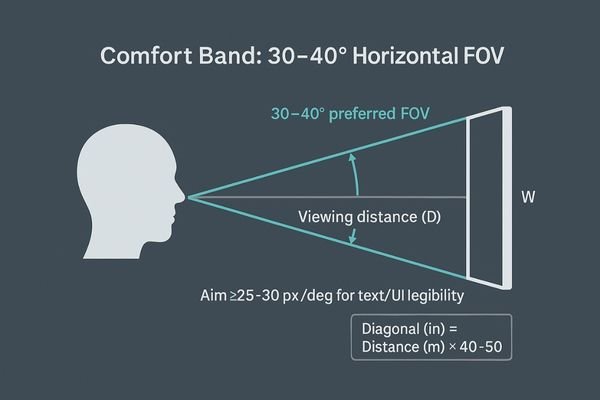
When selecting a surgical or diagnostic display, this formula cuts through the noise of technical specifications. For example, at a 1-meter viewing distance, the rule suggests a screen size of around 40 to 50 inches—large enough for clarity but not overwhelming.
Ensuring Visual Acuity
In addition to screen size, it is crucial to ensure angular legibility3 and visual acuity4. The primary visual content should occupy a horizontal field of view (FOV) of approximately 30° to 40°, minimizing head and neck strain. To guarantee clear detail, aim for at least 25–30 pixels per degree (px/deg). This ensures text, UI elements, and medical imaging content remain crisp and legible, prioritizing how clinicians actually perceive information over raw pixel density (PPI) alone.
| Viewing Distance (m) | 40x Multiplier (in) | 50x Multiplier (in) | Suggested Size |
|---|---|---|---|
| 0.7 | 28 | 35 | 27″ or 32″ |
| 1.0 | 40 | 50 | 43″ |
| 1.5 | 60 | 75 | 55″ |
| 2.0 | 80 | 100 | > 55″ |
27″ for close-range solo work (carts/desks, single-view)
For tasks in tight spaces like on a mobile cart, a large screen can be cumbersome. It forces the user too close, leading to excessive head scanning and neck strain during procedures.
A 27-inch display is ideal for close-range solo work at 0.6–0.9 meters. It keeps the entire screen within the user’s field of view, minimizing fatigue and keeping instruments within easy reach.
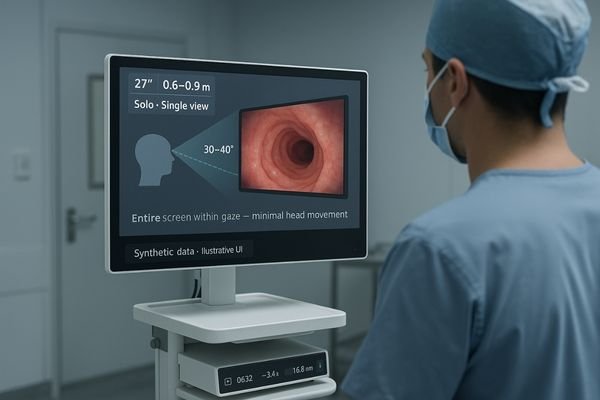
The 27-inch screen size shines in environments where the viewing distance is short, typically between 0.6 and 0.9 meters. This is the sweet spot for solo work performed at a desk, on an anesthesia machine, or on a mobile endoscopy cart. In these scenarios, the primary goal is to present a single, clear view of information without forcing the user to constantly turn their head or neck. The compact form factor of a 27-inch monitor5 ensures that the entire screen can be taken in with just eye movement, which is far less fatiguing over the course of a long procedure or shift. It also keeps essential instruments and controls within the user’s immediate reach. When considering resolution, a Full HD (1920×1080) display might suffice if the content is exclusively live video. However, a 4K monitor6 like the MS275PA provides significantly more detail and makes user interface elements and text much crisper, though it may require some UI scaling to ensure legibility at close distances. In tight clinical spaces where frequent repositioning is necessary, a 27-inch monitor avoids the ergonomic burden of an oversized display.
32″ as the ergonomic middle ground (arm/tower, mixed views)
A 27-inch screen can feel too small for multiview layouts, while a larger screen may be too big for arm-mounted setups. This can force a compromise between single-view clarity and multiview utility.
The 32-inch display is an ergonomic middle ground, ideal for 0.8–1.3 meter viewing distances. It excels in mixed-use scenarios, preserving legibility for both full-screen work and picture-in-picture layouts.
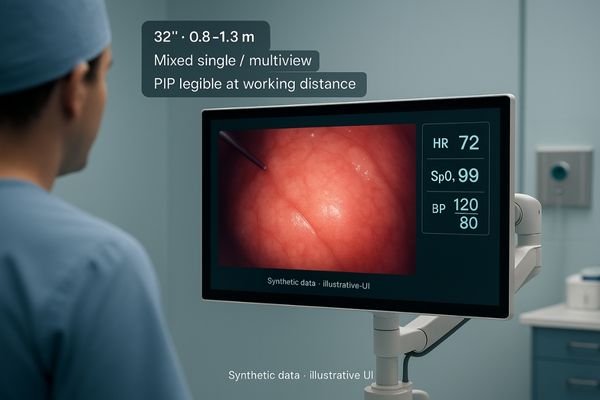
The 32-inch display7 format occupies a versatile position in clinical environments, making it my default recommendation for arm-mounted or tower-mounted applications. It is perfectly suited for viewing distances between 0.8 and 1.3 meters. At this range, it is large enough to provide an immersive full-screen view without overwhelming the user’s field of vision. Its key strength lies in its ability to handle mixed-view layouts8, such as picture-in-picture (PIP) or picture-by-picture (PBP), without forcing the user to squint to see details in the smaller windows. This makes it an excellent choice for workflows that alternate between focusing on a single detailed view (like an endoscopic feed) and comparing two sources side-by-side (like fluoro and vitals). A 32-inch monitor like the MS322PB strikes a balance, offering enhanced clarity and detail for complex procedures while remaining "spatially polite" enough to not dominate the workspace. This flexibility makes it a reliable workhorse for a wide range of surgical and interventional applications where both focused detail and contextual information are required.
55″ for wall-mounted team awareness (OR wall, briefings)
A small monitor in a large room is useless for team communication. When multiple clinicians need to see the same information from different positions, the display must provide shared situational awareness.
A 55-inch wall-mounted display is the solution for team-wide situational awareness at viewing distances of 1.4 to 2.5 meters. It is ideal for OR walls and briefing rooms.
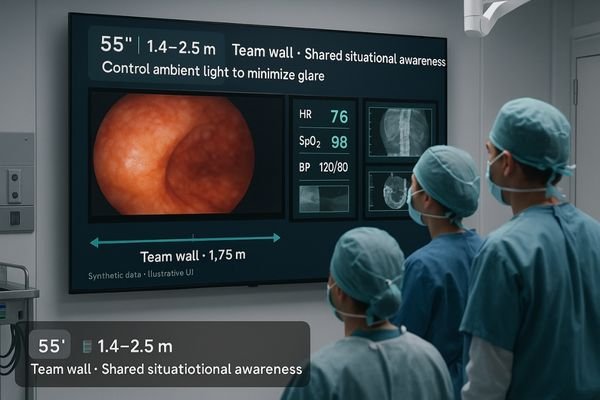
The 55-inch display format9 is not designed for a single user but for a team. It thrives when mounted on a wall and viewed from a distance of 1.4 to 2.5 meters. Its primary purpose is to provide shared situational awareness in environments like a hybrid operating room, a control room, or a pre-operative briefing area. In these settings, the screen serves as a central information hub, simultaneously displaying vitals, endoscopic video, radiological images, and other critical data for the entire team to see. However, the effectiveness of a large screen is highly dependent on its installation. The farther the viewing distance, the more that reflections and glare become a problem. Therefore, it is critical to first control the ambient lighting in the room. Furthermore, the screen must be mounted correctly, with its center positioned near the collective eye level of the team to avoid neck strain from looking up or down. A professional large-format surgical display10 like the MS550P is engineered with anti-reflection surfaces to mitigate glare, but proper room setup remains paramount for its successful integration.
Resolution, PPI & multiview penalty—recheck at your distance
Simply choosing a 4K monitor does not guarantee legibility. The interplay between screen size, resolution, and distance can create unexpected problems, especially when using multiview layouts that shrink content.
Always recheck legibility at your intended distance. A high PPI on a small 4K screen may require scaling, while a low PPI on a large screen needs a closer viewing distance. Multiview layouts shrink windows, demanding a final check.
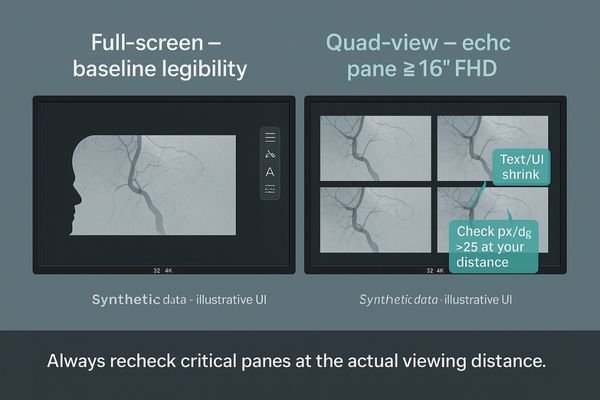
The relationship between resolution and screen size changes the legibility equation. For instance, a 27-inch 4K monitor has a very high pixel density (PPI)11. While this creates an incredibly sharp image, it also makes text and UI elements very small, often necessitating display scaling within the operating system to make them readable. Conversely, a 55-inch 4K monitor has a much lower PPI. To maintain the target of at least 25 pixels per degree for good visual acuity, you must ensure the viewing distance does not become too great. The biggest trap, however, is the multiview penalty12. When you use a Picture-by-Picture (PBP) or quad-view layout, you are effectively dividing the screen’s real estate. A quad-view on a 32-inch 4K monitor turns it into four separate ~16-inch Full HD displays. The text, lines, and subtle details within each of those panes are now significantly smaller. Before committing to a purchase, the most important final step is to simulate your most challenging layout—typically the one with the smallest information pane—and view it on the target screen from your actual working distance. This simple test is the only way to be certain that all critical information will remain legible.
Conclusion
Choosing the right screen size based on viewing distance is a fundamental step toward creating an ergonomic, efficient, and safe clinical environment that supports optimal visual performance. 📐
👉 For tailored recommendations and Reshin medical display solutions, contact martin@reshinmonitors.com.
-
Understanding clinical workflow is crucial for selecting displays that enhance performance and patient outcomes. ↩
-
Exploring this link can provide insights into optimizing display choices for better usability and comfort. ↩
-
Understanding angular legibility can enhance your display selection process, ensuring optimal viewing comfort and clarity. ↩
-
Exploring visual acuity will help you grasp its importance in achieving clear and legible text on screens. ↩
-
Explore the advantages of 27-inch monitors for ergonomic and efficient use in clinical environments. ↩
-
Discover how 4K monitors enhance clarity and detail, crucial for medical applications and user interfaces. ↩
-
Explore the advantages of 32-inch displays in clinical settings, enhancing workflow and user experience. ↩
-
Learn how mixed-view layouts like PIP and PBP can optimize medical workflows and enhance detail visibility. ↩
-
Explore how a 55-inch display format enhances collaboration and situational awareness in team settings. ↩
-
Learn about essential features of large-format surgical displays to ensure optimal performance in medical environments. ↩
-
Understanding pixel density is crucial for selecting the right monitor for clarity and legibility in your work. ↩
-
Exploring the multiview penalty can help you avoid common pitfalls in multi-display configurations, ensuring better usability. ↩


