
Surgical teams frequently report image quality issues that compromise tissue identification, extend procedure times, and increase surgeon fatigue. Across many OR environments I’ve supported, I have repeatedly seen how underperforming displays quietly introduce clinical risks that are often misdiagnosed as camera issues, surgeon fatigue, or simply “workflow complexity.”
Choosing a medical display for endoscopy and minimally invasive surgery requires balancing optical performance, hygiene engineering, signal reliability, and long-term operational stability. In this article, I summarize key engineering principles and share practical insights from Reshin’s OR visualization development and deployment experience.
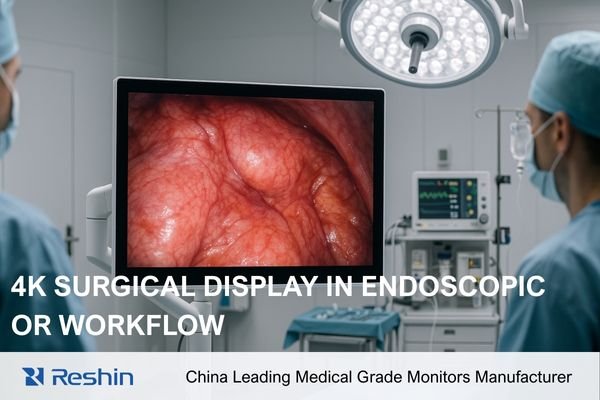
As an engineer responsible for integrating visualization systems into operating rooms, I’ve seen how display performance directly influences a surgeon’s ability to act with confidence. Subtle factors—color deviation1, glare, luminance instability, or even frame timing irregularities—can disrupt procedural flow. Over the years, working with OR integrators, surgical teams, and visualization vendors, I’ve developed a clear understanding of how displays behave under real surgical conditions and why certain design choices matter more than spec sheets suggest.
What Visual Performance Matters Most in Endoscopy and MIS?
Surgeons frequently express frustration with displays that render tissue boundaries ambiguously or present inconsistent colors between procedures. In MIS, where every decision relies on image feedback instead of direct visual contact, the stakes are even higher.
In my OR integration projects, I prioritize color accuracy, luminance stability, and optical clarity because these directly influence tissue differentiation. Reshin’s optical engineering—from bonding to calibration—ensures consistency between units and across long-term OR usage.
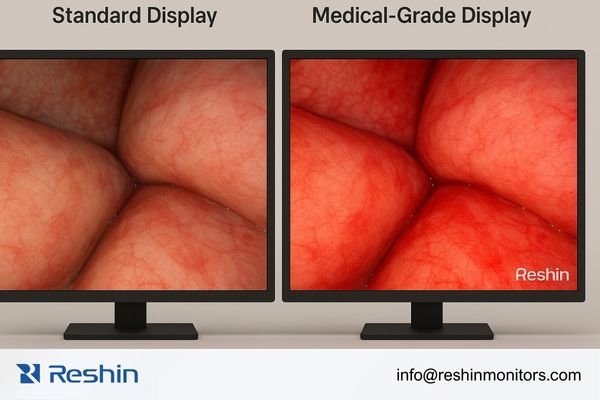
Color Accuracy Isn’t Just Visual Quality—It’s Clinical Safety
Accurate color reproduction affects decisions around inflammation, bleeding control, vessel recognition, and tissue perfusion. In the field, I have seen cases where:
- A slight green tint made ischemic areas harder to detect
- Inconsistent color profiles confused documentation and teaching feedback
- Surgeons lost confidence because the display differed from prior procedures
Professional medical displays require:
- ΔE < 2.02 after factory calibration
- Uniform color rendering across the entire panel
- Consistency across brightness levels and viewing angles
- A controlled thermal management system that prevents color drift
Reshin’s display calibration pipeline—built around multi-point color mapping and panel compensation algorithms—helps maintain this consistency throughout the display’s life cycle.
Luminance Stability and Shadow Detail Define MIS Precision
Endoscopic environments present harsh lighting differences: brilliant specular highlights on fluids, deep shadows within cavities, and frequent illumination changes. Displays must maintain:
- Stable luminance without drift, even during multi-hour surgeries
- Deep blacks that preserve shadow detail
- Uniform backlight consistency across the full screen
- Stable gamma curves unaffected by aging or heating
Reshin continuously tests luminance drift across extended operation cycles because OR monitors are routinely used for 6–12 hours per day. This testing ensures surgeons see predictable visual information at hour 1 and hour 10 of a procedure.
Why Anti-Reflection and Optical Bonding Matter More Than Resolution
Surgical lights create unpredictable reflections. In reflective displays, I’ve seen surgeons physically reposition themselves—or entire carts—to avoid glare.
Optically bonded displays:
- Remove internal air gaps
- Increase contrast
- Improve outdoor or bright-light performance
- Enhance durability during cleaning
- Reduce parallax for close-up viewing
Reshin’s AR glass + bonding combination is engineered for OR light angles, reducing reflection to <1% and preserving detail for both primary surgeons and assistants.
How Do OR Hygiene Requirements Influence Display Selection?
ORs impose strict infection-control guidelines that few commercial displays can survive. Liquid exposure, strong disinfectants, and repeated wipe-down cycles all stress hardware in ways office displays are never designed to handle.
From an engineering perspective, OR hygiene requires sealed structures, flat-glass design, and durable materials. Reshin’s OR product portfolio integrates these structural decisions from the earliest design stages to support long-term reliability and reduce contamination risk.
Why True OR-grade Housing Matters
In real-world OR settings, I have repeatedly seen display failures caused by:
- Fluid ingress into chassis seams
- Chemical-induced yellowing or surface haze
- Port corrosion from frequent cleaning
- Dust and moisture intrusion through ventilation holes
A proper OR display must integrate:
- Full-flat protective glass3
- No exposed seams or irregular edges
- Sealed or covered I/O ports
- IPX1–IPX6 ingress protection levels
- Fanless cooling systems that do not pull contaminants inside
Reshin’s OR enclosures use reinforced one-piece frames and medical-grade coatings that withstand multi-year disinfection without loss of optical clarity.
Material Science: The Hidden Backbone of Display Hygiene
Chemical-resistant glass, anti-corrosion metalwork, nano-coated surfaces, and durable touch controls all contribute to OR durability. These are invisible features that directly influence:
- Lifetime performance
- Cleaning efficiency
- Resistance to surface degradation
- Prevention of bacterial harboring
Reshin uses chemically strengthened cover glass and non-porous housings validated through repeated exposure tests to hospital-grade disinfectants.
Optical Bonding as a Hygiene Solution
Optical bonding delivers superior image quality, but equally important:
- Eliminates air gaps where condensation or biological residues could accumulate
- Strengthens the panel against mechanical cleaning pressure
- Reduces internal fogging caused by temperature fluctuation
In extreme OR humidity conditions, bonded panels remain clear while air-gap panels frequently fog or accumulate residue—something I’ve observed in multiple hospital deployments.
Why Are Interface Compatibility and Latency Critical in MIS Workflows?
Signal delays and compatibility issues are among the most common—and most disruptive—problems in MIS environments. Even a technically excellent display becomes a liability if signal processing introduces lag or workflow interruptions.
Low-latency visualization is essential for MIS accuracy. Reshin’s multi-interface design minimizes converter use, reduces signal path complexity, and maintains real-time feedback across diverse surgical imaging systems.
Latency: The Silent Disruptor of MIS Precision
In MIS, the surgeon’s eyes and hands rely on perfect synchronization. Any delay compromises accuracy. Real-world risk examples I’ve encountered include:
- 120 ms delays causing misalignment during suturing
- Timing drift making instrument tips appear to “float”
- Irregular frame timing increasing fatigue
- Converter failures mid-procedure due to overheating
True medical-grade displays must maintain:
- <20 ms processing delay4
- Frame synchronization across SDI/HDMI/DP
- Stable timing over hours of continuous operation
Reshin validates latency consistency under thermal load and long-duration operation to ensure real-world performance matches lab specifications.
Native Interfaces Reduce Failure Points
Modern OR systems use a mix of imaging signals:
- 12G-SDI for long distances
- HDMI 2.0 for 4K endoscopy processors
- DisplayPort for advanced imaging equipment
- Legacy DVI or VGA for compatibility with older systems
Relying on converters introduces:
- Additional points of failure
- Heat-related instability
- Latency accumulation
- Signal interference
Reshin integrates native 12G-SDI, HDMI 2.0, and DP directly into display hardware, significantly reducing both latency and integration risks.
How Should Resolution and Screen Size Be Balanced in the OR?
Choosing the right display size is not as simple as “bigger” or “higher resolution.” OR environments impose physical, ergonomic, and workflow constraints that require careful evaluation.
4K improves micro-tissue recognition in MIS, while large-format displays assist team coordination. I assess viewing distance, OR layout, and clinical workflow to determine ideal sizing for each deployment.
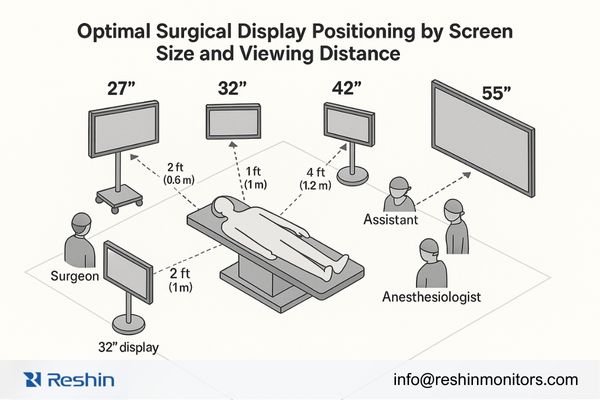
Viewing Distance Determines Optimal Resolution Value
Many believe 4K is always the best choice—but 4K only delivers value when:
- The viewer is within an appropriate viewing radius
- The source signal matches the monitor’s resolution
- The OR layout supports ergonomic viewing angles
General guidelines:
Beyond these distances, extra resolution yields diminishing returns.
Different OR Scenarios Require Distinct Display Strategies
- Precision MIS: surgical cart, 27–32” displays, close viewing
- Laparoscopy: 27–32” 4K is ideal for tissue visualization
- Teaching ORs: 42–55” provides visibility for multiple viewers
- Ceiling/Wall Mount Integration: requires optimal angle and brightness uniformity
A Note on Workflow Efficiency
Larger displays help communication across the OR, especially during teaching, trauma cases, or multi-modality guidance. But oversized displays placed too close can cause eye strain—another example of why OR-tailored sizing matters.
Recommended Reshin Surgical Monitors for Endoscopy & MIS
Selecting the right display for endoscopy and MIS often requires matching technical capabilities with specific clinical workflows. Based on my deployment experience and the performance characteristics discussed above, the following Reshin models represent the most suitable options for different OR environments and integration scenarios.
| Model | Size | Resolution | Key Features | Typical Use Case |
|---|---|---|---|---|
| MS275PA | 27" | 4K | Optical bonding, BT.2020, AR glass | Precision MIS visualization |
| MS270P | 27" | FHD | BT.709, anti-reflection, lightweight | Mobile endoscopy carts |
| MS322PB | 32" | 4K | 12G-SDI, PIP/PBP, sealed design | OR integration & MIS |
| MS430PC | 42.51" | 4K | Large format, flat glass | Hybrid OR & team visibility |
| MS550P | 55" | 4K | Teaching-oriented, multi-view | Multi-viewer ORs |
Which Models Are Suitable for Endoscopy and MIS Applications?
Reshin’s surgical monitor lineup balances optical clarity, OR-grade durability, and signal reliability, supporting consistent MIS performance. The portfolio is engineered for integration simplicity and long-term operational stability.
Primary Surgical Visualization
- Size: 27–32 inches
- Resolution: 4K
- Requirements: micro-tissue clarity, low latency
- Best choices: MS275PA, MS322PB
Team Visualization and Teaching
- Size: 42–55 inches
- Requirements: multi-view capability, wide visibility
- Best choices: MS430PC, MS550P
Mobile Cart Integration
- Size: 27 inches
- Requirements: lightweight, efficient, flexible
- Best choice: MS270P
Optimal Display Configuration by Surgical Scenario
| Surgical Scenario | Recommended Size | Resolution | Optimal Models | Reasoning |
|---|---|---|---|---|
| Precision MIS | 27–32" | 4K | MS275PA / MS322PB | Fine tissue visibility, low latency |
| Laparoscopy | 27–32" | FHD–4K | MS270P / MS322PB | Clear detail with flexible integration |
| Teaching OR | 42–55" | 4K | MS430PC / MS550P | Wide visibility for large teams |
| Mobile Endoscopy | 27" | FHD | MS270P | Lightweight, robust, mobile-friendly |
Conclusion
The selection of medical displays for endoscopy and MIS requires a multidimensional evaluation of optical clarity, signal processing reliability, hygiene durability, sizing strategy, and long-term operational performance. In OR environments where every decision depends on real-time perception, display quality becomes a direct clinical factor rather than an accessory.
From my engineering perspective, the most reliable outcomes come from treating visualization as an integrated ecosystem. Reshin’s product engineering follows this philosophy—combining optical bonding, calibrated color pipelines, multi-interface hardware, and OR-grade structural design. These choices support both clinical precision and predictable operational stability across long-term use.
Healthcare teams evaluating OR visualization upgrades can benefit significantly from solutions built around reliability, clarity, and workflow compatibility—values that Reshin’s engineering team continues to prioritize. If your organization is exploring enhancements to its surgical visualization ecosystem or seeking deployment guidance tailored to specific OR environments, Reshin’s engineering team is available to discuss practical approaches and share deeper technical insights. You can reach us through the contact channels below.
📧 Email: info@reshinmonitors.com
🌐 Website: https://reshinmonitors.com/
-
Exploring color deviation’s effects can lead to better visualization systems, ensuring surgeons have accurate information during procedures. ↩
-
Understanding ΔE < 2.0 is crucial for ensuring high-quality medical displays, which directly impacts clinical safety. ↩
-
Explore how Full-flat protective glass enhances durability and hygiene in medical displays, ensuring optimal performance in OR settings. ↩
-
Understanding the significance of low processing delays can enhance surgical precision and patient safety. ↩
-
Explore the advantages of 4K resolution to understand its value in different viewing scenarios. ↩


