Struggling with blurry or jagged images from an older 1080i endoscope? This motion blur can hide crucial details during a procedure. A proper endoscopic monitor instantly fixes this problem.
An endoscopic monitor should handle 1080i1 deinterlacing with a specialized video processing chip. This chip must convert the interlaced signal into a full 1080p progressive image in real-time. It does this by intelligently eliminating motion artifacts to provide a clear, stable, and lag-free view.
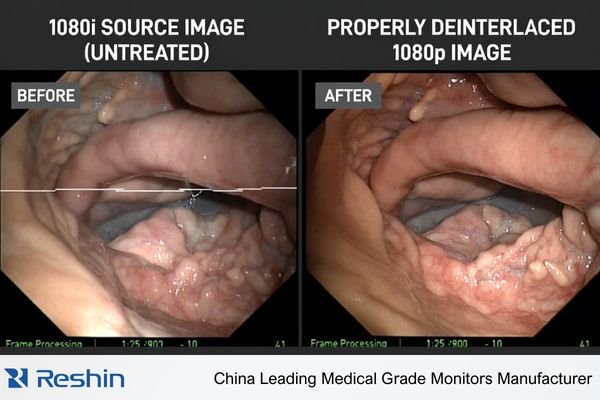
This process is fundamental for clear visualization in the operating room. Without it, the image you see is not a true representation of the surgical field. But how does it actually work, and why is doing it quickly so important? Let’s dive deeper into what happens inside the monitor. I want to show you exactly how we turn a problematic signal into a perfect surgical image.
What exactly is a 1080i signal in endoscopy?
The term "1080i" can sound like confusing technical jargon. But not understanding it means you can’t be sure your monitor is performing correctly. Let’s break it down simply.
In endoscopy, a 1080i signal is a high-definition video format2 (1920×1080) where each image frame is split into two fields. The camera sends the odd-numbered lines first, then the even-numbered lines. This method saves bandwidth but can create motion artifacts on modern displays.
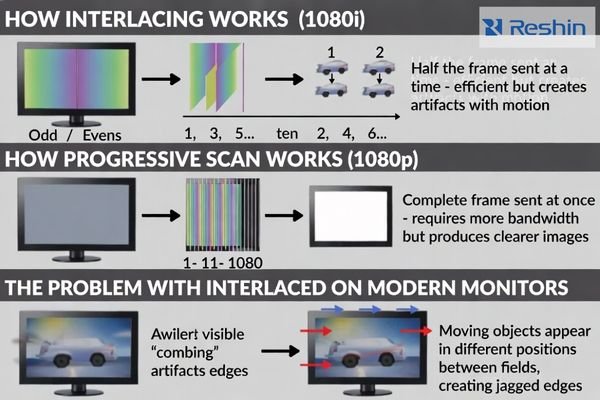
To understand 1080i, we first need to look at how images are "drawn" on a screen. Modern monitors use a method called progressive scan (the "p" in 1080p). This means the monitor draws every single line of the image in order, from top to bottom, for every frame. It’s one complete picture shown all at once. The "i" in 1080i stands for interlaced. This is an older technique. With an interlaced signal, the camera captures and sends only half the image at a time. First, it sends all the odd-numbered lines (1, 3, 5, etc.). Then, it sends all the even-numbered lines (2, 4, 6, etc.). Your eyes blend them together to see a full picture. This was a clever way to reduce the amount of data being sent, which was important for older broadcast and camera systems. The problem is that modern surgical monitors are progressive. They are built to display a full frame at once. When a progressive monitor receives an interlaced signal, it can cause visible issues, especially with motion.
The Visual Problem: Combing Artifacts
When the endoscope camera is moving, the object in the image is in a slightly different place between the odd-line field and the even-line field. When the monitor tries to display them together, you get a "combing" effect. The edges of moving objects look jagged, like the teeth of a comb. This is not just distracting; it actively reduces image clarity right when you need it most.
| Feature | 1080i (Interlaced) | 1080p (Progressive) |
|---|---|---|
| How it Works | Sends odd & even lines separately | Sends all lines at once |
| Best For | Static images, low bandwidth | Fast motion, modern displays |
| Potential Issue | "Combing" or motion artifacts3 | Requires more bandwidth |
| Monitor Goal | Must be converted to 1080p | Native format for modern monitors |
How does a monitor fix a blurry 1080i image?
You see those distracting jagged lines on the screen during a procedure. This is not just an annoyance; it can hide important details. The good news is your monitor has a smart chip inside that actively fixes the image.
A monitor fixes a 1080i image through a process called deinterlacing. A dedicated chip analyzes the video. For still images, it weaves the two half-frames together. For moving images, it uses motion-adaptive algorithms to intelligently predict and create the missing lines for a smooth 1080p picture.
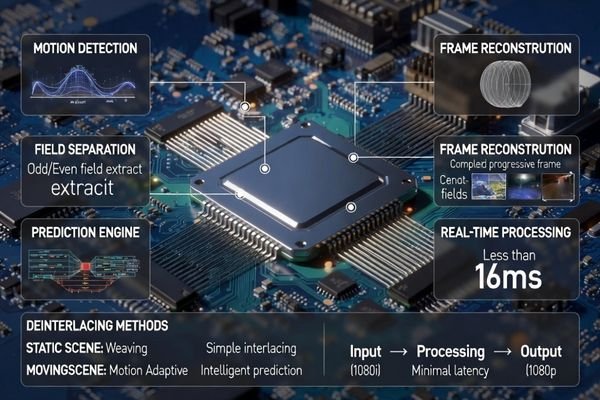
This all happens inside a small but powerful video processing chip in the monitor. Its only job is to take the incoming signal and make it perfect for the screen. When I first learned about this, I was amazed at how fast and smart the process is. The chip doesn’t just use one method; it uses the right method for the right situation. It is constantly "watching" the video signal4 to decide how to act. This is a critical function because a simple, cheap deinterlacing method can actually make the image look worse. A professional medical monitor has to be smarter. It analyzes the image content frame by frame to choose the best strategy.
Strategy 1: For Static Scenes
When the endoscope is held still, the chip uses a simple and effective method. It takes the first field (odd lines) and the second field (even lines) and just "weaves" them together. Since nothing is moving, the two halves fit together perfectly to create one complete, sharp 1080p frame. This is the ideal scenario and provides the highest possible image quality.
Strategy 2: For Moving Scenes
This is where the real intelligence comes in. When the camera moves, weaving the two fields together creates the combing artifacts we talked about. The chip knows this. So, instead of weaving, it switches to a "motion-adaptive" mode. It looks at the first field, and instead of waiting for the second, it intelligently predicts what the missing lines should look like based on the motion it detects. It analyzes the direction and speed of movement and generates the missing pixels to complete the frame. This happens so quickly and accurately that you just see a smooth, clear image without any ghosting or jagged edges. It’s this predictive ability that separates a great surgical monitor5 from a standard one.
Why is fast deinterlacing so critical for surgery?
You might notice a tiny delay between your hand movement and the image on the screen. This lag can disrupt hand-eye coordination and reduce a surgeon’s confidence. High-quality, real-time deinterlacing is the solution that eliminates this delay.
Fast deinterlacing is critical because surgeons rely on immediate visual feedback. Any delay, or latency, can disrupt hand-eye coordination. A good monitor must convert the 1080i signal to 1080p almost instantly to provide a true, real-time view of the surgical field, ensuring precision and safety.
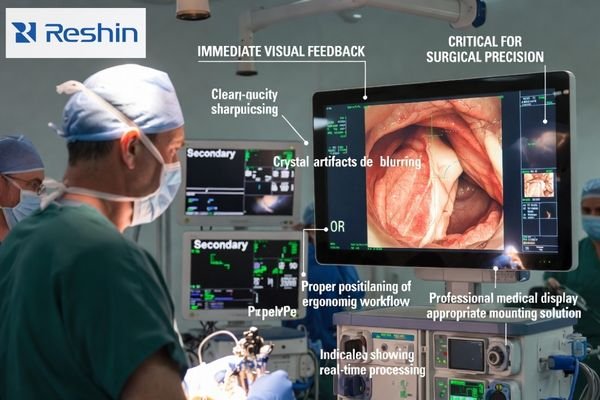
The process of deinterlacing, even when done well, takes time. It’s a calculation that the monitor’s chip has to perform. The time it takes to do this calculation is called latency. In the world of surgical displays, latency is the enemy. I remember seeing a demo once where a presenter was using a low-quality monitor. When they moved an object in front of the camera, the image on the screen visibly trailed behind. Now, imagine that delay happening with a delicate surgical instrument inside a patient. Even a delay of a few milliseconds can be felt by a surgeon and can interrupt the natural flow of a procedure.
The Problem of Latency
Latency disrupts the brain’s connection between action and reaction. A surgeon’s hand-eye coordination is built on the expectation of immediate feedback. When the image on the screen lags behind their hand movements, it can cause hesitation or even overcorrection. This is why the speed of the video processing chip6 is just as important as its intelligence. It must perform these complex deinterlacing calculations so fast that the delay is imperceptible to the human eye. This is a key design goal in our surgical monitors like the RESHIN MS322PB and MS275PA. We focus on minimizing latency at every stage.
The Goal: A Clear AND Immediate Image
Ultimately, the goal is not just to create a clear image from a 1080i source. The goal is to create a clear and immediate image. The surgeon needs to trust that what they are seeing on the screen is happening at that exact moment. This trust is built on the monitor’s ability to handle flawed signals like 1080i without introducing blur, artifacts, or delay. It ensures that the technology is an aid, not a hindrance, allowing the surgeon to focus completely on the patient.
Conclusion
A quality endoscopic monitor must use fast, intelligent deinterlacing to turn a 1080i signal into a clear, real-time 1080p image, ensuring both surgical precision and confidence.
If you want help validating 1080i deinterlacing performance in your actual OR signal chain (source format, switching path, latency checks, and artifact review), contact us and our engineering team can support your evaluation.
✉️ info@reshinmonitors.com
🌐 https://reshinmonitors.com/
-
Understanding 1080i is crucial for anyone working with video technology, especially in medical settings. ↩
-
Explore the benefits of high-definition video formats for improved viewing experiences. ↩
-
Discover how motion artifacts affect video quality and methods to reduce them for clearer images. ↩
-
Understanding video signals is key to grasping how video technology works in various fields. ↩
-
Explore the essential features of surgical monitors to ensure optimal performance in medical settings. ↩
-
Learn about the technology behind video processing chips and their role in improving image clarity. ↩