Hybrid operating rooms (Hybrid ORs) are where display choice becomes a workflow decision, not just a hardware choice. Surgical displays often sit at the center of multi-system imaging—endoscopy, angiography/DSA, ultrasound, navigation/fusion, PACS/EMR, and teaching outputs—so mounting style can matter more than small panel spec differences.
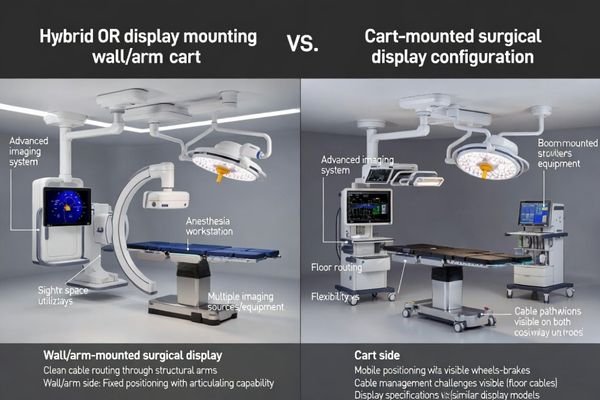
In most Hybrid ORs, a wall/arm-mounted display is the better “main screen” choice for repeatable sightlines, cleaner traffic flow, and structured cable integration—while a cart-mounted display is the better “support/backup” choice for flexibility, teaching, and rapid swap-out resilience.
Hybrid ORs are constraint-driven environments: room geometry, imaging equipment envelopes, team viewing zones, and uptime requirements all interact. The most reliable approach in real hospitals is usually “fixed main + mobile support1”—standardize the primary view and integration, then keep mobility where it adds operational value rather than floor chaos.
What makes a Hybrid OR display decision different?
A Hybrid OR isn’t “an OR plus a big imaging system.” It’s a multi-modality environment where multiple teams share the same room, and the display becomes a shared reference point across phases of care—often without anyone leaving the sterile field.
Because Hybrid ORs combine multiple imaging sources, multiple viewing audiences, and high equipment density, mounting style becomes a control lever for repeatability, safety, and uptime—not a cosmetic preference.
| Hybrid OR Trait | Why it changes the display decision | Mounting pressure point |
|---|---|---|
| Multi-system imaging sources2 | Inputs/outputs grow fast (more than one “main” feed) | Cable routing + switching strategy |
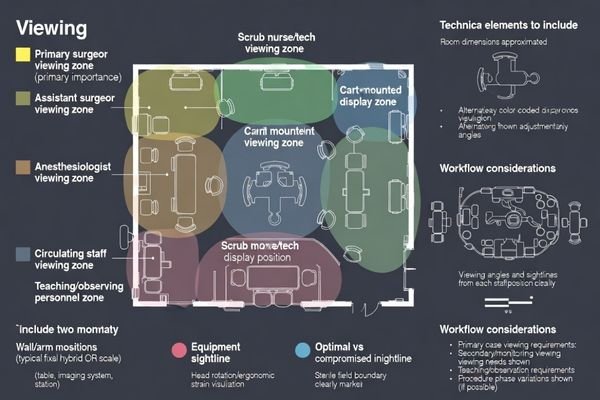
| Multi-team viewing needs | Surgeon, scrub team, anesthesia, nursing, proctoring each need sightlines | Viewing zones + angle control |
| High equipment density | More devices = more collision risk and floor congestion | Footprint + traffic lanes |
| Uptime is operationally critical | A failed display can delay or cancel cases | Swap-out plan + redundancy |
Workflow first: which mounting matches real Hybrid OR use cases?
Start from the workflow question that matters most: who needs to see what, where, and when. Mounting should follow viewing zones and case rhythm—not vendor habits or what “looks cleaner.”
Wall/arm mounting usually fits standardized operator-zone workflows, while carts fit variable audiences and fast reconfiguration—but carts drift into compromise unless parking zones, cable discipline, and a clear role are enforced.
| Use case | What matters most | Mounting that usually fits |
|---|---|---|
| High-volume, standardized hybrid cases | Consistency, speed, minimal variation | Wall/arm as primary |
| Multi-specialty / variable case mix3 | Repositioning for different teams | Cart as primary or strong support |
| Frequent teaching/proctoring | Extra sightlines without crowding | Cart as teaching/support display |
| Room still evolving (early phase) | Avoid construction, iterate fast | Cart-first, plan fixed later |
Sightlines & ergonomics: comfort isn’t a luxury in long procedures
In Hybrid ORs, procedures can run long, and precision demands stay high throughout. Ergonomics isn’t a “nice-to-have”—it’s a repeatable risk and efficiency factor that shows up every case.
Wall/arm mounting makes optimal height, distance, and angle easier to repeat case after case; cart mounting is flexible, but placement often degrades under congestion, quick setups, and limited maneuvering space.
Deep dive (ergonomics checklist you can actually apply):
- Primary surgeon line-of-sight4: screen centered to minimize head rotation
- Scrub team visibility: placement shouldn’t force leaning or twisting
- Sterile corridor protection: screen must not “steal” the clean traffic lane
- Repeatability: can you return to the same position every case?
- Adjustment controls: can the display be re-angled quickly without disrupting flow?
Space & traffic flow: floor clutter is the silent safety risk
Hybrid ORs are equipment-dense by design. Every additional object on the floor changes traffic patterns, increases collision risk, and complicates sterile workflow.
Wall/arm mounting reduces floor footprint and protects traffic lanes; carts add a large movable object plus cable routes, increasing trip/collision risk unless parking zones and keep-out boundaries are strictly managed.
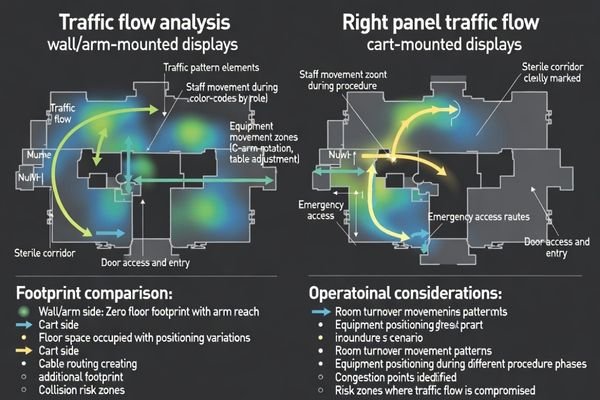
| Risk moment | Why it happens | What to do if you use carts |
|---|---|---|
| During table repositioning | Cart ends up in the “only available space” | Pre-define cart parking zones |
| When imaging gantry/C-arm moves | Collision envelope expands | Enforce keep-out boundaries |
| During turnover | Cables get rushed and tangled | Standardize a cable stow method |
| During emergencies | Anything on wheels becomes a variable | Use locking brakes + disciplined placement |
Cable management & integration: the difference between a system and a setup
Hybrid OR display decisions often fail at the “invisible layer”: cable routing, signal switching, and how cleanly the display integrates into the room’s video ecosystem. This is where uptime is won or lost.
Wall/arm mounting supports structured pathways and predictable routing; carts depend on daily discipline and can become fragile as sources, long runs, and redundancy requirements grow.
Deep dive (integration tiers that explain most real-world pain):
1) Setup: point-to-point cables, ad-hoc converters, minimal redundancy
2) Managed setup: labeled cables, dedicated switcher/routing, basic documentation
3) System: structured pathways + routing + monitoring + defined failure/backup behavior
What “structured” cable management looks like in practice
A structured plan means consistent connection points, labeled pathways, strain relief, and a switching strategy that doesn’t require improvisation mid-case. The goal is fewer mystery signal drops and fewer last-minute “which cable is this?” moments.
What makes carts fail5 over time
Carts usually fail because inputs multiply: extra sources, extra outputs for teaching/recording, and extra adapters that quietly accumulate. Without a stow method and standard port plan, the cart becomes a moving bundle of exception handling.
Infection control & cleaning: what’s easiest to keep truly clean?
Infection control is a daily operational reality. Mounting affects how many surfaces exist, how many touchpoints staff interact with, and how consistently cleaning happens in real life.
Wall/arm mounting reduces wheels and floor contact points, simplifying cleaning; carts can be safe but introduce more touch surfaces and “hard-to-clean” areas that depend heavily on disciplined protocols.
Deep dive (cleaning reality checklist):
- How many surfaces are “out of sight” (rear panels, under handles, wheel assemblies)?
- Who owns cleaning (nursing, tech, EVS), and is it consistent?
- Are there turnover moments where carts get skipped due to time pressure?
- Are disinfectant compatibility and materials clearly defined for staff?
Stability & collision risk: big screens change the equation
As screen size increases, mechanical stability and collision risk rise too. A larger display changes the room’s “collision geometry,” especially when equipment moves.
Fixed mounting typically provides more predictable positioning and less position drift; carts can be stable, but stability depends on base design, brake quality, and how often the cart is moved during cases and turnover.
| Stability factor | Why it matters | Wall/arm advantage | Cart mitigation |
|---|---|---|---|
| Position drift | Screen slowly “walks” away from ideal | Fixed geometry | Locking brakes + defined parking |
| Micro-vibration | Precision viewing suffers in long cases | Structural rigidity | Heavier base + less movement |
| Collision envelope | Screen edges become collision points | Predictable placement | Keep-out zones + staff discipline |
Maintenance, downtime, and backup strategy: the overlooked deciding factor
A Hybrid OR’s success is measured in completed cases and on-time schedules. Display downtime is not a minor inconvenience—it can cascade into rescheduling, overtime, and reduced utilization.
Wall/arm-mounted displays may require coordinated downtime for service; carts can often be swapped quickly, which makes cart-mounted units especially valuable as backup even when a fixed display is the main screen.
Deep dive (simple backup playbook):
- Define what “failure” means (no signal, physical damage, control failure)
- Decide the swap time target (minutes, not hours)
- Keep known-good cables with the backup cart
- Document the signal chain so staff can re-route under pressure
Cost: CAPEX vs total cost of ownership (TCO) in a Hybrid OR
Cost decisions in Hybrid ORs often get trapped at CAPEX: “Which option is cheaper to buy and install?” The better question is TCO: “Which option reduces ongoing friction and protects utilization over time?”
Carts can reduce upfront cost and avoid construction, but fixed mounting can reduce long-term chaos, troubleshooting time, and clutter-related inefficiency—so high-utilization Hybrid ORs often favor wall/arm for the main display.
| Cost bucket | Wall/arm (primary) | Cart (primary) |
|---|---|---|
| Upfront install | Higher (planning + routing) | Lower (minimal construction) |
| Turnover time | Often faster via repeatable placement | Can vary; depends on discipline |
| Troubleshooting time | Lower with structured integration | Higher if cables/converters sprawl |
| Downtime exposure | Higher if no backup plan | Lower if swap-out is easy |
| Standardization across rooms | Easier | Harder (cart variance grows) |
Future upgrades: adding more sources, more rooms, and new workflows
Hybrid ORs evolve. More imaging sources, new routing requirements, additional outputs for teaching, and expansion to more rooms tend to happen faster than expected.
Carts are modular and easy to redeploy, while wall/arm solutions scale best when you plan spare conduits, ports, and expansion capacity from day one—future-proofing is mostly infrastructure planning.
Deep dive (upgrade planning prompts):
- How many sources do you have today, and how many within 12–24 months?
- Do you expect more outputs (teaching, remote guidance, recording, control room)?
- Will rooms need to share equipment or remain self-contained?
- Is there a roadmap for routing/switching expansion (ports, bandwidth, redundancy)?
My recommendation: the “fixed main + mobile support” model for Hybrid ORs
Most Hybrid ORs need two things at once: consistent main-view ergonomics and integration, plus flexible support and operational resilience. That tension is why either/or decisions often fail.
For many Hybrid ORs, the best balance is a wall/arm-mounted primary display for repeatability and integration, plus a cart-mounted support display for teaching, secondary viewing, and rapid swap-out backup.
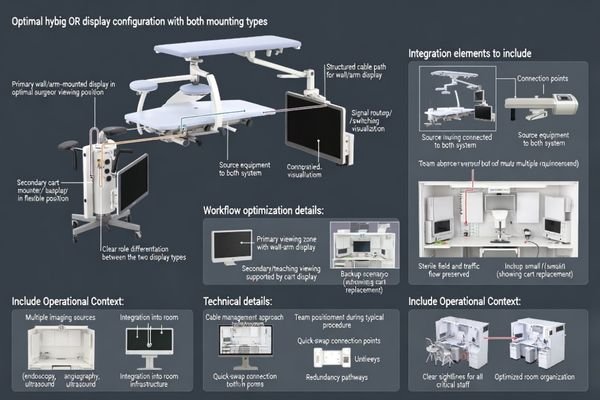
Deep dive (how to implement without overengineering):
- Define the primary viewing zone and lock it in as the default
- Assign the cart a clear role (teaching/support/backup—not “random extra screen”)
- Pre-wire standard connection points so the cart plugs in cleanly
- Rehearse a swap routine (who does what, in what order, with which cables)
Decision checklist: 8 questions to choose the right mounting
When decisions drag on, it’s usually because stakeholders argue from different priorities. This checklist compresses the decision into measurable room realities.
If you score high on stability, crowding, and standardization, go fixed for the main display. If you score high on variability, speed, and backup, go cart. If you score high on both, “fixed main + mobile support” is usually the most realistic answer.
1) Is the main viewing position stable every case?
2) Is floor space already crowded?
3) Do you frequently change who needs to view the screen (anesthesia/nursing/teaching)?
4) Do you require hidden cables and a “clean room” look?
5) Is rapid swap-out backup critical to protect schedules?
6) Are you avoiding construction work right now?
7) Will you add more sources/routing within 12–24 months?
8) Do you have a standardization goal across multiple ORs?
FAQ
Can a cart-mounted display be the main screen in a Hybrid OR?
Yes—if your room truly needs frequent repositioning, you have enough floor space, and your team consistently parks the cart in defined zones. If carts become “wherever they fit,” cart-as-primary often drifts into poor ergonomics and higher collision risk.
What’s the safest way to manage cables on carts?
Treat cable management like a standard operating procedure: fixed cable lengths, labeled ends, strain relief, and a consistent stow method. The goal is to avoid dangling loops across traffic lanes and reduce connector wear from repeated tugging.
Do wall-mounted displays complicate maintenance?
They can. Because they behave like room infrastructure, servicing may require coordination and planned downtime. Pairing a fixed primary display with a cart-based backup reduces downtime exposure.
How many inputs/outputs should I plan for in a Hybrid OR?
Plan beyond today’s minimum. Hybrid ORs often add sources and outputs for recording/teaching faster than expected, so leaving expansion capacity helps avoid stacking converters and adapters later.
How should we plan backup if the main display fails mid-case?
Define a swap path in advance: where the backup cart lives, which ports it uses, which cables are included, and who performs the switch. A backup that requires “finding the right cable” during a case is not a real backup.
If we choose wall/arm mounting, how do we keep flexibility?
Add a cart-mounted support display for secondary viewing/teaching/backup, and pre-wire connection points that allow fast, clean integration. This preserves flexibility without turning the floor into an obstacle course.
Conclusion
In a Hybrid OR, “better” is determined by workflow constraints. Wall/arm mounting is usually the stronger main-screen choice when you need repeatable ergonomics, protected traffic flow, and structured integration; cart mounting is the stronger operational tool when you need flexibility and rapid swap-out resilience.
At Reshin, we design medical-grade display solutions for surgical environments where uptime, cleaning realities, and integration discipline matter. Our focus is helping teams deploy display setups that stay reliable over time—across rooms, across case types, and across evolving imaging stacks.
✉️ info@reshinmonitors.com
🌐 https://reshinmonitors.com/
-
Learn about this approach to optimize surgical workflows and improve operational efficiency. ↩
-
Explore how multi-system imaging enhances surgical efficiency and decision-making. ↩
-
Discover insights on how a variable case mix can optimize team performance and patient care. ↩
-
Understanding this concept can enhance surgical efficiency and reduce fatigue, making it essential for any surgical team. ↩
-
Discover insights on preventing cart failures, ensuring longevity and efficiency in your equipment management. ↩