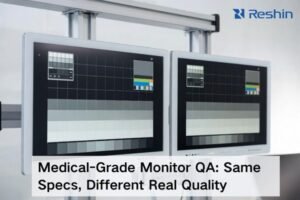
Are you confused about what makes a medical monitor special? Using a regular screen for clinical work can introduce risks you can’t afford. Medical monitors are designed to prevent this.
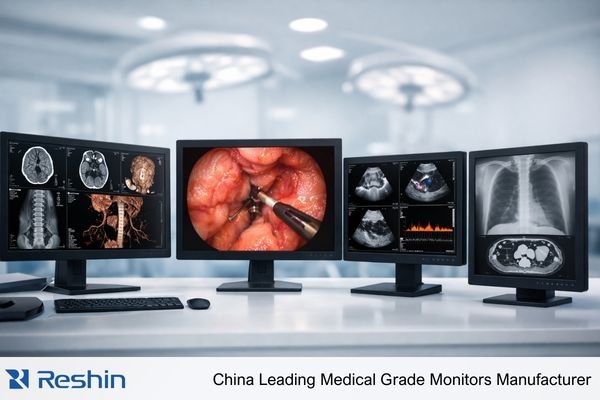
A medical-grade monitors1 is a specialized display built for clinical environments. It shows images from medical equipment like CT scanners or endoscopes with high accuracy and stability. This is essential for applications like surgery and radiology diagnosis, ensuring doctors see precise information to make critical decisions.
Now you know the basic definition. But the world of medical displays is more detailed than it might seem. To really understand their value, we need to explore what sets them apart from the monitors on your desk. Let’s dive into the key differences and why they matter so much in a hospital.
What Makes Medical Monitors Different from Consumer Displays?
Thinking a standard 4K monitor is good enough for clinical work? That idea could compromise patient safety. Consumer screens lack the consistency and compliance needed for medical imaging. Let’s look at the critical differences.
Medical monitors differ from consumer displays in several key ways. They offer superior grayscale and color accuracy2, long-term luminance stability, and are built to comply with medical standards like DICOM. They also have specialized interfaces and are designed for reliability and easy cleaning in clinical environments.
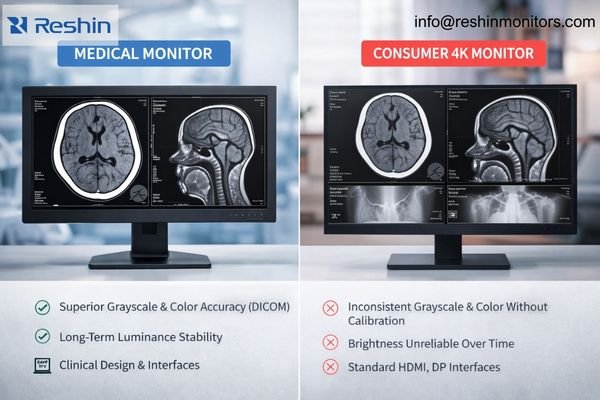
I often get asked by system integrators if a high-end commercial display will do the job. My answer is always a careful "no." The differences are not just about image quality on day one; they are about reliable performance over years of use. A consumer monitor’s brightness and color can change quickly, which is a major problem in medicine. A radiologist needs to see the exact same shade of gray today as they will a year from now. This is where medical-grade engineering comes in.
Accuracy and Consistency
The most important job of a medical display is to show images exactly as they were captured. For radiologists looking at X-rays, this means perfect grayscale reproduction. We follow a standard called DICOM Part 143 to ensure that every shade of gray is distinct and correct. This helps doctors spot subtle details that could be missed on a normal screen. At our company, we ensure every diagnostic monitor is factory-calibrated to meet this standard.
Compliance and Build Quality
Medical monitors are medical devices. They must meet strict regulations, like the CE MDR in Europe. They are also built to last in a 24/7 hospital environment. This includes using a power supply that is medically certified and designing the monitor to handle frequent cleaning with harsh chemicals. We also focus on providing stable, long-term supply for our B2B partners, which is something consumer brands cannot guarantee.
Key Differences at a Glance
| Feature | Medical Grade Monitor | Consumer Monitor |
|---|---|---|
| Grayscale | Calibrated to DICOM Part 14 standard | Not calibrated, inconsistent |
| Luminance | High and stable over time | Lower brightness, degrades quickly |
| Compliance | Medically certified (e.g., CE MDR) | Standard electronics certifications |
| Cleaning | Designed for harsh disinfectants | Can be damaged by chemicals |
| Lifecycle | Long, stable product availability | Short, changes frequently |
| Support | B2B engineering and project support | General consumer support |
What Are the Main Types of Medical Grade Monitors?
Do you find the variety of medical monitors confusing? Choosing the wrong type means the display might not be right for its task, whether in surgery or for diagnosis. I can help clarify this.
The two primary types of medical monitors are surgical displays4 and diagnostic displays. Surgical monitors are for real-time visualization in operating rooms, focusing on color and low latency. Diagnostic monitors are for radiologists to interpret images like X-rays and CT scans, prioritizing grayscale accuracy.
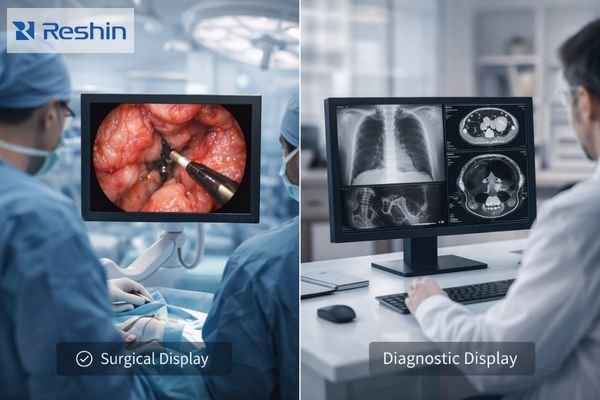
In our business, we serve both of these fields, and their needs are very different. A surgeon performing a laparoscopy needs to see vivid, accurate color with no delay. A radiologist reading a mammogram needs to see the faintest differences in tissue density. That’s why we have developed separate product lines, each optimized for its specific job. We also offer clinical review monitors, which are a versatile option for general viewing at nurse stations or acquisition consoles. Let’s break down the two main categories.
Surgical and Endoscopy Displays
These monitors are the surgeon’s eyes in the operating room. They are connected to endoscopes, surgical cameras, and other OR equipment. The top priority here is real-time performance. Key features include:
- Low Latency: The image must appear instantly, with no lag.
- Accurate Color: Surgeons need to see realistic tissue color to make decisions.
- 4K Resolution: High resolution provides a clear and detailed view of the surgical site.
- Connectivity: They need inputs like 12G-SDI to handle uncompressed video signals from cameras. Our surgical models like the MS322PB often include multiple inputs and Picture-in-Picture (PIP) modes5 to show several video sources at once.
Diagnostic Displays
These monitors are the workhorses of the radiology department. Radiologists use them to read images from CT, MRI, and DR machines. Here, the focus is on detail and consistency. Key features include:
- High Resolution: Resolutions can go up to 12MP to show extremely fine details.
- DICOM Compliance: They are factory-calibrated for perfect grayscale, which is critical for diagnosis.
- Luminance Stability: A built-in sensor often checks and maintains brightness levels automatically. Our diagnostic monitors, like the 8MP MD85CA, are designed for this stability, ensuring that what a doctor sees is always accurate.
Comparing the Main Types
| Feature | Surgical/Endoscopy Display | Diagnostic Display |
|---|---|---|
| Primary Use | Real-time OR visualization | Reading & interpreting medical images |
| Key Priority | Low latency, color accuracy | Grayscale accuracy, consistency |
| Typical Resolution | FHD, 4K | 2MP, 4MP, 8MP, 12MP |
| Key Standard | – | DICOM Part 14 |
| Common Inputs | SDI, HDMI, DisplayPort | DisplayPort, DVI |
Conclusion
Choosing the right medical monitor is vital for modern healthcare. Understanding the core differences and types helps you select the correct tool for your specific clinical application and ensure patient safety.
If you’d like help matching display performance to your workflow (use case, signal chain, cleaning/mounting, and validation needs), reach out and our engineering team can support your evaluation.
✉️ info@reshinmonitors.com
🌐 https://reshinmonitors.com/
-
Explore this link to understand the unique features and benefits of medical-grade monitors in clinical settings. ↩
-
Explore the importance of color accuracy in surgical monitors for effective decision-making. ↩
-
Learn about DICOM Part 14 to see how it ensures accurate grayscale reproduction in medical displays. ↩
-
Explore the role of surgical displays in enhancing real-time visualization during surgeries. ↩
-
Discover how PIP modes enhance the functionality of surgical monitors during procedures. ↩