
A practical buyer guide for organizing diagnostic display classes across radiology and PACS workstation environments. The goal is not to force one monitor specification onto every position, but to create a repeatable standard that separates workstation roles, limits unnecessary model variation, simplifies spare planning and supports future replacement.
Scope: This guide explains a standardization method rather than presenting one disclosed hospital deployment. Representative Reshin models are used later to illustrate 2MP, 3MP and 5MP product directions. They are not presented as three models deployed together in one customer project.
Germany · EU radiology workstation programs
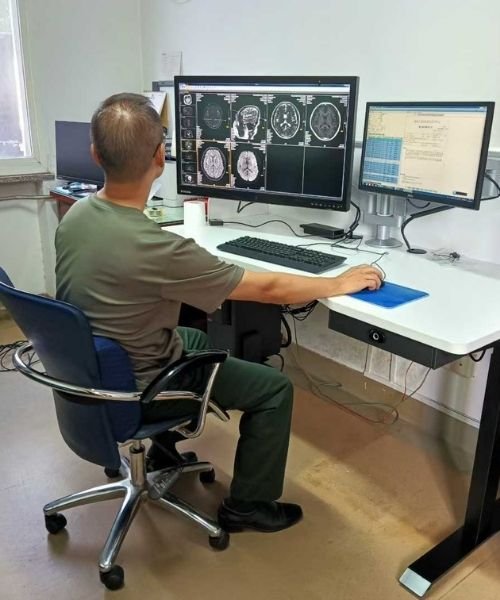
Standardization is useful when it reduces unnecessary variation. It becomes counterproductive when different workstation roles are forced into one display specification simply for purchasing convenience.
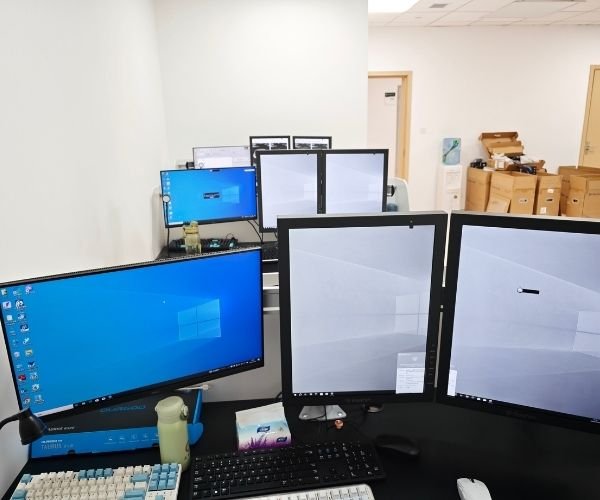
Acquisition-related review, general diagnostic review, higher-detail interpretation and secondary positions do not always require the same display class.
A practical standard should distinguish positions where a higher pixel matrix or tighter display performance is genuinely required.
High-volume standard positions and specialized higher-tier workstations may need different spare and replacement strategies.
The objective is a controlled family of display classes, not one model applied to every workstation regardless of application.
A useful multi-class standard begins with workstation function and project requirements. Resolution is then used as one part of the class definition, rather than the only decision factor.
A 2MP direction can provide a practical baseline for general diagnostic or review positions where the actual application, image-detail requirement and project specification support this level. In a larger workstation fleet, this class may also provide the greatest opportunity for common spares and simplified replacement.
Final use should always follow the actual application, regulatory requirements and customer validation criteria.
A 3MP direction can be retained as a controlled higher tier for workstations that require more image area or detail than the standard baseline. Keeping it as a defined class prevents higher-specification positions from creating an uncontrolled mix of unrelated models.
The decision should consider luminance, grayscale behavior, calibration, interfaces and physical integration in addition to resolution.
A 5MP direction can be reserved for applications where the project requires a higher pixel matrix and tighter image-performance expectations. Because these positions are usually more specialized, replacement and spare planning should remain controlled rather than merged into the general workstation pool.
A 5MP specification should not be treated as an automatic requirement for every diagnostic workstation.
The matrix below is intended as a planning framework. Exact monitor selection still depends on the imaging application, required display performance, interfaces, calibration approach and customer acceptance criteria.
| Decision Area | 2MP Class | 3MP Class | 5MP Class |
|---|---|---|---|
| Standardization Role | Broad baseline class for suitable general diagnostic or review positions. | Controlled higher-detail tier for workstation roles requiring more display detail. | Specialized higher-detail tier for applications with higher project requirements. |
| Resolution Direction | Approximately 2MP. | Approximately 3MP. | Approximately 5MP. |
| Spare Strategy | A larger common spare pool may be practical when this is the main standard class. | Maintain a separate controlled spare pool for higher-tier positions. | A smaller but tightly controlled replacement inventory is usually more appropriate. |
| Replacement Planning | Prioritize platform commonality and straightforward replacement. | Match the replacement to the defined workstation role and performance class. | Maintain closer control of model, calibration and application requirements. |
| Key Validation Areas | Application fit, luminance, grayscale behavior, interfaces and mounting. | Application fit, image detail, calibration, interfaces and workflow. | Higher-detail application requirements, calibration, image performance and continuity. |
The strongest display standard is usually a controlled family of platforms. Common supplier logic, interfaces, documentation, mounting and service methods can be retained wherever possible, while real performance classes remain separated where workstation roles justify the difference.
Reduce unnecessary variation in interfaces, mounting, documentation, supplier management and service practices.
Do not force higher-detail and standard positions into one specification if their application requirements are genuinely different.
Special interface, luminance, mechanical or workflow requirements should be treated as managed exceptions rather than new uncontrolled standards.
The following models illustrate how Reshin can support a three-class diagnostic display strategy. They are shown as representative product directions, not as three models deployed together in one disclosed project.
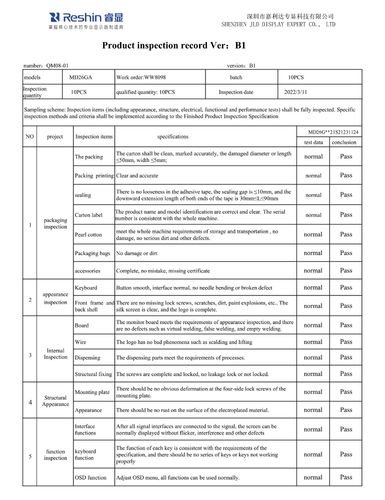
A representative Reshin 2MP diagnostic display direction that can be evaluated as a standard-class platform where the application and project requirements support it.
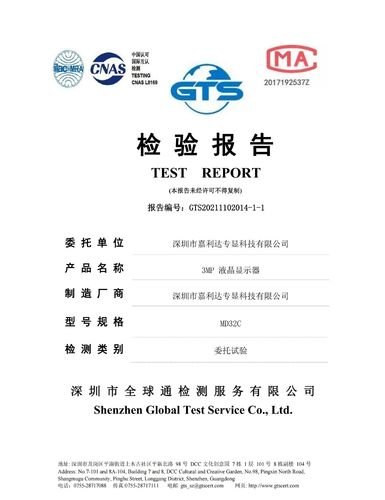
A representative 3MP platform with stronger supporting inspection and verification material in the available Reshin evidence set. It can illustrate a controlled higher-detail workstation tier.

A representative Reshin 5MP diagnostic display direction for projects requiring a dedicated higher-detail class rather than applying the highest resolution indiscriminately across every workstation.
Evidence boundary: MD26GA, MD32C and MD52G are used here to illustrate a 2MP / 3MP / 5MP standardization structure. This guide does not claim that these three models were deployed together within one specific hospital, PACS installation or customer rollout.
A useful diagnostic display standard is not finished when the first monitors are selected. It should also define how replacements, spare units and future model changes will be controlled.
A workstation fleet becomes difficult to maintain when every replacement introduces a new display model, new interface behavior or a new validation path. Standardization should therefore consider replacement compatibility, spare inventory and future supplier continuity from the beginning.
Maintain a larger common spare pool for the most widely deployed standard class.
Keep 3MP and 5MP replacement units separated where their workstation roles require different validation.
Define interfaces, mounting, display performance and documentation that a replacement must preserve.
When a model or component changes, evaluate the impact before the new configuration becomes the replacement standard.
A standard should remain stable, but not frozen indefinitely. The following changes are reasonable triggers for a controlled review.
The clinical or technical role of a workstation changes materially.
A new imaging application introduces different image-detail or display requirements.
A standard display model becomes unavailable or is scheduled for discontinuation.
Workstations move to different graphics outputs, connection methods or signal paths.
Customer, quality or regulatory requirements introduce new verification expectations.
A component, platform or controlled product configuration requires formal change review.
This page is intended to help buyers structure a diagnostic display standard without presenting an unsupported deployment story.
Reshin has real 2MP, 3MP and 5MP diagnostic display directions supported by product, inspection and quality documentation. These product classes can be used to build a controlled workstation standard according to actual application requirements.
This page does not claim that one hospital, PACS integrator or radiology group deployed MD26GA, MD32C and MD52G together across a specific number of rooms or workstations. Any such project-specific claim should only be published when direct evidence exists.
Standardization is one stage of the decision process. Use the related Reshin pages below for supplier evaluation, workstation selection, PACS planning and lifecycle change control.
Review Reshin diagnostic display manufacturing, quality-control and OEM support capabilities.
Review display planning for PACS workstations, radiology environments and system-integration programs.
See how diagnostic display directions can be separated before sample evaluation for a radiology equipment program.
See how product changes can be documented, assessed and released after an OEM configuration has already been established.
Share your workstation roles, imaging applications, current monitor classes, required resolution tiers, calibration expectations, signal interfaces, estimated quantities, spare strategy and replacement cycle. Reshin can help structure the display classes and identify suitable product directions for further evaluation.
Not automatically. A useful standard should first separate workstation roles, application requirements and image-detail expectations. The same class can be retained across positions that have comparable requirements, while genuinely different roles may justify a separate display tier.
Separate classes can reduce uncontrolled model variation while still preserving the performance differences required by different workstation roles. This also makes spare planning, replacement and supplier management easier to control.
Review the standard when workstation roles change, new imaging applications are introduced, a monitor reaches end of life, interface architecture changes, validation requirements change or a supplier configuration requires controlled revision.
A higher pixel matrix does not automatically make a display the correct choice for every workstation. Resolution should be evaluated together with luminance, grayscale behavior, calibration, interfaces, physical integration, application requirements and project validation criteria.
The replacement baseline should define the required application role, resolution class, luminance and grayscale expectations, interfaces, mounting, calibration approach, documentation and any customer-specific validation criteria.
Reshin can support product-class comparison, interface and workstation requirement review, available quality documentation, representative model selection, sample planning and continuity discussion according to the actual project scope.
We use cookies to improve website functionality, analyze site performance, and protect inquiry forms from spam. You can accept all cookies, reject non-essential cookies, or manage your preferences at any time.
Tell us the application, model or required specification, quantity and destination country. We will review your request and reply by email.