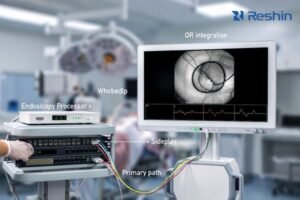
In clinical imaging workstations, ICC profile decisions can affect diagnostic consistency and workflow repeatability—especially in environments where multiple applications, GPUs, and display types coexist on the same workstation or across reading rooms and OR integration setups.
ICC profile decisions for medical displays depend on your clinical workflow and calibration approach. Prefer disabling or neutralizing OS-level ICC transforms when diagnostic applications and monitors already use validated internal calibration, but consider keeping ICC for color-managed workflows. The key is preventing competing transforms that reduce repeatability across applications and system states.
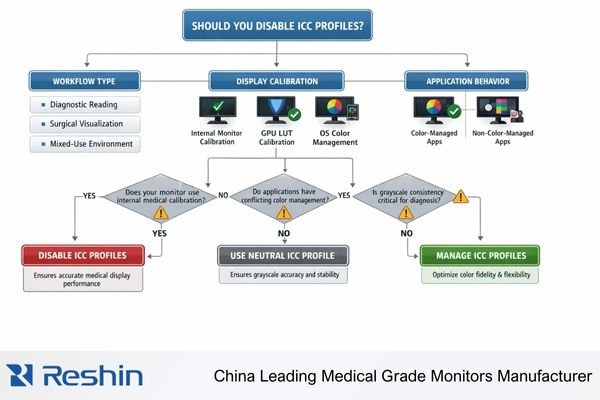
A reliable strategy treats ICC profile handling1 as part of end-to-end display pipeline validation rather than a simple toggle. The practical goal is repeatable rendering: the same study should look the same after reboot, after GPU/driver updates, and across the specific applications used clinically. To get there, you need to understand where transforms occur (application, OS color management, GPU LUT, monitor LUT) and then remove or control any layer that can silently override the intended calibration baseline.
What exactly does an ICC profile do in a medical imaging workflow?
Understanding ICC profile function helps clarify when they support or interfere with medical imaging requirements.
ICC profiles act as color-management translation rules that tell operating systems and color-aware applications how a monitor reproduces color. In medical imaging, this can become complex because displays may already follow defined grayscale response curves through internal calibration, and extra system-level conversions can create competing transforms if not coordinated.
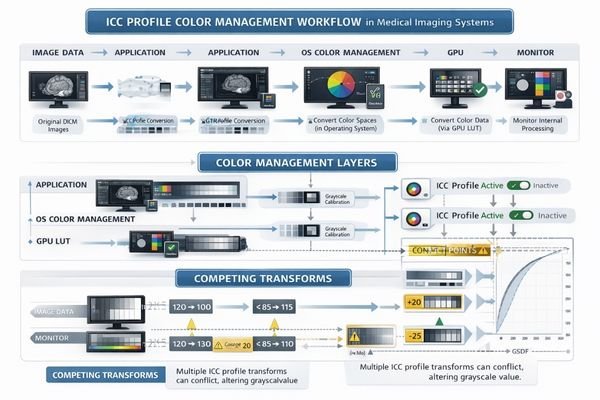
In OS-rendered workflows, an ICC profile is effectively a “map” that helps a color-managed application convert image values into a monitor’s actual behavior. That can be beneficial for color consistency across devices, but medical viewing often prioritizes stable luminance and grayscale behavior under a defined response curve. When the monitor is already calibrated using internal LUTs and medical presets, the ICC layer should not become the primary “owner” of tone mapping unless your workflow explicitly manages it and validates it as part of QA.
Color Management Translation Process
ICC profiles describe monitor color reproduction characteristics so the OS and color-managed applications can perform conversions consistently. This is most relevant when an application relies on the OS color management system and expects a specific display profile to be loaded. In practice, the effective result depends on the full chain: application output → OS color management → GPU LUT behavior → monitor processing (internal LUT/presets). If multiple layers attempt to “correct” tone or color, results can diverge across applications and across system events like login, driver resets, or display hot-plug.
Medical Imaging Complexity
Medical workflows add requirements beyond general color management: stable luminance, consistent grayscale perception, and long-term repeatability. Many diagnostic pipelines anchor calibration to the display’s internal processing and the intended grayscale response (commonly aligned with DICOM GSDF2 / DICOM Part 14 expectations). In those cases, an OS-level ICC profile may be unnecessary for clinical viewing and can become a source of variability if it is applied inconsistently or changed by updates. ICC is most helpful when your clinical use case truly depends on color-managed rendering and you control profile creation, loading, and maintenance.
When can ICC profiles cause problems for diagnostic consistency?
ICC-related consistency problems typically arise from mixed workflow assumptions and conflicting color management approaches.
ICC issues appear when workflows contain mixed assumptions: monitors calibrated to medical curves, GPU drivers applying gamma/LUT changes, operating systems enforcing ICC profiles, and imaging software with varying color management implementations. This can make identical studies look different between applications, users, or system states, affecting grayscale perception and subtle contrast discrimination.
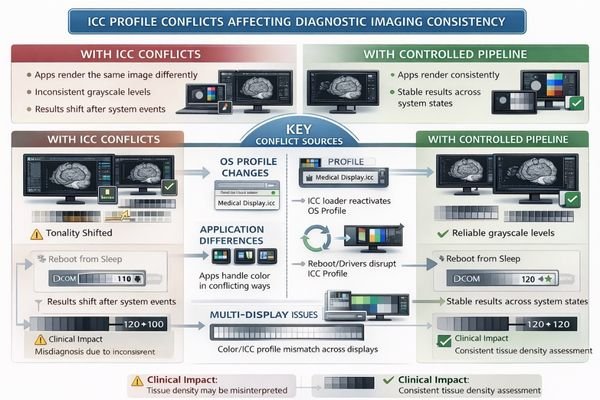
Practical problems show up when the effective tone response shifts depending on which component controls color mapping at that moment. One application might be fully color-managed and apply the ICC profile, while another bypasses OS color management entirely, producing different grayscale or color appearance on the same monitor. Variability can also appear after reboot/login (profile loader behavior), after GPU driver updates (LUT resets), or in multi-display setups where each panel requires its own profile but only one is configured correctly.
To reduce risk, focus on repeatability over “looks good right now.” Identify who owns calibration3 (monitor internal LUT, GPU LUT, or OS/application), then remove hidden layers that can override it. After any ICC change, validate using standardized test patterns and confirm consistency inside the exact clinical applications you use—not just in a single viewer—then document the configuration so it can be restored and audited after updates or hardware changes.
Should you disable ICC profiles for surgical and endoscopy displays?
Surgical and endoscopy environments have specific requirements that influence ICC profile decisions.
In surgery and endoscopy, priorities include real-time visibility, low latency, stable brightness, and predictable color rendering of live video chains. Many OR video sources deliver standardized signals, and displays are tuned to reproduce those signals consistently. ICC becomes problematic when video paths include workstation operating systems where some applications apply ICC while others ignore it, creating mismatched appearance between live, recorded, and streamed views.
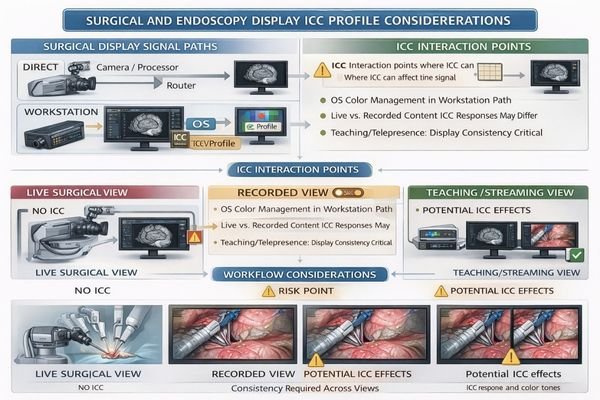
In many OR setups, the monitor is fed directly by SDI/HDMI sources through video routing, cameras, or processors. In those direct-feed paths, OS ICC profiles are typically irrelevant because the OS is not rendering the image. The risk increases when the workflow includes OS-based capture, recording, teaching, or telepresence—because different software components may treat color management differently. That can lead to visible inconsistencies between live video, recorded clips, and streamed output, even when the source is the same.
| Signal Path Type | ICC Relevance | Management Approach | Consistency Factors | Recommended Strategy |
|---|---|---|---|---|
| Direct SDI/HDMI Feed | Not applicable | Use monitor internal presets | Video signal format, scaling settings | OS ICC not in the path; validate video modes |
| Workstation Capture | Can cause conflicts | Control application behavior | Mixed color management implementation | Minimize ICC, test across applications |
| Teaching/Recording Chain | High risk | Standardize pipeline | Live vs recorded appearance matching | Neutralize ICC, document signal chain |
| Multi-Source Routing | Complex interactions | Simplify conversions | Source-dependent appearance | Internal calibration priority |
| Streaming/Telepresence | Variable application | Application-specific testing | Remote viewing consistency | Test actual workflow scenarios |
For surgical environments, safer approaches keep the signal path deterministic. Use validated monitor video modes and internal presets, avoid OS-side “enhancements,” and treat ICC as a controlled variable only when a specific OS-based application is known to be fully color-managed and validated in your teaching/recording workflow.
The key requirement is visual consistency4 across the workflow: what the surgeon sees live should match what the team reviews in recorded material and what remote participants see, within the practical limits of each system. Reducing unnecessary color-management complexity often improves repeatability more than adding additional layers of conversion.
A practical decision framework: disable, keep, or manage ICC profiles?
Systematic decision frameworks help determine appropriate ICC profile strategies for specific clinical workflows.
Decision-making should start from clinical tasks and rendering control points. If diagnostic applications expect known grayscale behavior and use internal calibration or display medical presets, disabling or neutralizing OS ICC often reduces variability. If workflows include color-managed applications for pathology or specialized review, keeping ICC can improve consistency provided profile creation and maintenance are controlled. Mixed-use environments benefit from workflow separation.
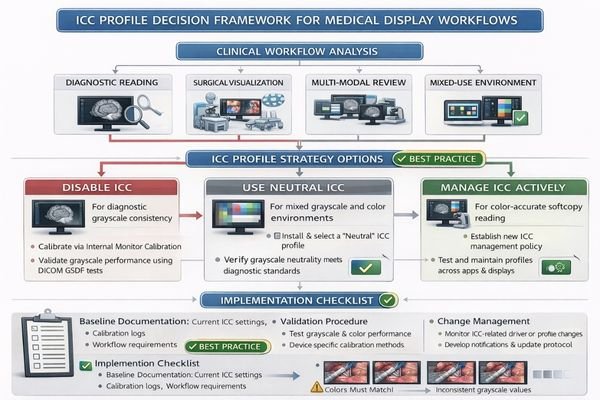
Successful ICC management depends on defining a baseline and preventing drift. A practical baseline is: “what is calibrated where” (display internal LUT vs GPU LUT vs OS/application), “what profiles exist” (per display, per workstation role), and “what events can change them” (reboot/login, driver updates, remote sessions, KVM switching). When these are documented, you can restore known-good settings quickly and avoid silent changes that only show up after clinical complaints.
Diagnostic Reading Considerations
Diagnostic workflows typically benefit from simplified color pipelines anchored in display internal processing, with OS profiles acting as optional secondary layers rather than the primary calibration foundation. If your reading application assumes a stable grayscale response aligned with DICOM expectations, you generally want to minimize OS-level transforms that can vary across applications. After any ICC adjustment, confirm stability using standard test patterns and a cross-application check in the actual clinical viewer(s), then record the configuration and include it in routine QC and change-management procedures.
Mixed Workflow Management
Mixed-use environments require separation between diagnostic reading5 stations and general-purpose workstations. A dedicated reading station should have locked-down display settings, controlled updates, and a clear policy on whether OS ICC profiles are used or neutralized. Non-diagnostic stations can use ICC profiles more freely for general color-managed tasks, but still benefit from controlled profile creation and version tracking. This separation prevents accidental changes made for office or conferencing tasks from affecting diagnostic repeatability on clinical reading systems.
Choosing the right medical display setup for ICC-sensitive workflows?
Display selection should minimize dependence on operating system transforms while maintaining consistent behavior across operational conditions.
Selection strategies should prioritize internal monitor calibration capabilities over ICC-dependent approaches.
For ICC-sensitive environments, prioritize displays that reduce dependence on operating system transforms and maintain consistent behavior across reboots, graphics hardware changes, and different applications.
| Clinical Role / Application | ICC Sensitivity | Calibration Approach | Recommended Model | Configuration Strategy |
|---|---|---|---|---|
| Diagnostic Reading | High sensitivity | Internal LUT priority | MD32C | Disable ICC, internal calibration |
| Multi-Modal Diagnosis | Moderate sensitivity | Hybrid calibration | MD46C | Selective ICC management |
| High-Resolution Clinical | High sensitivity | Precision internal calibration | MD50C | Internal calibration priority |
| Surgical Visualization | Low ICC relevance | Video mode optimization | MS270P | Direct signal path optimization |
| Advanced Surgical Display | Variable sensitivity | Signal path control | MS321PB | Minimize OS-side processing |
Diagnostic reading applications benefit from monitors where calibration is anchored in display internal processing supported by routine quality control, so the OS profile is secondary rather than foundational. This reduces the chance that an OS loader, GPU driver reset, or mixed application behavior will change the effective grayscale response without notice.
Color video and mixed-content review workflows should match resolution and size to viewing distance and task requirements, while keeping the interface and signal chain stable. Ensure consistent scaling behavior, avoid driver-side “enhancements” that alter gamma or contrast dynamically, and validate appearance in the actual applications used for review, capture, or teaching.
Consider cleaning and mounting constraints including OR arm compatibility, sealed designs, and disinfection-tolerant surfaces, because physical handling can affect perceived uniformity over time through glare changes, micro-scratches, and protective cover reflections. Make compliance and validation part of deployment by defining diagnostic versus non-diagnostic station roles, locking settings appropriately, and planning lifecycle service so recalibration or component replacement does not reintroduce ICC conflicts.
FAQ
If I disable the ICC profile, will images become "more accurate" for diagnosis?
Not automatically—accuracy depends on whether your diagnostic viewer and monitor are already calibrated to the intended medical response. Disabling ICC mainly removes one potential layer of conversion and can improve repeatability if ICC was competing with the calibrated pipeline.
Why do my images look different in two applications on the same workstation?
Often because one application is color-managed and the other is not. The color-managed application may apply the ICC profile while the other bypasses it, creating a visible mismatch in tone response or color appearance.
Should I keep one ICC profile for dual monitors?
Typically no—each monitor should have its own profile if you use ICC at all. Reusing one profile across different panels often worsens inconsistency unless the displays are closely matched and validated as a pair.
Does ICC matter if my surgical monitor is fed directly by SDI/HDMI equipment?
In most direct-feed setups, ICC does not apply because the OS is not rendering the image. The key is ensuring the video signal format, scaling behavior, and monitor video mode are configured and validated for your workflow.
Can I use ICC for non-diagnostic tasks on the same PC used for reading?
It’s possible, but it increases risk. The safer approach is separating diagnostic and non-diagnostic workflows (different user profiles, different workstations, or locked-down display pipelines) to avoid accidental changes that affect diagnostic repeatability.
What’s the simplest validation after changing ICC settings?
Use standardized test patterns and compare results before/after across the exact clinical applications you use, then document the configuration (profiles, versions, GPU/driver state) and include it in routine QC and update procedures.
Conclusion
Disabling ICC profiles is not a universal rule for medical displays; it is a control decision aimed at preventing competing transforms that reduce repeatability. The most effective approach depends on your clinical tasks, calibration baseline, and application behavior. If diagnostic consistency is the priority, simplifying the pipeline and relying on validated internal calibration typically provides more predictable results than relying on OS-level ICC behavior that may differ between applications and system states.
At Reshin, we treat ICC profile decisions as part of comprehensive display pipeline validation rather than isolated configuration choices. For surgical and endoscopy video chains, maintaining deterministic signal paths and avoiding OS-side surprises is especially important in mixed capture and teaching workflows where consistency across live, recorded, and streamed content affects clinical utility. In every deployment scenario, the best outcomes result from documenting the chosen approach, validating it using the same tools and applications used clinically, and incorporating ICC profile handling into routine quality control and change management across the equipment lifecycle.
✉️ info@reshinmonitors.com
🌐 https://reshinmonitors.com/
-
Understanding ICC profile handling is crucial for achieving consistent color rendering across devices and applications. ↩
-
Exploring DICOM GSDF will provide insights into standardized grayscale response, essential for consistent medical diagnostics. ↩
-
Proper calibration techniques are essential for achieving accurate color representation, which is vital in various professional fields. ↩
-
Maintaining visual consistency is vital for effective communication in video production; learn strategies to achieve it. ↩
-
Explore this link to understand essential practices that enhance accuracy and reliability in diagnostic reading. ↩