
31.5-inch 3D 4K UHD surgical monitor designed for stereoscopic endoscopy, 3D laparoscopy, robotic-assisted visualization, and OR integration workflows.
MS324PA is a 31.5-inch 3D 4K UHD surgical monitor designed for stereoscopic endoscopy, 3D laparoscopy, robotic-assisted visualization, and advanced OR imaging workflows. With passive polarized 3D support, 3840×2160 resolution, optical bonding, HDMI 2.0, DP 1.2, DVI, 3G-SDI and 12G-SDI connectivity, it supports 3D surgical video integration with compatible endoscopic camera systems and OR routing infrastructure.
MS324PA is a 31.5-inch 3D 4K UHD surgical monitor designed for OR teams and system integrators working with stereoscopic endoscopy, 3D laparoscopy, robotic-assisted visualization, and advanced surgical imaging workflows. Its passive polarized 3D display mode and 3840×2160 UHD resolution support stereoscopic image presentation for compatible 3D camera systems, helping surgical teams view depth cues and spatial relationships more intuitively during 3D video workflows.
With optical bonding, AR front glass, and multiple video interfaces including HDMI 2.0, DP 1.2, DVI, 3G-SDI and 12G-SDI, MS324PA is suitable for integration with 3D endoscopic camera systems, OR routing equipment, surgical carts, booms, and multi-source operating room video platforms. Compatibility should be confirmed according to the camera control unit, 3D output format, routing path, and final installation environment.
Buyer Fit
MS324PA is suitable for 3D endoscopy systems, laparoscopic equipment projects, robotic-assisted visualization setups, hybrid OR integration, teaching hospital environments, and stereoscopic surgical video workflows that require a 31.5-inch 3D 4K surgical monitor.
| Product Type | 3D 4K Surgical Monitor |
|---|---|
| Screen Size | 31.5″ (80.01 cm) |
| Resolution | 3840 × 2160 (4K UHD) |
| Brightness | 450 cd/m² |
| Contrast Ratio | 1000:1 |
| Color Depth | 10-bit, 1.07 Billion Colors |
| Viewing Angle | 178° (H) / 178° (V) |
| 3D Mode | Passive Polarized 3D / Compatible with 3D Endoscopic Systems |
| Inputs | HDMI 2.0 ×2, DP 1.2 ×2, DVI ×1, SDI (3G ×4, 12G ×1), USB (OTG) ×1 |
| Outputs | HDMI 2.0 ×1, DVI ×1, SDI ×1 |
| Signal Formats | 2160p/60Hz, 1080p/60Hz, 1080i, 720p, 576p, 480p |
| Power | DC 24 V (220 W Max) |
| Dimensions | 751.6 × 468.1 × 83.2 mm |
| Weight | Approx. 10.2 Kg ±0.5 Kg |
| Mounting | VESA 100 × 100 mm |
| Certifications | CE (MDR), ISO 13485, RoHS, DICOM mode support |
Model Selection
MS324PA is positioned for 3D 4K surgical visualization. Use this comparison to decide whether your project needs standard 4K OR integration, high-brightness Mini-LED performance, or passive 3D surgical display support.
| Model | Size | Resolution | Main Positioning | Best For |
|---|---|---|---|---|
| MS321PB | 31.5" | 3840×2160 | Standard 4K surgical monitor with 12G-SDI | 4K endoscopy systems, OR integration, and standard surgical video workflows. |
| MS322PB | 32" | 3840×2160 | 32-inch 4K minimally invasive surgery monitor | 32-inch 4K surgical imaging and minimally invasive OR workflows. |
| MS323PA | 31.5" | 3840×2160 | Mini-LED high-brightness 4K surgical monitor | Premium high-brightness surgical visualization and advanced OR display projects. |
| MS324PA Current Model | 31.5" | 3840×2160 | Passive 3D 4K surgical monitor | 3D endoscopy, 3D laparoscopy, robotic-assisted visualization, and stereoscopic OR workflows. |
Need help choosing between standard 4K, Mini-LED and 3D surgical display options?
MS324PA is designed for stereoscopic surgical video workflows, supporting depth cues and spatial perception when connected with compatible 3D endoscopic or laparoscopic camera systems.
The 31.5-inch 3840×2160 UHD panel provides detailed image presentation for 3D endoscopy, laparoscopy, robotic-assisted visualization, and OR teaching scenarios.
Optical bonding helps reduce internal reflections and improves perceived contrast under bright OR lighting, while the flat front surface supports routine wipe-down cleaning in clinical environments.
PIP, PBP and quad-view modes support multi-source viewing, allowing teams to monitor 3D surgical video, auxiliary imaging, room camera feeds, or system information within complex OR workflows.
HDMI 2.0, DP 1.2, DVI, 3G-SDI and 12G-SDI interfaces support flexible connection with 3D camera systems, surgical video processors, routing devices, and OR visualization platforms.
A durable housing design and VESA 100×100 mounting support integration with surgical carts, booms, wall installations, and operating room display setups.
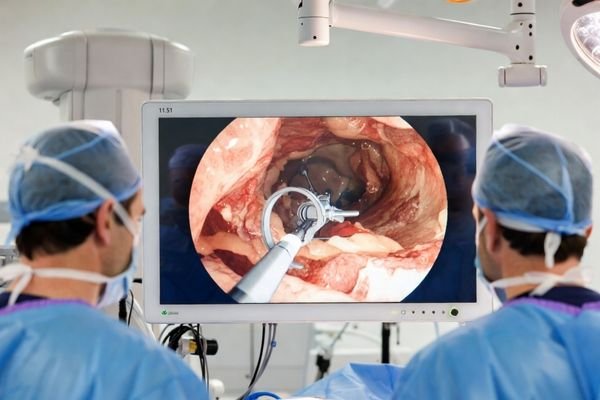
MS324PA supports stereoscopic 3D image presentation for compatible laparoscopic camera systems, helping OR teams view depth cues and spatial relationships during 3D minimally invasive workflows.
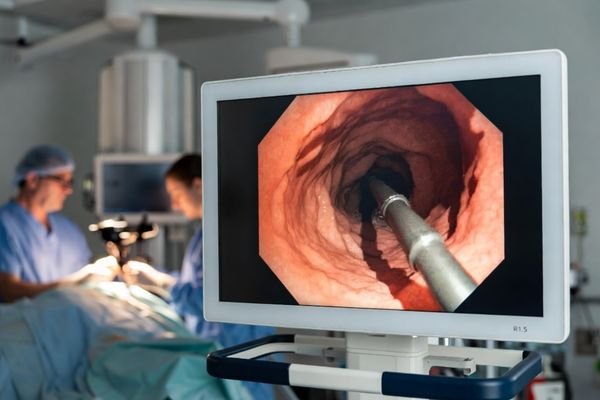
For 3D endoscopy suites, MS324PA can display stereoscopic video from compatible 3D endoscopic systems, supporting depth-aware viewing during diagnostic, therapeutic, and training workflows.
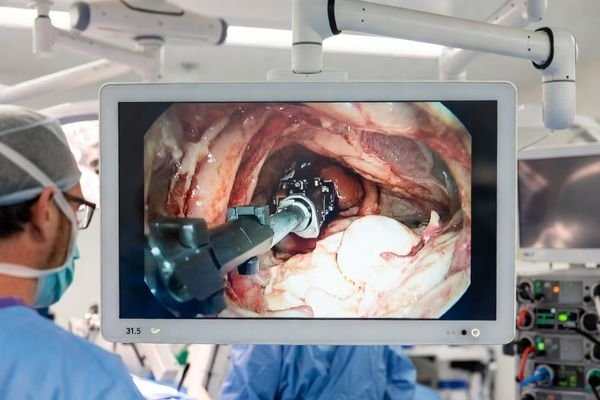
For robotic-assisted visualization and OR collaboration, MS324PA supports 3D 4K UHD display workflows and multi-source video integration for teams using stereoscopic surgical imaging systems.
Passive 3D stereoscopic visualization supports depth cues and spatial perception when used with compatible 3D endoscopy, laparoscopy, or surgical visualization systems.
The 31.5-inch 4K UHD panel provides a detailed display area for 3D laparoscopic, endoscopic, robotic-assisted, and OR teaching video workflows.
MS324PA is designed for integration with compatible 3D endoscopic and laparoscopic imaging chains. Final compatibility should be confirmed based on the camera control unit, output format, and OR routing setup.
Optical bonding helps reduce glare and internal reflections under strong OR lighting, while the flat front surface supports easier wipe-down cleaning during routine clinical use.
HDMI, DisplayPort, DVI, 3G-SDI and 12G-SDI connectivity supports flexible integration with 3D camera systems, video processors, routing equipment, and surgical visualization platforms.
PIP, PBP and quad-view modes support multi-source OR workflows, while VESA 100×100 mounting allows integration with carts, booms, wall arms, and surgical room installations.
Share your 3D camera system type, signal output format, target application, quantity, and integration requirements. Our team will review your request and reply with suitable MS324PA configuration suggestions.

We use cookies to improve website functionality, analyze site performance, and protect inquiry forms from spam. You can accept all cookies, reject non-essential cookies, or manage your preferences at any time.
Tell us the application, model or required specification, quantity and destination country. We will review your request and reply by email.