In hospital IT planning, understanding the distinct roles of RIS, HIS, and PACS helps teams avoid duplicated functions, unclear ownership, and workflow gaps that slow imaging delivery.
RIS drives radiology department operations (scheduling, status tracking, reporting), HIS manages enterprise-wide patient administration and clinical orders, and PACS stores, routes, and displays imaging studies; together they form one care pathway, but each “owns” a different part of workflow truth.
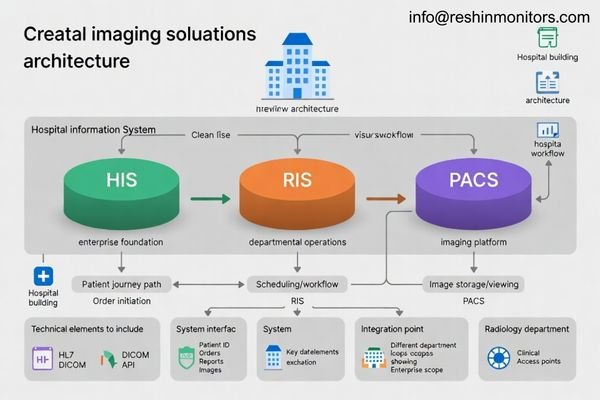
These three systems form the core of modern imaging operations1, but they often appear to overlap because they share patient identity, orders, reports, and clinical access. Clear role definition makes integration easier, reduces handoff errors, and improves turnaround time as imaging volumes grow.
What are RIS, HIS, and PACS, and why do they get confused?
Hospitals often deploy these platforms together, so users experience them as one connected workflow even though each system has a different primary job and operating scope.
RIS focuses on radiology workflow and reporting, HIS provides enterprise patient/encounter and order context, and PACS manages image archiving, routing, and viewing; confusion happens because all three exchange identifiers, orders, reports, and access signals across the same patient journey.
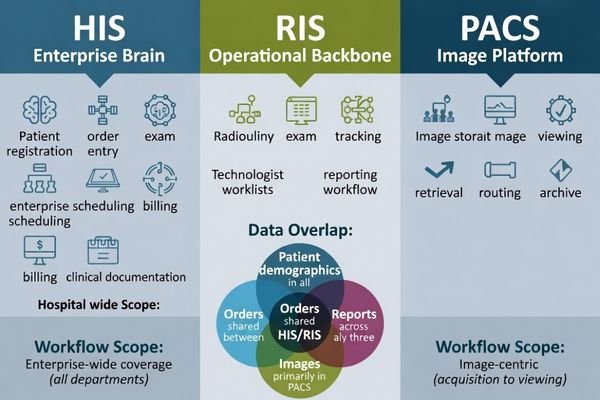
RIS concentrates on imaging department throughput with scheduling, exam tracking, and report lifecycle control. HIS focuses on hospital-wide administration and clinical coordination across departments. PACS is centered on image objects and the infrastructure needed to store, deliver, and display studies reliably for diagnosis and clinical review.
System Functions and Operational Focus
RIS concentrates on radiology operations with scheduling optimization, modality management, and reporting workflows, while HIS manages enterprise clinical and administrative operations across all hospital departments, and PACS focuses specifically on image lifecycle management2 and distribution.
Data Overlap and Integration Challenges
The confusion arises because these systems must coordinate patient identification, order management, and result distribution, requiring careful integration design to prevent data inconsistencies, workflow interruptions, and operational conflicts that could affect patient care quality and departmental efficiency.
How does the RIS workflow differ from HIS in imaging-centric care?
Most imaging demand begins as a clinical order, but imaging departments still need specialized operational control to schedule, perform, and report studies efficiently under high volume and time pressure.
HIS typically originates imaging orders and maintains enterprise care context, while RIS turns those orders into radiology operations through scheduling, protocoling, exam status management, contrast and resource documentation, and report lifecycle control—keeping the department’s throughput and turnaround predictable.
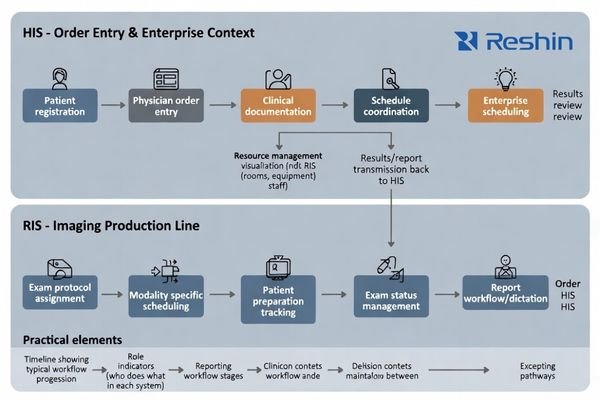
This separation matters most as hospitals scale: without RIS-level controls3, imaging can become a bottleneck that delays care; without HIS governance, imaging can become siloed and harder to coordinate across inpatient and outpatient contexts. Practically, HIS maintains enterprise context and consistency, while RIS manages the radiology “production line” so patients move from order to completed report with clear ownership at each step.
What makes PACS different from RIS and HIS in terms of data and access?
Unlike text-centric clinical systems, imaging platforms must move and render large, performance-sensitive image datasets across multiple users, locations, and devices while keeping access consistent and reliable.
PACS is image-object–centric: it prioritizes reliable archiving, fast retrieval, lossless routing, and consistent visualization so the right study (including priors) opens quickly for diagnostic reading, clinical review, MDT rooms, and remote consults across modalities and sites.
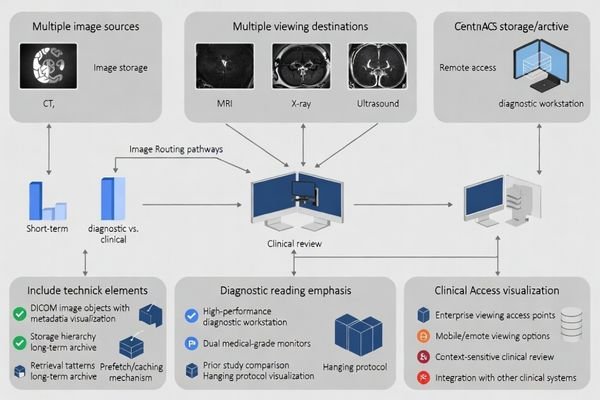
Because imaging data is large and access patterns are bursty, PACS design4 emphasizes bandwidth, caching and prefetch, redundancy, and viewer compatibility in ways that typical HIS/RIS databases do not. This is why “we can store images somewhere” is not the same as “clinicians can reliably open priors quickly across sites,” especially when multiple modalities and remote review are involved.
| System Aspect | RIS Focus | HIS Focus | PACS Focus | Clinical Impact |
|---|---|---|---|---|
| Data Type | Workflow and text | Administrative and clinical | Image objects | Visualization quality |
| Performance Priority | Throughput optimization | Enterprise integration | Image delivery speed | Reader efficiency |
| Storage Requirements | Structured data | Patient records | Large image archives | Long-term accessibility |
| Access Patterns | Departmental workflows | Hospital-wide coordination | Multi-site image sharing | Care continuity |
| Integration Approach | Radiology-centric | Enterprise-wide | Image-centric | Workflow alignment |
How should you integrate RIS, HIS, and PACS for a robust imaging solution?
Integration works best when teams agree on who “owns” patient identity, orders, exam status, report finalization, and image availability—and they design interfaces around real exception cases, not just ideal workflows.
Build a clear ownership map: HIS is the enterprise source for patient identity and orders, RIS is the imaging workflow controller for scheduling/status/reporting, and PACS is the image archive and distribution hub—then align identifiers and state transitions end-to-end to prevent drift.
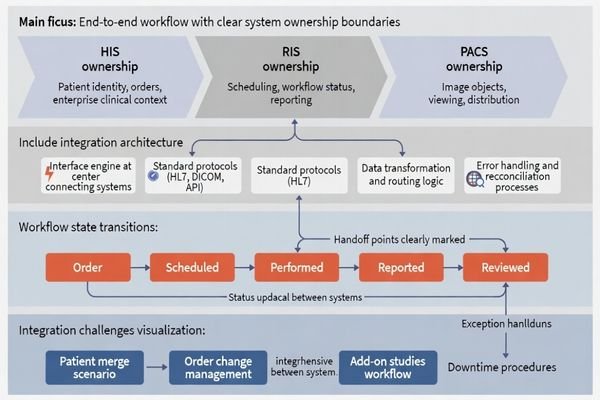
The most common failure mode is ambiguous ownership, where multiple systems attempt to be authoritative. To avoid mismatched patient IDs, orphan studies, and delayed reads, map a clear state model (ordered → scheduled → performed → reported → reviewed) and include operational handling for patient merges, order changes, add-on studies, and downtime workflows so staff can continue working safely when exceptions occur.
System Authority and Data Ownership
The most common failure mode involves ambiguous ownership5 where multiple systems attempt to be authoritative, leading to mismatched patient IDs, orphaned studies, delayed reads, and user distrust that compromises clinical workflow efficiency and patient care quality.
Workflow State Management and Exception Handling
Clear integration design must account for real clinical scenarios including emergency orders, patient transfers, study modifications, and system downtime, ensuring that workflows remain functional and data consistency is maintained even during exceptional circumstances that commonly occur in healthcare environments. Contact us at info@reshinmonitors.com if you need assistance developing comprehensive RIS-HIS-PACS integration strategies for your specific healthcare facility requirements and clinical workflow needs.
How to choose medical displays for RIS/HIS/PACS workflows?
Different users view different content under different risk levels, so display choices should follow workflow role, reading intent, and the consistency needed across rooms and sites.
Select displays by task and risk: diagnostic PACS reading benefits from stable grayscale consistency and a controlled calibration workflow, while RIS/HIS workstations favor ergonomics and split-pane clarity; for MDT and remote review, plan signal chain, mounting, cleaning, and fleet consistency.
For PACS diagnostic reading, prioritize DICOM-calibrated behavior, stable grayscale consistency, and an appropriate resolution for your modality mix, because subtle contrast perception and repeatability matter more than “vivid” presentation.
| Clinical Role / Application | Usage Pattern | Display Requirements | Recommended Model | Key Integration Considerations |
|---|---|---|---|---|
| Diagnostic Reading | PACS workstation use | DICOM calibration, grayscale accuracy | MD26GA | Stable luminance, calibration support |
| Clinical Review | Multi-system access | Balanced performance, ergonomic viewing | MD33G | Comfortable long-session use |
| Administrative Workstations | RIS/HIS workflows | Clear text display, split-pane support | MD45C | Adequate brightness, screen real estate |
| Consultation Areas | Collaborative review | Image and report viewing | MD46C | Flexible positioning, reliable operation |
| Multi-disciplinary Rooms | Team-based decisions | Large format, shared viewing | MD50C | Clear visibility, comprehensive connectivity |
For RIS and HIS usage at desks or nurse stations, usability and ergonomics often dominate, especially for long hours of patient list review, order entry, and report editing. For mixed scenarios like dictation with priors, MDT review, or remote consults, confirm the signal chain and interfaces, mounting and cleaning constraints, and lifecycle serviceability so display fleets remain consistent over years.
FAQ
Is RIS always separate from HIS?
Not always. Some hospitals run enterprise HIS/EMR suites with radiology modules covering many RIS functions, but dedicated RIS remains common when imaging volume is high or workflows require deeper radiology-specific controls.
Does PACS include the viewer, or is that separate?
It depends on the vendor and deployment. Many PACS offerings include a viewer, but some environments use separate enterprise imaging or universal viewer layers that connect to PACS repositories.
Where are radiology reports stored—RIS, HIS, or PACS?
Commonly, reports are authored and managed in RIS, then distributed to HIS/EMR for enterprise clinical access; some PACS also store report-related objects, but governance should define one system of record for final reports.
If we already have PACS, do we still need RIS?
PACS solves image storage and distribution; RIS solves radiology operations and reporting workflow. If your current HIS module covers scheduling, protocoling, status tracking, and reporting well, RIS may be optional—otherwise it’s often essential.
What is the most common integration pitfall among RIS/HIS/PACS?
Patient identity mismatches and unclear ownership of exam status are the biggest issues—both lead to missing priors, orphan studies, and delays that users feel immediately.
Which workflow benefits most from upgrading medical displays?
Diagnostic PACS reading benefits the most, because display consistency and calibration directly affect lesion conspicuity and reader confidence, especially when multiple readers and sites must match.
Conclusion
RIS, HIS, and PACS are complementary layers: HIS anchors enterprise patient and order context, RIS runs radiology workflow and reporting, and PACS delivers image archiving, routing, and clinical access where care happens.
With clear system ownership and exception-ready integration, teams reduce identity mismatches, prevent missing priors, and keep imaging workflows fast and dependable as volumes, sites, and modality complexity continue to grow.
✉️ info@reshinmonitors.com
🌐 https://reshinmonitors.com/
-
Understanding the core components of imaging operations can enhance your knowledge of healthcare systems and improve patient care. ↩
-
Exploring image lifecycle management can provide insights into optimizing image storage and retrieval processes in healthcare. ↩
-
Understanding RIS-level controls can help improve imaging efficiency and patient care in hospitals. ↩
-
Understanding PACS design is crucial for optimizing medical imaging workflows and ensuring efficient access to images. ↩
-
Understanding ambiguous ownership can help improve clinical workflows and patient care quality. ↩