
Immersive 3D visualization with 4K UHD clarity, designed to enhance depth perception and precision in advanced surgical procedures.
Designed for immersive OR visualization, the MS324PA 31.5″ 3D 4K UHD surgical monitor delivers clear depth perception for precise surgical decisions. It supports optical bonding to reduce reflections and integrates smoothly with modern OR systems via multi-input connectivity including HDMI/DP and 12G-SDI.
The MS324PA is a 31.5-inch 3D 4K UHD surgical monitor engineered for operating-room visualization, designed to enhance intraoperative depth perception and spatial awareness. By presenting stereoscopic detail more intuitively, it helps clinicians better judge tissue planes, instrument positioning, and fine anatomical structures—supporting confident performance in complex minimally invasive procedures. With optical bonding to reduce reflections and glare, it maintains clear visibility under bright OR lighting. Multiple input options—including HDMI, DP, and SDI (with 12G-SDI)—enable seamless integration with 3D endoscopic/laparoscopic camera systems and OR infrastructure across diverse surgical workflows.
| Product Type | 3D 4K Surgical Monitor |
|---|---|
| Screen Size | 31.5″ (80.01 cm) |
| Resolution | 3840 × 2160 (4K UHD) |
| Brightness | 450 cd/m² |
| Contrast Ratio | 1000:1 |
| Color Depth | 10-bit, 1.07 Billion Colors |
| Viewing Angle | 178° (H) / 178° (V) |
| 3D Mode | Passive Polarized 3D / Compatible with 3D Endoscopic Systems |
| Inputs | HDMI 2.0 ×2, DP 1.2 ×2, DVI ×1, SDI (3G ×4, 12G ×1), USB (OTG) ×1 |
| Outputs | HDMI 2.0 ×1, DVI ×1, SDI ×1 |
| Signal Formats | 2160p/60Hz, 1080p/60Hz, 1080i, 720p, 576p, 480p |
| Power | DC 24V (220W Max) |
| Dimensions | 751.6 × 468.1 × 83.2 mm |
| Weight | Approx. 10.2 KG ±0.5 KG |
| Mounting | VESA 100 × 100 mm |
| Certifications | CE (MDR), ISO13485, RoHS, DICOM Compliance |
32″ 4K Surgical Display — MS322PB · 32″ 4K surgical display for minimally invasive surgery with BT.2020 color performance, optical bonding, and multi-input connectivity
31.5″ 4K UHD Mini-LED Surgical Monitor — MS323PA · 31.5″ 4K UHD Mini-LED surgical monitor featuring ultra-high brightness and optical bonding for precise tissue visualization
MS324PA is built for stereoscopic imaging workflows, enhancing depth perception and spatial awareness to support precise instrument guidance and confident intraoperative decisions.
31.5″ 3840×2160 resolution delivers crisp, high-detail visualization for laparoscopic, endoscopic, and 3D surgical scenes—supporting accurate recognition of fine anatomical structures.
Optical bonding helps reduce internal reflections and improves perceived contrast under bright OR lighting, while supporting a flat, wipe-clean front surface for routine disinfection.
Multi-view modes including PIP, PBP, and quad-view enable simultaneous monitoring of multiple sources—useful for collaboration, teaching, and complex OR workflows.
Equipped with HDMI, DP, DVI, and professional SDI interfaces (including 12G-SDI), MS324PA supports flexible integration with surgical camera systems and OR routing infrastructures.
Built for clinical environments with a durable housing and VESA 100×100 mounting for carts, booms, or wall setups—supporting stable installation and efficient OR workflows.
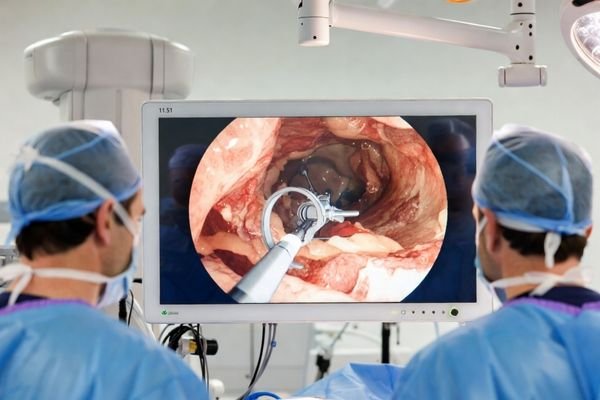
MS324PA 31.5″ 3D 4K UHD surgical monitor enhances depth perception for precise instrument guidance and confident visualization during advanced laparoscopic procedures in the OR.
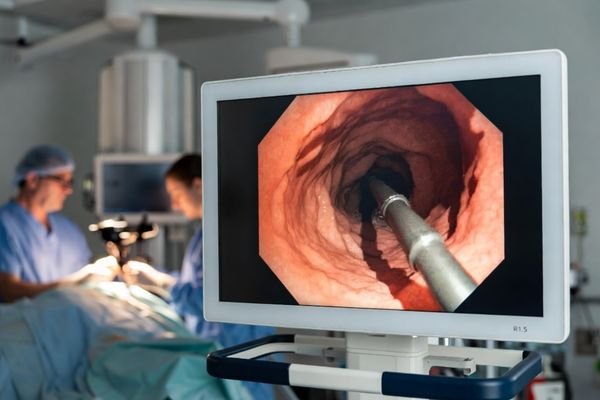
Designed for endoscopy suites, MS324PA supports immersive 3D visualization that helps clinicians judge depth and tissue layers more intuitively during diagnostic and therapeutic endoscopy.
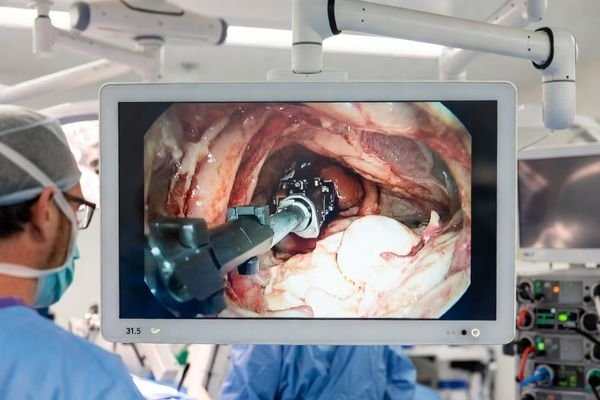
For robotic-assisted procedures and OR collaboration, MS324PA provides 3D 4K UHD visualization to support precise depth cues, smoother teamwork, and efficient multi-device integration.
3D stereoscopic visualization improves spatial awareness and depth judgement, helping surgeons guide instruments more precisely and interpret tissue layers with greater confidence.
3840×2160 resolution on a 31.5″ screen delivers crisp detail for 3D laparoscopic and endoscopic procedures, supporting accurate recognition of fine anatomical structures.
Designed to work with 3D endoscopic and laparoscopic imaging chains, enabling stable stereoscopic presentation that supports complex minimally invasive workflows and training environments.
Optical bonding helps reduce glare and internal reflections for clearer viewing under bright OR lighting, while supporting a flat, wipe-clean surface for daily disinfection.
Comprehensive connectivity including HDMI, DP, DVI, and SDI (with 12G-SDI) supports flexible integration with 3D camera systems, routing devices, and modern OR video infrastructures.
PIP/PBP/quad-view modes help teams monitor multiple sources, while VESA 100×100 mounting supports carts, booms, and wall installations for efficient OR layouts.
We’d love to hear from you! Send us a message using the form opposite, or email us to get support from Reshin.
To provide the best experiences, we use technologies like cookies to store and/or access device information, Consenting to thesetechnologies will allow us to process data such as browsing behavior or unique lDs on this site, Not consenting or withdrawing consentmay adversely affect certain features and functions.
We will contact you within 1 working day, please pay attention to the email with the suffix “@reshinmonitors.com”.
We will contact you within 1 working day, please pay attention to the email with the suffix “@reshinmonitors.com”.