
An anonymized pre-rollout project showing how Reshin supported a PACS workstation integration partner in separating general image review, diagnostic reading, side-by-side comparison and wide-format reporting requirements into a smaller set of repeatable display profiles for multi-room planning.
Evidence scope: Customer identity, project location, commercial terms, site quantities and selected rollout details remain confidential. This page presents the disclosed profile-planning process together with relevant installation, model-verification and lifecycle-control evidence. Final installation, user acceptance and operational performance are not claimed.
The project did not treat every workstation as an independent monitor purchase. Display requirements were grouped by reading role, screen quantity, layout, interface conditions and future reuse.
A shared multi-room rollout was divided into repeatable profiles before individual display models were compared.
Single-screen review, consultation and routine image access.
Higher-detail grayscale review with a defined diagnostic profile.
Matched dual-monitor layouts for side-by-side image review.
Wide-format or multi-window layouts combining review and reporting.
PACS workstation integration partner · South Korea, East Asia
Multi-room and multi-department workstation planning
Pre-rollout profile definition and deployment preparation
Role mapping, profile review, model comparison and continuity planning
The review reduced uncontrolled room-level variation by defining a manageable set of standard workstation profiles and separating application-specific exceptions.
Each profile combined the intended reading role, screen arrangement and display direction so repeated rooms could be evaluated against the same baseline.
A repeatable single-screen profile for routine image review, consultation, acquisition-related use and general workstation access.
Layout: Single screen
Direction: 2MP-class display
Status: Standard profile
A higher-detail profile for CT/MRI and grayscale-focused reading environments requiring closer DICOM-oriented image review.
Layout: Single or matched dual
Direction: 3MP diagnostic display
Status: Higher-level profile
A matched dual-monitor profile for comparison workflows requiring coordinated screen quantity, orientation and workstation placement.
Layout: Matched dual monitor
Direction: 2MP or 3MP pair
Status: Separate comparison profile
An alternative profile for workstations combining image review, reporting tools and multiple application windows on one display.
Layout: Wide-format screen
Direction: Multi-window display
Status: Alternative profile
5MP or higher-resolution directions were retained for applications requiring greater image detail, but they remained outside the immediate standard workstation portfolio.
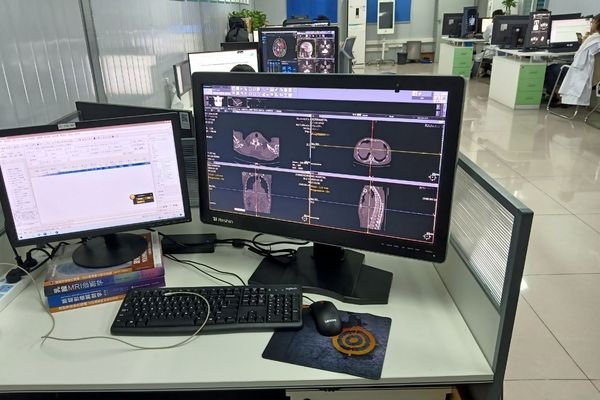
Profile planning considered the complete workstation arrangement, not only monitor resolution or screen size.
This image represents a relevant PACS workstation environment and is not presented as the confidential customer’s exact installation.
The evidence below covers four practical areas considered in a PACS workstation program: installation guidance, interface fit, model-level display verification and longer-term lifecycle control.
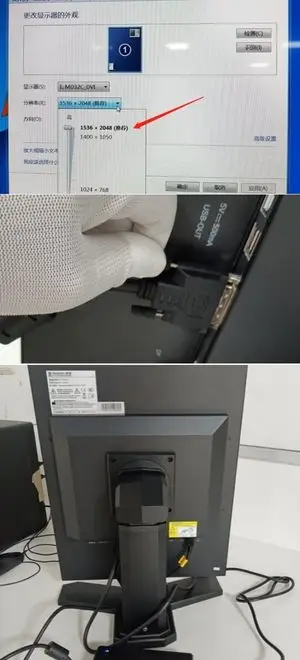
Relevant installation documentation demonstrates how signal connection, power input, cable security, monitor orientation and workstation-side setup can be reviewed before sampling or field installation.
Workstation output and monitor input
Power adapter and secure cable connection
Portrait or landscape display setup
Workstation-side display configuration
Representative model-level documentation, not the confidential customer’s installation file.
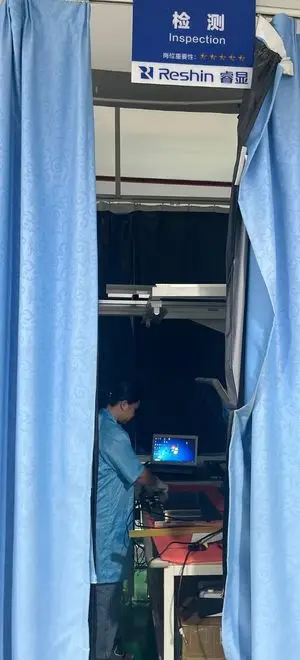
Representative interface inspection supports verification of signal recognition, cable connection, display output and operating status before a workstation configuration moves to the next stage.
DP, HDMI, DVI and applicable interfaces
Signal detection and image output
Display functions and input switching
Cabling and workstation-side fit
Representative Reshin verification environment, not the customer’s project workstation.
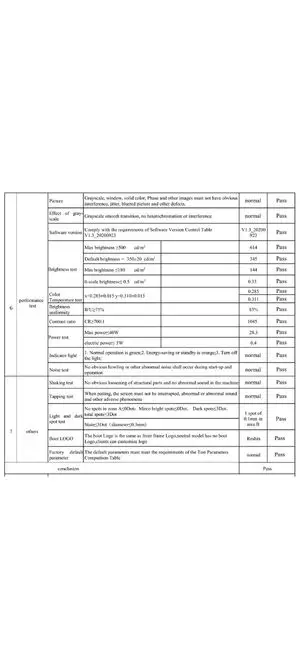
A redacted MD26C record demonstrates the types of performance and release checks available for a practical PACS review or acquisition-related display direction.
Brightness-level verification
Screen consistency review
Grayscale, color and contrast
Interface, pixel and final status
Model-level evidence, not the customer’s exact unit, batch or purchase order.
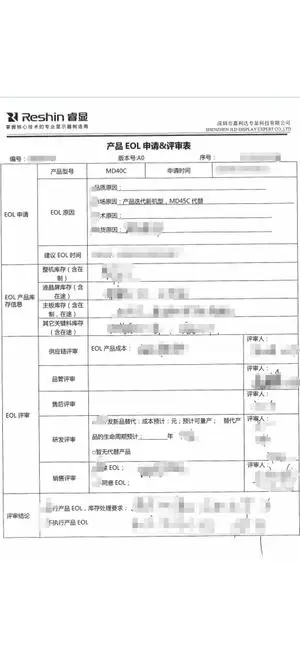
Representative lifecycle-control evidence shows how model changes, discontinuation risks and replacement directions can be reviewed for repeated PACS workstation programs.
Revision, EOL or replacement
Inventory and supply review
Reorders, spares and revalidation
Documented internal review
Representative supplier evidence, not a document from this anonymized PACS project.
The profile-planning information describes the anonymized PACS review. Installation guidance, interface inspection, model verification and lifecycle-control records demonstrate relevant Reshin capability, but are not presented as proof of the customer’s exact workstation, production batch, installation or completed rollout.
The objective was not to force every room into one configuration. It was to standardize repeatable needs while preventing special applications from expanding the common monitor portfolio.
The review changed the project from room-by-room monitor selection into a smaller and more repeatable workstation-profile framework for customer-side evaluation and broader rollout planning.
Multiple workstation requirements were consolidated into a limited set of single-screen, diagnostic, matched dual-monitor and wide-format profiles.
Common room requirements were separated from higher-resolution, special-interface and application-specific configurations that required individual review.
Screen quantity, layout, resolution, interface, orientation, mounting, rollout quantity, spare planning and replacement direction were organized for further evaluation.
This case documents profile definition and deployment preparation. Final quantities, installation completion, user acceptance and operational performance are not claimed.
The case is published to demonstrate workstation-profile planning and supplier-support capability without exposing confidential customer, commercial or controlled deployment information.
These models represent relevant Reshin directions for similar PACS workstation programs. They are application references and are not presented as confirmed customer selections in this anonymized case.
A practical 24-inch direction for general PACS review, acquisition-related workstations and CT/MRI applications requiring a 16:10 display format.
A 3MP grayscale direction for PACS and CT/MRI reading stations requiring higher resolution, DICOM-oriented modes and a focused diagnostic profile.
A 30-inch wide-format direction for side-by-side image review, reporting support and multi-window PACS workflows on one larger display surface.
This experience is relevant to teams defining repeatable display profiles before multi-room, multi-department or phased workstation rollout.
Review Reshin's support for PACS vendors, workstation builders and imaging integrators defining repeatable display programs.
Review integration risks, multi-monitor consistency, display matching and scalable workstation-deployment considerations.
Compare display options by resolution, screen format, workstation role, grayscale direction and intended PACS workflow.
Review public certifications, manufacturing controls, engineering capability and available supplier-evaluation evidence.
Share your workstation roles, screen quantity per station, single-screen, matched dual-monitor or wide-format requirements, target resolution, graphics outputs, signal interfaces, mounting conditions, rollout quantity and replacement expectations. Reshin can help organize a practical profile direction before broader supplier or sample evaluation.
PACS workstation programs may be subject to confidentiality, procurement restrictions, site-security requirements or controlled deployment planning. Reshin therefore publishes the application context, profile logic, support scope and disclosed project stage without identifying the customer or project sites.
The case documents workstation-profile definition and pre-rollout planning. It covers role mapping, screen and layout comparison, display-direction review, installation inputs and lifecycle considerations. It does not claim final installation, user acceptance or completed deployment.
No. The project-context information describes the anonymized review. Installation guidance, model-level verification, interface inspection and lifecycle-control evidence demonstrate relevant Reshin capability and are not presented as the customer's exact workstation, batch or project document.
Yes. Profile review can cover single-screen, matched dual-monitor, wide-format and higher-resolution directions according to workstation role, screen quantity, graphics output, interfaces, orientation, mounting conditions and deployment scale.
Project teams should confirm workstation role, screen quantity, display direction, resolution, GPU output, signal interfaces, orientation, mounting, cable routing, room quantities, spare-unit planning and the replacement path for approved profiles.
Lifecycle planning helps project teams understand approved model continuity, controlled revisions, spare-unit requirements, replacement direction and the possible impact of future display changes before broader rollout.
Helpful inputs include the number of workstations, role of each station, screen quantity, preferred layout, resolution direction, graphics outputs, signal interfaces, orientation, mounting limitations, target market, rollout stage and expected replacement or expansion requirements.
We use cookies to improve website functionality, analyze site performance, and protect inquiry forms from spam. You can accept all cookies, reject non-essential cookies, or manage your preferences at any time.
Tell us the application, model or required specification, quantity and destination country. We will review your request and reply by email.