
While modern endoscopy displays are predominantly 16:9 widescreen, many hospitals still rely on legacy systems outputting 4:3 and 5:4 signals. Without proper handling, these signals can result in distorted images that compromise clinical accuracy.
To properly support legacy 4:3 and 5:4 endoscopy signals, medical displays need four key capabilities: accurate signal detection, aspect ratio preservation (typically with pillarboxing), high-quality scaling, and low-latency processing – all while enabling flexible display modes for mixed old/new video sources.
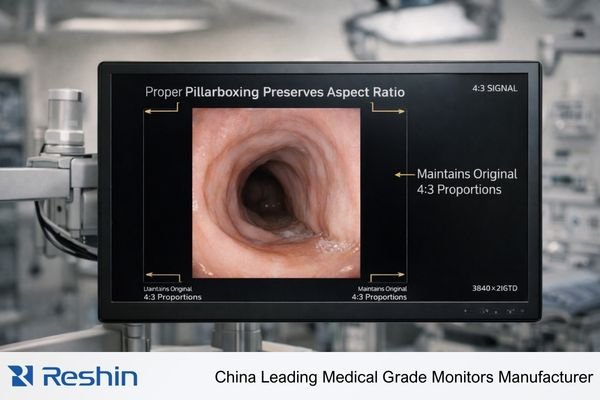
The challenge of supporting legacy signals1 goes far beyond basic input compatibility. Let me share why this matters and how modern surgical displays address these requirements to ensure optimal clinical visualization.
Why is proper aspect ratio handling critical for endoscopic procedures?
I’ve seen cases where improper scaling stretched circular anatomical structures into ovals and distorted measurement markers. These distortions can severely impact clinical judgment during procedures.
Maintaining the original aspect ratio is crucial because it preserves the true proportions of anatomical structures, measurement scales, and text overlays. Forced stretching to fill a widescreen display can lead to diagnostic errors and compromised procedural accuracy.
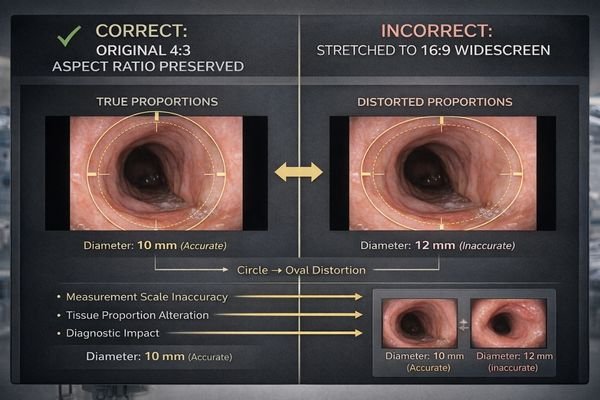
Dive deeper: Understanding aspect ratio handling approaches
When it comes to displaying 4:3 or 5:4 signals on modern widescreen monitors, there are several technical approaches, each with distinct clinical implications:
1. Pillarbox Display Mode
- Maintains original aspect ratio with black bars on sides
- Preserves true anatomical proportions
- No distortion of measurement scales
- Maximizes vertical resolution usage
2. Stretch-to-Fill Mode (Not Recommended)
- Forces image to fill entire 16:9 screen
- Distorts circular structures into ovals
- Compromises measurement accuracy
- Misleading tissue proportions
3. Intelligent Scaling Options2
| Scaling Method | Advantages | Disadvantages |
|---|---|---|
| 1:1 Pixel Mapping | Perfect clarity, Zero latency | Smaller image size |
| Bilinear Scaling | Smooth transitions | Slight softening |
| Bicubic Scaling | Better detail preservation | Minimal processing delay |
The optimal solution typically involves implementing pillarbox mode as the default while providing flexible scaling options for specific clinical scenarios. This approach ensures both accuracy and usability across different endoscopic procedures and system configurations.
How can surgical displays handle mixed old and new video sources?
In my experience consulting with hospitals, many facilities run both legacy and modern endoscopic systems simultaneously, creating complex signal management challenges.
Modern surgical displays address this through multi-input architecture supporting both legacy (VGA, DVI, SD-SDI) and current (HDMI 2.0, DisplayPort, 12G-SDI) interfaces, with intelligent signal detection and automated format handling.
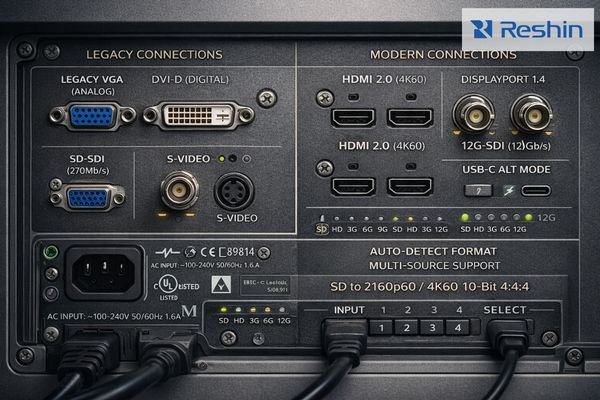
Dive deeper: Multi-source visualization strategies
Modern surgical displays employ several key technologies to effectively manage mixed video sources:
Signal Processing Architecture3
- Dedicated scaling engines for each input
- Independent aspect ratio control per source
- Zero-latency signal path options
- Automatic format detection and configuration
Advanced Display Modes
| Mode | Description | Clinical Use Case |
|---|---|---|
| PIP | Legacy source in corner window | Reference viewing |
| PBP | Side-by-side display | Comparison analysis |
| Quad Split | Four sources simultaneously | Multi-system integration |
| Dynamic Layout | Customizable arrangements | Procedure-specific setup |
The implementation of these features requires careful attention to several technical aspects:
- Signal integrity maintenance across all inputs
- Synchronized processing to prevent timing issues
- Clean switching between sources
- Consistent color and brightness matching
- Flexible user controls for layout adjustment
These capabilities allow surgical teams to effectively utilize both older and newer imaging systems while maintaining optimal visualization quality for each source.
Conclusion
Proper support for legacy 4:3 and 5:4 signals remains crucial in modern surgical displays, requiring sophisticated handling of aspect ratios, scaling, and multi-source integration to ensure accurate clinical visualization.
-
Understanding legacy signals is crucial for grasping how modern systems integrate with older technologies. ↩
-
Learn about Intelligent Scaling Options to discover how different methods can impact image quality and measurement accuracy. ↩
-
Understanding the components of Signal Processing Architecture can enhance your knowledge of surgical display technologies. ↩


