
Choosing a monitor for PACS and radiology projects often looks simple at first: compare resolution, brightness, and size, then pick the strongest specification sheet. In actual deployment work, that approach usually overlooks the factor that determines whether the project stays stable after validation, rollout, and future expansion.
Buyers should evaluate a diagnostic monitor manufacturer by its ability to deliver consistency, documentation support, and long-term supply continuity, not by one standout specification alone. In PACS and radiology projects, stable execution across validation, integration, and rollout is a stronger success indicator than brightness or resolution in isolation.
Quick Takeaways
- Do not shortlist a supplier based on sample image quality alone.
- Define workflow, modality, and deployment scope before comparing models.
- Review DICOM consistency, calibration logic, and long-term image stability early.
- Check interface planning, documentation support, and revision control before rollout.
- Treat supplier selection as a project risk decision, not only a specification decision.

In projects involving hospital IT teams, OEM partners, and PACS integrators, early discussions often focus too heavily on panel specifications. Those details do matter, but only as part of a larger decision. A project can start with a strong sample and still fail later if documentation is incomplete, revisions are poorly controlled, or follow-up supply becomes difficult to manage.
From an engineering and deployment standpoint, a manufacturer should be judged by how it handles sample validation, calibration consistency, interface planning, and multi-batch delivery. Those factors say much more about long-term project risk than a single number on a datasheet. For buyers managing multi-site rollout1, internal approvals, or future expansion, that difference is often where the real purchasing decision is made.
Why Manufacturer Capability Matters More Than a Single Strong Spec
In PACS and radiology projects, the real purchasing decision is shaped less by a monitor’s most attractive feature and more by whether the manufacturer can stay stable across validation, delivery, and support.
Specifications confirm whether a display can show an image, but manufacturer capability determines whether a project can move forward with fewer delays, fewer revisions, and fewer quality surprises. In larger deployments, consistency, communication, issue handling, and change control often matter more than any individual technical specification.
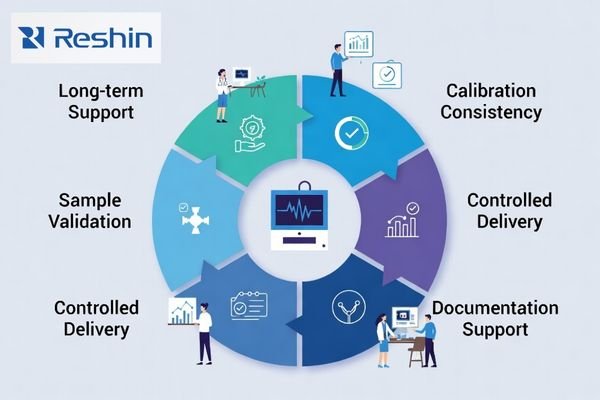
In staged deployments, a specification advantage loses value quickly if the supplier cannot maintain the same performance across later batches. It is more useful to examine how a manufacturer handles validation feedback2, whether revision notices are clear, and how reliably the same display behavior can be repeated from the first shipment to the next. That repeatability is what makes procurement, project management, and clinical deployment easier to control over time.
Before moving deeper into model comparison, buyers should ask a simple question: Can this manufacturer support the project after the first successful sample? In PACS and radiology programs, that question often matters more than which product sheet looks strongest on day one.
What Buyers Need to Confirm Before Shortlisting a Diagnostic Monitor Manufacturer
Before shortlisting suppliers, buyers need to define the project boundary clearly. A PACS or radiology display program is not simply about choosing one monitor that looks acceptable in a demo.
Before shortlisting a diagnostic monitor manufacturer, buyers should confirm modality, reading workflow, target resolution, mounting method, interface path, deployment volume, and future rollout plans. Those conditions determine whether the display will actually fit the workstation, imaging system, and expansion strategy behind the project.
A practical shortlisting discussion should usually confirm:
- clinical use case and reading workflow
- modality mix and image type
- workstation output and signal path
- mounting and installation conditions
- deployment volume and future expansion
- documentation scope and revision expectations
How Reshin Typically Supports the Shortlisting Stage
At this stage, our team usually tries to make the decision boundary clearer before model comparison becomes too narrow. In practice, we often start by confirming the modality mix, workstation path, deployment structure, and documentation expectations before treating sample performance as the main decision point.
What we usually clarify early includes:
- which reading workflow the display needs to support first
- whether the workstation output and interface path already match the target resolution
- how mounting, enclosure, and deployment conditions may affect selection
- what documentation and revision expectations should be aligned before sample review
This does not replace product evaluation. It simply makes the evaluation more meaningful, because the team is judging project fit instead of reacting only to first-sample image quality.
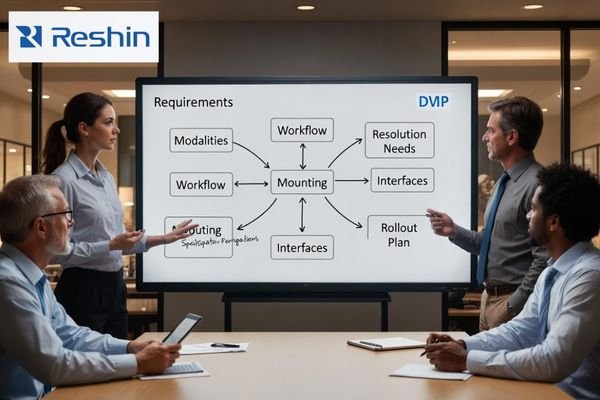
Define the Clinical and Workflow Scope First
When assessing a new radiology or PACS project, it helps to begin by clarifying what the monitor actually needs to support in daily use. That means identifying whether the workflow is grayscale-dominant3, multi-modality, or consultation-oriented, and whether the system will mainly display CT, MRI, DR, CR, or mixed image types. These distinctions matter because a display that works well in one diagnostic context may not be the best fit in another.
It is also important to look at how the monitor will be used inside the reading environment itself. A workstation used for routine grayscale review has very different priorities from a setup used for multi-window consultation or mixed color-and-grayscale interpretation. Buyers who define this clinical scope early usually make much better supplier decisions later, because they are comparing fit instead of reacting only to sample image quality.
Confirm the Deployment and Integration Conditions Early
The next step is to confirm how the display will fit into the actual project framework. Buyers should usually confirm the workstation type, interface path, mounting condition, deployment volume, and whether the project will later expand across multiple sites or private-label programs. These conditions shape not only model selection, but also the supplier’s ability to support future rollout without creating new integration problems.
In practice, many project delays start because the team evaluates the sample first and the deployment conditions second. The opposite order is usually more reliable. Once the integration path, rollout scale, and documentation expectations are clear, sample review becomes much more meaningful. At that point, the team is no longer asking only whether the image looks good, but whether the full project can move forward with fewer changes and fewer surprises.
How to Judge DICOM Consistency, Calibration, and Long-Term Image Stability
In diagnostic imaging projects, it is risky to put too much weight on a one-time sample that looks impressive under ideal conditions. What matters more is whether grayscale behavior and luminance remain stable through daily use, environmental variation, and later batches.
A meaningful evaluation of DICOM and calibration claims focuses on long-term consistency, manageable QC, and repeatable performance across time, sites, and production runs. The more clearly a manufacturer can explain its calibration logic and stability controls, the more credible the solution becomes for real deployment.
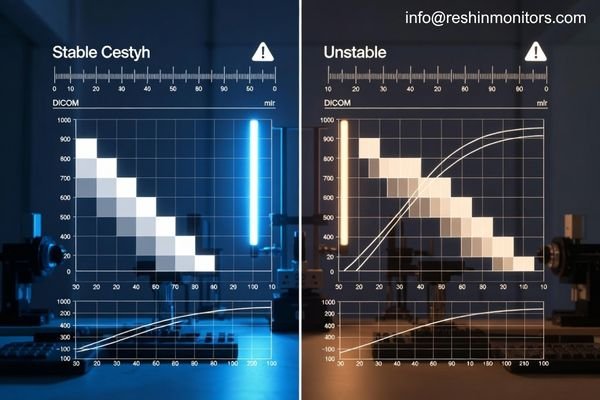
A practical review of DICOM and calibration support should usually cover:
- how calibration is maintained after installation
- how luminance drift is monitored or controlled
- what validation logic or records support consistency
- how performance is explained across time, sites, and batches
How Reshin Usually Explains Diagnostic Stability
When buyers ask about DICOM consistency or calibration, we usually try to explain the logic in operational terms instead of only repeating feature labels. That means showing how calibration is maintained after installation, how luminance drift4 is considered, and what kind of consistency discussion can realistically be supported across multiple units or later batches.
In practical discussions, we usually focus on:
- how the display behavior is explained beyond a one-time factory setting
- what consistency logic can be shared for later deployment stages
- how calibration-related communication stays aligned with the actual project workflow
- how buyers can judge whether the solution still makes sense after installation, not only before shipment
That kind of explanation tends to be more useful than a simple “supports DICOM” statement, because it gives the buyer something closer to deployment logic instead of brochure language.
In practice, the key question is not whether the supplier says the display supports DICOM, but whether that claim remains meaningful after installation and over time. That matters because PACS and radiology teams do not manage only one screen in one room. They often manage multiple users, multiple locations, and long service periods. If display behavior becomes inconsistent over time, the hidden cost appears in rechecking, maintenance effort, and reduced deployment efficiency.
Integration Fit, Documentation Support, and Supply Continuity Shape Project Risk
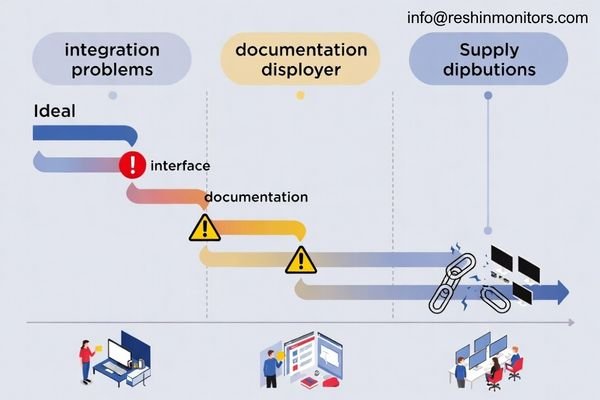
In many PACS and radiology projects, the most serious delays do not come from image quality. They come from integration issues, missing documentation, uncontrolled revisions, and weak supply planning.
Poor interface fit, unclear revision control, incomplete documentation, and unstable supply continuity can slow approval, delay installation, and increase internal coordination cost. A manufacturer that can support integration planning and maintain predictable supply usually reduces more project risk than a monitor that simply performs well in an isolated test.
If your team is already comparing suppliers for PACS or radiology rollout, it is usually more useful to review diagnostic monitor manufacturer capability at this stage than to keep comparing sample images in isolation.
Integration Problems Usually Start Before Installation
From an engineering perspective, the display strategy needs to work inside the real system, not only in a sample room. That means checking signal compatibility5, mounting constraints, workstation output capability, and how the monitor will fit the existing imaging path. A model that appears suitable on paper can still create friction if the interface plan is incomplete or the workstation cannot support the intended resolution and viewing mode reliably.
Interface planning should be treated as part of risk control, not as a late-stage technical detail. The earlier the team confirms signal path, mounting conditions, and system compatibility, the easier it becomes to avoid rework during installation. This is especially important in projects that involve phased rollout, because a small integration mismatch can become a repeated problem across multiple sites.
Documentation and Supply Continuity Affect Long-Term Control
Documentation management and supply continuity also deserve close review. In real B2B medical imaging projects, the difficulty often appears after the first successful sample. Teams then need stable follow-up supply, clear revision notices, and documentation that stays aligned with the delivered product. If those parts are weak, internal coordination becomes slower and future expansion becomes harder to control.
That is why documentation support and supply planning should be evaluated together. A reliable manufacturer should be able to explain how changes are communicated, how future orders are handled, and how project continuity is protected across longer purchasing cycles. For procurement and management teams, that level of control often has more long-term value than a small performance advantage in an early test.
How Reshin Typically Supports Project Continuity
In longer PACS and radiology programs, our team usually treats continuity as part of early project coordination, not as a later afterthought. That usually means aligning documentation scope during evaluation, discussing interface and workstation fit before rollout, and keeping communication clearer when follow-up supply or revision updates become relevant.
The goal at this stage is not to promise that nothing will ever change. It is to make sure the project team can understand:
- what has been confirmed at the evaluation stage
- what should stay aligned between sample review and later delivery
- how change communication is handled when follow-up orders are involved
- how supply planning can better support multi-site or staged deployment
For buyers, this usually increases confidence more than a small one-time performance advantage, because it helps the project remain manageable after the first shipment.
Different Radiology Workflows Need Different Levels of Diagnostic Display Support
In radiology and PACS projects, one display tier does not fit every workflow. Different environments place different demands on resolution, grayscale behavior, color handling, viewing layout, and workstation compatibility.
The table below is not meant as a rigid product recommendation. It is an example of how workflow type changes display expectations and supplier evaluation priorities.
Based on the project’s support needs, the display platform should usually be matched to the actual reading task before discussing pricing or rollout scale. For multi-modality environments that need both color and grayscale support across DR, CT, MRI, and PACS review, a 3MP platform like MD32C is often the most balanced choice. For grayscale-focused daily reading in mainstream PACS workstations, MD33G is a stronger fit because the discussion shifts toward stability, auto calibration, and long-term consistency. When the workflow moves into expert consultation, denser viewing layouts, or higher-resolution review, MD85CA becomes more relevant because the project needs more information on screen, more viewing flexibility, and a clearer high-end platform path.
| Clinical Role / Application | Usage Pattern | Display Requirements | Recommended Model | Key Integration Considerations |
|---|---|---|---|---|
| Multi-Modality Diagnostics | Reading DR, CT, MRI, and PACS images where both color and grayscale workflows need to be supported. | Dual-mode color and grayscale viewing, DICOM-oriented calibration, and multi-modality workflow fit. | MD32C | Confirm workstation output capability, viewing orientation, and whether the workflow mixes grayscale and color review on the same platform. |
| Mainstream PACS Workstations | Routine daily PACS diagnostics with a primary focus on grayscale reading for CT, MRI, and DR. | Strong grayscale stability, auto calibration logic, PACS-oriented consistency, and manageable long-term QC. | MD33G | Align calibration expectations, ambient light conditions, and consistency targets across multiple units or reading rooms. |
| Expert Consultation & High-Resolution Reading | Expert review, remote consultation, complex comparison layouts, and higher-information-density reading environments. | 8MP resolution, flexible multi-window viewing, PACS workstation fit, and support for denser review layouts. | MD85CA | Verify workstation output bandwidth, signal path capacity, and how the display layout supports consultation or advanced review workflows. |
FAQ About Choosing a Diagnostic Monitor Manufacturer for PACS and Radiology Projects
How do buyers know whether they need 3MP or 8MP diagnostic support?
The decision is not about choosing the largest number. In most routine PACS, CT, MRI, or DR reading environments, a strong 3MP platform is often enough because the main priorities are grayscale consistency, workflow fit, and deployment efficiency. An 8MP platform becomes more relevant when the project requires denser information display, more complex layouts, expert consultation, or higher-resolution review.
What should buyers ask a manufacturer for before sample testing begins?
Buyers should usually confirm the application scenario, workstation type, recommended resolution tier, interface plan, mounting method, documentation scope, expected lead time, and how revision changes are controlled. Sample evaluation is much more useful when these project boundaries are defined early, because the team can judge fit, not just picture quality.
How can buyers tell whether DICOM and calibration claims are meaningful?
It helps to look beyond the phrase “supports DICOM” and ask how the manufacturer maintains consistency over time, between environments, and across batches. If the explanation covers calibration logic, luminance behavior, and long-term maintenance in a clear way, the claim is usually more credible than a simple feature statement.
Why does long-term supply continuity matter so much in PACS and radiology projects?
Because these projects rarely end with a single purchase. They often include repeat orders, multi-site rollout, future expansion, and long lifecycle management. If supply becomes unstable or revisions are not well controlled, buyers face revalidation work, project delay, and more internal coordination. Stable supply continuity keeps the whole program more predictable.
Before You Choose a Diagnostic Monitor Manufacturer, Confirm These 5 Things
Before making a supplier decision, it helps to confirm these five points clearly:
- Workflow fit — Does the display match the actual PACS or radiology reading scenario?
- Calibration and DICOM logic — Can the supplier explain long-term image consistency clearly?
- Integration conditions — Are signal path, workstation output, and mounting conditions already defined?
- Documentation and revision control — Can the supplier support stable project communication after sampling?
- Supply continuity — Can the supplier support repeat orders, expansion, and longer purchasing cycles?
In conclusion, PACS and radiology buyers are not only selecting a monitor. They are selecting a manufacturing partner that can reduce risk from requirement alignment and sample validation through integration, delivery, and long-term support. The strongest purchasing decisions usually come from evaluating how well the manufacturer can support the full deployment path, not just how well one sample performs in isolation.
If your team is evaluating suppliers for a PACS, radiology workstation, or diagnostic deployment project, the next useful step is usually to compare supplier capability at the project level, not only the product-sheet level.
✉️ info@reshinmonitors.com
🌐 Diagnostic Monitor Manufacturer
-
Exploring multi-site rollout strategies can enhance efficiency and effectiveness in healthcare IT implementations. ↩
-
Exploring validation feedback can improve your supplier relationships and product quality. ↩
-
Understanding this concept is crucial for selecting the right display for grayscale reviews, ensuring optimal diagnostic accuracy. ↩
-
Understanding luminance drift is crucial for maintaining display consistency, which directly impacts the efficiency of PACS and radiology teams. ↩
-
Understanding signal compatibility is crucial for ensuring seamless integration in engineering projects, preventing costly issues later. ↩


