
A documented replacement framework for legacy 19-inch grayscale medical displays used in installed radiology workstation environments. The focus is not simply on selecting a newer monitor, but on preserving the screen format, native output, legacy signal path, grayscale behavior, physical fit and service continuity that the existing workstation still depends on.
Evidence scope: The page uses Reshin’s documented EOL-to-successor records, MD17G model-level assembly and inspection evidence, and legacy-workstation compatibility criteria. It does not present one disclosed customer’s complete chronology, final site acceptance or commercial rollout.
Reference Market: Poland · Central & Eastern Europe
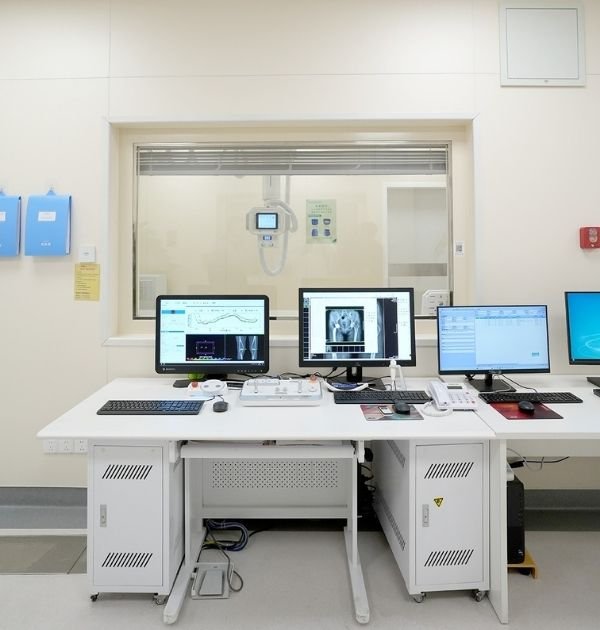
Legacy DR/CR workstations often remain useful long after an original display platform reaches end of life. At that point, the replacement decision is constrained by the workstation that already exists: its software viewport, GPU output, native screen geometry, signal interfaces, mounting space, power arrangement and expected grayscale behavior.
A newer display can have a higher resolution and more modern interfaces yet still create new problems if it changes the established 5:4 layout, forces software scaling, requires unsupported signal conversion or no longer fits the installed mechanical envelope.
Replacement principleThe objective is to preserve the workstation behavior that still matters, then validate only the differences introduced by the successor platform. A replacement becomes an upgrade project when screen format, resolution, signal architecture or workflow expectations materially change.
The supplied lifecycle record documents a group of legacy 19-inch grayscale medical display models reaching end of life and identifies MD17G as the successor direction. That record is more useful than a generic “replacement available” statement because it links the change to a defined product family and a documented comparison.

The EOL notice proves the documented successor direction. It does not by itself prove compatibility with every installed DR/CR workstation. Actual output recognition, software scaling, grayscale behavior, mounting, cabling and local acceptance criteria still need to be checked against the customer’s system.
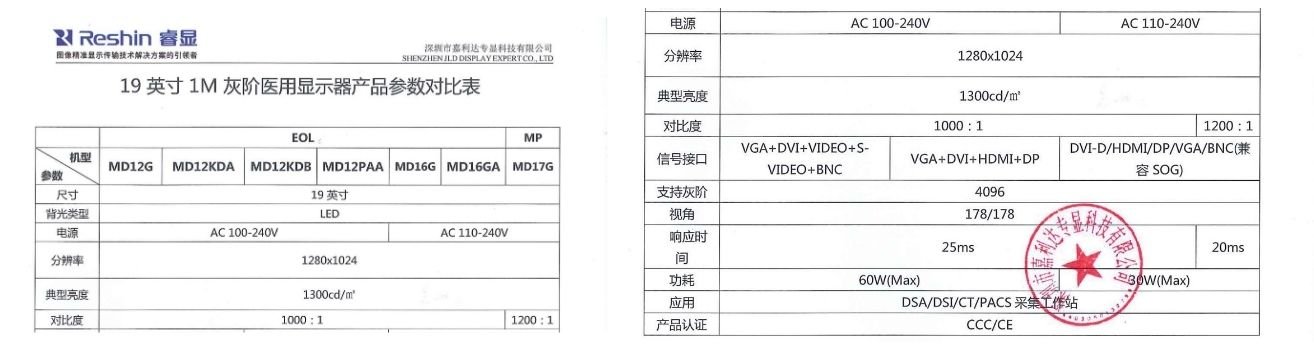
19-inch grayscale medical display family with a 1280 × 1024 native format.
MD12G / MD12KDA / MD12KDB / MD12PAA / MD16G / MD16GA.
MD17G is identified in the supplied discontinuation record as the replacement direction.
DVI and VGA remain relevant; the successor record also documents HDMI, DP and BNC/SOG capability.
MD17G assembly instructions include controlled appearance, electrical and native-format inspection steps.
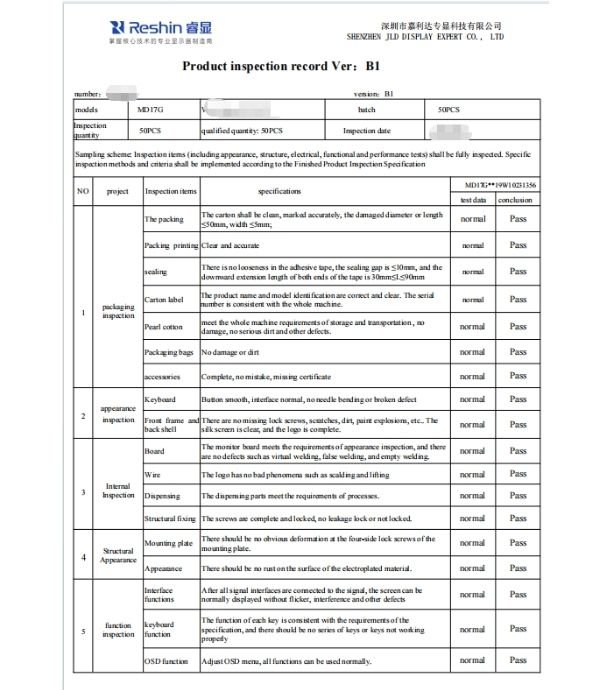
Interface operation, grayscale transition, luminance, uniformity, contrast and electrical checks are recorded in the model-level inspection file.
The review started with the installed monitor and workstation conditions, then separated direct-replacement requirements from optional workflow upgrades.
19-inch / 5:4 layout where the application viewport is built around the legacy format.
1280 × 1024 where the workstation software and graphics path are configured for that output.
DVI or VGA where those interfaces remain part of the installed system or service strategy.
Mounting, cable access, power access and workstation-side service clearance.
Confirm stable input recognition on the actual graphics output and cable path.
Check grayscale transition, luminance direction and the viewing behavior required by the workstation role.
Confirm that the image viewport and user interface remain usable without unintended scaling or geometry changes.
Check VESA, enclosure dimensions, connector access and real installation conditions.
A move away from 5:4 may require software-layout and image-viewport review.
2MP or 3MP is not a direct replacement decision if it changes the established workstation baseline.
Adapters or a new digital interface architecture introduce a different validation path.
If the workstation moves to a different reading task or image-detail expectation, treat the change as a new display-class evaluation.
The lifecycle document identifies the successor direction. Separate model-level records add the manufacturing and inspection evidence needed to show that the replacement platform is built and checked under controlled criteria.
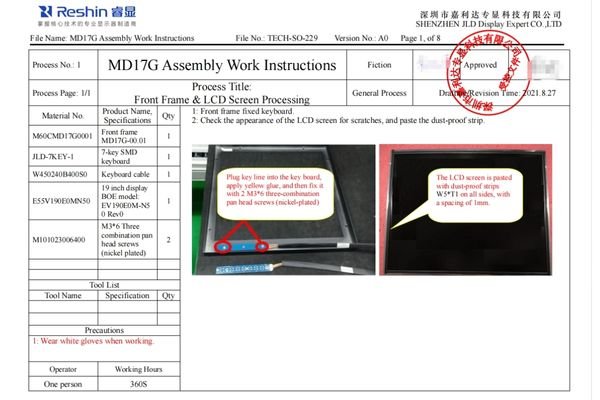
The assembly instruction identifies MD17G and the 19-inch display platform at manufacturing-document level, linking the successor direction to a controlled build process rather than a brochure-only specification.
Assembly work instruction
Model / manufacturing
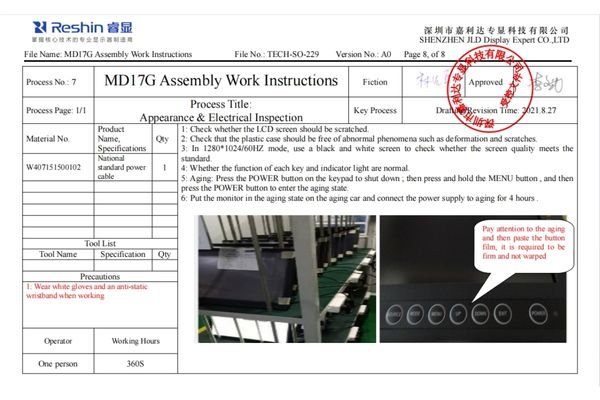
The appearance and electrical inspection instruction explicitly calls for screen-quality checking in 1280 × 1024 / 60 Hz mode. That is directly relevant to a legacy workstation where the native display format is part of the replacement constraint.
1280 × 1024 / 60 Hz
Appearance & electrical inspection
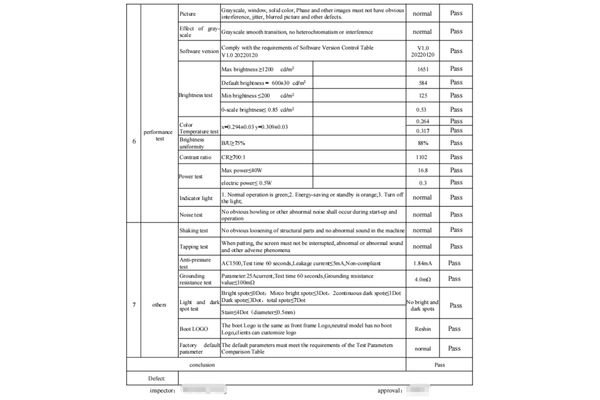
The supplied product inspection record documents grayscale transition and measured performance checks. These values are model-level QA evidence, not a confidential customer acceptance report.
584 cd/m² recorded
88% recorded
1102:1 recorded
Smooth transition — Pass
The following sequence is the appropriate way to use the documented successor evidence in a comparable installed workstation. It is intentionally separated from a claim that one confidential customer completed every step shown below.
Record the original monitor model, front/rear labels, native resolution, aspect ratio, active input, connector photographs, VESA pattern, power input, installation space and the workstation application screen. This creates the reference against which every replacement difference can be judged.
Separate fixed installed-base conditions — such as the 5:4 viewport, 1280 × 1024 output, legacy cabling or mounting envelope — from optional upgrades. This prevents an apparently simple monitor replacement from quietly becoming a workstation redesign.
Review the available model-level records and verify the successor sample for input recognition, native-format behavior, grayscale presentation, luminance direction, physical condition, cable access and controlled model identity before it reaches the installed workstation.
Confirm source recognition, software scaling, image geometry, grayscale behavior, mounting, power and cable routing under the real DR/CR workstation conditions. Any adapter, resolution change or different screen geometry should be treated as a new validation variable rather than assumed compatible.
Once the customer approves the actual workstation result, record the approved replacement configuration, required cables or adapters, mounting conditions, document version and future spare/replacement rule so later service does not restart the same compatibility investigation from zero.
The strongest installed-base strategy is not to wait until the next monitor becomes unavailable. A controlled replacement baseline should connect lifecycle communication, successor mapping and the rules that keep future service changes from drifting away from the approved workstation.
Define which successor direction is intended to replace the discontinued platform and which legacy conditions it is expected to preserve.
Keep signal, mechanical, display-format and revision changes visible so a later replacement does not silently invalidate the workstation baseline.
Record spare strategy, replacement documentation and future EOL handling before a field failure forces an emergency selection.
The cleanest decision is often to separate “keep the installed workstation working” from “improve the workstation specification.” Combining both goals too early increases validation scope and makes service continuity harder to control.
Use this path when the priority is to preserve the existing workstation format and reduce unnecessary change.
Use this path when the customer is willing to revalidate screen format, graphics output, application layout and potentially the workstation reading role.
Compare entry-level, 2MP, 3MP, 5MP and higher-resolution display directions by workflow, screen format and intended role.
Review Reshin’s support for radiology equipment manufacturers, PACS integrators and controlled diagnostic-display programs.
Review certifications, manufacturing controls, technical documentation, project evidence and supplier-evaluation resources.
Use the separate standardization framework when a replacement project becomes a broader multi-class workstation strategy.
Send the installed monitor information before choosing a successor. Reshin can use the existing workstation conditions to structure a direct-replacement review or identify where the project has already crossed into an upgrade path.
Original monitor model & label photos
Existing signal outputs & cable photos
Power input & service-access limits
Software screen or viewport screenshot
Native resolution & aspect ratio
VESA / mounting / available space
DR/CR application / workstation role
Target market, quantity & replacement stage
A different aspect ratio can alter the workstation viewport, application scaling and physical arrangement even when the new monitor has a higher resolution. If the existing software is designed around a 1280 × 1024 / 5:4 format, widescreen migration should be treated as a revalidation variable rather than a drop-in replacement.
Preserve the existing interface when it is part of a stable workstation path or service requirement and the successor supports it directly. An adapter introduces another component, signal-conversion behavior and failure point, so it should be treated as an additional validation item rather than assumed equivalent.
When the new direction changes resolution class, aspect ratio, GPU output, signal architecture, workstation layout or reading expectations, the scope is no longer just “replace the old monitor.” It should be handled as an upgrade with a broader validation plan.
The native output may be tied to the installed GPU, operating-system settings, application viewport and image geometry. The supplied MD17G assembly instruction also includes an explicit 1280 × 1024 / 60 Hz inspection step, which shows why native-format behavior remains part of the controlled successor evidence.
Record the model, front and rear labels, native resolution, aspect ratio, active input, connector photos, VESA pattern, power input, screen orientation, installation space and a workstation software screenshot. Those details form the legacy baseline for replacement mapping.
No. Model-level documentation defines the functions and inspection evidence available for the display platform, but final suitability should be checked in the actual workstation and against the customer’s intended use, acceptance criteria and applicable local requirements.
We use cookies to improve website functionality, analyze site performance, and protect inquiry forms from spam. You can accept all cookies, reject non-essential cookies, or manage your preferences at any time.
Tell us the application, model or required specification, quantity and destination country. We will review your request and reply by email.