
Many buyers I speak with start from a simple assumption: if a standard commercial monitor can display a medical image, it can support the workflow as well. In real diagnostic projects, that is usually where the confusion begins. From an engineering standpoint, the real difference is not just resolution, brightness, or panel size. It starts with grayscale logic, then moves into consistency across workstations, calibration and QA, and finally long-term deployment control.
A DICOM-oriented workflow is built around stable grayscale presentation, repeatable calibration logic, and controlled reading conditions over time. A standard commercial monitor may display a medical image, but it is usually not designed to support the grayscale behavior, QA discipline, and workflow control that a diagnostic process depends on. A dedicated diagnostic monitor manufacturer is typically working toward a different project goal than a standard commercial display vendor.
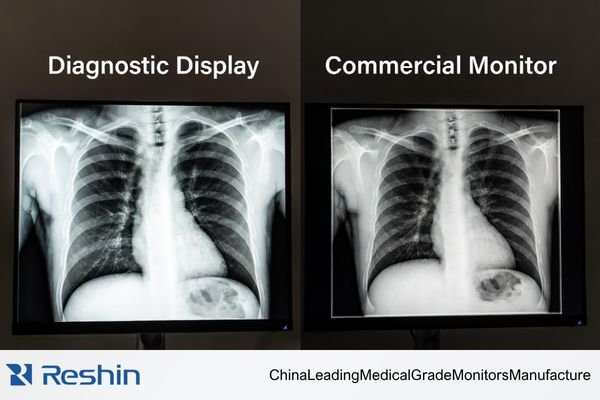
In actual diagnostic deployments, my first concern is not whether a monitor can open an image from PACS. Most modern screens can do that. What I care about is whether the display is built to support controlled reading conditions across time, across workstations, and across later replacement cycles. A commercial monitor is usually made to be a general-purpose display endpoint. A diagnostic workflow asks more from the screen than that.
A DICOM-oriented workflow is closer to a managed system than a simple viewing setup. The display needs to follow a grayscale logic that supports medical reading1, fit into calibration and QA routines, and behave in a way that remains predictable as the project grows. That is the real separation point. In our own project reviews, I usually break this down into a few practical checks first: whether the grayscale target is clear, whether the display can stay aligned across workstations, and whether later QA can still be carried out without adding extra uncertainty to the reading process. The issue is not whether the image appears on the screen. The issue is whether the screen can support a reading process that stays stable and explainable over time.
A DICOM-Oriented Workflow Is Not the Same as “Any Screen That Can Show the Image”
When I first discuss a diagnostic project with a buyer, I do not start by asking whether a commercial monitor can show the image. I start by asking whether the project needs a display that can support repeatable reading conditions.
A standard commercial monitor can display a PACS image, but a DICOM-oriented workflow depends on controlled presentation, stable grayscale behavior, and reading conditions that remain predictable across workstations and over time.
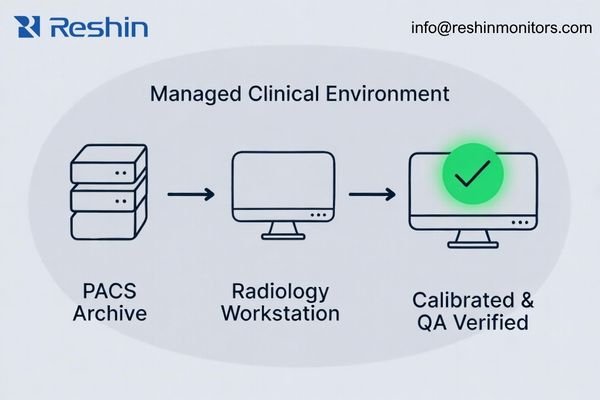
When I review project requirements, I usually explain it this way: showing an image is a task, but supporting a diagnostic workflow is a process. A commercial monitor can complete the task. That does not automatically mean it is suited to the process. Diagnostic reading depends on a chain of things staying aligned, and the display is one of the most important parts of that chain.
Why Showing the Image Is Not the Same as Supporting the Reading Process
The value of a diagnostic workflow is that the image on screen is meant to be presented in a controlled way, not just displayed in a technically possible way. Subtle grayscale differences should come from the image data itself, not from the display drifting, compressing dark tones, or behaving differently from one unit to another. A standard commercial monitor is usually not built around that goal.2
What Buyers Actually Need to Keep Consistent
A workflow only works when conditions stay close enough from one reading station to the next. That includes the main workstation, the secondary room, and the replacement unit that may be installed later. A DICOM-oriented display platform is designed to be calibrated, checked, and managed toward that kind of continuity. That is a very different design target from a general commercial screen.
The Real Difference Starts with Grayscale Logic, Not with Headline Specs
When I compare a diagnostic display with a standard commercial monitor, I do not begin with 4K, peak brightness, or marketing contrast ratio. I begin with grayscale logic. In diagnostic reading, that usually tells me more than the headline spec sheet.
The central difference is that a diagnostic display is built around DICOM GSDF-oriented grayscale behavior, while a standard commercial monitor is usually not. That difference affects how reliably subtle low-contrast details can be seen and how consistently those details are presented across reading conditions.
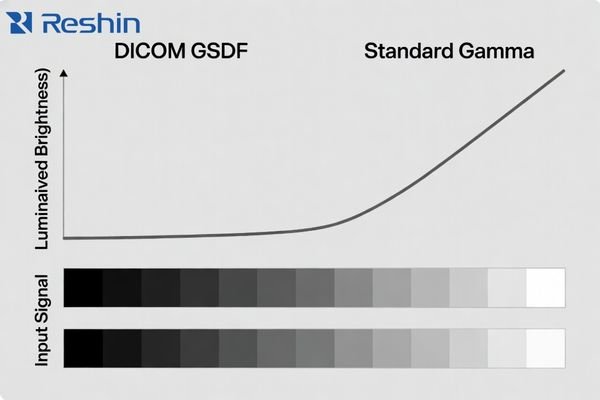
The practical value of DICOM GSDF is that it gives the display a clearer grayscale target for medical image presentation. Instead of simply making the screen look bright or visually pleasing, it aims to make grayscale differences more perceptually consistent for diagnostic viewing. That matters because many clinically relevant details live in the transitions between shades, not in the most obvious black-and-white extremes.
A standard commercial monitor usually follows a conventional gamma approach intended for office work, general visual comfort, media, or mixed-purpose viewing. That is a different design objective. The result can be a screen that looks sharp and vivid but still handles shadow detail, midtone separation, or brighter structures in a way that is less suitable for diagnostic review. This is also why two monitors with similar retail-style specs may still create very different levels of reading confidence in practice. In our own evaluation work, I usually do not let the discussion stop at “the sample looks fine” because that first impression says much less than people expect if the grayscale behavior is not being checked against the actual reading workflow. For buyers comparing platforms in PACS-related projects, this is one reason why medical-grade displays in PACS workflows should be evaluated differently from standard commercial screens.
Buyers Usually Carry More Risk from Inconsistency Than from Lower Specs
From a project point of view, I usually see more risk in inconsistency than in a slightly lower headline specification. A single screen can look acceptable during a demo and still create problems later when the project expands.
One commercial monitor may appear acceptable in isolation, but that does not prove that later units, replacement units, or multi-room deployments will behave closely enough in grayscale and luminance. One of the main values of a DICOM-oriented workflow is that it is built to reduce that uncertainty.
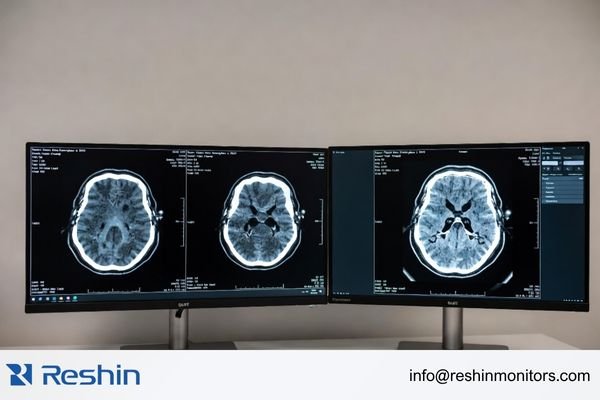
Once a diagnostic program moves beyond a single desk, consistency becomes much more important. If two reading rooms show the same image a little differently, that difference may not always be dramatic, but it still introduces uncertainty into a process that is supposed to stay controlled. The same issue shows up again when older units are replaced and the new screen does not behave closely enough to the one it is replacing. In practice, when our team helps buyers review this kind of project, we usually do not rely on one good unit as proof. We look more closely at whether the display behavior can remain sufficiently aligned across multiple workstations, later replenishment, and future replacement cycles.
The table below captures the practical difference in how these two paths usually behave from a buyer’s perspective.
| Risk Area | Standard Commercial Monitor | DICOM-Oriented Display |
|---|---|---|
| Multi-Unit Deployment | Visible differences in grayscale, brightness, or color may appear across units, even within the same model family. | Built for tighter consistency control across multiple units in diagnostic environments. |
| Long-Term Replenishment | Later purchases may not follow the same panel, firmware, or behavior logic as the original batch. | More likely to support managed continuity and clearer revision control over time. |
| Perceptual Consistency | Grayscale presentation is not usually standardized around diagnostic viewing targets.3 | Intended to support more standardized grayscale behavior for controlled reading conditions. |
When buyers choose a DICOM-oriented path, they are not only choosing a monitor. They are choosing a way to reduce variability in the reading environment. That difference usually matters more over the life of the project than a single spec advantage on paper.
Calibration, QA, and Workstation Coordination Are Part of the Workflow Difference
I often remind buyers that the difference between a diagnostic display and a commercial one does not stop at the panel. The workflow difference also shows up in calibration, QA discipline, and the way the display fits into the workstation environment.
A diagnostic display is meant to be managed as part of a clinical workflow. That usually includes calibration support, routine QA visibility, and coordination with PACS workstations. A commercial monitor is usually not built with that same level of workflow control in mind.
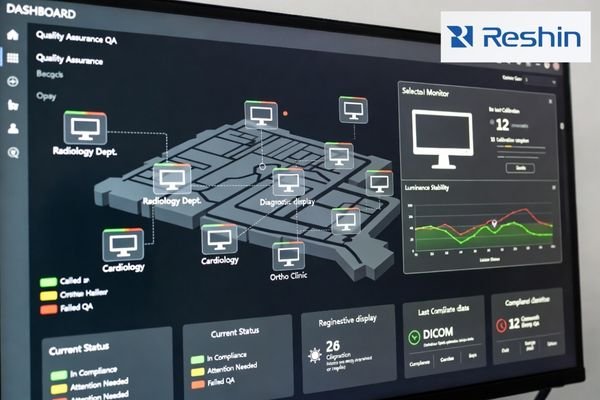
A diagnostic display project is rarely about one isolated screen. It is about whether the whole imaging chain remains understandable and manageable after deployment. That is where calibration and QA start to matter much more.
The Role of Calibration and QA
A true diagnostic display is built to be checked and maintained against a defined target. It can be calibrated with tools and methods that support medical grayscale presentation4, and many platforms also support more structured QA routines over time. That does not just improve the first-day result. It gives the team a way to verify that the display is still behaving in a usable and controlled way later on. In the projects I support, I usually want the calibration path and the later QA path to be discussed together, because a display that looks acceptable on day one but cannot be reviewed in a practical way later will still add risk to the workflow.
Why Workstation Coordination Matters Too
The workflow difference also appears in how the display fits into the broader reading environment. PACS workstations, QA platforms, locked settings behavior, and performance history all matter more in diagnostic projects than they do in general office display use. That is what turns the screen from a simple output device into a managed part of the diagnostic chain. In projects where reading consistency and QA visibility matter, this is usually where the gap between a standard commercial monitor and a diagnostic platform becomes much clearer.
Different Diagnostic Workflow Priorities Naturally Lead to Different Display Platforms
Once a project clearly commits to a DICOM-oriented workflow, the display choice usually starts moving away from generic commercial screens and toward platforms designed around diagnostic logic. The next step is not to memorize model names. It is to define the workflow priority first.
The table below is best read as a workflow map rather than a product ranking list.
| Workflow Priority / Reading Scenario | Usage Pattern | Display Requirements | Recommended Model | Key Integration Considerations |
|---|---|---|---|---|
| Primary Grayscale Reading | High-volume CT, MRI, and DR reading where grayscale consistency is the main priority. | Strong DICOM-oriented grayscale behavior, luminance stability, and QA-friendly workflow fit. | MD33G | Focus on QA management, workstation fit, and deployment continuity across multiple reading positions. |
| Mixed-Task Clinical Review | Workflows that move between DICOM-oriented grayscale review and color-based viewing tasks. | Reliable dual-mode behavior for grayscale and color without forcing awkward workflow compromises. | MD32C | Verify workstation coordination, mode-switching logic, and practical fit with the user’s PACS workflow. |
| High-Detail Grayscale Reading | Reading tasks that place greater emphasis on fine grayscale differentiation and stricter image consistency. | Higher-detail grayscale presentation, strong uniformity expectations, and more demanding QA alignment. | MD52G | Confirm QA expectations, local diagnostic requirements, and the long-term stability needed for higher-demand grayscale use. |
FAQ About DICOM-Oriented Workflow vs Standard Commercial Monitor
Can a standard commercial monitor display PACS images?
Yes, it can display the image, but that is not the same as being suitable for a diagnostic workflow. From an engineering standpoint, I care more about whether grayscale consistency, luminance stability, and ongoing calibration plus QA can be managed in a predictable way over time.
Is a 4K commercial monitor automatically better than a lower-MP diagnostic monitor?
No. In diagnostic projects, higher resolution does not replace DICOM-oriented grayscale behavior, long-term luminance stability, or deployment consistency. Buyers usually get better answers by comparing workflow fit than by comparing one isolated spec.
Why is DICOM calibration different from ordinary display calibration?
Because the goals are different. Ordinary display calibration is usually about general visual accuracy or preferred color appearance. DICOM calibration is aimed at more controlled grayscale presentation for medical viewing. Those are not the same target.
What should buyers confirm first when comparing diagnostic displays with commercial monitors?
I usually suggest confirming whether the project truly depends on diagnostic reading consistency. If it does, then grayscale logic, calibration method, QA visibility, workstation coordination, and long-term deployment control all become more important than price or consumer-style headline specs alone.
The Buyer Question Is Not “Can It Show the Image?” but “Can It Support the Workflow?”
The real difference between a DICOM-oriented workflow and a standard commercial monitor is not just a label difference between medical and consumer products. It is a difference in purpose. One is built to support more controlled grayscale presentation, more stable reading conditions, and better fit with QA and long-term deployment. The other is usually built as a general-purpose display endpoint.
For buyers, the more useful question is not “Can this screen show the image?” but “Can this screen support the workflow I need to keep stable?” If the project depends on reading consistency, QA visibility, and deployment continuity, the next step is usually to review those workflow conditions with a diagnostic monitor manufacturer rather than compare consumer-style specifications alone.
✉️ info@reshinmonitors.com
🌐 Diagnostic Monitor Manufacturer
-
"DICOM GSDF Calibration in Medical Displays for Accuracy", https://reshinmonitors.com/dicom-gsdf-calibration-medical-displays/. The DICOM Grayscale Standard Display Function defines the gamma and luminance response required for medical displays to render grayscale images consistently. Evidence role: definition; source type: institution. Supports: The display needs to follow a grayscale logic that supports medical reading.. Scope note: Standard outlines ideal performance but does not guarantee compliance of specific hardware. ↩
-
"[PDF] Consumer vs. medical-grade displays: Which one should you buy?", https://assets.barco.com/m/5bbc249b245ff95d/original/Brochure-Consumer-vs-medical-displays-which-one-should-you-buy.pdf. The DICOM Grayscale Standard Display Function (GSDF) was specifically developed to ensure consistent rendering of subtle grayscale differences, a feature not required in standard commercial displays. Evidence role: general_support; source type: encyclopedia. Supports: A standard commercial monitor is usually not built around that goal.. Scope note: Focuses on the calibration specification rather than empirical performance of all consumer monitors. ↩
-
"DICOM GSDF Calibration in Medical Displays for Accuracy", https://reshinmonitors.com/dicom-gsdf-calibration-medical-displays/. The DICOM Grayscale Standard Display Function specifies target luminance response curves for medical diagnostics, which are not typically implemented in standard consumer monitors. Evidence role: definition; source type: encyclopedia. Supports: Grayscale presentation on consumer monitors is not standardized to diagnostic display targets defined by DICOM.. Scope note: Does not quantify the number of consumer models lacking GSDF compliance. ↩
-
"DICOM Gray-Scale Standard Display Function – AJR Online", https://ajronline.org/doi/10.2214/AJR.13.11509. The DICOM Grayscale Standard Display Function (GSDF) defines tools and methods for calibrating medical displays to a consistent grayscale response across devices; it is specific to radiological imaging and does not address full-color workflows. Evidence role: mechanism; source type: institution. Supports: It can be calibrated with tools and methods that support medical grayscale presentation. Scope note: The GSDF standard focuses on grayscale performance and may not cover color calibration requirements. ↩


