
In any diagnostic display project, resolution is a basic specification. It is easy to compare, easy to put into a table, and easy to discuss early. But from the way I evaluate real projects, pixel count alone does not tell me whether the platform will stay dependable once it moves into daily reading, routine QC, multi-site deployment, and later replenishment.
Resolution matters, but it rarely defines the whole project by itself. In practice, I usually look at the project in this order: task and modality fit first, then DICOM behavior, then luminance stability, then QA discipline and workflow control. A strong diagnostic monitor manufacturer should be able to support that full evaluation path, not just offer a higher resolution number.
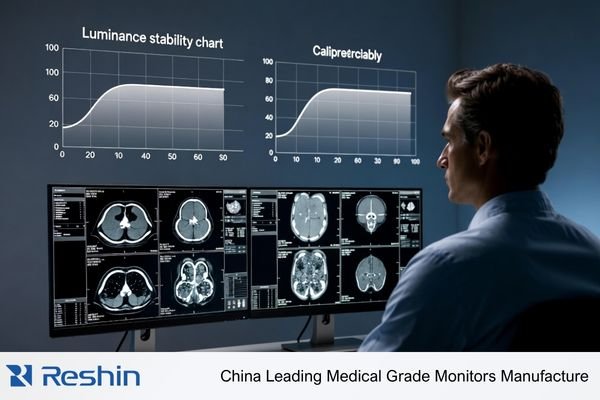
In a diagnostic display project, I rarely treat resolution as the only criterion. Resolution tells me how much detail a display can theoretically carry, but it does not tell me whether the project will stay trustworthy through daily reading, multi-site deployment, routine quality control, and long-term replenishment. Many projects run into trouble not because the pixel count is too low, but because the platform is not consistent enough, stable enough, or easy enough to control over time.
For procurement, imaging IT, and PACS project teams, project controllability usually matters more than the resolution figure on its own. A successful project is one where every display in every reading room behaves predictably day after day and year after year. That requires looking past the headline specification and focusing on the factors that make a display not just sharp, but stable, verifiable, and manageable across its full working life.
Resolution Is Important, but It Rarely Defines the Whole Project
Resolution is an important starting point. It sets an upper limit on how much image detail a display can show. But in a complete project, it is still only one part of the decision.
Resolution indicates detail capacity, but it does not guarantee project stability or reading reliability. Many projects run into problems not because the pixel count is too low, but because consistency, stability, and long-term control are not strong enough to support daily use.
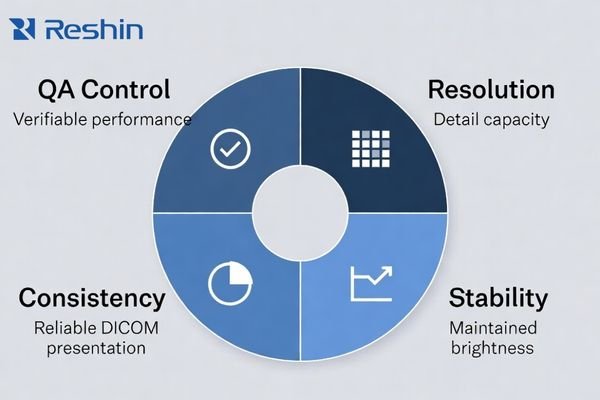
When I review failed installations or support projects that have become difficult to manage, the root cause is rarely a lack of pixels. The more common issues are inconsistent grayscale presentation between monitors, luminance that changes in ways the team cannot easily predict, or weak quality-control discipline across a fleet of displays. For buyers, those issues usually create more operational risk and more long-term cost than the difference between one resolution tier and another in a non-mammography task.
That is why I do not look at resolution in isolation. I look at how the platform behaves after deployment, how well it holds calibration logic, and how easy it is to keep the entire fleet under control. That is usually where project value is won or lost.
Task and Modality Fit Matter Before Chasing Higher Resolution
From an engineering standpoint, I always start with the reading task, not with a target megapixel number. The modality and the type of reading being performed should shape the display decision first.
The main risk in display selection is not failing to choose the highest resolution tier. It is failing to align the display platform with the actual diagnostic task. Task fit and modality fit come before resolution escalation.
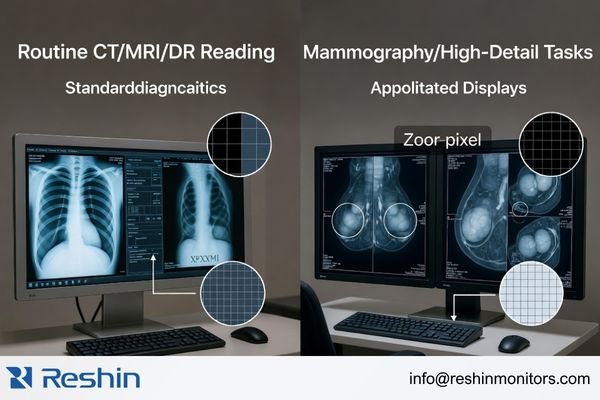
The needs of different diagnostic tasks are not interchangeable. A display chosen for routine CT, MRI, or DR reading in a PACS workflow is not being asked to do exactly the same job as one used for mammography or another higher-detail grayscale task. In real projects, the most useful question is not “What is the highest tier available?” but “What does this reading task actually require every day?”
Aligning the Display with the Diagnostic Task
I usually define the task first and then determine the appropriate display tier. The requirements for reviewing CT, MRI, or DR images in a routine PACS environment are not the same as the requirements for digital mammography or breast tomosynthesis. A platform that fits one of those workflows well is not automatically the best fit for the other. The better decision is the one that gives the task the detail it needs without adding unnecessary complexity or cost elsewhere in the project.
In our own project discussions, we usually begin by narrowing four practical inputs before we even talk about a model: the main modality, the primary reading task, the workstation environment, and the expected deployment scale. That early step often prevents the common mistake of discussing resolution first and project fit second.
The Risks of a Mismatched Resolution Tier
A resolution tier that is too low for the task can limit visible detail and raise project risk in higher-demand reading scenarios. But moving higher without a clear task-based reason can create a different set of problems. It can stretch the budget, create graphics-card and workstation planning issues, and make it harder to keep deployment consistent across an organization. In practice, the best choice is usually the one that keeps clinical needs, IT reality, and long-term project control in balance.
DICOM Consistency and Luminance Stability Usually Matter More in Daily Reading
In a diagnostic reading environment, what matters most is whether grayscale information stays stable and trustworthy over time. This is where DICOM behavior and luminance stability often become more important than resolution alone.
Resolution addresses detail capacity, but DICOM consistency and luminance stability determine whether those details can be seen reliably in real use. A high-resolution display is not a dependable diagnostic platform if its grayscale presentation drifts or its brightness changes unpredictably over time.
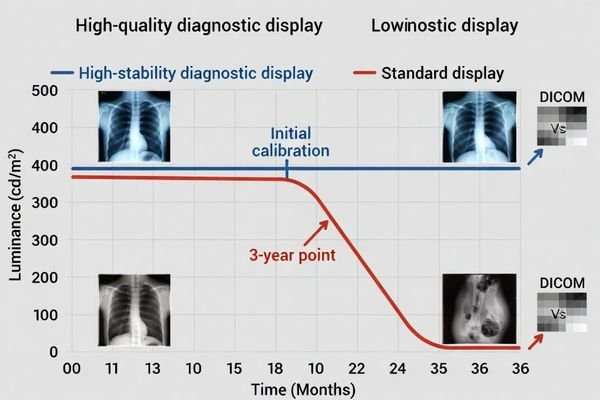
When I evaluate diagnostic displays, I pay close attention to long-term behavior. A display can look excellent during the first sample review, with sharp detail and clean contrast, but that first impression does not tell the whole story. If the same display later shows noticeable grayscale drift, needs constant correction, or loses luminance in a way the team cannot manage easily, the value of its higher resolution drops very quickly.
That is why I put more weight on stable DICOM presentation and predictable luminance control than on headline specifications. For radiologists and imaging teams who use these displays every day, lasting stability supports reading reliability in a way that first-day sharpness alone simply cannot.
In our own evaluations, we usually do not stop at whether a sample “looks good” on day one. We try to clarify how the display handles calibration logic, what kind of stability behavior is expected over time, and how the team plans to verify that performance after deployment. That conversation often tells me more about the real quality of the project than the first visual impression alone.
QA Discipline, Uniformity, and Workflow Fit Decide Whether the Project Stays Controllable
A successful diagnostic display project is rarely about one unit. It usually involves multiple units, long-term maintenance, and keeping performance consistent across the whole installed base. That is where project-level discipline starts to matter more than single-product appeal.
Long-term project success depends on clear acceptance logic, practical QA routines, stable screen uniformity, and strong workflow fit. Without those controls, high resolution stays a selling point instead of becoming a stable and scalable reading platform.
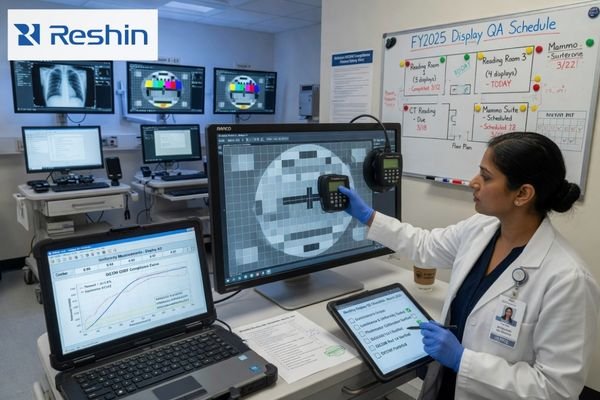
When I support a larger deployment, my attention shifts from the specification of one display to the controllability of the whole system. I want to know whether the team has a usable acceptance standard before deployment, whether routine QC can actually be carried out, whether luminance and uniformity can be tracked over time, and whether performance can stay consistent across reading rooms and replacement cycles.
The table below shows the difference between a simple pixel-first evaluation and a more mature project-first evaluation.
| Evaluation Area | Pixel-Focused View | Project-Focused View |
|---|---|---|
| Initial Sample | Does the display look sharp and bright? | Does the display meet uniformity expectations? Is the QA process verifiable? |
| Deployment | Are we buying the highest resolution available? | Can we keep performance consistent across all deployed units? Does it fit the PACS workflow? |
| Long-Term Maintenance | What is the warranty period? | Is there a workable routine QC process? How is luminance stability managed over time? |
In daily reading, efficiency is often shaped more by smooth workflow behavior than by a marginal increase in resolution. If a platform is easier to verify, easier to maintain, and easier to integrate into the actual reading workflow, it usually creates more long-term value than extra megapixels alone.
In our own project work, we usually try to make QA expectations visible early instead of leaving them until after the first batch is delivered. That normally means agreeing on acceptance checks, discussing how routine QC will be handled, and making sure the customer is not evaluating one sample while planning a fleet that will be managed in a completely different way. When that part is clear early, the whole project tends to stay much easier to control.
Different Diagnostic Priorities Naturally Lead to Different Display Platforms
Different diagnostic tasks naturally lead to different display priorities. The goal is not to find one display that wins every comparison. The goal is to find the platform that best matches the actual reading task, QA burden, and operational demands of the project.
From my view of the current product landscape, one project may place more weight on grayscale consistency and long-term stability, while another may care more about dual-mode flexibility or higher-detail grayscale reading. That difference in project priority is exactly why display selection should start with the task rather than end with the resolution number.
| Clinical Role / Application | Usage Pattern | Display Requirements | Recommended Model | Key Integration Considerations |
|---|---|---|---|---|
| Mainstream DR, CT, MRI, or PACS Reading | Primary grayscale reading with steady daily volume. | Strong emphasis on grayscale consistency, DICOM behavior, and long-term luminance stability. | MD33G | Focus on QA discipline, fleet management, and consistent performance across multiple workstations. |
| Mixed-Task Diagnostic Reading (Color & Grayscale) | Workflows that move between grayscale images, color images, and mixed-view tasks. | Flexible handling of DICOM-oriented grayscale and color viewing in one practical workflow. | MD32C | Verify smooth fit with the PACS application and workstation environment for efficient task switching. |
| Mammography or Higher-Detail Grayscale Tasks | Reading environments that demand finer grayscale detail and stricter long-term consistency. | Higher-detail grayscale performance, strong DICOM-oriented control, and stable long-term behavior. | MD52G | Check workstation compatibility and confirm that local QA practice matches the intended reading environment. |
FAQ About What Matters More Than Resolution in a Diagnostic Display Project
Does this mean resolution is no longer important?
No. Resolution is still a basic requirement. The point is that it does not define project success by itself. A more mature evaluation starts with task and modality fit, then checks DICOM behavior, luminance stability, QA discipline, and long-term deployment control.
Why do buyers often over-focus on resolution?
Because resolution is easy to quantify and easy to compare at the beginning. In actual projects, grayscale stability, uniformity, QA logic, and cross-site consistency often have a more direct effect on long-term risk and later management cost.
What should buyers confirm before comparing higher-MP options?
I usually suggest confirming three things first: whether the task and modality are properly matched, whether DICOM and QA are verifiable, and whether future deployment and replenishment will remain controllable. Once those are clear, comparing resolution becomes much more useful.
Can a lower-resolution platform still be the better project choice?
Yes, if it is matched to the task. When a modality does not truly require a higher resolution tier, and the current platform is stronger in DICOM behavior, consistency, stability, workflow fit, and deployment control, it can absolutely be the safer project choice.
The Better Project Question Is Not “How High?” but “How Stable?”
In a diagnostic display project, the more useful question is usually not “Can the resolution go higher?” but “Can this display perform its intended task consistently, verifiably, and sustainably over time?” That shift in focus is what turns a specification discussion into a real project decision.
In my own project work, I usually put modality fit, DICOM consistency, luminance stability, QA discipline, and deployment control ahead of the resolution number itself. Those factors are closer to the real outcome of the project and to the risks that procurement, imaging IT, and reading teams actually carry. If you are planning a new diagnostic display project, it is usually better to review the task, QC expectations, and deployment plan early than to wait until the project has already been framed around one headline specification.
✉️ info@reshinmonitors.com


