
In an Operating Room (OR) display integration project, the conversation often starts with the easiest things to compare: 4K resolution, brightness, and color gamut. Those factors do matter, but they are rarely what determine whether the project runs smoothly once the room goes live. In my experience, the more useful way to evaluate an OR display system is to look first at the video path and routing logic, then at switching and latency behavior, then at mounting and cleanability, and finally at consistency across multiple units and future supply.
Successful OR display integration depends more on system-level predictability, stable signal switching, practical mounting, and multi-unit consistency than on the standalone specifications of a single monitor. A capable surgical monitor manufacturer should help the project stay controllable across the full display layer, not just offer a stronger spec sheet.
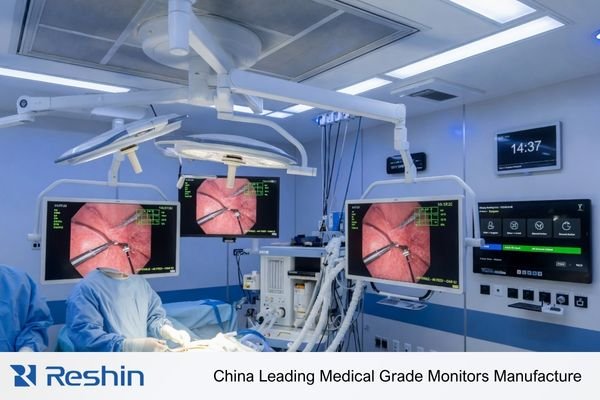
In my OR integration work at Reshin, I rarely start by asking how strong a screen looks on paper. I start by defining its role inside the complete video system. An OR display is not an isolated device. It sits inside a signal chain that may include surgical cameras, video processors, routing matrices, control room infrastructure, and multiple viewing positions in the same room. Many difficult projects do not break down because the image is not sharp enough. They break down because the signal path does not behave in a predictable way when sources switch, systems reboot, or rooms are expanded later.
From an engineering standpoint, the display has to be treated first as a reliable system component and then as a viewing endpoint. That means I pay closer attention to signal stability, switching recovery, mounting practicality, service access, and lifecycle control1 than to headline specs alone. Those are the factors that usually decide whether an OR display system remains easy to live with over long operating cycles.
OR Display Integration Starts with the Video System, Not the Screen Alone
In OR integration projects, a common mistake is to choose the display in isolation and only later ask how it will behave inside the room. In practice, that order usually creates avoidable trouble.
An OR display is one node in a larger video system that includes cameras, processors, routers, and multiple viewing endpoints. Integration success starts with understanding the full video path, because many project issues come from signal-chain behavior rather than from the screen itself.
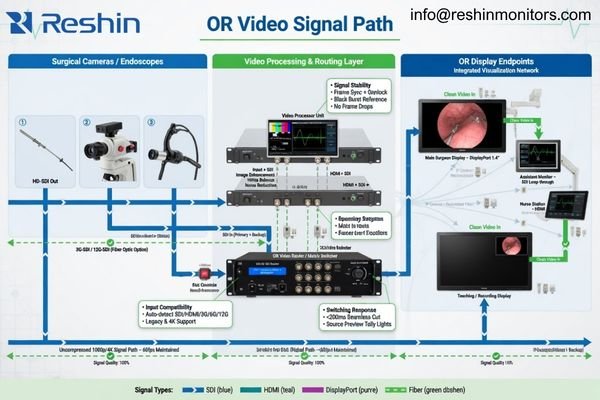
When I support system integrators and OR project teams, my first questions are almost always about the signal path. What camera system is being used? What processor sits upstream? How many displays are in the room? Will the system switch between endoscopy, C-arm, PACS, or external sources? Once those answers are clear, the display role becomes much easier to define.
That is also why I do not treat an OR display integration project as a monitor-only decision. A screen can look excellent in isolation and still create friction when it is placed inside a more complicated signal environment. Startup lock behavior, wake-up response, repeated switching, and consistency across different inputs are the kinds of things that often decide whether the project feels stable or fragile in daily use.
Stable Switching and Low-Latency Behavior Matter More Than a Strong Spec Sheet
In a live surgical environment, predictability matters more than a beautiful data sheet. A display with strong published specs still creates workflow risk if switching is slow, recovery is uneven, or motion behavior is unstable.
In the OR, stable switching, reliable signal recovery, and low-latency behavior often matter more than the headline specification itself. A display that stays predictable during source changes and long operating sessions usually creates more project value than one that simply looks stronger on paper.
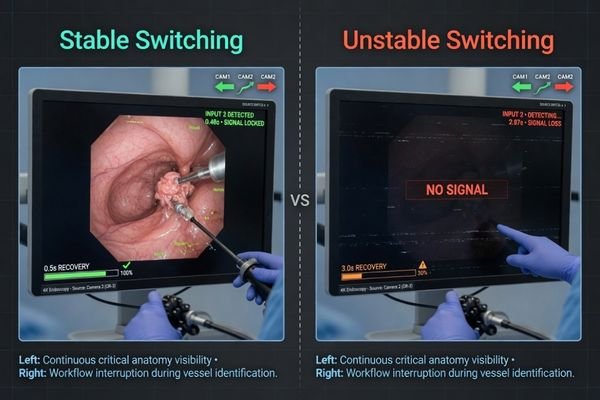
A specification sheet tells me what a display should be able to do under controlled conditions. In project work, I care more about what happens when the setup is less controlled. Can the display recover quickly after a routed source changes? Does it behave the same way across HDMI, DP, and SDI paths? Does the image remain stable after repeated switching through a matrix? Those are the questions that usually matter once the room is in use.
Prioritizing Predictability Over Headline Specs
In a working OR, video sources do not stay static. They are switched, routed, reconnected, and sometimes reconfigured during the life of the system. A few seconds of dark screen or delayed signal recovery may not show up in a brochure, but it can create avoidable workflow disruption in the room. That is why I place real weight on source switching recovery, input consistency, and startup behavior rather than only on resolution or brightness figures.
The Hidden Cost of Latency and Unstable Motion
Low latency also matters, but again, I look at it as part of system behavior rather than as an isolated marketing phrase. If the display response feels delayed, or if motion handling changes depending on the source path, the operator experience becomes less comfortable and less confident2. The best result is usually not the most dramatic spec sheet. It is the setup that feels stable, immediate, and predictable every time the system is used.
Mounting, Cable Access, and Cleanability Often Decide Whether the Integration Is Practical
Some of the most stubborn OR integration problems have very little to do with image quality. They come from installation choices, cable access, cleaning routines, and maintenance access that were not thought through early enough.
The practicality of OR integration is often decided by physical design. Mounting compatibility, cable access, serviceability, and wipe-down convenience can have a more direct impact on long-term usability than small differences in image performance.
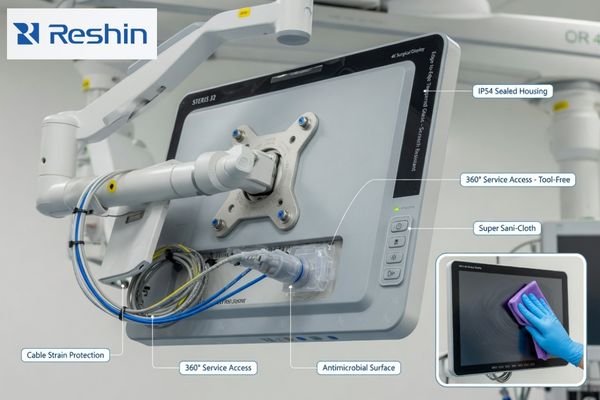
A display mounted on a boom arm behaves differently from one mounted on a wall or placed on a mobile cart. Connector direction, cable bend radius, strain relief, and service access all change once the installation method is fixed. I have seen projects where the display itself was fine, but routine service became awkward because the connectors were nearly unreachable after installation.
| Integration Aspect | Common Pitfall | Engineering Priority |
|---|---|---|
| Mounting (Boom Arm / Cart) | Ignoring weight balance, movement range, or cable strain during repositioning. | Confirm VESA compatibility, balance, and stable cable support from the start. |
| Cable Access & Routing | Placing connectors where they become difficult to reach after installation. | Keep input access and cable paths practical for both setup and later service. |
| Cleanability & Surface Design | Choosing housings or front surfaces that are awkward to wipe down in daily OR use.3 | Prefer wipe-friendly surfaces, protected front design, and layouts that support routine cleaning. |
These points may look small at the planning stage, but they shape the daily experience of the room. In OR environments, practical design is not a nice extra. It is part of whether the integration will feel manageable over time.
Multi-Display Consistency and Lifecycle Control Matter More Than a Single Good Sample
A successful OR integration project rarely stops at one screen. More often, it includes a primary surgeon view, one or more assistant displays, wall-mounted shared displays, and later replenishment across multiple rooms. That is where consistency becomes more important than one good first sample.
The real question is not whether one unit looks good during evaluation, but whether image behavior, settings logic, hardware continuity, and replenishment control stay consistent across the full deployment. Without lifecycle discipline, early validation quickly loses its value.
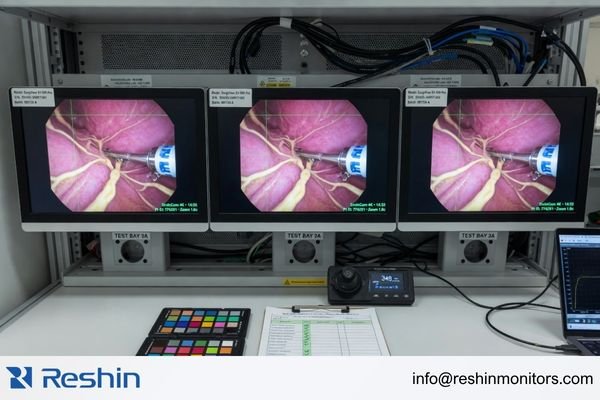
Based on the projects I support with PACS and KVM partners, one strong sample only proves a local result. It does not prove that the same behavior will hold across every room, every role, and every future batch. In OR environments, that gap matters a lot. If the surgeon-facing view behaves one way, but the assistant display or shared wall display behaves differently, the room becomes harder to standardize and harder to trust.
The Challenge of Multi-Unit Consistency
When several displays are used in the same room, they need to behave in a way that feels coordinated. That does not always mean every panel is identical in role, but it does mean the image response, brightness logic, switching behavior, and settings control should remain consistent enough for team use. The more rooms a project includes, the more important that consistency becomes.
Why Lifecycle Control Matters After the First Approval
OR systems usually stay in service for years4. That means the display platform validated today may need replenishment later, often after the room design and integration logic have already been fixed. If a later batch introduces unexpected interface changes, physical differences, or different behavior across inputs, the original integration work loses value fast.
In project planning, I usually want four things to be clear early: the same image behavior across surgeon, assistant, and shared-view displays; a locked settings logic across rooms; documented replenishment continuity; and a clear change-notification process if anything in the platform changes. Those items are rarely glamorous, but they are often what keeps an OR rollout under control.
Different OR Integration Roles Naturally Lead to Different Display Platforms
The right display choice depends on the role the display plays inside the room. In OR integration, it is more useful to define the display role first and then choose the platform than to begin by chasing the strongest-looking model.
The table below maps representative platforms to different OR integration roles rather than trying to rank them in the abstract.
| Integration Role / OR Scenario | Usage Pattern | Display Requirements | Recommended Model | Key Integration Considerations |
|---|---|---|---|---|
| Primary Surgeon View | Close-range main viewing from an endoscopy or surgical camera feed. | Clear 4K image, strong color performance, stable switching behavior, glare control, and practical input flexibility. | MS275PA | Prioritize the main signal path, confirm stable behavior with the primary camera system, and review mounting position, front-surface protection, and everyday OR cleanability. |
| Complex Multi-Source Integration | Display role inside a room with routing, source switching, and more than one important video path. | Broad interface support, consistent response across inputs, stable recovery after switching, and stronger system-fit behavior. | MS322PB | Test routed sources through the actual matrix, verify switching recovery across planned inputs, and confirm cable access and serviceability after installation. |
| Shared / Large-Format OR View | Wall-mounted or larger-format viewing for team reference, teaching, or collaborative procedures. | Good large-area visibility, wide viewing angles, mounting flexibility, and stable image presentation for group viewing. | MS430PC | Match the screen size to room distance, confirm wall-mount and cable-routing practicality, and review how the display will be used in longer OR sessions. |
FAQ About What Really Matters in OR Display Integration
In OR integration, should buyers confirm the monitor first or the signal path first?
I usually recommend confirming the signal path and routing logic first, then defining the monitor role inside that system. Many OR display problems do not come from the panel itself. They come from switching behavior, recovery time, startup response, and input handling across the full signal chain.
Is 4K always the most important requirement in OR display integration?
No. In many surgical scenarios, 4K is important, but it is not the only thing that matters. Stable switching, low-latency behavior, mounting practicality, and long-term consistency are often just as important and sometimes more important to the overall project experience.
Why does one good sample not guarantee a good OR integration project?
Because OR integration is about repeatable behavior across multiple devices, rooms, and deployment stages. One good sample proves that one local setup worked. It does not prove that routing, cleaning, maintenance access, replenishment continuity, and future consistency are already under control.
No. A primary surgeon-view display usually places more weight on close-range clarity, source behavior, and main-view usability. A shared-view display usually places more weight on large-area visibility, mounting logic, and team readability. The roles are related, but they should not be evaluated in exactly the same way.
The Real OR Integration Question Is Not “How Good Is the Screen?” but “How Predictable Is the System?”
If I had to reduce this topic to one practical conclusion, it would be this: in OR display integration, what matters most is not one standout specification on one screen. What matters most is whether the whole display layer behaves in a predictable, maintainable, and repeatable way under real OR constraints.
In my own project work, I prioritize routing stability, switching recovery, mounting practicality, multi-unit consistency, and lifecycle control before I worry about who has the most impressive headline specification. Those are the factors that sit closest to the final result of the integration and to the real risks carried by system integrators, hospital engineering teams, and rollout programs. If you are planning an OR display integration project, the most useful next step is usually to review your signal path, switching logic, mounting plan, and rollout expectations before locking the display platform.
✉️ info@reshinmonitors.com
🌐 Surgical Monitor Manufacturer


