
In the surgical display projects I support, interface discussions almost never start with the ports on the back of the monitor. They start with the signal path. Buyers and integrators usually want to know whether the video source, cable run, routing hardware, and display can work together as one stable system, because that is what determines whether the image remains predictable in real OR use.
In surgical display projects, interface and routing decisions are usually reviewed through five practical factors: source-output match, cable distance, switching predictability, installation fit, and future expansion. A qualified surgical monitor manufacturer should help align the display with the full signal path, not just with a list of connector types.
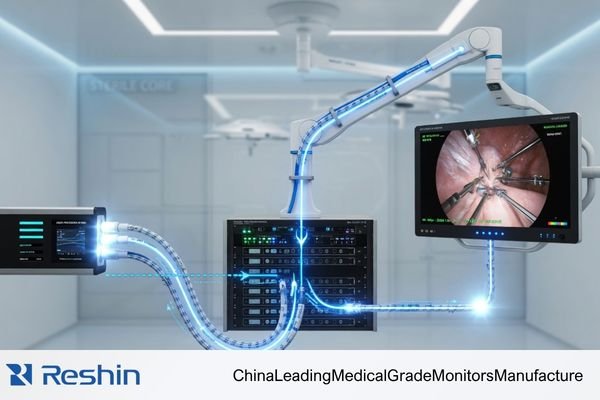
For serious OR integrators and hospital technical teams, choosing a display is not about counting ports. It is about building a signal path that stays stable, controllable, and maintainable over time.1 A poor routing decision can turn a strong display into a weak point in the project, even when the panel itself is not the problem.
That is why my conversations with clients usually begin with the signal path. We map the journey from source to screen, look at cable distance, switching behavior, intermediate devices, and installation constraints, and then decide which interface strategy actually fits the project. The safer display choice is usually the one that fits the routing plan best.
Why Interface Choice in Surgical Display Projects Starts with the Signal Path
When I begin working on a surgical display project, I do not start by asking which ports the team prefers. I start by mapping the signal path. An interface is not an isolated feature. It is one link in the chain that connects the camera processor to the final display.
The outcome of a surgical display project is shaped less by the connector list on the monitor and more by whether the full signal path—from source to cable run to display input—remains stable and predictable. The safer question is not which monitor has more ports, but which signal path will be easier to control.
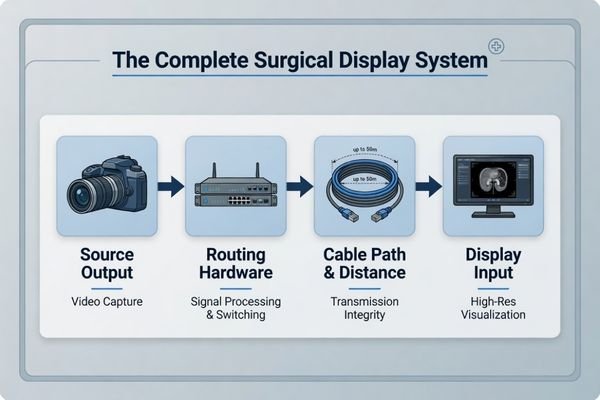
For experienced buyers and OR integrators, the most useful question is usually not “Which display offers the broadest port list?” It is “Which signal path architecture is least likely to create instability later?” That shift matters because a display can only perform as well as the signal it receives2.
From a Port List to a System View
A system view changes the way interface decisions are made. A display may support 12G-SDI, but that alone does not solve the project if the source only outputs HDMI, if switching hardware is already fixed, or if the planned signal path introduces avoidable conversion steps. In practice, many interface problems are not really monitor problems. They are signal-path design problems that appear at the monitor.
Stability and Scalability Matter Early
A well-planned signal path supports more than a clean image today. It also makes later changes easier to manage. If the routing plan is stable, documented, and realistic for the installation, it becomes much easier to add another display, support a teaching feed, or update part of the workflow later without rebuilding the whole system.
Surgical Buyers Do Not Review Interfaces by Name Alone
In real projects, serious buyers do not usually review SDI, HDMI, or DisplayPort by name alone. They review how each one fits the routing distance, surrounding device ecosystem, installation method, and workflow of the room.
Buyers usually review interface choice through deployment logic. SDI is often better suited to longer-distance routed paths, HDMI is practical for local device-adjacent use, and DisplayPort becomes more relevant in higher-bandwidth or workstation-style scenarios. The real issue is fit, not label.
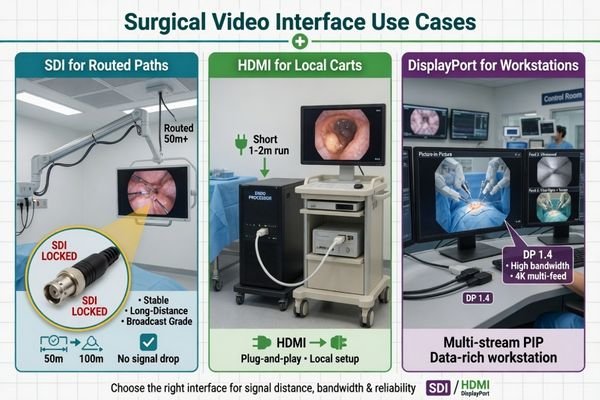
The name of the interface matters less than the problem it is solving. In a routed OR display path, an interface is being judged for stability across distance and switching. On a local tower connection, it is usually being judged for straightforward compatibility. In a workstation-style environment, it may be judged for bandwidth, image quality support, or multi-source behavior.
From what I see in actual deployments, teams usually think about these interfaces in practical terms:
- SDI is often chosen for longer-distance professional routing where stable transport and locking connectors matter.
- HDMI remains useful for short local connections where the source and display are physically close.
- DisplayPort becomes more valuable when the workflow leans toward higher-bandwidth or more advanced workstation-style use.
In our own integration reviews, we usually look at source type, cable distance, routing hardware, and installation position before we recommend which interface should take priority. That order tends to reveal the right decision faster than starting from connector names alone.
Why Routing Decisions Often Create More Project Risk Than the Display Panel Itself
In the project reviews I have been involved in, the display panel itself is often not the real source of trouble. More often, risk comes from the routing plan around it. A capable monitor can still look unstable if the signal path has been designed poorly.
The wrong interface path, unrealistic cable routing, EMI-sensitive placement, poor switching behavior, or no failover planning can all make a suitable display behave badly in the OR. Serious buyers care about whether the routed system stays stable over time, not whether it worked once in a simple setup test.
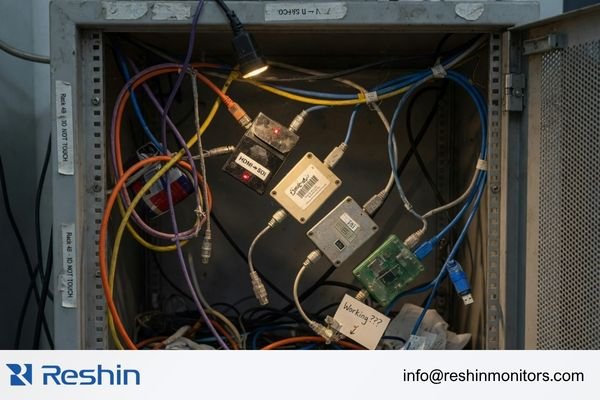
The operating room is not a forgiving environment for signal problems3. There are long cable runs, electrically busy surroundings, switching points, and often more than one live source involved. In that context, routing errors tend to show up as intermittent failures, unstable behavior, or service headaches rather than as a clean and obvious one-time fault.
The most common routing risks I see include:
- Using the wrong interface for the actual path
- Planning cable runs that are unrealistic for the chosen interface
- Relying on unnecessary conversions that add instability
- Ignoring switching behavior until late in the project
- Skipping backup or failover thinking for critical displays
What matters to technical teams is not whether the monitor works when connected directly to a source on a bench. What matters is whether it still behaves predictably at the end of a routed path, after switching, under daily use, and across the life of the installation.
What Serious Buyers and Integrators Actually Check Before They Approve a Routing Plan
For serious buyers and experienced OR integrators, a routing plan is not just a line on a system diagram. It is a set of practical checks that have to hold up before the display strategy can be trusted in real workflow.
A routing plan is usually approved only after teams verify source-output match, realistic cable distance, predictable switching behavior, workflow support, maintainability, and failover logic. The question is not whether the image appears once, but whether the path remains dependable over time.
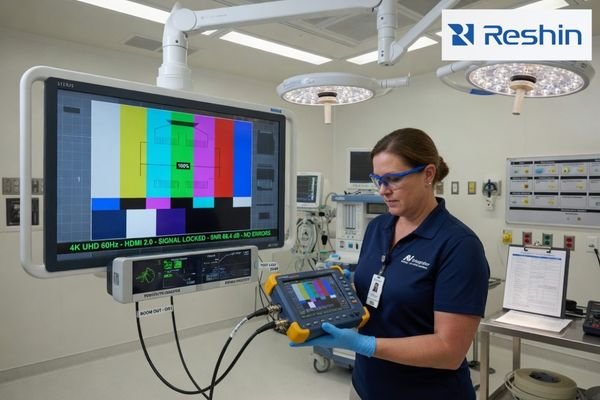
In my experience, the teams that avoid routing problems are the ones that check behavior, not just connectivity.4 They are not only confirming that the image comes up. They are checking how predictably it recovers after switching, how stable it remains through routed distribution, and how practical the setup will be to maintain later.
Before sign-off, the review usually comes back to a set of practical checkpoints:
| Checkpoint Area | Key Question to Verify | Engineering Rationale |
|---|---|---|
| Source-to-Display Match | Does the processor output format actually match the display input requirements? | Prevents format mismatch, handshake problems, and avoidable “No Signal” behavior. |
| Cable Path Reality | Are the cable length and routing path realistic for the chosen interface strategy? | Reduces the chance of signal degradation and intermittent image loss. |
| Switching Predictability | Does the display recover consistently after passing through relevant routers, matrices, or switching devices? | Confirms that routed behavior remains stable in the real chain, not just in a direct connection. |
| Workflow Support | Does the path support recording, teaching displays, multi-image use, or other workflow needs? | Ensures the routing design serves the actual room function, not just the primary image. |
| Maintainability | Is the installation practical to access, diagnose, and support later? | Helps prevent service complexity from becoming a long-term project burden. |
| Redundancy / Failover | Is there a backup path, secondary input, or failover logic for critical display use? | Reduces risk if one routed path fails or becomes unstable. |
| Future Expansion | Will adding another display, source, or recording requirement create an interface bottleneck later? | Keeps the project scalable without major rework. |
At Reshin, we usually walk through these checks early, before we lock the display recommendation. That helps us catch routing problems while they are still easy to correct, instead of discovering them during installation or acceptance testing.
Different Routing Strategies Lead to Different Surgical Monitor Tiers
In real projects, different routing strategies naturally lead to different monitor tiers. A direct local setup does not need the same display profile as a routed 4K OR backbone, and neither of those looks the same as a teaching or integration-heavy environment.
This is why monitor choice works better when it follows routing complexity. In our own project practice, we usually sort requests into compatibility-first systems, mainstream 4K routed systems, and more integration-heavy environments before recommending a display platform. That makes it easier to match the monitor to the real job instead of treating every project as if it needs the same interface profile.
| Clinical Role / Application | Usage Pattern | Display Requirements | Recommended Model | Key Integration Considerations |
|---|---|---|---|---|
| Legacy & Mixed-Source Chains | Compatibility-first environments integrating newer displays with older endoscopy towers or mixed signal types. | Broad legacy input support, stable FHD performance, and routing-friendly compatibility. | MS270P | Best suited to projects that need legacy timing validation, mixed-source compatibility, and practical routing across SDI, DVI, VGA, S-Video, or Video paths. |
| Mainstream 4K Integration | Modern ORs using a 4K imaging chain with mixed SDI, HDMI, and DP source conditions. | 4K support, 12G-SDI readiness, AR front protection, optical bonding, and multi-image flexibility. | MS275PA | Best reviewed in terms of full 4K chain readiness, 12G-SDI path stability, and how well the display supports mixed-interface workflows without unnecessary conversion. |
| Routing-Heavy & Integrated ORs | Teaching hospitals and advanced integrated ORs with multi-input, multi-output, and more complex signal distribution. | Broader I/O, routing-ready behavior, larger 4K viewing, and dependable multi-image capability. | MS322PB | Best suited to environments that need multi-input behavior, output routing support, and a display that works as part of a larger integration matrix rather than as a simple endpoint. |
For buyers, this is usually the point where routing logic starts turning into a practical display decision. Instead of asking which monitor is best in the abstract, they can ask which monitor tier best matches the actual signal strategy of the project.
FAQ About Interface and Routing in Surgical Display Projects
Is SDI always the safest choice in surgical routing?
Not always. SDI is often a strong fit for longer-distance, professionally routed paths, but the better question is whether it matches the source, workflow, and routing conditions of the actual project.
Why is HDMI still relevant if buyers care about stability?
Because HDMI remains practical for local source-to-display connections where devices are physically close together. It becomes risky mainly when teams try to use it where a routed backbone solution would be more appropriate.
When does DisplayPort become the better choice?
DisplayPort becomes more useful in higher-bandwidth or more advanced workstation-style scenarios. It is not always the backbone of an OR path, but it can be the better fit in certain high-performance environments.
Why should routing be discussed before the monitor is finalized?
Because a monitor will always be limited by the path around it. Source output, cable distance, switching logic, and installation constraints all shape which display is truly the right fit.
The Safer Surgical Display Choice Is Usually the Better-Routed One
For serious buyers and integrators, the value of discussing interfaces and routing is not learning more connector terminology. It is identifying signal-path risk early enough to make better project decisions. When the routing plan is realistic, the interface strategy matches the room, and future expansion is considered from the start, the display project becomes easier to control.
That is why the most reliable conclusion is not that one interface is always superior. It is that the safer surgical display is usually the one that fits the routing plan best and is easiest to keep stable over time. If you are evaluating a new surgical display project, the most useful next step is to share your processor output, cable distance, switching path, mounting layout, and future expansion plan so the display strategy can be matched to the real signal path rather than to assumptions.
✉️ info@reshinmonitors.com
🌐 Surgical Monitor Manufacturer
-
"Design and Maintenance of the Surgical Suite | AORN Periop Today", https://www.aorn.org/article/4-must-know-updates-for-design-and-maintenance-of-the-surgical-suite. These recommended practices from the Association of periOperative Registered Nurses (AORN) emphasize that operating room display selection should prioritize reliable signal transmission, controllability, and maintainability over port count. Evidence role: expert_consensus; source type: education. Supports: For serious OR integrators and hospital technical teams, choosing a display is not about counting ports. It is about building a signal path that stays stable, controllable, and maintainable over time.. Scope note: This guidance is tailored to perioperative environments and may not reflect requirements in other clinical settings. ↩
-
"What is Signal Integrity? – Ansys", https://www.ansys.com/simulation-topics/what-is-signal-integrity. This authoritative source outlines how display output fidelity is directly constrained by the quality and integrity of its input signal. Evidence role: general_support; source type: education. Supports: a display can only perform as well as the signal it receives. Scope note: Focuses on professional video systems; may not cover every consumer-grade display. ↩
-
"IEC 60601-1-2: New edition on electromagnetic compatibility", https://blog.johner-institute.com/systems-engineering/iec-60601-1-2/. IEC 60601-1 outlines stringent electromagnetic compatibility requirements for operating rooms, indicating that electrically noisy surroundings can challenge medical equipment signal pathways. Evidence role: general_support; source type: institution. Supports: The operating room is not a forgiving environment for signal problems.. Scope note: Does not provide specific quantitative data on signal path failures in operating room installations. ↩
-
"Reliable Intrinsic Connectivity Networks: Test-Retest Evaluation …", https://pmc.ncbi.nlm.nih.gov/articles/PMC2877508/. Professional AV commissioning guidelines recommend validating dynamic signal behavior in routing systems, not merely static connectivity, to ensure reliable operation. Evidence role: expert_consensus; source type: institution. Supports: Teams that avoid routing problems are the ones that check behavior, not just connectivity.. Scope note: Recommendations vary by organization and system complexity. ↩


