
PACS monitor replacement becomes risky when the project changes more than the display. I usually start by protecting the existing PACS workflow, because workstation habits, screen layout, calibration routine, and user expectations may already be stable.
Radiology monitor replacement should preserve the existing PACS workflow wherever possible. A safe replacement plan should audit the installed workstation baseline, match the replacement display class, validate a pilot workstation, freeze the approved configuration, and roll out the replacement in controlled phases.
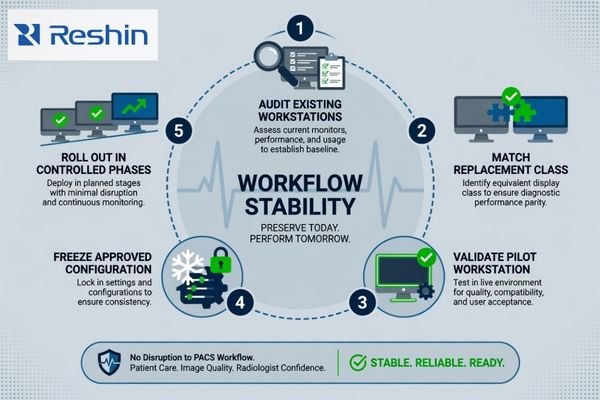
A replacement project is different from a new deployment. The hospital may already have stable reading habits, known service routines, accepted desk layouts, and PACS workstation settings that users trust. If the new monitor changes the workflow unexpectedly, the technical upgrade can create resistance, adjustment work, and acceptance delay.
That is why I treat radiology monitor replacement as a deployment standardization task. I first identify what must remain unchanged, then confirm what needs improvement, such as aging displays, inconsistent models, limited spare units, unstable brightness behavior, or difficult future replacement. A safe PACS workstation display replacement plan should follow five steps: audit the installed baseline, match the replacement display class, validate one representative workstation, freeze the approved configuration, and roll out the replacement in controlled phases. This leads to the first question: how to protect the PACS workflow during replacement.
Why PACS Workflow Should Be Protected During Radiology Monitor Replacement
Radiology monitor replacement is not only a hardware purchase. It affects workstation output, reading layout, user habits, calibration routine, and service planning across the PACS environment.
The existing PACS workflow should be protected during monitor replacement because many hospitals already have stable reading habits, display layouts, graphics settings, and maintenance processes. Replacement should reduce aging display risk without forcing unnecessary changes to a workflow that already works.

When I review a diagnostic monitor replacement project, I separate the display problem from the workflow that should remain stable. The monitor may need replacement because of age, inconsistency, brightness decline, limited availability, or supply risk. The PACS viewer layout, workstation role, and user routine may not need to change.
Replacement Should Not Become an Unplanned Workflow Redesign
A monitor replacement can accidentally become a workflow redesign when the new display changes resolution, aspect ratio, mounting height, screen position, cable routing, or viewer layout. Users may then need to adjust their reading habits even though the original goal was only replacement. For PACS and imaging workstation integrators, this risk matters because a display change can affect workstation acceptance even when the PACS software itself is unchanged.
The First Task Is to Preserve What Already Works
Before selecting a replacement direction, I identify which parts of the current setup are accepted by users and service teams. This may include the screen arrangement, dual-monitor workflow, calibration process, desk layout, cable route, reporting room routine, and service record method. If these conditions are stable, the replacement monitor should fit them as closely as possible. Improvement should focus on the display risk, not on unnecessary disruption.
What Existing Conditions Should Be Reviewed Before Selecting Replacement Monitors
Replacement planning should begin with the installed environment. I do not recommend selecting a new diagnostic display before the current PACS workstation conditions are documented.
Before selecting replacement monitors, the project team should review current workstation output, monitor resolution, screen layout, graphics card capability, cable type, mounting method, desk space, PACS viewer layout, calibration workflow, ambient lighting, user habits, replacement quantity, and rollout schedule.
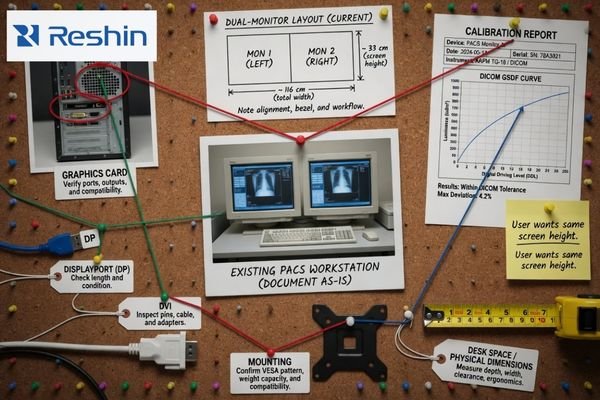
The existing workstation output is one of the first items I check. A replacement display must match the graphics card capability, available ports, cable type, expected resolution, and operating system display settings. If these items are ignored, the monitor may connect physically but still create wrong scaling, unstable recognition, or layout changes inside the PACS viewer1. This is especially important when the PACS monitor replacement project includes older workstations, several workstation generations, or different reading-room roles.
I also review the physical and operational conditions around the workstation. Mounting method, VESA arm, desk depth, cable path, room lighting, user position, and calibration workflow can all affect replacement success. A display that fits the specification may still fail user acceptance if it changes posture, reading distance, or screen arrangement. In Reshin replacement discussions, I usually ask the project team to provide the current monitor list, workstation output, cable or port type, PACS viewer layout, replacement quantity, room role, and rollout schedule before I recommend a replacement direction. This helps the discussion move from a general display request to a controlled replacement baseline.
Radiology Monitor Replacement Planning Matrix for PACS Workstations
A replacement matrix helps the project team convert existing conditions into planning actions. I use it to reduce assumptions before sample validation and batch procurement.
A radiology monitor replacement matrix should connect each existing PACS workstation condition with its replacement risk, confirmation item, and safer planning action. This helps biomedical, PACS, procurement, and integration teams preserve workflow while controlling technical risk.
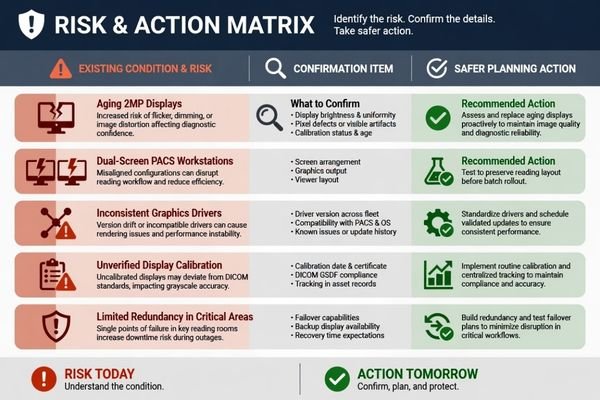
The matrix below is not a final specification. It is a planning tool for existing PACS environments. It helps the team identify where replacement may be simple, where sample testing is required, and where rollout should be limited until the risk is confirmed.
| Existing Project Condition | Replacement Risk | What to Confirm | Safer Planning Action |
|---|---|---|---|
| Aging 2MP displays in general review stations | New display may change layout, brightness behavior, or user acceptance | Current resolution, graphics output, viewer layout, calibration routine | Match the replacement class to the current role and validate with a sample workstation |
| Mixed monitor models across rooms | Inconsistent image behavior, accessories, service records, and spare unit planning | Installed model list, room role, calibration process, replacement quantity | Standardize replacement groups by room role and deployment phase |
| Dual-screen PACS workstations2 | Replacement may disrupt established side-by-side reading habits | Screen arrangement, graphics output, PACS viewer layout, desk space | Test whether the replacement preserves the reading layout before batch rollout |
| Limited graphics output on older workstations | New monitor may not run at the expected resolution or refresh behavior | Graphics card capability, port type, cable type, driver setting | Validate compatibility before approving the model for older workstation groups |
| No approved baseline record | The team cannot confirm whether the new display preserves the previous workflow | Current model, resolution, layout, cable, calibration method, room role | Create an installed baseline record before selecting replacements |
| Phased replacement across departments | Different batches may create inconsistent user experience or service complexity | Rollout timing, spare units, model continuity, documentation control | Freeze approved configurations and manage replacement by phase |
| Departments with strict reading habits | Users may reject changes in size, layout, brightness, or viewing distance | User workflow, ambient light, mounting position, acceptance criteria | Conduct user-side sample validation before full replacement |
| Existing calibration routine already accepted | New display may require a different process or unclear service ownership | Calibration method, software process, record handling, maintenance responsibility | Confirm repeatable calibration workflow before procurement expansion |
| No pilot-room or fallback plan | Batch rollout may continue even if users reject the new setup | Pilot workstation, user feedback, service response, fallback unit | Approve one pilot room and define a fallback plan before expansion |
This matrix helps avoid replacing monitors one room at a time without a shared plan. At Reshin, I use this type of matrix to group replacement needs before model recommendation. I do not treat every room as the same request. I usually separate general review stations, diagnostic reading stations, dual-screen workflows, older workstation groups, and phased replacement batches before discussing sample approval. For PACS integrators, I focus on workstation output and viewer layout. For biomedical teams, I focus on calibration responsibility and service records. For procurement teams, I focus on approved configuration, spare units, and model continuity. For radiology managers, I focus on user acceptance and minimal reading disruption.
How to Validate Replacement Monitors Before Full PACS Rollout
Sample validation should happen before batch replacement. A monitor that works during a quick display check may still create workflow disruption when deployed across multiple PACS workstations.
Replacement monitor validation should confirm workstation compatibility, resolution recognition, DICOM-related behavior, brightness stability, calibration process, PACS viewer layout, user acceptance, physical mounting, documentation, approved configuration repeatability, and phased rollout planning before full deployment.
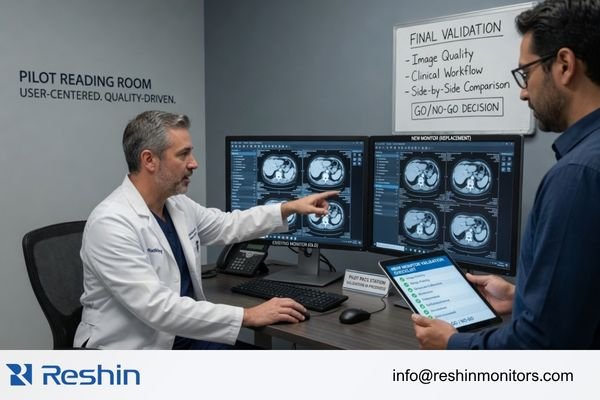
I prefer to validate replacement monitors with the actual workstation chain or a representative configuration. The test should include graphics output, cable type, display mode, resolution recognition, PACS viewer layout, calibration workflow, mounting condition, user acceptance, and configuration repeatability. At Reshin, I usually separate sample validation into workstation signal review, display behavior confirmation, physical installation review, documentation control, and replacement batch planning. If your team needs engineering review before full PACS rollout, send the current monitor list, workstation output, replacement quantity, and rollout schedule to info@reshinmonitors.com.
Sample Testing Should Reproduce the Existing Workflow
The sample should be tested in the same workflow that the hospital wants to preserve. If the current setup uses a fixed screen layout, the replacement should be checked under that layout. If the room depends on a specific mounting height or viewing distance, the physical installation should be reviewed. The goal is not only to confirm that images appear, but to confirm that the replacement monitor does not create avoidable changes to daily operation.
Rollout Planning Should Include Documentation and Supply Control
After the sample passes, the approval should define the exact replacement condition. This includes workstation type, cable configuration, mounting method, calibration process, accessories, documentation, accepted room role, and service ownership. I usually consider the replacement ready for wider rollout only when the workstation recognizes the expected resolution, the PACS viewer layout remains stable, calibration responsibility is clear, user feedback does not show workflow disruption, and the approved configuration can be repeated for later batches. For phased projects, I also connect the approval with long-term supply and model consistency because replacement may continue over months or years.
Recommended Radiology Monitor Models for PACS Replacement Planning
After the existing workflow is documented and the validation method is clear, product direction becomes easier to manage.3 I prefer to connect each replacement model to a practical PACS role instead of treating one display as suitable for every workstation. Final approval should depend on sample testing, workstation compatibility, calibration workflow, and user acceptance.
The following model directions can support PACS replacement planning when used in the right project context. They are not universal recommendations. Each model should be tested against the current workstation output, screen layout, room conditions, documentation needs, and phased deployment plan before batch procurement is approved.
| Clinical Role / Application | Usage Pattern | Display Requirements | Recommended Model | Key Integration Considerations |
|---|---|---|---|---|
| General 2MP-class PACS review replacement | Routine review workstation replacement or aging display refresh | Practical 2MP-class diagnostic display direction depending on project requirements | MD22CA | Confirm current resolution, graphics output, calibration workflow, mounting, and user acceptance |
| CT/MRI or mixed-modality review workstation replacement | Replacement for modality review or cross-sectional image review workstation | 2MP-class diagnostic display behavior after validation | MD26C | Test PACS viewer layout, grayscale and color behavior, workstation compatibility, and cable configuration |
| 3MP diagnostic workstation replacement | Replacement for selected diagnostic reading stations or mixed image review rooms | 3MP DICOM color monitor direction depending on room role | MD32C | Validate display layout, brightness behavior, calibration process, and batch consistency |
| Dual-screen PACS workflow replacement or consolidation | Replacement where existing dual-screen style workflow may need a unified display direction | 4MP dual-screen PACS display direction depending on user acceptance | MD45C | Review graphics output, screen layout, desk space, reading habits, and phased rollout risk |
FAQ
Can radiology monitors be replaced without changing the PACS software? Yes, in many projects the PACS software can remain unchanged. The replacement monitor should still be tested with the existing workstation output, viewer layout, calibration workflow, and user habits before rollout.
What should be checked before replacing PACS workstation monitors? The team should check graphics output, current resolution, cable type, screen layout, mounting method, PACS viewer behavior, calibration process, ambient lighting, user acceptance, documentation, replacement quantity, and rollout timing.
Is it better to replace all radiology monitors at once or in phases? It depends on project requirements, workstation variation, user acceptance risk, and service capacity. Phased replacement can reduce rollout risk, but it requires stronger control of approved configuration, model consistency, documentation, and spare unit planning.
How can hospitals avoid workflow disruption during diagnostic monitor replacement? Hospitals can reduce disruption by documenting the installed baseline, testing samples in real workstation conditions, preserving accepted screen layouts, confirming calibration responsibility, and freezing approved replacement configurations before batch deployment.
What information should a project team prepare before requesting replacement support? It is useful to prepare the current monitor list, workstation output, cable or port type, PACS viewer layout, room role, replacement quantity, calibration process, and rollout schedule. These details help the supplier review replacement risk more accurately.
Conclusion
Radiology monitor replacement should protect the existing PACS workflow while reducing the risk created by aging, inconsistent, or difficult-to-maintain displays. I start by auditing the installed baseline, reviewing workstation output, confirming screen layout, checking PACS viewer behavior, documenting calibration routine, and validating representative replacement conditions. A controlled replacement plan should then freeze the approved configuration and manage rollout by phase, so diagnostic monitor replacement does not become an unnecessary workflow redesign.
At Reshin, I support PACS monitor replacement projects by connecting sample validation, workstation integration review, documentation continuity, phased rollout planning, and long-term model consistency. This helps PACS integrators, biomedical teams, department managers, equipment manufacturers, distributors, and procurement teams control replacement risk without disrupting established workflows. Share your PACS monitor replacement plan for engineering review.
✉️ info@reshinmonitors.com
-
"Resolving font legibility in PACS on high resolution monitors – Barco", https://www.barco.com/en/support/knowledge-base/15600-font-too-small-on-high-resolution-monitors-e-g-32mp-with-pacs. This technical support article explains that high-resolution monitor settings can affect PACS font size, scaling, and viewer display behavior. This supports checking resolution, port type, graphics settings, and PACS compatibility before replacement. Scope note: Actual behavior depends on PACS software, GPU settings, and monitor configuration. ↩
-
"PACS Diagnostic Monitors: How to Choose the Right Display", https://reshinmonitors.com/how-to-choose-the-right-pacs-diagnostic-monitor/. This source discusses PACS monitor selection, including dual-screen workstation use for image comparison and routine review. Scope note: The best configuration depends on modality, reading workflow, and workstation setup. ↩
-
"How to Document Product Validation Process and Outcomes", https://www.linkedin.com/advice/1/how-can-you-document-product-validation-process-i6rbc. This source explains the value of documenting validation steps, results, and decisions. This supports recording the existing PACS workflow and validation method before choosing a replacement monitor. Scope note: It is general product validation guidance, not specific to medical imaging. ↩


