Cath lab monitor replacement becomes risky when it is treated as a simple display swap. I usually start by reviewing the installed equipment baseline, because signal chains, mounting structures, room workflows, and service routines may already be fixed.
A safe cath lab monitor replacement plan should follow five steps: audit the installed equipment baseline, confirm the signal chain, validate a representative setup, freeze the approved configuration, and control model consistency across future batches.
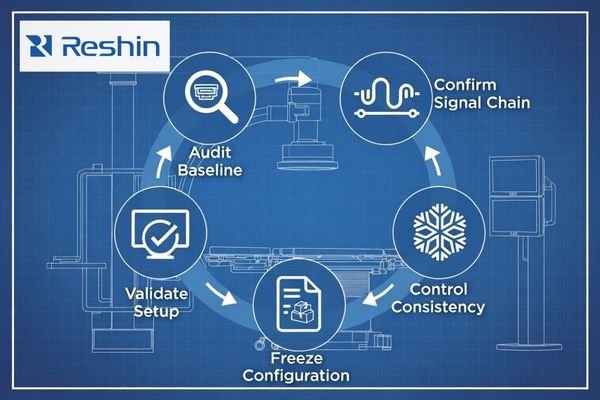
In long-term cath lab equipment projects, the display is part of a larger interventional imaging environment. It may connect to angiography equipment, fluoroscopy output, C-arm systems, video routers, switchers, ceiling-mounted integration platforms, or room display control systems. If the replacement monitor changes the signal path, mounting condition, image layout, or display behavior unexpectedly, the project may create new service risk.
That is why I treat cath lab monitor replacement as a lifecycle planning task. I first document the current equipment condition, then identify what must remain unchanged and what should be improved. A cath lab display replacement project should reduce aging display risk while protecting the installed angiography signal chain, room integration, and future service continuity before replacement models are discussed.
Why Cath Lab Monitor Replacement Requires Long-Term Equipment Planning
Cath lab monitor replacement is not only a hardware purchase. The display is connected to imaging equipment, room layout, mounting structure, operator habits, source routing, and service routines.
Long-term cath lab monitor replacement should reduce aging display risk while preserving stable equipment integration. The project team should review the installed signal chain, room workflow, mounting condition, documentation, spare unit needs, and future replacement plan before approving a replacement direction.

When I review a cath lab replacement project, I separate the display problem from the installed system that should remain stable. Aging or inconsistent monitors may need replacement, but the angiography system, fluoroscopy source output, C-arm output, room routing, and mounting structure may not need to change.
Replacement Should Protect the Installed Equipment Baseline
The installed baseline includes the source device, interface type, cable route, room layout, mounting position, power condition, signal routing method, and service routine. If these conditions are not reviewed, a replacement monitor may connect physically but still create signal recognition, image scaling, mounting, brightness, or workflow acceptance issues. I prefer to preserve stable integration first, then improve the display condition through validated replacement.
Long-Term Projects Need More Than One Sample Decision
A single sample approval may not be enough for a multi-year equipment project.1 Replacement may happen across several rooms, hospitals, equipment generations, procurement phases, or OEM equipment programs. If the approved configuration is not controlled, later batches may differ in accessories, cable requirements, documentation, firmware settings, labeling, or supply status. This is why I connect cath lab equipment lifecycle planning with spare unit logic, configuration control, and future service continuity.
What Installed Cath Lab Conditions Should Be Reviewed Before Replacement
Replacement planning should start with the installed environment. I do not recommend selecting a new monitor direction before the current signal chain, room layout, and service condition are documented.
Before cath lab monitor replacement, the project team should review the current monitor list, imaging system output, video interface, cable type, routing path, expected resolution, mounting method, arm or boom structure, room layout, power conditions, cleaning requirements, accessories, documentation, replacement quantity, spare unit needs, rollout schedule, and target supply period.
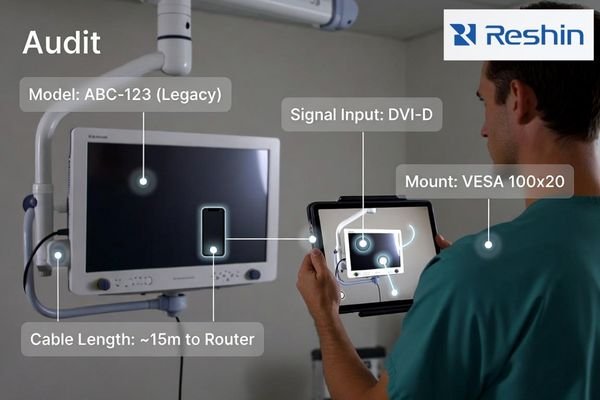
The current monitor list should include display size, quantity, room role, connected source, interface type, mounting method, and any known service issue. I also review the angiography, fluoroscopy, C-arm, or routing source that feeds the display. Cable type, cable length, expected resolution, signal routing path, input behavior, and source switching requirements should be confirmed before the replacement direction is discussed. This reduces the chance of approving a monitor that cannot repeat the current room workflow.
Physical and lifecycle conditions matter as much as signal behavior. Fixed mounting arms, ceiling booms, wall brackets, power position, cleaning requirements, accessories, labeling, and documentation can all affect replacement success. At Reshin, I usually ask for the current monitor list, signal source, interface type, cable path, mounting photos, room role, replacement quantity, project timeline, and target supply period before recommending a replacement direction. This helps keep the review practical and close to the installed equipment condition.
For C-arm and mobile imaging equipment projects, I also review whether the display is part of a fixed room system, a mobile imaging cart, or a repeated equipment platform. This is why replacement planning may need to connect with C-arm mobile imaging manufacturers when the monitor must remain compatible with repeated system production or field replacement needs.
Cath Lab Monitor Replacement Planning Matrix for Long-Term Projects
A replacement planning matrix helps the project team turn installed conditions into safer actions. I use it to identify which risks require sample testing, documentation control, configuration freeze, or phased rollout.
A cath lab monitor replacement matrix should connect existing project conditions with replacement risk, confirmation items, and safer planning actions. This helps equipment manufacturers, integrators, biomedical teams, and procurement teams avoid uncontrolled changes during long-term replacement.
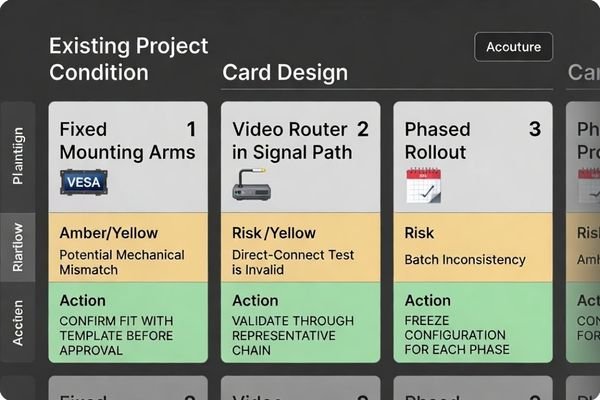
The matrix below is a planning tool, not a final specification. It helps the project team understand where replacement may be simple and where the installed system requires deeper validation before procurement expands.
| Existing Project Condition | Replacement Risk | What to Confirm | Safer Planning Action |
|---|---|---|---|
| Aging displays in cath lab rooms | Replacement may change image layout, brightness behavior, or user acceptance | Current display role, source output, interface, resolution, room lighting | Validate a sample in the existing room or representative setup |
| Mixed monitor generations2 | Different displays may create inconsistent service and replacement records | Installed model list, room role, accessories, documentation | Group replacements by room role and equipment generation |
| Different angiography or C-arm outputs | One replacement direction may not fit all source devices | Source type, signal format, interface, resolution, refresh behavior | Test each major equipment output before standardizing |
| Long cable routing | Signal stability may change after replacement | Cable type, length, connector condition, routing path | Validate the display with the planned cable route |
| Video router or switcher in the signal path | Direct connection testing may not represent the installed room behavior | Router output, input switching, signal lock, scaling, source switching | Validate the monitor through the actual routing path or a representative chain |
| Image scaling or cropping sensitivity | The replacement may change image layout or displayed field area | Source resolution, aspect ratio, scaling mode, display settings | Confirm image layout before approval, not only signal recognition |
| Fixed mounting arms or ceiling booms | New monitor may not fit the existing structure | VESA pattern, weight condition, arm movement, cable clearance | Confirm mechanical fit before sample approval |
| Phased replacement across rooms or hospitals | Later batches may differ from the approved sample | Rollout phase, delivery schedule, spare unit plan, documentation | Freeze approved configurations by phase |
| OEM equipment projects requiring repeat supply | Future production may be affected by model changes | Forecast quantity, supply period, configuration record | Confirm continuity expectations before procurement expansion |
| No approved baseline record | The team may not know what condition the replacement should match | Existing setup, signal chain, accessories, settings | Create a baseline record before selecting replacement direction |
| Unclear spare unit plan | Service teams may lack compatible replacement units later | Spare quantity, room priority, replacement schedule | Define spare unit logic during project planning |
| Documentation requirements | Installation and service teams may receive inconsistent information | Datasheet, user guide, packing list, service notes, labels | Freeze documentation before batch order |
After this matrix, I usually group replacement risks by room role, equipment generation, signal chain, mounting condition, and rollout phase. This helps Reshin support a clearer replacement path instead of treating all cath lab rooms as the same display problem. For cath lab equipment manufacturers, I focus on repeat supply, approved configuration, and change control. For interventional suite integrators, I focus on signal routing, mounting, and room-level installation conditions. For hospital biomedical teams, I focus on service records, spare units, and replacement responsibility. For procurement teams, I focus on documentation continuity, phase planning, and long-term model consistency.
How to Validate Replacement Monitors in the Existing Cath Lab Signal Chain
Validation should use the actual angiography, fluoroscopy, C-arm, video routing, or representative equipment signal chain whenever possible. A bench test alone may not show room-level risk.
Cath lab replacement monitor validation should confirm signal recognition, input stability, image layout, resolution behavior, color and grayscale presentation, brightness behavior, source switching, cable routing, mounting, cleaning conditions, user acceptance, documentation, and repeatability before full replacement.
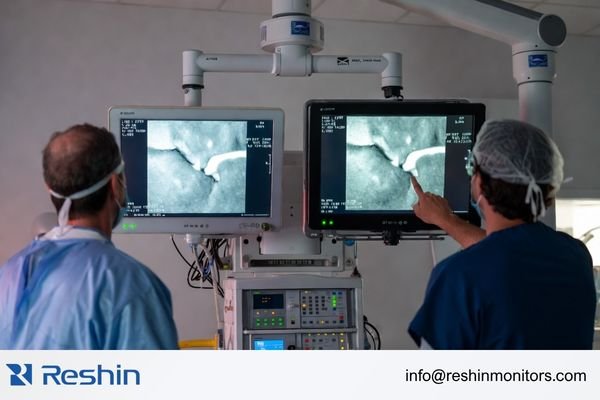
I prefer to test the replacement monitor under the same signal path planned for installation. This includes the source device, routing path, cable type, input interface, display setting, mounting position, room lighting, and source switching behavior. For engineering review, send the current monitor list, signal source, interface type, cable route, mounting photos, replacement quantity, project timeline, and target supply period to info@reshinmonitors.com.
Signal and Image Behavior Should Be Tested Under Installed Conditions
The team should confirm signal lock, input recognition, image layout, resolution behavior, color and grayscale presentation, brightness visibility, and stability during source changes. If the room uses a router, switcher, or long cable path, the display should be tested through that path. A replacement monitor that works in direct connection may behave differently in the installed signal chain.3
For angiography monitor replacement or C-arm monitor replacement projects, I also check whether the image is displayed with the expected aspect ratio, scaling mode, and screen position. The goal is not only to make the signal appear. The replacement monitor should preserve the intended image layout and avoid unexpected cropping, stretching, or source-switching instability.
Mechanical and User-Side Acceptance Should Be Documented
Mounting fit, viewing position, cable clearance, cleaning access, power location, arm movement, ceiling boom clearance, and user feedback should be recorded during validation. At Reshin, I usually support sample validation by helping the project team confirm the tested configuration, review documentation, freeze accessories, and connect the approved setup with long-term model consistency. This does not replace project-specific approval, but it helps reduce repeat mistakes during phased replacement.
I usually consider the replacement ready for wider rollout only when the monitor locks the expected signal reliably, preserves the planned image layout, fits the existing mounting structure, passes user-side review, keeps the documentation clear, and can be repeated with the same configuration in later batches. Without these pass criteria, a sample test may confirm only a temporary connection rather than a repeatable replacement solution.
How to Freeze the Approved Configuration for Multi-Year Equipment Projects
A passed sample should become an approved configuration record before procurement expands. This record should describe the condition that passed validation, not only the replacement display direction.
For long-term cath lab equipment projects, I include monitor model, input interface, cable configuration, mounting accessories, power setup, display settings, documentation, packaging or labeling needs, spare units, replacement schedule, and change-control process in the approved configuration. If a project requires repeat delivery over several years, this record helps prevent later batches from drifting away from the tested setup.
Configuration freeze should also include the supply and communication process. If a component, accessory, packaging method, firmware setting, labeling rule, or documentation requirement changes, the project team should know whether retesting or approval update is required. I connect this step with long-term supply and model consistency because cath lab replacement projects often continue beyond one order, one room, or one installation phase.
For medical display OEM/ODM equipment projects, I also treat configuration freeze as part of project continuity. The approved configuration should not depend only on a single sample. It should define what must remain stable across repeated procurement, field replacement, documentation updates, and future production planning.
Recommended Cath Lab Monitor Directions for Replacement Projects
After the installed condition, validation path, and configuration freeze method are clear, product direction becomes more controlled. I prefer to connect each replacement direction to a practical equipment role instead of presenting one monitor direction as suitable for every cath lab, angiography, or C-arm project. Final approval should depend on signal-chain testing and project-specific validation.
The following table uses replacement directions rather than fixed model codes. This is safer for long-term cath lab equipment projects because the final display choice should be confirmed against the source device, interface list, mounting condition, documentation needs, replacement quantity, and project lifecycle before procurement.
| Clinical Role / Application | Usage Pattern | Display Requirements | Replacement Direction | Key Integration Considerations |
|---|---|---|---|---|
| Cath lab main display replacement | Replacement for primary interventional imaging display role | Main display direction depending on source output, viewing distance, and room layout | Cath lab main display replacement direction | Confirm angiography or fluoroscopy output, signal stability, image layout, mounting, and user acceptance |
| Angiography system monitor replacement | Equipment-side or room-integrated angiography display replacement | Angiography monitor replacement direction depending on interface and workflow | Angiography system display replacement direction | Validate input recognition, resolution behavior, cable path, brightness visibility, scaling, and documentation |
| C-arm equipment monitor replacement | Mobile or fixed C-arm display replacement in equipment projects | C-arm monitor replacement direction depending on mechanical and signal requirements | C-arm equipment display replacement direction | Review source output, mounting structure, power condition, cable routing, and repeat supply needs |
| Interventional room auxiliary display replacement | Secondary, reference, or supporting source display role | Auxiliary display direction depending on source priority and room position | Interventional room auxiliary display direction | Confirm multi-source routing, input switching, room position, service access, and accessory consistency |
| Long-term OEM equipment replacement | Repeat supply for equipment manufacturers or multi-year replacement programs | OEM equipment replacement direction depending on approved configuration and supply period | Long-term OEM display replacement direction | Freeze interface, mechanical details, labeling, packaging, documentation, spare units, and change-control process |
These directions are not universal recommendations. They are starting points for engineering review. In a cath lab display replacement project, the safer decision is the one that can be validated in the signal chain, repeated across future batches, documented clearly, and maintained without creating avoidable service complexity.
FAQ
When should cath lab monitors be replaced in long-term equipment projects? Cath lab monitors should be considered for replacement when aging, inconsistent behavior, limited spare units, supply risk, mounting mismatch, signal-chain instability, or service difficulty affects the equipment project. The timing should be based on installed condition review and project-specific validation.
What should be checked before replacing cath lab monitors? The team should check the current monitor list, signal source, interface type, cable path, resolution, room layout, mounting structure, power condition, cleaning expectations, accessories, documentation, spare unit needs, rollout schedule, and target supply period.
Can cath lab monitors be replaced without changing the angiography or C-arm system? Yes, in many projects the imaging system can remain unchanged. The replacement monitor still needs validation with the existing angiography, fluoroscopy, C-arm, router, switcher, or room signal chain before approval.
Why is model consistency important for cath lab monitor replacement? Model consistency helps reduce variation in accessories, mounting, documentation, signal behavior, spare units, and service communication. This is especially important when replacement happens across several rooms, hospitals, equipment generations, or procurement phases.
Should cath lab monitor replacement be done room by room or in phases? It depends on project requirements, equipment variation, service capacity, and procurement planning. Phased replacement can reduce risk, but each phase should have a frozen approved configuration, a clear spare unit plan, and a documented change-control process.
What information should be prepared before requesting cath lab monitor replacement support? The project team should prepare the current monitor list, signal source, interface type, cable route, mounting photos, room role, replacement quantity, spare unit needs, rollout schedule, and expected supply period. These details help the supplier review replacement risk more accurately before recommending a monitor direction.
Conclusion
Cath lab monitor replacement for long-term equipment projects should begin with the installed baseline, not with a simple hardware comparison. I review the source device, interface type, signal routing, cable path, mounting structure, room role, documentation, spare units, rollout plan, and target supply period before recommending a replacement direction. Then I validate the replacement monitor inside the actual or representative signal chain and freeze the approved configuration before procurement expands.
At Reshin, I support cath lab replacement projects by connecting installed-condition review, signal-chain validation, sample testing, configuration freeze, documentation continuity, spare unit planning, and long-term model consistency. This helps equipment manufacturers, cath lab integrators, C-arm projects, hospital biomedical teams, distributors, and procurement teams reduce avoidable replacement risk across multi-year equipment programs. Share your cath lab monitor replacement plan for engineering review.
✉️ info@reshinmonitors.com
-
"Medical Device Verification Statistical Techniques", https://starfishmedical.com/resource/medical-device-design-verification/. ISO 13485:2016 design verification requirements recommend evaluating multiple production units throughout the project lifecycle to ensure consistency and control specification drift over extended procurement phases. Evidence role: expert_consensus; source type: institution. Supports: A single sample approval may not be enough for a multi-year equipment project.. Scope note: ISO 13485 provides general guidance without prescribing exact sample numbers, which should be tailored to project complexity. ↩
-
"Just-in-time approach in healthcare inventory management – PMC", https://pmc.ncbi.nlm.nih.gov/articles/PMC9805965/. Guidelines on medical device asset management note that maintaining multiple generations of displays increases complexity of service protocols and replacement record-keeping. Evidence role: general_support; source type: government. Supports: Different displays may create inconsistent service and replacement records. Scope note: Scope may differ depending on hospital size and asset-management system maturity. ↩
-
"How long can a hdmi 2.1 cable be without quality loss – Reddit", https://www.reddit.com/r/buildapc/comments/12amhzk/how_long_can_a_hdmi_21_cable_be_without_quality/. This source explains how components like switchers, routers, and long cable runs can alter digital display handshakes and degrade signal quality, causing a monitor that works on a direct link to fail in a complex signal chain. Evidence role: mechanism; source type: encyclopedia. Supports: A replacement monitor that works in direct connection may behave differently in the installed signal chain.. Scope note: Specific effects depend on cable length, connector type, and component quality. ↩