
Surgical monitor selection becomes risky when one display class is expected to support every procedure scenario. I usually start by separating ENT, urology, GI endoscopy, laparoscopy, and OR observation before discussing size, resolution, or model direction.
Surgical monitor model mapping should connect each display class to the procedure workflow, video source, signal chain, viewing distance, mounting method, room layout, and user role. A practical mapping plan should follow five checks: procedure workflow, video source and signal chain, display class, installation conditions, and sample validation before model freeze.
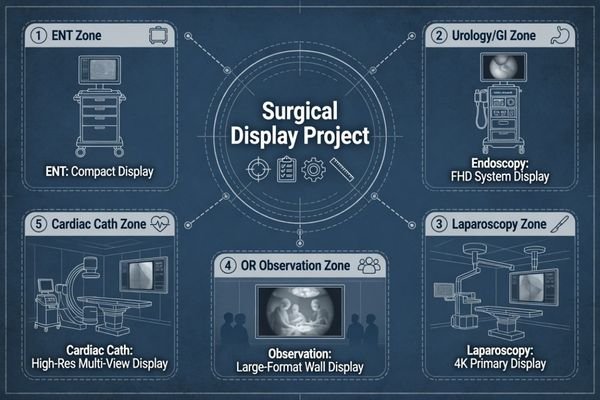
In real surgical display projects, the mistake is often not choosing a poor monitor. The mistake is comparing models before the procedure workflow and video chain are clear. An ENT cart, a urology tower, a GI endoscopy system, a laparoscopic setup, and an OR observation wall may all require medical display support, but their engineering risks are not the same.
That is why I map the workflow first, then connect it to the proper surgical monitor class. I review procedure type, video source, output resolution, signal interface, cable route, viewing distance, mounting position, user role, and deployment scale before discussing product direction. This mapping logic leads directly to the first project decision: the procedure workflow.
Why Surgical Monitor Mapping Should Start from the Procedure Workflow
A surgical monitor should not be selected from screen size or resolution alone. I first check the procedure type, video chain, room layout, viewing position, mounting method, and user role.
The procedure workflow defines the surgical display priority. ENT, urology, GI endoscopy, laparoscopy, and OR observation create different demands for size, signal compatibility, viewing distance, image behavior, mounting, cable routing, glare control, and integration validation. Model mapping should happen before model comparison.
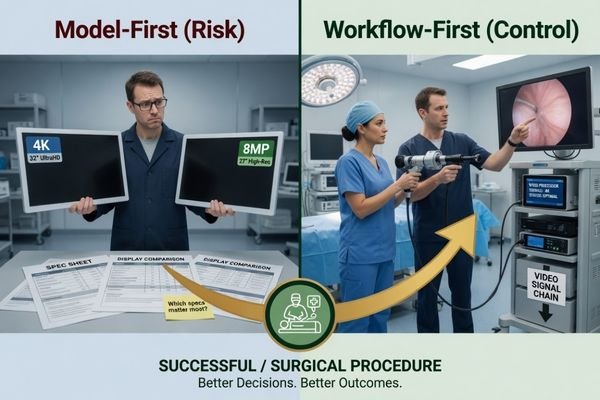
When I review a surgical monitor project, I separate the procedure requirement from the product preference. A compact ENT setup, a mobile endoscopy cart, a laparoscopic system, and a large OR display may all need reliable video presentation, but the installation risks are different. Workflow mapping prevents over-selection, under-selection, and unnecessary model changes after sample testing.
Procedure Type Defines the Display Role
ENT procedures may need a compact and practical monitor direction because cart space, short viewing distance, and equipment mobility can be important. Urology and GI endoscopy projects often depend on stable FHD or WUXGA-class image review and reliable signal behavior from the endoscopy system. Laparoscopy may require a larger screen, higher resolution direction, and stricter validation because the display is central to the procedure workflow. OR observation may need room visibility and signal routing more than close procedure viewing. I avoid assuming one monitor size fits all procedure rooms.
Integration Conditions Define the Validation Path
The video source and integration chain are as important as the monitor class. I check whether the display receives signal from an endoscopy processor, surgical camera system, camera control unit, video router, recorder, extender, or OR integration platform. For endoscopy system manufacturers, model mapping should confirm signal interface, output resolution, cable route, mounting plan, and repeatable sample testing before batch use.
How ENT, Urology, GI, Laparoscopy and OR Observation Create Different Display Priorities
Each procedure scenario creates its own display priority. I compare viewing distance, video source, cable movement, room movement, user role, and integration burden before recommending a monitor class.
ENT projects may need compact and practical deployment. Urology and GI endoscopy may prioritize stable image review and signal compatibility. Laparoscopy may require larger size, higher resolution, stricter video chain validation, and workflow acceptance. OR observation may prioritize room visibility, mounting, power planning, and signal routing.
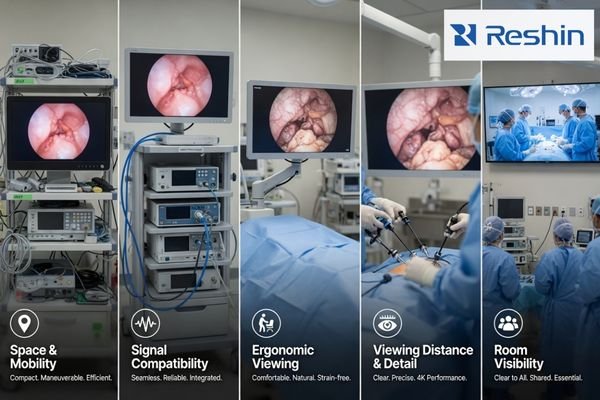
ENT projects often begin with space control. The monitor may be installed on a cart or positioned close to the procedure area, so practical size, mounting, cable routing, and short-distance viewing matter. In some projects, the display direction also needs to consider legacy video formats, existing carts, and limited installation space.
Urology and GI endoscopy projects usually require stable video presentation from the endoscopy system, predictable signal compatibility, and comfortable procedure-side viewing. In these projects, I focus on whether the monitor works correctly with the system output, whether the selected signal interface is repeatable, and whether the image behavior is acceptable during sample testing.
Laparoscopy projects may need a larger display class or 4K direction, depending on procedure workflow and video source. The full video chain should be reviewed, including camera output, processor output, cable route, router or recorder involvement, and display input. Surgical light reflection, viewing angle, cable movement, and perceived latency should also be checked during validation.
OR observation is different. It may not require close procedure viewing, but it may need a large-format display for room visibility, teaching, team awareness, or integrated video routing. For surgical systems and OR integrators, this means the monitor direction should be mapped to the actual viewing role, not only to the word “surgical.”
In Reshin surgical monitor discussions, I usually ask the project team to share the procedure type, video source, output resolution, signal interface, cable route, mounting plan, viewing distance, quantity, and target deployment schedule before recommending a display direction. These inputs help move the discussion from a general surgical display request to a controlled integration baseline.
Surgical Monitor Model Mapping by Procedure Scenario
Model mapping becomes clearer when the procedure scenario is separated from the model code. I use this step to define the display class before discussing detailed product selection.
A procedure scenario should be mapped to a typical display class, usage pattern, validation focus, and selection direction. This helps project teams decide which surgical monitor class deserves sample validation before specific models are reviewed.
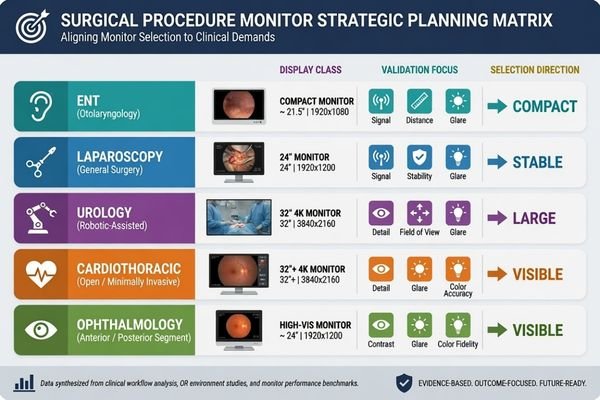
Before I recommend specific models, I build a practical mapping table. This table is not a final specification. It is a project filter. It helps the team understand which monitor class may fit the procedure workflow and which risks should be tested before model approval.
| Procedure Scenario | Typical Display Class | Usage Pattern | Validation Focus | Selection Direction |
|---|---|---|---|---|
| ENT procedure setup | Compact HD or small-format surgical monitor | Close viewing, cart-based or space-limited deployment | Legacy video format, signal compatibility, cart space, short viewing distance, mounting, cable route | Choose a compact class that fits existing procedure room or cart conditions |
| Urology endoscopy system | FHD endoscopy monitor1 | Endoscopy tower or procedure-side viewing | Endoscopy tower output, resolution recognition, signal interface, cable movement, color and brightness behavior | Select a stable endoscopy display class after system-level testing |
| GI endoscopy system | 24-inch FHD/WUXGA-class endoscopy monitor | Routine endoscopy image viewing with system integration | Signal interface, 16:10 workspace needs, image presentation, cleaning workflow, accessories | Match monitor size and input behavior to the endoscopy system design |
| Laparoscopy project | Larger FHD or 4K surgical monitor | Procedure viewing from a greater distance or central OR position | 4K signal chain, cable stability, viewing distance, surgical light reflection, latency perception, mounting stability | Validate larger or higher-resolution classes with the real surgical video chain |
| OR observation | Large-format OR display | Room visibility, observation, teaching, or team awareness | Video routing, multi-user visibility, wall or arm mounting, power configuration, visibility across the room | Use a large-format display class when observation is the main role |
This mapping step helps avoid premature model freeze. It also gives engineering, procurement, and clinical-side teams a common language. At Reshin, I usually group surgical monitor projects by procedure role, video source, display size direction, installation method, and batch deployment stage. I do not treat an ENT cart, a urology tower, a GI endoscopy system, a laparoscopic setup, and an OR observation wall as the same request.
After the display class is agreed, the next step is to confirm whether the selected model behaves correctly in the real procedure environment.
What Should Be Confirmed Before Freezing a Surgical Monitor Model
Model mapping is only the first step. Before a surgical monitor is frozen for batch use, I prefer to confirm both video behavior and installation conditions.
Before model freeze, the project team should confirm video source, signal interface, output resolution, cable type, cable length, mounting method, viewing distance, color and brightness behavior, glare under surgical lighting, cleanability expectations, power configuration, OR integration conditions, documentation, accessories, batch consistency, and long-term supply.
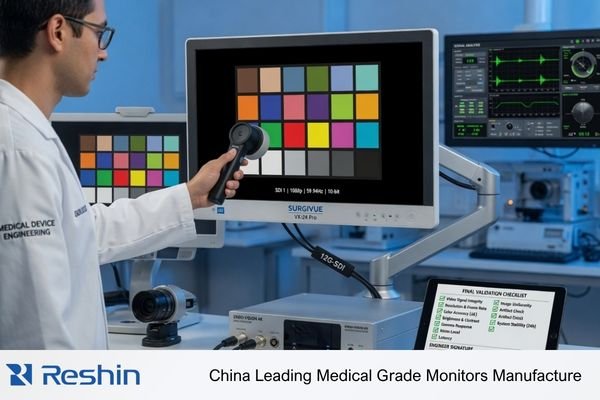
A monitor class may look suitable on paper, but project risk appears during integration. I check the surgical video source, signal output, cable length, cable route, mounting method, room layout, user position, power configuration, documentation needs, and future replacement plan. If your team needs engineering review before surgical monitor model freeze, send the procedure type, video source, output resolution, signal interface, cable route, mounting plan, quantity, and rollout schedule to info@reshinmonitors.com.
Video Source and Signal Chain Should Be Tested Together
A surgical monitor should be tested with the actual video source or a representative system. Signal interface, output resolution, color behavior, brightness setting, display mode, cable stability, and source switching should be confirmed before batch approval. I also check whether the monitor remains practical inside the procedure workflow. A sample that works in a test room may still create risk2 if the real video chain, cable route, router, recorder, extender, or mounting condition is different.
At Reshin, I usually separate sample validation into video source review, signal chain confirmation, display behavior check, installation review, documentation control, and batch deployment planning. This makes it easier for the customer to decide whether one approved configuration can be repeated across later equipment builds or multi-room deployments.
Installation and Supply Conditions Should Be Frozen Clearly
Physical integration should be reviewed before procurement expands. Mounting position, viewing distance, cleanability expectations, power configuration, accessories, packing, documentation, and service communication should be confirmed. I also consider batch consistency and long-term supply and model consistency, especially when the monitor will be integrated into surgical equipment or deployed across multiple rooms.
I usually consider a surgical monitor ready for wider rollout only when the system recognizes the expected resolution, the signal remains stable through the actual cable route, color and brightness behavior are acceptable under the intended room conditions, mounting and viewing position are confirmed, and the approved configuration can be repeated for later batches. These items do not replace image validation, but they reduce later installation, service, and replacement uncertainty.
Recommended Surgical Monitor Models for Different Procedure Projects
After the procedure workflow and display class are clear, product selection becomes more controlled. I prefer to connect each model to a practical surgical role instead of presenting one display as suitable for every procedure room. Final approval should still depend on sample testing, video source compatibility, mounting review, installation conditions, and project acceptance criteria.
The following mapping uses related Reshin surgical monitor models as project directions. It is not a clinical claim and does not replace validation. The goal is to help endoscopy system manufacturers, OR integrators, biomedical teams, distributors, and procurement teams compare monitor roles in a structured way before detailed evaluation.
| Clinical Role / Application | Usage Pattern | Display Requirements | Recommended Model | Key Integration Considerations |
|---|---|---|---|---|
| ENT procedure display | Compact setup, close viewing, cart-based or space-limited deployment | Compact HD surgical monitor direction for ENT or legacy video workflows3 | MS192SA | Confirm video source, mounting method, cable route, viewing distance, cart space, and workflow fit |
| Urology endoscopy monitor | Endoscopy tower or procedure-side image viewing | 21.5-inch FHD endoscopy display direction after system validation | MS220SA | Test system output, resolution recognition, signal interface, color behavior, accessories, and user acceptance |
| GI endoscopy monitor | Routine endoscopy system integration and wider image review | 24-inch WUXGA / 16:10 endoscopy monitor direction for GI workflow | MS247SA | Validate signal interface, mounting plan, cleaning workflow, power configuration, accessories, and batch consistency |
| Laparoscopy surgical display | Procedure viewing where larger size or 4K direction may be required | 32-inch 4K surgical monitor direction depending on video source and workflow | MS322PB | Confirm 4K output, cable stability, viewing distance, mounting, glare control, and OR integration conditions |
| OR observation display | Large-format room visibility, observation, teaching, or team awareness | 55-inch 4K OR observation display direction | MS550P | Review signal routing, wall or arm mounting, power plan, room visibility, documentation needs, and rollout conditions |
FAQ
Should every surgical department use the same monitor model? No. Surgical monitor standardization should still respect procedure workflow, video source, viewing distance, mounting method, room layout, and user role. One model may simplify procurement, but it may not fit every procedure scenario.
Is a 4K surgical monitor always necessary for endoscopy projects? No. A 4K direction may be useful when the video source, procedure workflow, signal chain, and viewing conditions support it. For some ENT, urology, or GI projects, an HD, FHD, or WUXGA-class surgical monitor may be more practical depending on project requirements.
What should be tested before approving a surgical monitor for batch deployment? The team should test video source compatibility, signal interface, output resolution, cable stability, color and brightness behavior, display mode, mounting, viewing distance, power configuration, documentation, accessories, and batch consistency.
How should OR observation displays be mapped differently from endoscopy monitors? OR observation displays are usually mapped for room visibility, signal routing, mounting, teaching, and team awareness rather than close procedure viewing. Their validation should focus on integration position, viewing distance, video routing, power plan, and display role inside the OR.
What information should a project team prepare before requesting surgical monitor support? It is useful to prepare the procedure type, video source, output resolution, signal interface, cable route, mounting plan, viewing distance, quantity, accessories, and rollout schedule. These details help the supplier review model direction and integration risk more accurately.
Conclusion
Surgical monitor model mapping should begin with the procedure workflow, not only with size or resolution. ENT, urology, GI endoscopy, laparoscopy, and OR observation projects create different risks in video source compatibility, signal chain stability, viewing distance, mounting, room layout, and long-term deployment. I use mapping to narrow the display class first, then confirm the selected model through sample testing, integration review, installation checks, and documentation control before batch use.
At Reshin, I support surgical monitor projects by connecting procedure mapping with video chain review, sample validation, mounting assessment, batch consistency, and long-term supply planning. This helps endoscopy system manufacturers, OR integrators, biomedical teams, equipment manufacturers, distributors, and procurement teams reduce avoidable mismatch before deployment. Share your surgical monitor project requirements for engineering review.
✉️ info@reshinmonitors.com
-
"Best Monitor Resolution for Endoscopic Surgery", https://reshinmonitors.com/endoscopic-monitor-resolution-guide/. Industry standards for urology endoscopy setups commonly specify full high-definition (1080p) displays to ensure accurate visualization of anatomical structures. Evidence role: expert_consensus; source type: government. Supports: FHD endoscopy monitor. Scope note: May not reflect the latest ultra-high-definition trends in some specialized centers. ↩
-
"Medical Device Prototype Testing: Key Steps for Clinical… | Delve", https://www.delve.com/insights/medical-device-prototype-testing. IEC 60601-1 requires medical electrical equipment to be validated under clinical-like conditions to verify safety and functional performance in the intended environment. Evidence role: general_support; source type: institution. Supports: A sample that works in a test room may still create risk if the real video chain, cable route, router, recorder, extender, or mounting condition is different.. Scope note: Standard covers general medical electrical equipment, not surgical video monitors specifically. ↩
-
"Best Resolution for ENT Endoscopic Displays – Reshin Monitor", https://reshinmonitors.com/ent-endoscopic-display-resolution-guide/. Typical otolaryngology endoscopic procedures often employ compact HD (720p or 1080p) monitors to accommodate narrow working spaces and close-range viewing. Evidence role: general_support; source type: education. Supports: Compact HD surgical monitor direction for ENT or legacy video workflows. Scope note: Equipment recommendations may vary by institution and specific workflow. ↩


