
Multi-room radiology projects become difficult when each room selects diagnostic monitors separately. I usually see the risk appear later, during calibration, replacement, service communication, spare unit planning, or workstation expansion, not during the first monitor installation.
Diagnostic monitor standardization should assign 2MP, 3MP, and 5MP classes according to room role, reading task, workstation environment, and replacement plan. The goal is not to use one monitor everywhere, but to create a controlled standard that reduces variation across multi-room radiology deployment.
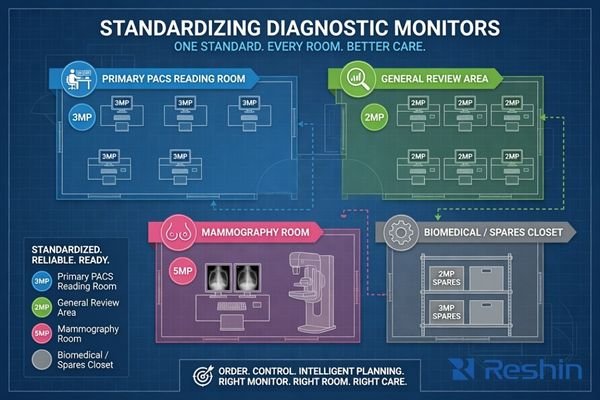
In a single workstation project, one monitor decision may be manageable. In a multi-room deployment, the same decision affects procurement records, calibration workflow, spare unit planning, biomedical maintenance, user feedback, and future expansion. If every room is handled as a separate purchase, the hospital may receive different display classes, accessories, mounting conditions, and replacement expectations.
That is why I treat radiology monitor planning as a standardization task before model freeze. I first define approved room classes, reading roles, workstation output requirements, replacement boundaries, and exception rules. Then I assign monitor classes in a controlled way. This helps the team avoid uncontrolled variation before purchase orders, installation batches, and future service requests begin.
Why Multi-Room Radiology Projects Need Monitor Standardization
A multi-room project should not depend on separate monitor decisions made room by room. I prefer to build a shared deployment standard before procurement, installation, and future replacement begin.
Multi-room radiology projects need monitor standardization because inconsistency can appear across image review, calibration workflow, procurement records, service communication, and later replacement. Standardization connects each room role with an approved monitor class and reduces avoidable variation during deployment.
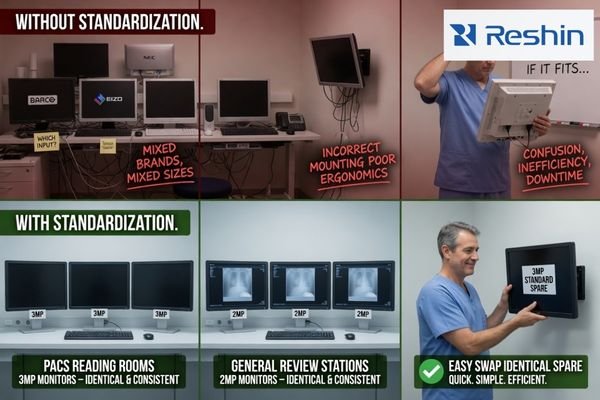
From an engineering standpoint, standardization does not mean forcing every workstation into the same display class. It means defining which rooms can share a class, which rooms need separation, and which monitor directions should be protected for future replacement. This is especially important when deployment happens in phases.
Inconsistent Room Planning Creates Long-Term Service Risk
A project may look successful during installation but become difficult to maintain later. Different rooms may use different display classes, mounting parts, cables, calibration workflows, and replacement rules. This creates confusion for biomedical teams and procurement teams. It can also make user feedback harder to compare because the workstation environment is not controlled. I prefer to reduce this variation before the first batch is approved.
Standardization Should Start from Room Role
The room role should define the monitor class direction. A primary PACS reading room, general review workstation, modality review area, and mammography room do not carry the same viewing task. For PACS and imaging workstation integrators, this room-based structure helps align workstation output, user expectations, calibration responsibility, and future expansion under one deployment plan.
In practice, I also treat standardization as a documentation problem. The team should define approved monitor classes, room assignments, spare unit rules, accessory requirements, calibration responsibility, and replacement boundaries. Without this written standard, the same project may become dependent on individual purchasing decisions later.
How 2MP, 3MP and 5MP Diagnostic Monitor Classes Should Be Assigned
The assignment of 2MP, 3MP, and 5MP classes should follow deployment logic. I avoid treating megapixel count as a simple ranking for every room.
2MP-class monitors may support general PACS review, DR/CR review, or cost-controlled workstation deployment depending on project requirements. 3MP-class monitors may fit higher diagnostic review needs. 5MP-class monitors should be mapped more cautiously for mammography or high-detail grayscale review workflows.
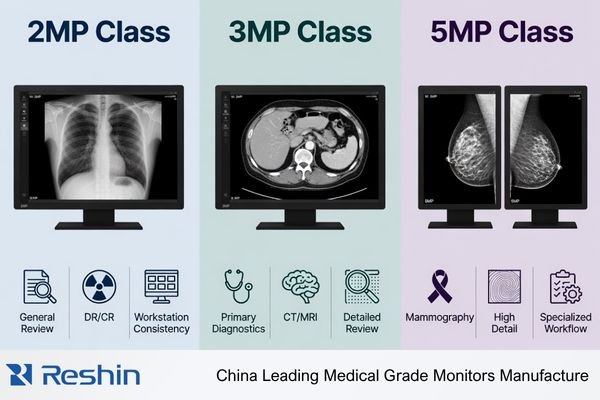
A 2MP-class diagnostic monitor can be practical for general review rooms, routine PACS workstations, DR/CR review areas, or replacement pools1, depending on the reading task and acceptance criteria. In multi-room projects, this class is often considered where the team needs dependable deployment behavior, controlled cost, easier service planning, and a stable replacement route. However, I still confirm workstation compatibility, calibration workflow, image presentation, and user acceptance before approving it for wider use.
A 3MP-class monitor may be assigned when the project requires a higher diagnostic review class for CT/MRI, mixed image review, or selected radiology reading stations. It should not be added only because it appears stronger on paper. A 5MP-class monitor should be treated separately because mammography or high-detail grayscale review workflows can create stricter validation pressure. Higher megapixel only adds value when the room role, workstation chain, and acceptance process justify the added complexity.
Standardization Matrix for Multi-Room Radiology Monitor Planning
A standardization matrix helps the team separate room planning from product preference. I use it to align room role, approved monitor class, validation focus, exception rules, and replacement risk before model freeze.
A multi-room radiology monitor plan should map each room or workstation type to a suitable monitor class, reading role, validation focus, and standardization risk. This helps procurement, PACS, and biomedical teams control variation before batch deployment.
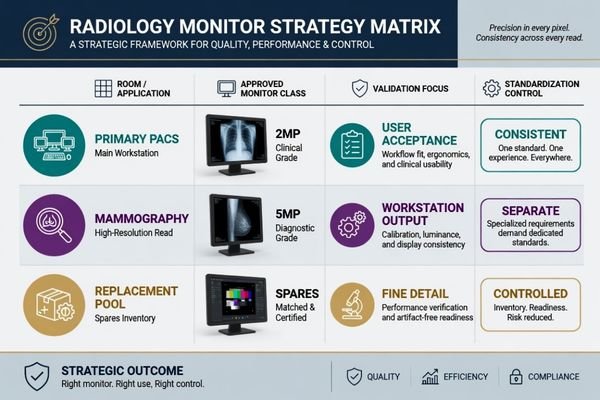
The matrix below is a planning tool, not a final specification. It helps the project team decide where monitor classes can be shared, where they should remain separated, and where exception review is required. The final decision should be confirmed during sample testing and workstation validation.
| Room or Workstation Type | Typical Reading Role | Approved Monitor Class Direction | Validation Focus | Standardization Control |
|---|---|---|---|---|
| Primary PACS reading room | Main radiology image review and reporting workflow | 3MP diagnostic monitor, depending on project requirements | Workstation output, image presentation, calibration workflow, user acceptance | Keep the approved class consistent across primary reading stations |
| General review workstation | Routine image access, consultation, or department review | 2MP diagnostic monitor2 | Resolution recognition, PACS viewer layout, mounting, service process | Avoid over-specification and uncontrolled mixed monitor use |
| Modality review area | CT/MRI or mixed modality image review near equipment workflow | 2MP or 3MP diagnostic monitor | Signal compatibility, grayscale and color behavior, workstation chain | Define whether the room follows general review or higher review class rules |
| DR/CR reading station | Radiographic image review with practical deployment needs | 2MP or 3MP diagnostic monitor | Image presentation, calibration workflow, deployment cost, batch consistency | Keep room-to-room behavior consistent during phased deployment |
| Mammography room | High-detail grayscale breast imaging review | 5MP mammography display | Fine grayscale detail, brightness stability, calibration control, acceptance process | Separate from general deployment because validation pressure is higher |
| Replacement pool | Spare unit planning for phased deployment and service continuity | Standardized 2MP or 3MP class, depending on installed base | Model continuity, accessories, documentation, supply planning | Prevent uncontrolled substitutions during maintenance or expansion |
I use this matrix as a pre-purchase alignment document. Radiology, PACS, biomedical, and procurement teams can mark which monitor class is approved for each room type, which rooms need exception review, and which replacement units should be kept consistent during later service. Once this class plan is accepted, the next step is to validate whether the selected standards can survive real workstation and room conditions.
What Should Be Confirmed Before Freezing Standard Monitor Classes
Standardization should be tested before batch procurement. A monitor class plan may look reasonable, but deployment risk appears when it meets workstation hardware, room conditions, user habits, and service workflow.
Before freezing standard monitor classes, the team should confirm graphics output, display behavior, calibration workflow, brightness stability, ambient light, mounting, cable routing, user acceptance, documentation, spare unit planning, batch consistency, and long-term supply. These checks reduce rollout and replacement risk.

I treat the standard monitor class plan as conditional until it is checked against the actual deployment environment. The team should test representative workstations, room layouts, cable routing, mounting methods, and calibration responsibilities. Before I consider the standard ready for procurement, I usually confirm these control points:
- Approved room classes: which rooms use 2MP, 3MP, or 5MP monitor classes.
- Exception rules: which rooms require separate review before substitution.
- Replacement pool: which models, accessories, and cable sets should remain consistent.
- Calibration ownership: who manages calibration checks and records after installation.
- Change control: how future model changes are reviewed before deployment.
If your team needs help reviewing the standard monitor class plan before procurement expands, send the deployment plan to info@reshinmonitors.com.
Workstation and Room Conditions Must Match the Standard
A standard monitor class should be validated with the real workstation chain or a representative configuration. Graphics output, resolution recognition, cable type, display layout, and PACS viewer behavior should be confirmed before batch approval. Room conditions also matter. Ambient light, desk depth, mounting height, and user position can affect acceptance.3 If these conditions vary across rooms, the standard should define where the monitor class applies and where retesting is needed.
Replacement Planning Should Be Built into the Standard
A standardized deployment should include spare unit logic, documentation control, accessories, and batch consistency. If future replacement is not planned, the hospital may later receive a different model, cable set, mounting condition, or calibration process. I connect this review with long-term supply and model consistency because multi-room radiology projects often continue beyond the first delivery. The standard should remain usable during expansion and service.
Recommended Diagnostic Monitor Models for Standardized Radiology Deployment
After the room roles and monitor classes are defined, model selection becomes more controlled. I prefer to connect each model direction to a standardized deployment role instead of presenting one model as suitable for every room. Final approval should depend on sample testing, workstation compatibility, calibration workflow, and project acceptance criteria.
The following model directions are for standardized radiology deployment planning. They help PACS integrators, biomedical teams, procurement teams, equipment manufacturers, and distributors connect display roles with practical deployment scenarios. The same model may serve different projects depending on validation results, but the standard should clearly define where each model is approved.
| Clinical Role / Application | Usage Pattern | Display Requirements | Recommended Model | Key Integration Considerations |
|---|---|---|---|---|
| General PACS review workstation or replacement pool | Routine review, phased replacement, or cost-controlled workstation deployment | 2MP-class diagnostic monitor direction depending on project requirements | MD22CA | Confirm workstation output, calibration workflow, mounting method, and replacement consistency |
| CT/MRI or modality review workstation | Cross-sectional image review or mixed modality review environment | 2MP-class diagnostic display direction with controlled image behavior after validation | MD26C | Test PACS viewer behavior, grayscale and color presentation, and user acceptance |
| Primary reading room or selected diagnostic workstation | Higher diagnostic review class for CT/MRI, DR/CR, or mixed image review | 3MP DICOM color monitor direction depending on room role | MD32C | Validate display layout, brightness behavior, calibration process, and batch consistency |
| Mammography room or high-detail grayscale review workflow | Dedicated high-resolution breast imaging review environment | 5MP mammography display direction4 | MD52G | Apply stricter validation for grayscale detail, brightness stability, calibration control, and acceptance process |
FAQ
Should every radiology room use the same diagnostic monitor class? No. Standardization does not mean using the same monitor class everywhere. It means assigning monitor classes consistently according to room role, reading task, workstation environment, and replacement plan.
When does a multi-room project need both 2MP and 3MP monitors? A project may need both when some rooms support general PACS or DR/CR review while others require a higher diagnostic review class for CT/MRI or mixed image review. The split should be based on workflow and confirmed during sample testing.
Why should 5MP monitors be separated from general radiology deployment planning? 5MP monitors are usually mapped more cautiously for mammography or high-detail grayscale review workflows. They may require stricter validation, calibration control, and acceptance review than general radiology deployment.
What risks appear when diagnostic monitor models are mixed without standardization? Mixed models can create inconsistent calibration workflows, different accessories, unclear procurement records, user feedback variation, and replacement difficulty. These risks often appear after deployment rather than during initial purchase.
Conclusion
Standardizing 2MP, 3MP, and 5MP diagnostic monitors across multi-room radiology projects is a deployment control task, not only a display selection task. The goal is to match each room role with an approved monitor class while reducing variation in image review, calibration workflow, service communication, procurement records, spare unit planning, and future replacement. I prefer to define the class standard first, then validate representative workstations, room conditions, documentation, and long-term supply before batch procurement expands.
At Reshin, I support radiology monitor projects by connecting standard monitor class planning with sample validation, integration review, batch consistency, and replacement strategy. This helps PACS integrators, biomedical teams, equipment manufacturers, distributors, and procurement teams reduce avoidable deployment risk across multiple rooms. Share your multi-room radiology monitor standardization plan for engineering review.
✉️ info@reshinmonitors.com
-
"ACR Appropriateness Criteria – American College of Radiology", https://www.acr.org/Clinical-Resources/Clinical-Tools-and-Reference/Appropriateness-Criteria. ACR clinical guidance supports matching display selection with the intended imaging task and review context. This supports using 2MP-class diagnostic monitors for routine PACS, DR/CR review, consultation, and replacement planning where clinically appropriate. Scope note: Final requirements depend on modality, local policy, calibration, and workflow. ↩
-
"Assessment of display performance for medical imaging systems", https://pubmed.ncbi.nlm.nih.gov/15895604/. The AAPM TG18 report provides display performance and quality assurance guidance for medical imaging systems. This supports selecting diagnostic displays according to clinical use case and image review requirements. Scope note: QA criteria and clinical requirements may vary by modality and institution. ↩
-
"Ambient Lighting: Effect of Illumination on Soft-Copy Viewing of …", https://www.ajronline.org/doi/10.2214/AJR.05.2048. This source explains that ambient lighting and workstation ergonomics can affect soft-copy image viewing. This supports considering room light, desk depth, mounting height, and user position during monitor deployment. Scope note: Optimal settings vary by room, display type, and clinical workflow. ↩
-
"ACR–AAPM–SIIM Practice Guideline for Determinants of Image …", https://pmc.ncbi.nlm.nih.gov/articles/PMC3553374/. This guideline discusses factors affecting image quality in digital mammography and related display practices. It supports the need for higher-resolution displays in mammography-focused workflows, commonly associated with 5MP display selection. Scope note: Requirements vary by jurisdiction, modality, and regulatory framework. ↩


