
PACS workstation rollout can fail quietly when a diagnostic display sample is approved only from a specification sheet. I treat sample acceptance as an engineering gate before batch installation, not as a formality after purchasing starts.
A diagnostic display sample acceptance test should confirm workstation compatibility, signal behavior, DICOM-related display behavior, calibration workflow, image presentation, mounting, documentation, acceptance records, and rollout readiness before PACS workstations are deployed. The goal is to reduce field adjustment, user disruption, and replacement risk.
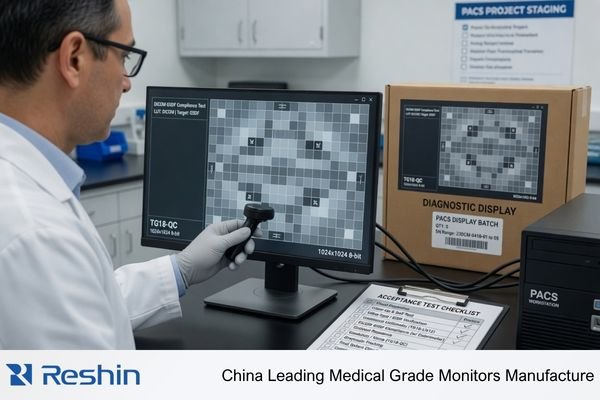
In PACS projects, the display is only one part of the workstation environment. The graphics output, PACS software, operating system settings, calibration process, reading room, desk layout, and future replacement plan all affect whether the sample can be used safely in deployment. A monitor that looks acceptable during a quick image check may still create risk during batch installation.
That is why I connect sample testing with the real PACS workstation environment. For PACS and imaging workstation integrators, sample acceptance should define what is approved, what remains conditional, and what must be retested before the rollout scope expands. The first step is understanding why testing must come before installation.
Why Sample Acceptance Testing Should Come Before PACS Workstation Rollout
A PACS rollout may involve many workstations, users, and room conditions. If the sample is not tested properly, small compatibility problems can become repeated field service issues.
Sample acceptance testing should happen before PACS rollout because display risk often appears inside the workstation chain. Specifications alone cannot confirm signal stability, resolution recognition, calibration workflow, user acceptance, documentation readiness, or long-term replacement behavior in the actual deployment environment.
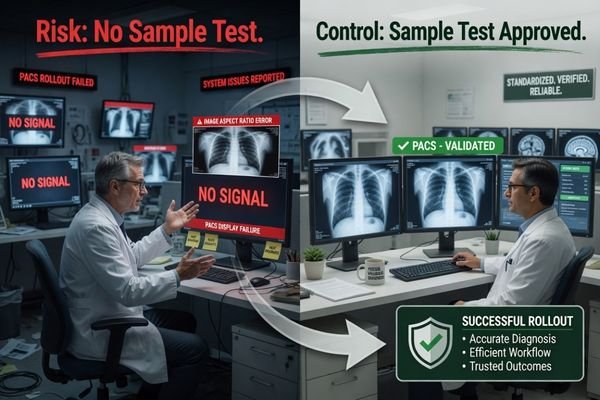
I use sample acceptance testing to identify rollout risk before installation teams repeat the same mistake across many stations. The review should confirm whether the diagnostic display works with the intended workstation output, reading task, calibration method, and deployment plan. A sample is not approved just because it powers on and shows images.
Specification Approval Does Not Equal Rollout Readiness
A specification sheet can help with early screening, but it cannot prove whether the display behaves correctly in the project environment. Resolution recognition may differ by graphics card. Calibration workflow may not match the team’s maintenance process. Mounting may create ergonomic problems. Room lighting may affect user acceptance.1 These issues are easier to correct during sample testing than after multiple workstations have already been installed.
Early Testing Reduces Repeated Field Adjustments
When a PACS rollout starts without strong sample acceptance, the team may face repeated brightness adjustment, cable replacement, layout correction, or user feedback after installation. This increases service pressure and delays acceptance. I prefer to find these risks during sample review, document the result, and freeze only the conditions that passed. This makes later deployment more controlled and easier to reproduce.
What Should Be Prepared Before Testing a Diagnostic Display Sample
A useful sample review should be close to the real rollout environment. I do not start from the display alone because the workstation chain defines many acceptance risks.
Before testing a diagnostic display sample, the team should prepare the target or representative workstation, graphics output, expected resolution, PACS software environment, calibration requirements, mounting plan, ambient light condition, documentation needs, project roles, and clear acceptance criteria. Without these items, the test may not represent rollout reality.
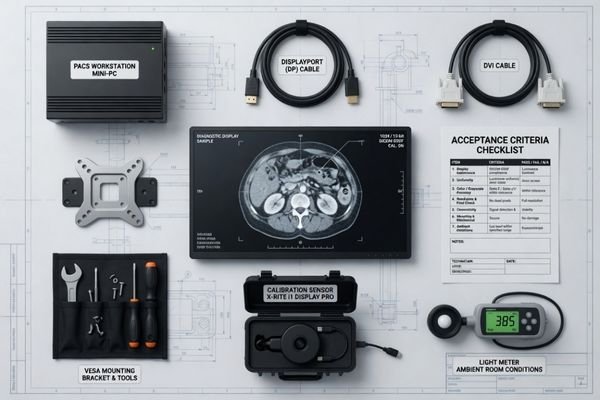
The workstation should represent the actual deployment as closely as possible. I usually ask the rollout team to prepare the same or representative graphics card, video output, operating system settings, PACS viewer environment, cable type, and expected display layout. If several workstation configurations will be used, the sample should not be tested against only the easiest one. Otherwise, a display may pass the sample stage but fail when connected to another workstation group.
Acceptance criteria should also be prepared before the test starts. The team should define how to judge resolution recognition, image presentation, calibration workflow, brightness behavior, mounting suitability, accessories, packaging, labeling, documentation, and service process. For projects involving radiology monitor deployment, this preparation helps separate real approval from informal visual acceptance. The result should be a controlled decision: pass, conditional pass, retest, adjustment required, or not ready for rollout.
I also prefer to involve the right project roles during sample acceptance. The PACS or workstation team confirms signal output, software behavior, and workstation compatibility. The biomedical or IT team confirms calibration, maintenance, and service workflow. The procurement team confirms documentation, accessories, packaging, and supply expectations. When these roles review the sample together, the approval decision becomes less subjective and easier to repeat during deployment.
Diagnostic Display Sample Acceptance Test Items for PACS Workstations
A structured acceptance review prevents the team from focusing only on one visible item. I use acceptance areas to connect technical checks with rollout risk.
A diagnostic display sample acceptance test should include workstation signal output, resolution recognition, DICOM-related behavior, brightness stability, calibration workflow, image presentation, mounting, documentation, packaging, accessories, batch consistency, and approved rollout scope. Each item affects whether the sample can support PACS workstation deployment.
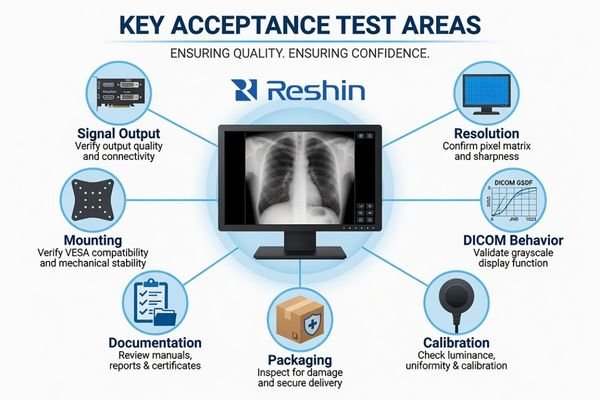
The table below is a practical acceptance framework. It does not replace project-specific requirements, and it should be adjusted depending on workstation design, hospital acceptance process, and imaging workflow. The purpose is to avoid approving a sample from one narrow test condition and then discovering deployment risk later.
| Acceptance Test Area | What to Check | Why It Matters | Possible Risk If Ignored | Acceptance Direction |
|---|---|---|---|---|
| Workstation signal output | Graphics card, video port, cable type, and display connection stability | The display must work inside the actual workstation chain | Intermittent signal, wrong display mode, or repeated field troubleshooting | Test with the target or representative workstation output |
| Resolution recognition | Native resolution detection, scaling behavior, and multi-display layout | PACS image layout depends on correct display recognition | Blurred display, wrong layout, or user rejection | Confirm stable recognition under expected operating settings |
| DICOM-related behavior | DICOM mode, grayscale response, calibration support, and record availability under the project acceptance criteria | Diagnostic image review depends on controlled display behavior2 | Inconsistent image presentation across workstations | Validate according to the defined acceptance process |
| Brightness stability | Brightness setting, warm-up behavior, and maintenance expectations | Stable viewing conditions support consistent workstation use | Frequent manual adjustment or inconsistent user feedback | Define acceptable behavior during sample testing |
| Calibration workflow | Calibration method, software process, record handling, and service responsibility | The maintenance team must be able to repeat the process | Rollout delay or unclear service ownership | Confirm who performs calibration and how records are managed |
| Image presentation | PACS viewer display, grayscale and color image behavior, and reading layout | The user must accept the display in the actual software environment | Images appear different from expectation or previous stations | Test with representative PACS cases and user role |
| Mounting and ergonomics | Stand, arm, VESA mounting, height, angle, cable routing, and desk space | Physical installation affects comfort and service access | Poor layout, cable stress, or installation rework | Confirm the installation method before batch deployment |
| Documentation | Datasheet, user guide, calibration notes, packing list, and service documents | Rollout teams need consistent reference materials | Confusion during installation, inspection, or maintenance | Freeze required documents before procurement expansion |
| Packaging and accessories | Power adapter, cables, mounting accessories, labels, and package protection | Batch delivery must match installation needs | Missing accessories or inconsistent unpacking process | Confirm packing configuration during sample approval |
| Batch consistency | Model continuity, accessory consistency, and future replacement planning | PACS rollout often needs phased delivery and later service | Mixed behavior between batches or difficult replacement | Confirm supply and consistency expectations before rollout |
| Acceptance record and approved scope | Test condition, pass or fail result, limitations, approved workstation group, and retest trigger | The team must know where the approval applies | A sample may be used beyond the tested condition | Record the approved scope before rollout expands |
A sample that passes only basic image display is not necessarily ready for PACS rollout. I prefer to record the test condition, the acceptance result, and any limitation. This helps the project team decide whether approval applies to one workstation, one department, one workstation group, or the full deployment scope.
A useful sample acceptance result should not stop at “passed” or “failed.” I prefer to record five outputs: tested workstation configuration, approved display settings, calibration and documentation status, known limitations, and approved rollout scope. This makes the result easier to repeat during batch deployment and easier to review when another workstation group is added later.
How to Decide Whether the Sample Is Ready for PACS Rollout
The final decision should connect test results with rollout scope. A sample may pass limited testing but still require retesting before wider PACS deployment.
A diagnostic display sample is ready for PACS rollout only when it supports the intended workstation variations, user role, calibration process, service workflow, documentation needs, approved scope, and replacement plan. If major risks remain open, rollout should pause or be narrowed until retesting is complete.
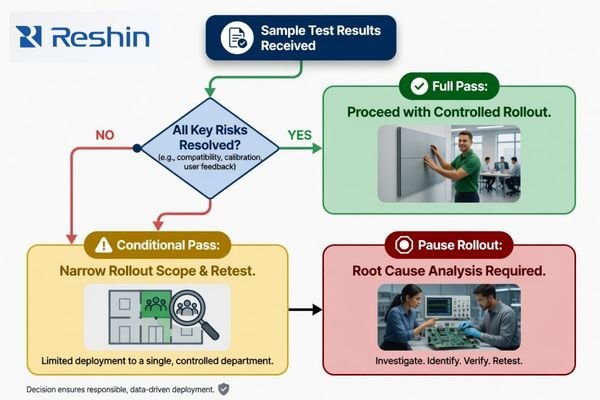
I classify sample results by deployment risk. A full pass means the tested conditions match the rollout scope. A conditional pass means the sample may be used only under defined limits. If the result depends on untested workstations, uncertain calibration responsibility, unresolved documentation, or user acceptance concerns, I do not treat it as rollout-ready. For engineering review before freezing the rollout decision, send the project conditions to info@reshinmonitors.com.
In practice, I usually separate the result into four decision levels:
- Full pass: The tested workstation chain matches the rollout scope, and no major risk remains open.
- Conditional pass: The sample can be used only under defined workstation, mounting, calibration, or documentation conditions.
- Retest required: One or more conditions changed, such as graphics output, cable type, PACS viewer version, operating system setting, or mounting method.
- Pause rollout: Signal behavior, resolution recognition, calibration workflow, documentation, packaging, or user acceptance remains unresolved.
When the Sample Can Move Toward Rollout
A sample can move toward rollout when the test environment represents the real workstation chain and the result is repeatable. The team should know which graphics output was used, which resolution was confirmed, how calibration will be handled, what mounting method is approved, and what documentation will accompany batch delivery. The approval should also define whether the display is approved for all stations or only for a specific workstation group.
When the Rollout Should Pause or Narrow
Rollout should pause when the sample works only under one narrow condition, when another workstation output has not been tested, or when users report image presentation concerns that remain unresolved. It should also pause when calibration workflow, packaging, accessories, acceptance records, or future replacement planning is unclear. For phased projects, narrowing the first deployment group can reduce risk while the team confirms broader compatibility and long-term supply and model consistency.
Recommended Diagnostic Displays for PACS Workstation Sample Evaluation
After the acceptance framework is clear, model evaluation becomes more practical. I prefer to connect each diagnostic display sample to a PACS workstation role instead of treating one product direction as suitable for every deployment. Final approval should always depend on testing with the workstation chain, calibration workflow, user role, and project acceptance criteria.
The following model directions are useful for PACS workstation sample evaluation because they allow the project team to compare display roles before batch procurement. The purpose is not to rank products universally. It is to help integrators, hospital IT teams, biomedical teams, and procurement teams match sample testing to the intended workstation scenario.
| Clinical Role / Application | Usage Pattern | Display Requirements | Recommended Model | Key Integration Considerations |
|---|---|---|---|---|
| General PACS workstation sample evaluation | Routine review station testing, replacement planning, or multi-station rollout preparation | Practical diagnostic display direction depending on project requirements | MD22CA | Confirm graphics output, resolution recognition, calibration workflow, and mounting layout |
| CT/MRI workstation sample review | Cross-sectional image review with controlled grayscale and color presentation | Diagnostic display behavior suitable for modality review after validation | MD26C | Test PACS viewer behavior, workstation compatibility, brightness setting, and user acceptance |
| DR/CR or mixed radiology workstation evaluation | Diagnostic reading environment where a higher display class may be preferred | 3MP DICOM color monitor direction3 depending on workflow needs | MD32C | Validate image presentation, calibration process, desk layout, and batch consistency |
| PACS dual-screen workflow replacement sample | Reading station where layout consolidation or dual-screen replacement is being considered | 4MP dual-screen PACS display direction | MD45C | Review graphics output, viewing layout, user adaptation, and service documentation before approval |
FAQ
Is one diagnostic display sample enough before PACS workstation rollout? One sample may be enough for early evaluation, but it may not be enough for full rollout approval if multiple workstation configurations, rooms, or user groups are involved. Additional testing may be needed depending on deployment variation.
Should sample acceptance testing focus only on DICOM calibration? No. DICOM-related behavior is important, but sample acceptance should also include signal output, resolution recognition, PACS software behavior, mounting, documentation, accessories, packaging, acceptance records, and batch consistency.
What should be done if the display sample works in one workstation but not another? The team should pause broad approval and identify the difference in graphics output, cable type, operating system setting, driver behavior, or display configuration. The sample should be retested under the workstation conditions planned for rollout.
When should a PACS rollout be paused after sample testing? Rollout should pause when key risks remain unresolved, such as unstable signal behavior, incorrect resolution recognition, unclear calibration workflow, user acceptance concerns, missing documentation, incomplete accessories, or uncertain replacement planning.
Conclusion
Diagnostic display sample acceptance testing protects PACS workstation rollout from avoidable field risk. A sample should be tested inside the real or representative workstation chain, not approved only from a datasheet or a quick image check. By reviewing signal output, resolution recognition, display behavior, calibration workflow, mounting, documentation, accessories, batch consistency, and approved scope, the project team can make a clearer pass, conditional pass, retest, or pause decision.
At Reshin, I support PACS workstation display projects by connecting sample validation with integration review, rollout scope, documentation control, and long-term supply planning. This helps integrators, hospital IT teams, biomedical teams, equipment manufacturers, and procurement teams reduce uncertainty before batch deployment. Share your PACS workstation display sample plan for engineering review.
✉️ info@reshinmonitors.com
-
"How Lighting Ergonomics Boosts Productivity and Wellbeing – BenQ", https://www.benq.com/en-us/campaign/ergonomic-lighting-workplace-design-guide.html. Research in medical imaging ergonomics has shown that ambient lighting levels can significantly influence users’ visual comfort and acceptance of diagnostic workstations. Evidence role: general_support; source type: research. Supports: Room lighting may affect user acceptance.. Scope note: Findings on lighting and comfort may vary by display technology and examination task. ↩
-
"DICOM Medical Display Calibration Software | ColourSpace", https://lightillusion.com/medical.html. The DICOM Part 14 Grayscale Standard Display Function details calibration protocols to ensure consistent diagnostic image presentation across displays. Evidence role: definition; source type: other. Supports: Diagnostic image review depends on controlled display behavior. Scope note: Focuses on grayscale calibration; color calibration may follow separate guidelines. ↩
-
"Luminance Performance and DICOM Calibration – PMC – NIH", https://pmc.ncbi.nlm.nih.gov/articles/PMC3045256/. These standards recommend 3-megapixel DICOM-calibrated color monitors for diagnostic reading of digital radiography and computed radiography images. Evidence role: expert_consensus; source type: institution. Supports: 3MP DICOM color monitor direction depending on workflow needs. Scope note: Recommendations focus specifically on DR/CR modalities and may differ for other imaging types. ↩


