
Interventional room display planning becomes risky when every monitor is treated as the same display point. I usually start by separating the main view, review view, auxiliary sources, and shared room visibility before discussing screen size, model direction, or input count.
Interventional room display layout planning should follow five steps: define display roles, list all source signals, map routing paths, validate viewing position and mounting, and freeze the approved layout package before installation. Main view, review view, and multi-source inputs should be confirmed before model selection expands.
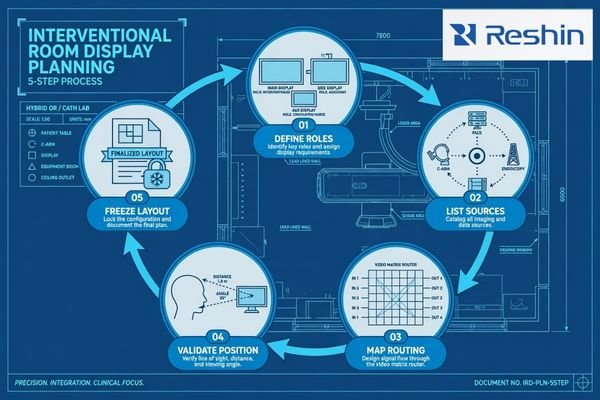
In cath lab, angiography, DSA, fluoroscopy, and hybrid OR projects, a display is part of the room workflow. It may show live imaging, reference images, workstation output, ultrasound, endoscopy video, patient monitoring, room camera signals, or a combined multi-view layout. If these roles are mixed without planning, integration risk increases.
That is why I treat cath lab monitor planning as a layout and signal-routing decision. I first map who needs to see each source, where they stand, how the signal reaches the display, and which role the display must support. A safe cath lab display layout should move through a controlled process: define display roles, list all source signals, map routing paths, validate the viewing and mounting conditions, and freeze the approved layout package before room installation begins.
Why Interventional Room Display Layout Should Start from Workflow Roles
Display layout planning should not start from screen size alone. In an interventional room, each display should support a clear viewing task, source priority, and user position.
The display layout should start from workflow roles such as live imaging main view, review or reference view, auxiliary source display, and room-level shared display. This helps the project team decide who sees which source, from which position, and during which procedure stage.

The first planning question is not whether the display should be larger or higher resolution. The first question is whether the display is supporting the primary procedure view, a secondary review task, an auxiliary source, or shared room visibility. A main live imaging view, a secondary review view, and a shared room display may all require stable image presentation, but their installation and validation priorities are different.
Layout Planning Should Come Before Screen Size
Screen size becomes useful only after the display role is defined.1 A large display placed in the wrong position may not support the operator’s line of sight. A smaller review display may work well if it is used for reference images or workstation output. In angiography room display and cath lab monitor planning, I prefer to define viewing priority before discussing display size, because room workflow determines whether the display is practical.
Source Priority Should Be Defined Before Routing
Source priority should also be confirmed before routing is frozen. The main source may come from angiography, DSA, fluoroscopy, C-arm imaging, or another interventional imaging system. Review sources may come from PACS, a workstation, or previous studies. Auxiliary sources may come from ultrasound, endoscopy, patient monitoring, or room camera systems. For surgical systems and OR integrators, this role separation helps avoid treating every routed source as equal.
In Reshin layout reviews, I usually separate display roles before discussing model direction. This helps the project team avoid a common mistake: selecting monitors from size and input count first, then discovering later that the main view, review view, and auxiliary sources do not match the room workflow.
Main View, Review View and Auxiliary View: How Display Roles Differ
Main, review, auxiliary, and shared views should be defined before model selection. Each role has a different viewing task, signal source, layout risk, and validation focus inside the room.
The main view usually supports live imaging or procedure-focused viewing. The review view may support reference images, PACS review, prior images, or workstation output. The auxiliary view may show supporting sources such as ultrasound, endoscopy, patient monitoring, camera feed, or external workstation signals.
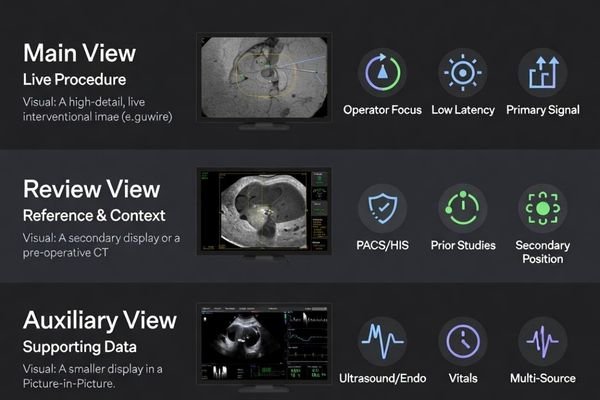
The main view is usually the display role with the highest workflow priority2. It should be positioned according to the operator’s line of sight, expected viewing distance, mounting angle, and source signal. If the main view is placed only according to wall space or arm availability, the display may be visible but not practical. I also review whether the main source will be routed directly, routed through a processor, or combined with other signals before reaching the display.
The review view has a different purpose. It may support reference images, PACS review, previous studies, or secondary workstation output depending on project requirements. It does not always need the same position, size, or source priority as the main view. In many cath lab display layout projects, the review view should support the main workflow without competing with it.
Auxiliary and shared views add another layer of complexity. They may include ultrasound, endoscopy, patient monitoring, room camera, external workstation output, or multi-view processor output. These sources should be assigned to clear display roles, input paths, and user positions before the interventional room display layout is frozen.
Multi-Source Input Planning Matrix for Interventional Imaging Rooms
Multi-source input planning helps the project team avoid unclear routing decisions. I use this step to connect each source type with display role, layout risk, confirmation items, and safer planning action.
A multi-source input matrix should map source type, display role, layout risk, confirmation items, and planning action. This helps cath lab, hybrid OR, and interventional imaging teams validate display roles before installation and procurement expand.
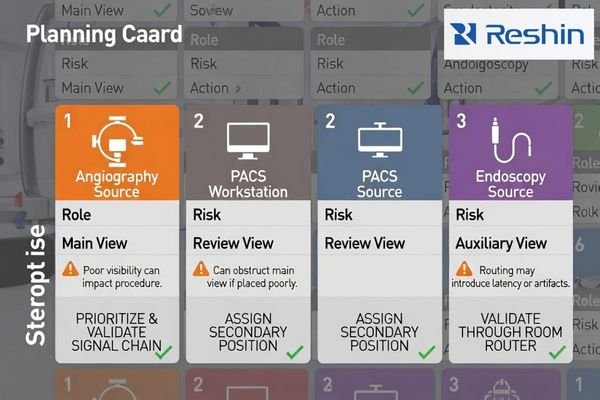
The matrix below is a practical planning tool. It does not replace project-specific engineering review. It helps the team decide which signals deserve main view priority, which sources should remain secondary, and which routing paths need validation before installation.
| Source Type | Display Role | Layout Risk | What to Confirm | Safer Planning Action |
|---|---|---|---|---|
| Angiography or DSA output | Main live imaging view | Wrong position or unstable routing may affect workflow visibility | Output resolution, signal interface, routing path, viewing distance | Assign main view priority and validate with the intended signal chain |
| Fluoroscopy image source | Main or secondary procedure view | Source switching may change display mode or layout3 | Signal format, input recognition, switching behavior | Test source behavior before freezing the display role |
| C-arm or mobile imaging system | Main or secondary imaging source | Mobile system output may not match fixed-room routing assumptions | Output interface, cable length, resolution, physical position | Validate mobile source routing before layout freeze |
| PACS workstation | Review or reference view | Review images may compete with the main procedure display | Workstation output, layout, resolution, user position | Place as a review view with clear source priority |
| Ultrasound system | Auxiliary or reference view | Supporting image may be difficult to see from the intended position | Output interface, cable path, mounting location | Assign to auxiliary display or multi-view layout after testing |
| Endoscopy camera processor | Auxiliary source or shared procedural view | Processor output may not match the selected input path | Resolution, refresh rate, signal interface, color behavior | Validate through the real routing path when used |
| Patient monitor signal | Auxiliary view | Critical support information may be placed in a low-visibility area | Signal type, screen position, viewing distance | Keep source role clear and avoid layout crowding |
| Room camera | Observation or documentation support view | Low-priority source may consume main display space | Routing method, display size, room visibility | Assign to shared or auxiliary view depending on workflow |
| External workstation | Temporary or secondary source | Uncontrolled signal formats may create input recognition problems | Interface, resolution, cable type, fallback input | Define approved inputs before room handover |
| Multi-view processor output | Combined main, review, or auxiliary layout | PIP/PBP layout may not match user expectations | Source order, scaling, latency perception, control method | Approve the exact layout before installation |
| Recording or streaming output | Documentation, teaching, or external review path | Display layout may not match recording, teaching, or remote review output | Output path, source selection, scaling, recording endpoint | Confirm whether the display layout and recording layout should match |
This matrix helps prevent a common layout problem: every source is important, but no source has a clear display role. Once source priority is defined, the team can validate mounting, cable path, viewing distance, routing behavior, and long-term layout consistency more effectively.
At Reshin, I usually use this type of source-role matrix before recommending a display direction. I separate live imaging, review workstation output, auxiliary clinical sources, shared room visibility, and documentation outputs first. Then I check whether the intended signal chain, mounting position, viewing distance, and room workflow can support each role.
What Should Be Confirmed Before Freezing the Interventional Display Layout
The layout should be frozen only after signal, physical installation, and workflow conditions are reviewed. A layout that looks clear on a drawing may still fail during installation if source routing, display position, or mounting conditions are not validated.
Before layout freeze, the team should confirm source list, output resolution, input interface, routing path, main and secondary display positions, viewing distance, mounting method, cable routing, cleaning access, power and heat conditions, user acceptance, documentation, approved layout package, and future replacement consistency.
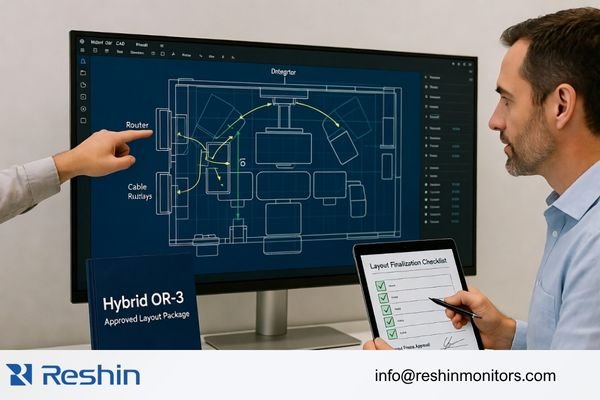
I treat the layout freeze as a controlled engineering decision. The team should confirm the source list, main view priority, review view position, auxiliary source routing, cable route, mounting method, power plan, service access, cleaning access, documentation, and approved layout package. For equipment manufacturers and room-level integration projects, medical display OEM/ODM solutions may also be relevant when display behavior, input configuration, mechanical integration, or documentation needs must be aligned before batch delivery.
In Reshin project discussions, I usually ask for the source list, output interfaces, routing devices, room drawing, expected display roles, mounting position, cable path, and rollout quantity before reviewing display direction. This helps avoid treating a room-level layout question as a simple monitor-size request. For engineering review before layout freeze, send these details to info@reshinmonitors.com.
Installation Conditions Should Match the Approved Layout
The approved layout should include more than display size. It should show where each display is mounted, how far it is from the user, which sources it receives, how cables are routed, and which display role each source supports. Cleaning access, heat conditions, power position, and service access should also be checked. If the installation team changes these conditions later, the display role may no longer match the original workflow plan.
Layout Freeze Should Have Clear Pass Conditions
I usually consider the interventional display layout ready for freeze only when each source has an assigned display role, the expected input path is tested, the main view remains visible from the intended operator position, source switching does not create unexpected layout changes, mounting and cable access are confirmed, and the approved configuration can be documented for installation and later replacement. Without these pass conditions, layout freeze may become only a drawing approval instead of a validated room plan.
Future Replacement Should Follow the Same Layout Logic
Interventional rooms may be upgraded, expanded, or replaced in phases. If the layout standard is not documented, future replacement can introduce different screen sizes, input behavior, mounting positions, or cable paths. I connect layout planning with long-term supply and model consistency because controlled replacement helps preserve the cath lab or hybrid OR workflow after the first installation.
Recommended Display Models for Interventional Room Layout Roles
After display roles and source paths are defined, model selection becomes more controlled. I prefer to connect each display direction to a layout role instead of presenting one model as suitable for every interventional room. Final approval should depend on source compatibility, input routing, viewing distance, mounting method, room layout, acceptance criteria, and the approved layout package.
The following models can support cath lab, angiography room, hybrid OR, and interventional room layout planning when validated under the intended project conditions. They are not universal recommendations. Each model should be reviewed with the actual or representative signal chain, room drawing, display role, mounting position, cable path, and documentation requirements before procurement or installation is finalized.
| Clinical Role / Application | Usage Pattern | Display Requirements | Recommended Model | Key Integration Considerations |
|---|---|---|---|---|
| 31.5-inch 4K interventional review display | Review view, secondary procedure source, PACS/workstation-related display role, or auxiliary source review | 4K display direction depending on source output, viewing distance, and room role | MS321PB | Confirm input interface, routing path, resolution recognition, mounting position, viewing distance, and user acceptance |
| 32-inch 4K cath lab or interventional room display | Main or secondary display role for validated 4K source workflow in cath lab, angiography, DSA, or hybrid OR projects | 4K display direction for controlled room integration after signal-chain validation | MS322PB | Validate signal stability, cable route, display position, brightness behavior, source switching, and workflow fit |
| Large-format shared room display | Room-level viewing, team awareness, observation, teaching, or multi-source shared display planning | Large 4K display direction depending on room layout, viewing distance, and source routing | MS550P | Review mounting structure, viewing distance, signal routing, power plan, service access, and long-term replacement consistency |
FAQ
What is the difference between main view and review view in an interventional room? The main view usually supports live imaging or procedure-focused viewing. The review view supports reference images, PACS review, prior images, or workstation output depending on the room workflow.
What signal inputs should be confirmed before selecting interventional room displays? The team should confirm source devices, output resolution, signal interface, refresh rate, cable type, routing path, input switching needs, multi-view processor output, recording output, and any mobile imaging source that may connect to the room layout.
Can one display show multiple sources in a cath lab or hybrid OR? Yes, depending on the display, routing system, processor, and project requirements. The team should validate PIP, PBP, switching behavior, source priority, scaling, latency perception, and user acceptance before approving a multi-source layout.
What should be validated before finalizing an interventional room display layout? The team should validate source routing, signal stability, resolution recognition, display position, viewing distance, mounting, cable routing, power conditions, cleaning access, user acceptance, documentation, approved layout package, and replacement consistency.
What information should be prepared before requesting display layout review? It is useful to prepare the source list, output interfaces, routing devices, room drawing, expected display roles, mounting position, cable path, display quantity, rollout schedule, and any future replacement requirements. These details help the supplier review layout risk more accurately.
Conclusion
Interventional room display layout planning should begin with workflow roles, not screen size alone. Main view, review view, auxiliary sources, and shared room displays each carry different requirements for source priority, viewing position, signal routing, mounting, and validation. I use layout planning to define how each source is displayed, who needs to see it, what routing path is expected, and what conditions must be tested before installation.
At Reshin, I support cath lab and interventional display projects by connecting room layout review, source mapping, signal-chain validation, mounting assessment, documentation control, approved layout package review, and long-term replacement planning. This helps angiography system manufacturers, cath lab integrators, hybrid OR teams, OEM/ODM projects, distributors, and procurement teams reduce layout uncertainty before deployment. Share your interventional room display layout plan for engineering review.
✉️ info@reshinmonitors.com
-
"ISO 9241-302:2008(en), Ergonomics of human-system interaction", https://www.iso.org/obp/ui/en/#!iso:std:40097:en. ISO 9241-302 recommends determining display characteristics, including screen size, based on the specific visual tasks to optimize user performance and comfort. Evidence role: general_support; source type: other. Supports: Screen size becomes useful only after the display role is defined.. Scope note: ISO standard addresses general office and visual display ergonomics, not exclusively medical imaging. ↩
-
"How To Select Medical Monitors For Clinical Reviews? – AG Neovo", https://www.agneovo.com/en_us/insight/guide-to-medical-monitors?srsltid=AfmBOopb9D_0x3Gm_ZSFzMDXEs9gJRBKkG78PmbpmRskqZQ4yx_lYVIK. Industry guidelines for interventional radiology room design define the main image display as the primary workflow reference and typically assign it highest priority in the display layout. Evidence role: expert_consensus; source type: education. Supports: The main view is usually the display role with the highest workflow priority.. Scope note: Guidelines reflect general best practices and may vary across institutions. ↩
-
"How do HDMI Devices Auto-Detect Resolution? : r/hometheater", https://www.reddit.com/r/hometheater/comments/6657ie/how_do_hdmi_devices_autodetect_resolution/. Technical analyses of video display systems report that changing video inputs can alter resolution, aspect ratio, or on-screen layout, leading to unexpected mode changes. Evidence role: mechanism; source type: paper. Supports: Source switching may change display mode or layout. Scope note: Depends on device firmware and configuration ↩


