In multi-unit diagnostic display projects, the difficult part usually starts after the first room goes live. The first installation may look smooth, but the real test comes later: adding workstations, expanding to other rooms, replacing failed units, and keeping reading conditions close enough over time. That is why I do not treat this kind of project as a bulk purchase. I treat it as a deployment and lifecycle control problem.
Effective multi-unit diagnostic display deployment is a lifecycle planning exercise, not a simple purchase. To avoid future replacement chaos, planning should start with a clear baseline, a realistic matching rule across workstations, a practical QA path, and replacement logic that is defined before expansion begins. A capable diagnostic monitor manufacturer should be able to support that full deployment logic, not just deliver the first batch.
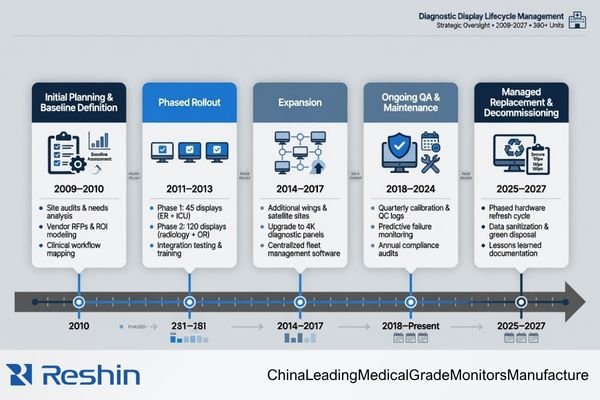
In practical terms, the buyer is not only selecting displays. The buyer is deciding how stable the reading environment will remain across rooms, across time, and across later replacement cycles1. Once I look at the project from that angle, the planning priorities change. Unit price and first delivery still matter, but they stop being the whole story.
What people later describe as “replacement chaos” is usually not a random accident. More often, it is the result of an early deployment plan that focused too much on getting the first batch installed and too little on how the environment would stay controlled later. In our own deployment reviews, I usually try to make that discussion happen at the start, because it is much easier to define the rules early than to repair inconsistency room by room later.
Multi-Unit Diagnostic Deployment Is a Lifecycle Planning Task, Not a Simple Purchase
When I review a multi-unit diagnostic display project, I do not see it as a larger version of a single-screen purchase. The harder part of the project usually begins after the first installation, when expansion, replacement, calibration maintenance, and workstation changes start to affect the reading environment.
A buyer is not only selecting displays. The buyer is deciding how consistent the diagnostic reading environment can remain across rooms, workstations, and replacement cycles. That requires lifecycle thinking, not just purchase-order thinking.
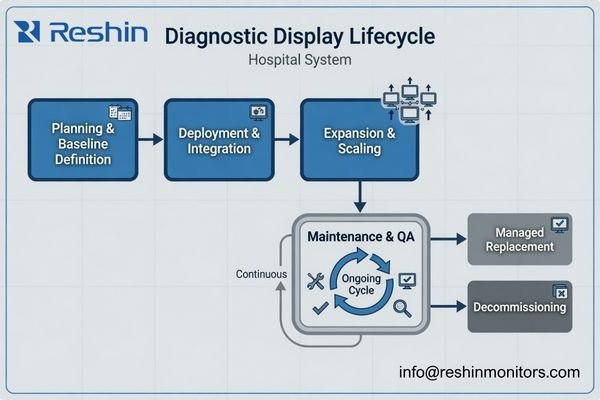 transactional purchase decision is short-term by nature2. It asks how many units are needed now, what they cost, and when they can ship. A deployment plan asks a different set of questions. It asks what happens when a second room is added, when one screen in a dual-head setup fails, when a later batch behaves slightly differently, or when a replacement unit arrives after the original rollout is already considered complete.
What Actually Gets Hard After the First Rollout
The point where projects usually become harder is not the first delivery. It is the moment when the team has to preserve reading consistency after the first delivery. That may happen during a room expansion, a later replenishment order, or a service replacement. Once that stage begins, the project stops being about quantity and starts being about control.
Why Expansion and Replacement Should Be Planned Together
In practice, expansion and replacement create similar risks. Both introduce later units into an environment that already has an accepted display behavior. If those later units do not stay close enough in grayscale response, luminance stability, and QA alignment, the reading environment starts to drift. That is why I usually plan expansion and replacement together instead of treating them as separate topics.
Future Replacement Chaos Usually Starts with an Unclear Baseline
In my experience, replacement chaos rarely begins at the replacement stage itself. It usually starts much earlier, when the project never clearly defined what the approved display platform actually is.
Future replacement becomes difficult when the baseline is vague. If model, grayscale behavior, luminance expectation, calibration method, and workstation role were never defined clearly enough, later replacement decisions become subjective and inconsistent.

A stable multi-unit deployment needs a reference point.3 Without one, every later decision becomes a fresh debate: Is this replacement close enough? Is this later batch acceptable? Can this unit go into the same room? That is where inconsistency begins to spread.
I usually want the baseline to lock at least the points below before the rollout grows:
| Baseline Control Item | Why It Matters Later |
|---|---|
| Approved model or platform | Later purchases and replacements need a clear reference beyond informal preference. |
| Grayscale and luminance expectation | Matching cannot be judged well if the target behavior was never defined. |
| Calibration method and QA rule | The team needs to know how the display will be checked and maintained over time. |
| Workstation role or deployment role | A replacement should match the role it is entering, not just the model family on paper. |
If that baseline is not set early, departments start making their own local decisions. One team may replace by availability, another by habit, and another by whatever looks closest that week. Over time, the reading environment becomes less controlled and much harder to manage.
Multi-Monitor Matching Matters More Than a Good First Batch
Many teams feel confident once the first batch is installed and looks fine. From my perspective, that only proves the first stage went well. It does not yet prove that the deployment will remain stable.
In multi-unit diagnostic deployment, consistent matching across rooms, workstations, and later batches usually matters more than one strong first delivery. A good first batch is useful, but it is not enough by itself.
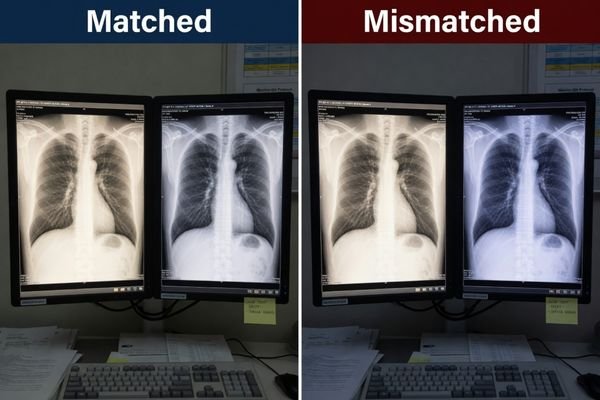
The real problem appears when the project expands. A dual-head workstation may need one side replaced. A new room may be added using a later batch. A hospital may standardize one site first and roll out the second site months later. In all of those cases, the project depends on later units staying close enough to the earlier environment.
That is why I put so much weight on matching. If the first batch looks good but later units arrive with different grayscale response, different luminance behavior, or different calibration behavior, the project loses the consistency it was supposed to protect. When our team helps plan multi-room deployments, I usually try to move the conversation away from “the sample looks good” and toward “how will this still match six months from now?”
The table below captures the practical difference b` etween a short-term buying view and a deployment-control view.
| Risk Area | Short-Term Purchase View | Deployment-Control View |
|---|---|---|
| First Batch | Does the first delivery look acceptable? | Can later units stay close enough to the original reading environment? |
| Dual-Head Replacement | Can we replace the failed side quickly? | Will the replacement still match the remaining screen closely enough? |
| Later Rollout | Can the next order be delivered on time? | Will the later batch remain aligned in grayscale, luminance, and QA behavior? |
When buyers plan for matching early, they are not adding complexity for no reason. They are reducing the number of exceptions the project will have to manage later4.
QA Path and Replacement Rules Should Be Planned Before Expansion Begins
From a deployment-control standpoint, I usually want the QA path and replacement rule defined earlier than many teams expect. If the project only focuses on getting the first room online, later replacements tend to become one-off decisions.
A more stable deployment begins by defining how displays will be checked, how matching will be judged, and what kind of replacement logic is acceptable before expansion starts. Without that, later replacement usually becomes reactive.
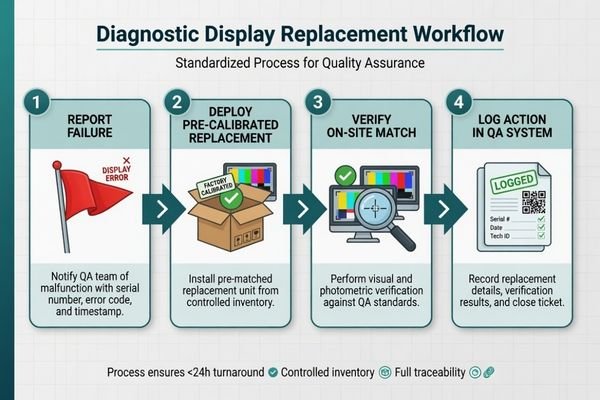
In practice, the team needs to know more than just which model was purchased. It needs to know how calibration will be maintained, how a new unit will be checked before it sits next to an existing one, what type of successor is acceptable, and how much difference is still considered manageable. Those rules do not need to be complicated, but they do need to exist.
At Reshin, I usually separate QA control from replacement approval early in the discussion. The first question is how the fleet will be kept verifiable over time. The second question is how a later unit will be judged before it is accepted into the same deployment. Keeping those two decisions visible early usually prevents later room-by-room exceptions.
This is also where long-cycle planning becomes useful. If the project expects multiple phases, later replenishment, or service replacement over time, then long-term supply and model consistency should not be treated as a separate topic that comes later. It is part of deployment planning from the start.
Different Deployment Roles Naturally Lead to Different Diagnostic Platforms
Once the project moves from single-screen thinking to deployment logic, the display choice becomes more role-driven. The goal is not to force every room into one model without thinking. The goal is to define which platform fits which deployment role, so later expansion and replacement stay easier to control.
The table below is best read as a deployment-role map rather than a simple product comparison.
| Deployment Role / Reading Scenario | Usage Pattern | Display Requirements | Recommended Model | Key Integration Considerations |
|---|---|---|---|---|
| Mainstream Grayscale Diagnostic Deployment | Primary CT, MRI, and DR reading across standard PACS workstations in multiple rooms. | Stable DICOM-oriented grayscale behavior, luminance control, and QA-friendly deployment fit. | MD33G | A practical baseline platform for multi-room standardization, replacement continuity, and fleet-level QA management. |
| Mixed-Task Diagnostic Deployment | Reading environments that move between grayscale diagnostic review and color-based clinical tasks. | Reliable color and monochrome behavior without creating awkward workflow splits. | MD32C | Useful when the deployment needs one platform that can support both grayscale and color-based workstation roles with clearer replacement logic. |
| Higher-Demand Grayscale Deployment | Reading roles with stricter grayscale expectations and greater emphasis on fine detail. | Stronger grayscale differentiation, stricter consistency expectations, and more demanding QA alignment. | MD52G | Better suited to rooms where replacement, calibration, and long-term stability must support a more demanding grayscale reading environment. |
FAQ About Multi-Unit Diagnostic Display Deployment
What should buyers confirm first before deploying multiple diagnostic displays?
I usually recommend confirming the deployment scope first: how many rooms, how many workstations, what reading roles, what matching expectation, and what future replacement path the project needs. Without that, even a good first batch may not lead to a stable long-term deployment.
Is it enough to just keep buying the same model number later?
Not always. The model name matters, but what matters more is whether later supply remains aligned in grayscale behavior, luminance stability, calibration logic, and workstation fit. A stable deployment depends on more than the label on the box.
Why is replacement planning not just an after-sales issue?
Because replacement problems usually reflect how the original deployment was planned. If no baseline, matching rule, or QA path was defined early, future replacement becomes reactive and inconsistent. Good replacement control usually starts before the first full rollout is finished.
What creates the most risk in a multi-unit diagnostic deployment?
In my experience, the biggest risk is not one faulty unit. It is uncontrolled inconsistency across rooms, batches, and replacement cycles. Once the reading environment starts drifting, the project becomes much harder to manage. That is also why medical-grade displays in PACS workflows are usually judged by their consistency and controllability, not only by their first-day image quality.
The Best Time to Prevent Replacement Chaos Is Before the First Rollout Is Finished
If I reduce the whole topic to one practical conclusion, it is this: future replacement chaos is usually the result of deployment logic that was never defined clearly enough in the first place. It is rarely a late-stage surprise. More often, it is an early planning gap that only becomes visible later.
In real diagnostic programs, the safer approach is to treat deployment, replenishment, and replacement as one connected system. That is usually where lifecycle planning shows its value. If you are planning a multi-room or multi-stage diagnostic rollout, the most useful next step is often to confirm your baseline, matching rule, QA path, and replacement logic with a diagnostic monitor manufacturer before expansion begins.
✉️ info@reshinmonitors.com
🌐 Diagnostic Monitor Manufacturer
-
"The Impact of Environmental Conditions on Calibration", https://ips-us.com/the-impact-of-environmental-conditions-on-calibration/. This source explains how display selection and calibration affect long-term consistency of viewing environments across different locations and over replacement cycles. Evidence role: mechanism; source type: research. Supports: The buyer is deciding how stable the reading environment will remain across rooms, across time, and across later replacement cycles.. Scope note: focuses on calibration standards rather than specific procurement decisions ↩
-
"Procurement vs Purchasing: Strategic vs Transactional Process", https://www.linkedin.com/posts/ajith-watukara_whats-the-difference-between-purchasing-activity-7405966643803172864-gJ9G. This source defines transactional purchasing as focusing on immediate requirements and logistical considerations, distinguishing it from strategic procurement. Evidence role: definition; source type: encyclopedia. Supports: A transactional purchase decision is short-term by nature. It asks how many units are needed now, what they cost, and when they can ship.. Scope note: May not cover industry-specific procurement practices. ↩
-
"DICOM Part 14 (GSDF) Explained for PACS Monitors", https://reshinmonitors.com/dicom-part-14-gsdf-guide/. The DICOM Part 14 standard specifies a Grayscale Standard Display Function intended as a reference point for calibrating and maintaining consistent luminance response across multiple medical imaging displays. Evidence role: definition; source type: institution. Supports: A stable multi-unit deployment needs a reference point.. Scope note: The standard is specific to medical imaging displays and may not address other deployment contexts. ↩
-
"The impact of standardized project management – PMI", https://www.pmi.org/learning/library/impact-standardized-project-management-contingency-1944. Guidelines from professional bodies suggest that standardizing display hardware early in deployment reduces the need for subsequent corrective actions and exceptions. Evidence role: expert_consensus; source type: institution. Supports: Early standardization and matching of display monitors in multi-room deployments reduces future project exceptions and complexity.. Scope note: Based on consensus best practices rather than quantitative analyses. ↩