Supporting 4K60 endoscopy systems requires more than “4K resolution” on a spec sheet. To deliver stable clinical visualization, the display must match the source’s real output format and remain reliable through the full OR signal chain.
When an endoscopy system outputs 4K60, the medical display must reliably lock to the exact 4K60 timing and format, maintain stable signal behavior through the real in-room chain, and keep latency, motion clarity, and color behavior predictable during surgery.
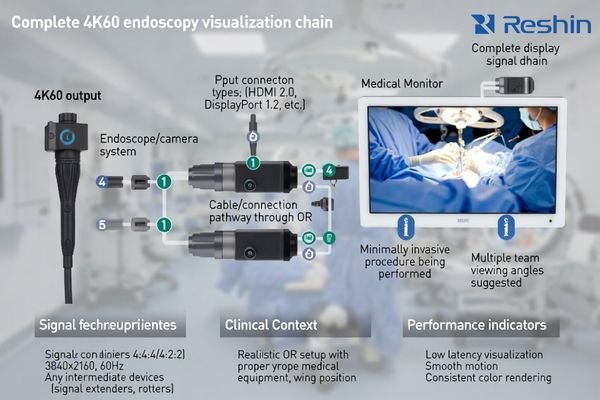
From my work with surgical visualization systems, achieving reliable 4K60 performance1 requires matching the entire signal chain to the endoscopy system’s actual output characteristics, not just meeting basic resolution specifications that may not reflect real-world compatibility requirements. Understanding the complete technical requirements ensures that the clinical benefits of 4K60 endoscopy are delivered consistently throughout demanding surgical procedures where image quality directly affects procedural success and patient outcomes.
What does 4K60 really mean for endoscopy visualization quality?
4K60 combines high resolution with smooth motion for enhanced surgical visualization when properly implemented throughout the signal chain.
In endoscopy, 4K60 combines a 4K-class pixel canvas with 60 frames per second, which can improve perceived detail and make camera and instrument motion feel more continuous—if the chain preserves that fidelity without added delay or artifacts.
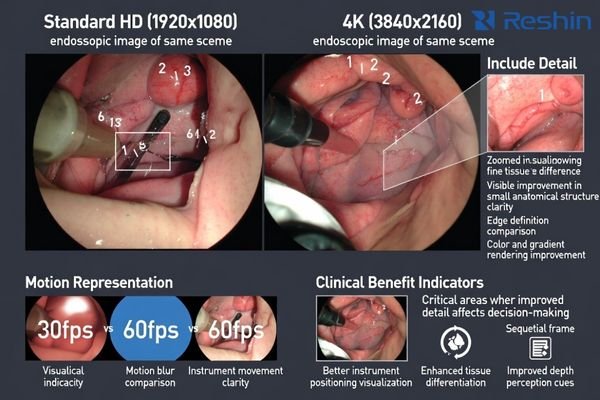
In my integration work at Reshin, the real question for clinical teams is not whether the source outputs 4K60, but whether the display can render that signal consistently during fast motion and frequent scene changes without introducing distracting lag, judder, or re-sync behavior that interrupts the procedure.
Resolution Benefits for Surgical Detail Recognition
The 4K resolution2 component provides more pixel detail than HD formats, which can make fine textures and small anatomical structures easier to see at typical viewing distances. The benefit is most noticeable when the image is shown without unnecessary scaling or conversion that softens edges and reduces the practical value of the higher pixel canvas.
Frame Rate Impact on Motion Perception and Instrument Tracking
The 60 frames per second component improves perceived motion continuity during panning and rapid instrument movement. In practice, the gain is reduced if processing adds noticeable latency or if the chain triggers intermittent re-lock events, which is why motion clarity and stability must be validated together rather than assumed from a “60 Hz” label.
Which input interfaces and signal formats are required to carry 4K60 reliably?
Interface compatibility and signal format support determine whether monitors can receive 4K60 signals without degradation or instability.
To carry 4K60 reliably, the monitor must accept the endoscopy system’s real output timing and format—including resolution, frame rate, chroma subsampling, bit depth, and timing—without forcing fragile conversions or frequent re-sync events.
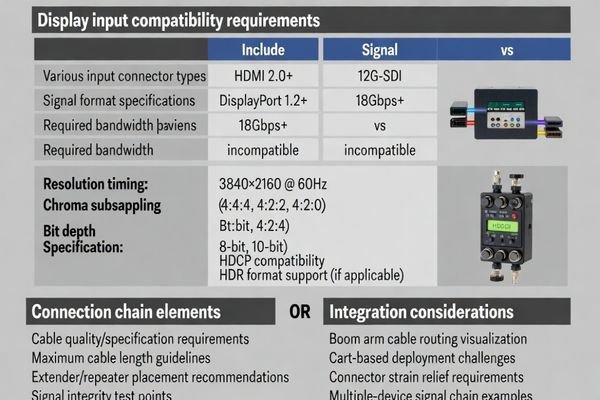
Based on the projects I support with PACS and KVM partners, the practical risk is rarely “the port label” and more often the real chain: cable quality and distance3, connector stress on carts and arms, and intermediate devices such as extenders, splitters, recorders, or switchers that may alter format behavior or trigger renegotiation. The most dependable approach is to confirm the exact source output, then validate that the display stays locked in the same room configuration used in surgery rather than in an idealized bench setup.
How do color processing, bit depth, and scaling affect 4K60 surgical viewing?
Internal signal processing quality determines whether monitors preserve the visual benefits of 4K60 endoscopy signals during clinical use.
Even if a monitor accepts a 4K60 signal, visible quality depends on its processing pipeline—scaling, internal precision, and color handling—because poor processing can blur fine detail or create banding and unstable tone behavior during rapid scene changes.
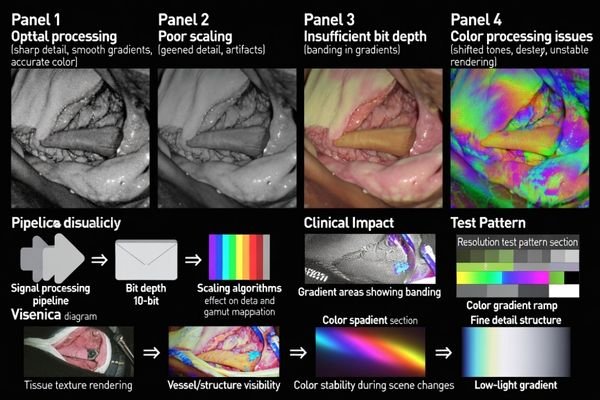
When I review failed installations, I often find that displays should keep color behavior consistent across brightness levels and maintain predictable rendering during motion, overlays, or picture-in-picture usage common in surgical environments.
| Processing area | What to verify at 4K60 | What it looks like when it fails | Practical validation |
|---|---|---|---|
| Scaling and mapping | Preserves fine textures without softening or artifacts | Detail looks “blurred,” edges look unstable | Native mapping checks and simple detail patterns |
| Color and tone stability | Consistent tissue-like rendering across scene changes | Color shifts, “pumping,” or unstable tones | Rapid scene change viewing and consistency checks |
| Internal precision (gradients) | Smooth transitions without obvious banding | Banding/posterization in subtle gradients | Gradient ramps and low-light scenes |
| Motion handling and processing delay4 | Motion remains clear without added lag | Smear/blur during fast motion or “laggy” feel | Fast motion sequences and end-to-end feel checks |
In endoscopy, the goal is not chasing theoretical color specifications but preserving detail and stable color behavior in the actual viewing modes used in the OR. If overlays, PIP, or recording outputs are part of the workflow, processing should remain predictable when those features are enabled.
What latency, motion handling, and stability tests matter most for 4K60?
Performance validation should focus on real-world scenarios where 4K60 issues become apparent during clinical use.
For 4K60 endoscopy, prioritize what clinicians notice immediately: end-to-end latency, motion clarity during fast movement, and stable signal lock without intermittent blackouts or repeated re-sync under stress.
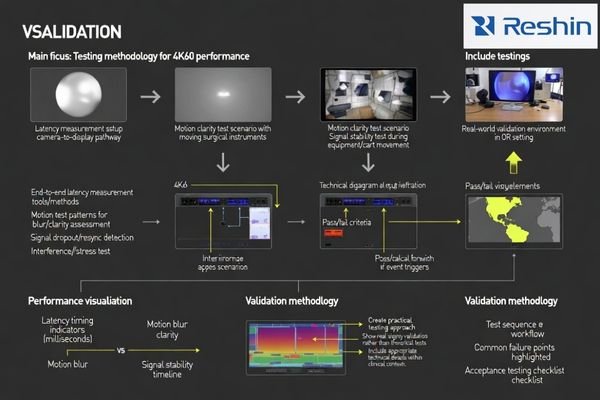
From an engineering standpoint, I usually recommend validating these behaviors using the actual camera system and the real in-room chain, because many failures appear only when the environment triggers them. A practical test set is to observe performance during common events such as input switching, recording activation, overlay toggling, and controlled cart/arm movement, then confirm the display does not drop out, does not renegotiate repeatedly, and does not introduce a “laggy” feel during precise instrument work.
End-to-End Latency Measurement5 and Clinical Impact
Total system latency from camera to display affects hand-eye coordination during delicate procedures, so the display should be evaluated in the full chain rather than in isolation. The most useful outcome is not a single number, but confidence that the system feels responsive during typical motion and interaction patterns.
Signal Lock Stability Under Operational Stress
4K60 chains are more sensitive to small disruptions, so stability should be validated under conditions that resemble daily OR use such as cable flex, connector stress, and device switching. If stability degrades only when the cart moves or when intermediate devices engage, that points to a chain issue that must be corrected before relying on 4K60 in live cases.
How do you select a medical display that is truly 4K60-ready for endoscopy?
True 4K60 readiness requires comprehensive compatibility validation beyond basic specification matching for reliable clinical deployment.
A truly 4K60-ready endoscopy display is one that matches the source’s exact output format, stays locked through the real OR chain, and keeps latency, motion, and color behavior predictable during the triggers that happen in surgery.
Consider how the monitor will be mounted, cleaned, and serviced, because repeated arm movement and harsh disinfection routines can stress connectors and increase intermittent failures over time in demanding surgical environments.
| Clinical role / application | What to prioritize for 4K60 workflows | Recommended Model | Deployment note |
|---|---|---|---|
| 4K endoscopy primary display | Stable 4K60 lock, low perceived latency, predictable behavior | MS430PC | Validate with full chain and common triggers |
| Surgical reference monitor | Multi-source stability and consistent rendering | MS550P | Confirm switching behavior and re-lock characteristics |
| Minimally invasive surgery | Motion clarity and responsive feel | MS321PC | Check fast-motion scenes and overlay usage |
| OR documentation display | Format tolerance with recorders/switchers in the chain | MS275PA | Validate with recording activation and routing |
| Mobile endoscopy cart | Robust deployment and repeatable acceptance checks | MS270P | Focus on cable routing, strain relief, and movement tests |
Finally, align lifecycle and validation needs including fleet consistency, controlled firmware changes, and repeatable acceptance tests to help ensure that a 4K60-ready deployment remains reliable after upgrades, room changes, or equipment refresh cycles that are inevitable in evolving healthcare technology environments.
FAQ
If my endoscopy system outputs 4K60, will any "4K monitor" work?
Not necessarily. The monitor must support the exact 4K60 timing and format the system outputs, and it must remain stable with the real in-room chain that may include extenders, switchers, or recorders.
Why does 4K60 sometimes fall back to 4K30 or 1080p in the OR?
This often happens when an intermediate device, cable, or extender cannot pass the full format reliably, causing the chain to renegotiate or the source to output a compatible lower format.
Does 4K60 always improve what surgeons see?
It helps most when the entire chain preserves detail and motion continuity; if the signal is downscaled, poorly converted, or delayed by processing, the practical benefit can be reduced.
What should I test first when 4K60 causes intermittent black screens?
Start by simplifying the chain: connect the source directly to the monitor with a known-good short cable, then reintroduce intermediate devices one by one to find where stability breaks.
Is low latency more important than maximum color specs for endoscopy at 4K60?
Often yes. Motion and responsiveness are immediately felt in endoscopy; the best choice balances predictable color behavior with low processing delay and stable locking.
How can I reduce long-term 4K60 instability caused by carts and mounts?
Use proper strain relief, avoid tight bends, secure connectors, and standardize cable routing so repeated arm movement and cleaning do not gradually damage the signal path.
Conclusion
A true 4K60 endoscopy display must do more than accept a 4K signal—it must lock stably to the system’s real 4K60 format, preserve motion and detail, and behave predictably through the complete in-room chain. Validating interfaces, processing behavior, latency, and stability under real triggers is the fastest way to ensure the expected clinical benefit.
Our experience at Reshin demonstrates that selecting displays based on verified compatibility—rather than basic specification claims—reduces dropouts, prevents surprise re-sync behavior, and helps surgical teams realize the practical value of 4K60 during demanding endoscopic procedures.
✉️ info@reshinmonitors.com
🌐 https://reshinmonitors.com/
-
Explore this link to understand the critical factors that ensure optimal performance in surgical settings. ↩
-
Explore how 4K resolution enhances surgical detail recognition, improving outcomes and precision in clinical procedures. ↩
-
Understanding cable quality and distance is crucial for ensuring optimal video signal transmission in medical setups. ↩
-
This resource provides insights on minimizing lag and ensuring clear motion, vital for effective surgical procedures. ↩
-
Understanding End-to-End Latency Measurement is crucial for ensuring responsive performance in medical procedures. ↩